Key Takeaway
Complete 2026 integration map for UK plumbers: Xero, Tradify, Dext connected. Data flow diagrams, sync settings, and troubleshooting included.
A plumbing business running five disconnected apps is slower than one running a paper diary. Every tool that doesn’t talk to the next one is a place where you retype data, miss a payment, or lose a certificate.
This is the wiring diagram. It shows exactly how the plumbing stack from the first four articles in this series — Tradify, Xero, GoCardless, Dext and Deputy — connects into a single system where a job booked on Monday flows all the way to a reconciled VAT return without you touching a keyboard twice. Where the tools connect natively, we’ll say so. Where they don’t, we’ll give you the exact Zapier or Make workflow to bridge the gap.
The Integration Architecture
Picture the data flowing left to right.
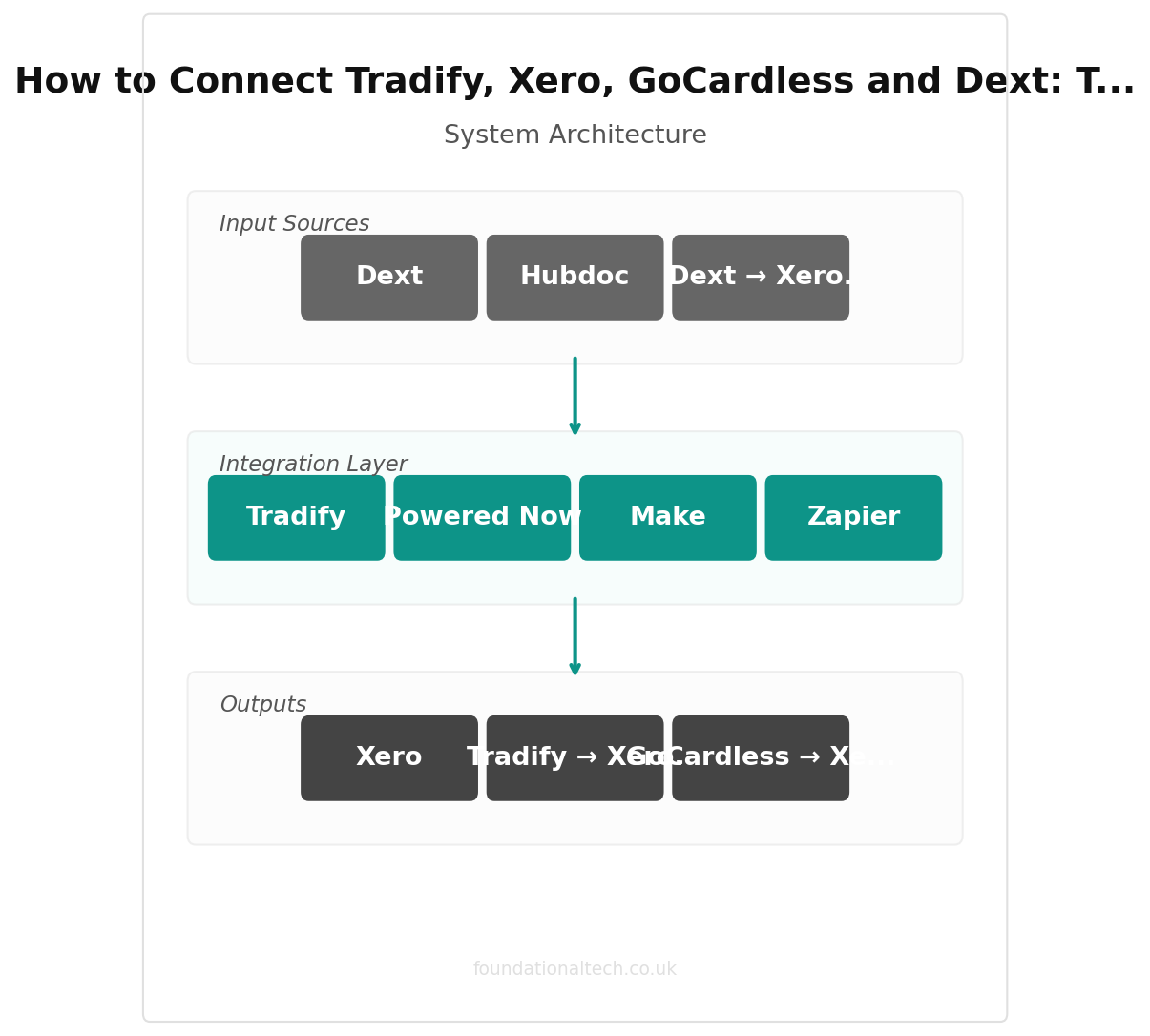
A customer calls. You create the job in Tradify and book it in the diary. The work gets done, you tap “complete,” and Tradify raises the invoice. That invoice flows into Xero, your accounting system. GoCardless collects the payment by Direct Debit on the due date and pushes the paid status back into Xero, which reconciles it against the bank feed. Supplier receipts photographed on-site go into Dext, which reads them and publishes them to Xero with the right VAT code. Staff hours logged in Deputy flow into Xero Payroll. At the end of the quarter, Xero files the VAT return straight to HMRC under Making Tax Digital.
Five tools, one spine. The spine is Xero — almost everything connects to it, which is why it sits in the middle of every plumbing stack worth building. Get the connections right and the system runs itself. Get them wrong and you’ve built five silos that each need feeding by hand.
Native Integrations (No Middleware Needed)
The best connection is one that’s built in. These pairs talk to each other directly — you switch them on once in the settings and never think about them again.
Tradify → Xero. This is the backbone. Tradify has a native, two-way Xero integration. Invoices and customer contacts sync automatically; payments recorded in Xero flow back to mark the Tradify invoice as paid. Setup is a single authorisation under Tradify’s Settings → Integrations. Map your Tradify income accounts to the matching Xero account codes during setup — skip this and every invoice lands in a default code your accountant has to re-sort.
GoCardless → Xero. Native. Xero has a built-in “Pay with GoCardless” option you switch on per invoice or per customer. The customer authorises a Direct Debit mandate once; after that, every Xero invoice you send to them pulls payment automatically on the due date. Fees are 1% + 20p per transaction, capped at £4, with no monthly charge.
Dext → Xero. Native. Photograph a builders’ merchant receipt, Dext extracts the supplier, date, net, VAT and total, and publishes it to Xero as a bill or spend-money transaction. Dext costs from around £24/month. Worth noting: Xero includes its own receipt-capture tool (Hubdoc) free on current plans, so if your receipt volume is low you may not need Dext at all.
Deputy → Xero. Native. Deputy (from around £3.50/user/month) handles rotas and timesheets; approved hours export straight into Xero Payroll, which is a £5/month add-on covering up to five employees. No retyping hours into payslips.
Xero → HMRC. Native, and mandatory. Xero is MTD-compliant, so VAT returns file directly to HMRC from inside Xero. This isn’t optional for VAT-registered plumbers — Making Tax Digital requires digital filing.
So four of your five connections are native. The middleware only comes in for the edges — the moments where a tool needs to nudge a human, or talk to something outside the accounting spine.
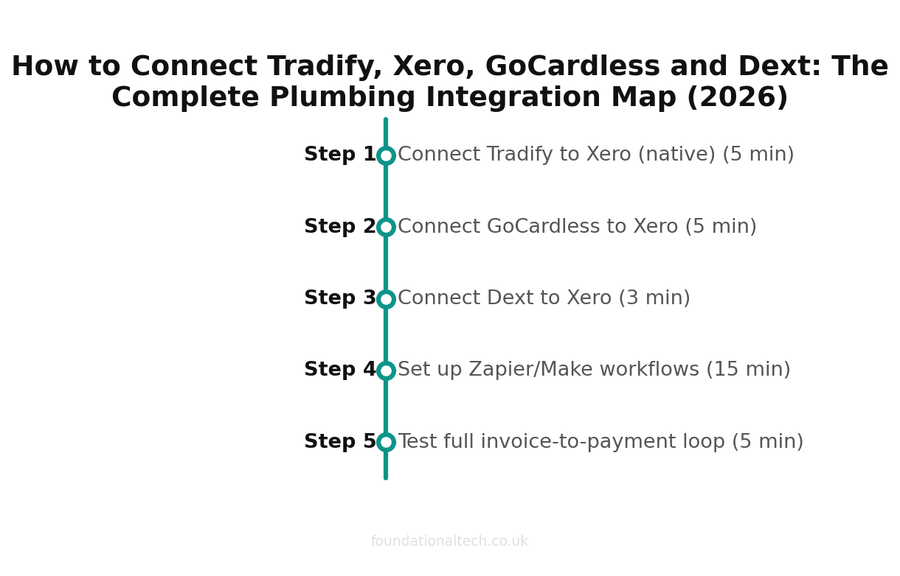
| Step | Action | Time |
|---|---|---|
| 1 | Connect Tradify to Xero (native) | 5 min |
| 2 | Connect GoCardless to Xero | 5 min |
| 3 | Connect Dext to Xero | 3 min |
| 4 | Set up Zapier/Make workflows | 15 min |
| 5 | Test full invoice-to-payment loop | 5 min |
Zapier / Make Workflows
Where native links don’t exist, Zapier (Free plan, or Professional from around £24/month) or Make (Core from around £7/month) fill the gap. A “task” or “operation” is one action — sending one text, creating one record. Here are the three that earn their place in a plumbing business.
Workflow 1: Job booked → customer confirmation text
Trigger: New job created in Tradify (or new event in your Tradify calendar)
Action: Send an SMS via Twilio or ClickSend confirming the date and a two-hour arrival window
Setup time: 20 minutes
This is the single highest-value automation for a plumber. Missed appointments and “what time are you coming?” calls evaporate. A confirmation text the moment the job is booked, plus a reminder the morning of, cuts no-shows and stops the phone ringing while you’re under a sink. On Zapier’s Free plan you get 100 tasks a month — enough for a sole trader testing the water.
Workflow 2: Invoice paid → thank-you and review request
Trigger: Invoice marked paid in Xero
Action: Wait two days, then email the customer a thank-you with a Google review link
Setup time: 25 minutes
Reviews win the next job. Most plumbers never ask because remembering to is itself admin. Automate the ask off the back of payment — the moment a customer is happiest — and your Google profile fills up without a single manual email. Add a filter so it only fires on invoices over, say, £100, and you skip review requests on trivial call-outs.
Workflow 3: Website enquiry → job and follow-up task in Tradify
Trigger: New submission on your website contact form (Gravity Forms, Typeform, or a Wix/Squarespace form)
Action: Create a new customer and an unscheduled job in Tradify, and create a “call back within 4 hours” task
Setup time: 30 minutes
Setup timeline — estimated time for each step 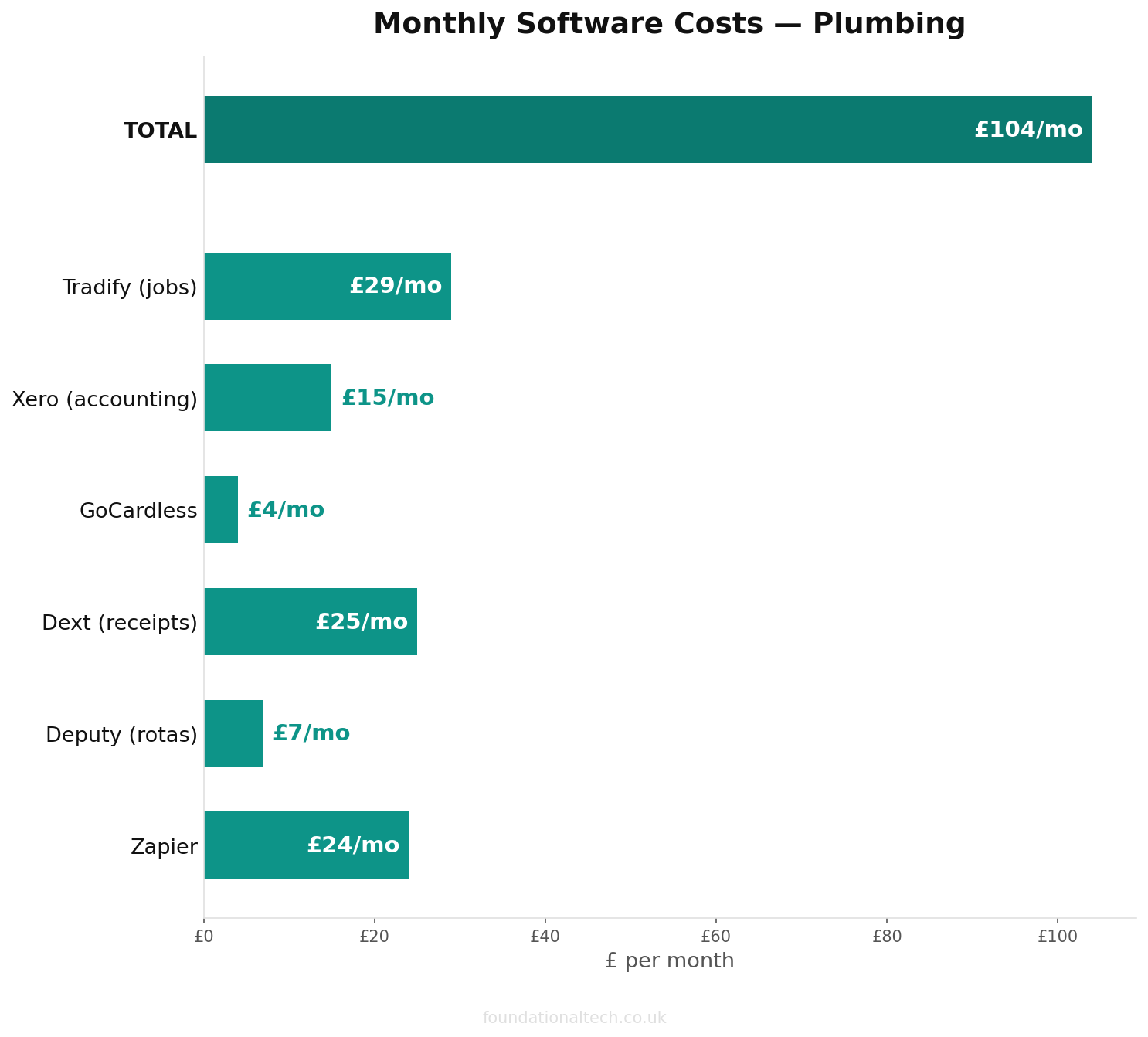
Monthly cost breakdown across the recommended tool stack 
Estimated ROI from automating admin tasks
Leads go cold fast. A web enquiry that sits in an inbox overnight is often a lost job by morning. Pipe every enquiry straight into Tradify as a job with a callback task and nothing slips through. This is where Make’s lower price and visual builder shine if you’re routing leads from several sources at once.
Workflow 4: Gas Safe certificate done → landlord email and filed copy
Trigger: Certificate completed in your compliance app (Gas Engineer Software, Powered Now) or a new PDF in a watched folder
Action: Email the landlord or letting agent the certificate, and save a copy to Google Drive or Dropbox in a dated folder
Setup time: 30 minutes
Landlord gas safety records (CP12s) have to reach the tenant and landlord within 28 days, and you have to keep a copy for two years. Miss it and you’re exposed. Automating the send-and-file the moment a certificate is signed off means the legal clock never depends on you remembering. Note the certificate itself is still produced and signed in your compliance software — the workflow only moves the finished document, it never generates it.
What the Integrations Cost to Run
The connections themselves are mostly free — native integrations come included in the tools you’re already paying for. The only added cost is the middleware for the four workflows above.
Native links (Tradify ↔ Xero, GoCardless ↔ Xero, Dext ↔ Xero, Deputy ↔ Xero): included — £0/month
Workflow automation: Zapier Professional (or Make Core ~£7/month) — from ~£24/month
SMS sending (workflows 1 & 2): Twilio / ClickSend, pay as you go — a few pence per text
A sole trader can start on Zapier’s Free plan (100 tasks/month) and Make’s free tier and pay nothing until the volume justifies upgrading. Most plumbing businesses never need more than the entry paid tier — the workflows above run comfortably inside a few hundred tasks a month.
4 native integrations
No middleware needed for the core Tradify + Xero + GoCardless + Dext stack
The Gotchas
Integrations break in predictable ways. These are the four that catch plumbers most often.
Duplicate contacts. Tradify and Xero both store customers, and if a name is spelled differently in each (“J Smith” vs “John Smith”), the sync creates a duplicate rather than matching them. Fix: pick one system as the master for contacts — usually Tradify, since that’s where new customers start — and let it push to Xero. Don’t create the same customer manually in both.
VAT code mismatches. Dext and Tradify both guess VAT treatment, and on plumbing work the guess is often wrong — reduced-rate energy-saving installations, the domestic reverse charge for subcontractors, zero-rated new builds. Check the VAT code before you publish, especially on construction-sector reverse-charge invoices. A wrong code repeated across a quarter is a painful VAT correction.
Direct Debit timing. GoCardless Direct Debit isn’t instant — it takes a few working days to clear from authorisation. If you mark a Tradify job “paid” expecting same-day money, you’ll be out of sync with reality. Set customer expectations and let the Xero reconciliation, not your assumption, confirm the cash has landed.
One-way vs two-way sync. Most native plumbing integrations are two-way, but middleware Zaps usually aren’t. A Zap that creates a Tradify job from a web form won’t update that job if the customer later replies to change the date. Know which links are live conversations and which are one-time handoffs, so you don’t trust a number that stopped updating a week ago.
Build the four native connections first, add the workflows once those are stable, and watch for the four gotchas. That’s the entire plumbing integration map — every app connected, every handoff accounted for, no data typed twice.
What’s the one integration you wish existed for your business — the handoff you still do by hand that should be automatic?
A & Y Financial Services builds these exact automation stacks for plumbing businesses across the UK. If you’ve read the architecture and want someone to implement it — that’s what we do.