Key Takeaway
3 no-code AI workflows for UK plumbers in 2026. Automate quotes, emails, customer reviews using Xero, Tradify, ChatGPT. Copy the setup in under an hour.
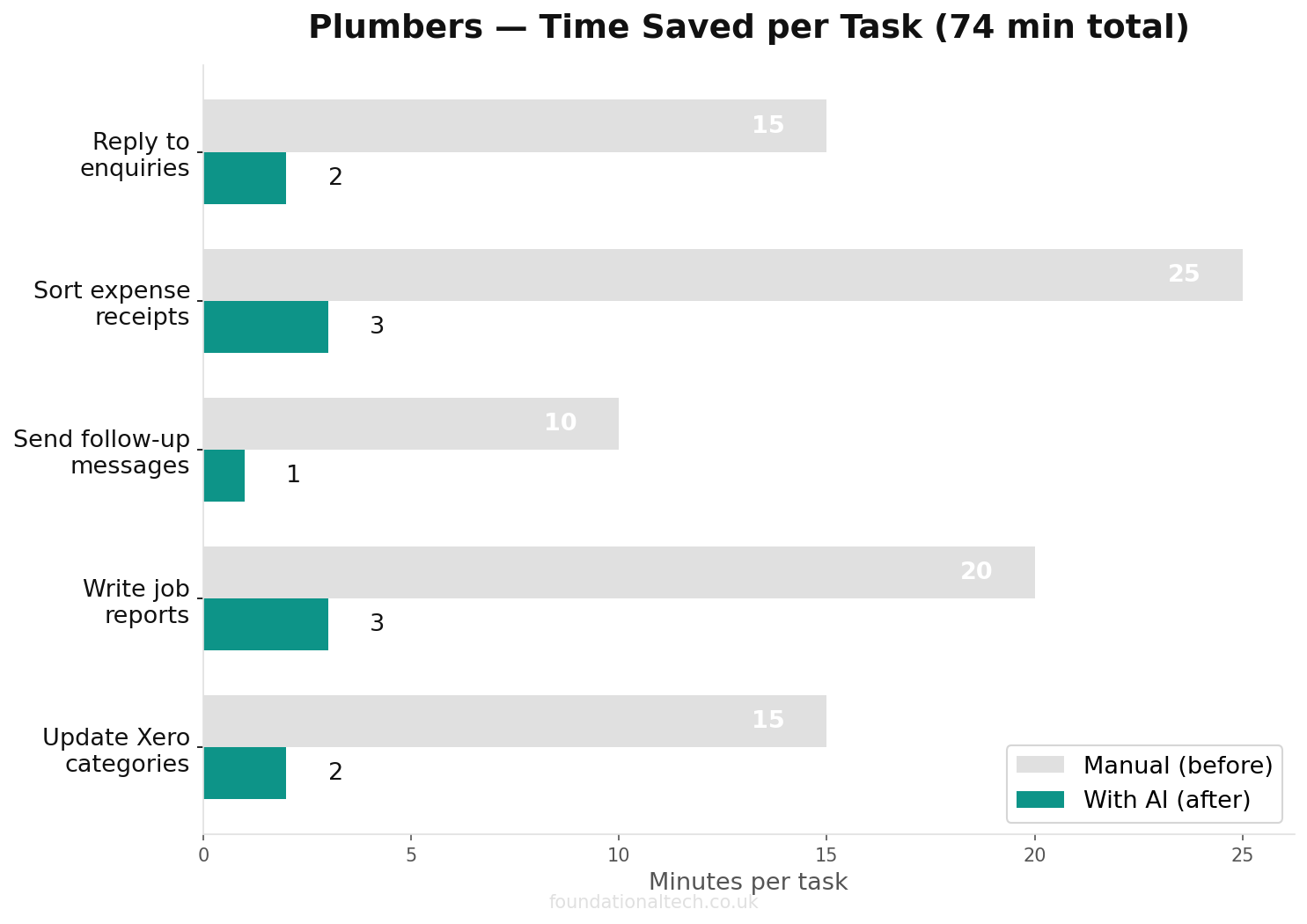
Most plumbers who use AI still copy and paste. They open ChatGPT, type a request, wait, then paste the answer into a quote or an email by hand. Useful, but it's a tool sitting in a drawer — you have to walk over and pick it up every time.
This article is about the next step: wiring that same AI into the tools you already run, so it works while your hands are full. A new enquiry lands and a draft reply is waiting before you've climbed out of the van. A job gets marked complete and a review request goes out on its own. No new app to learn, no code, about £20 a month plus a free automation account. Here are three workflows that do exactly that. If you have not tried AI manually yet, start with the copy-and-paste prompts for plumbers before wiring up automations.
Where AI Meets Your Existing Stack
Everything in this cluster so far has been about two separate blocks. The first five articles built your operational stack — Tradify for jobs and quotes, Xero for the books, GoCardless for getting paid, Dext for receipts. The AI articles (6 to 8) showed how a single AI assistant, set up once with your prices and your voice, can write quotes and replies that sound like you.
Those two blocks have been working side by side but not talking to each other. You still have to carry information across by hand — read the enquiry, ask the AI to draft a reply, paste it, send it. The bridge between them is an automation tool. Make (free for 1,000 operations a month, paid plans from about £7 a month) and Zapier (free for 100 tasks a month, Professional from around £23 a month, roughly £16 if you pay annually) both connect apps with no code. You build a workflow once by clicking boxes together, and from then on it runs itself. Add AI into one of those workflows and you have an assistant that acts without being asked.
A word of caution before we start. Automation is brilliant for drafting, sorting and chasing. It is not for anything that must be exactly right by law or by safety. Never let AI set your final prices, file your VAT, or touch a Gas Safe certificate or CP12 — those stay with you. Every workflow below ends with a human, usually you, pressing send.
Workflow 1: Enquiry In, Draft Reply Waiting (AI + Your Inbox)
The problem: enquiries arrive all day while you're under a sink. By the time you reach your phone at six, the customer has called two other plumbers. Speed wins work, and you can't be fast when you're elbow-deep in a boiler.
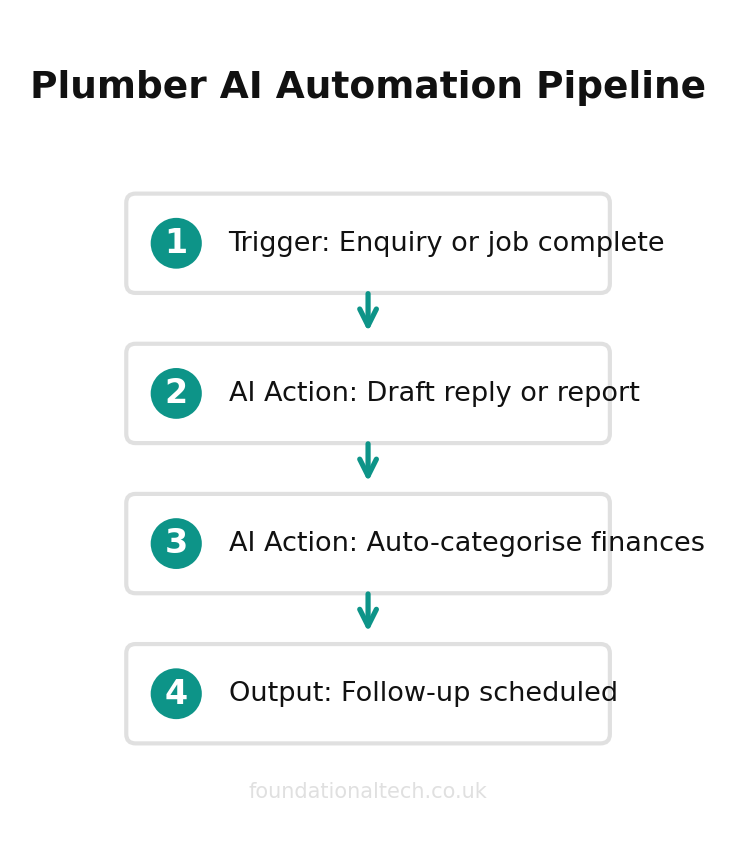
The fix: an automation that watches your enquiry inbox, reads each new message, and uses AI to draft a reply in your voice — ready for you to glance at and send.
How it works, box by box, in Make or Zapier:
Trigger — "New email in Gmail/Outlook" matching a filter (your contact-form address, or a subject line like "quote" or "enquiry").
AI step — pass the email text to ChatGPT or Claude with a standing instruction: "You are the office manager for a Leeds plumbing firm. Read this enquiry. Draft a warm, plain-English reply that thanks them, asks the two or three questions we need to quote (boiler make and age, access, photos), and says we'll come back within the day. Never quote a price. Sign off as the team."
Action — save that draft to your Drafts folder (not send). You read it, tweak if needed, hit send.
You've turned a cold inbox into a stack of ready replies. The customer hears back in minutes, and you've not stopped working. Cost: your existing AI subscription plus a free Make or Zapier account, since a handful of enquiries a day sits well inside the free tiers.
Workflow 2: The Books That Sort Themselves (AI + Finance)
The problem: receipts and odd transactions pile up, and the monthly catch-up with Xero eats an evening you don't have. Dext already pulls the data in; the time sink is making sense of it.
The fix: use AI to read and explain, not to post entries. Two practical versions:
Receipt triage. When a new receipt hits Dext, an automation sends the supplier name and amount to AI with the instruction: "Suggest the correct expense category for a plumbing business — materials, fuel, tools, subcontractor, or other — and flag anything unusual." The suggestion lands as a note for you or your bookkeeper to confirm. It doesn't file anything; it removes the guesswork.
Plain-English account questions. This one needs no automation at all — just your AI assistant and a report exported from Xero. Drop in last quarter's profit and loss and ask: "Which three costs grew fastest versus the previous quarter, and which jobs were least profitable per hour?" You get a straight answer in seconds instead of squinting at columns. It is decision support, not bookkeeping.
The hard line stays the same: AI can sort, suggest and explain. It never submits anything to HMRC and never files your VAT under Making Tax Digital. A human signs off every figure that leaves the building.
Workflow 3: The Follow-Ups That Never Get Forgotten (AI + Client Communications)
The problem: the jobs are done but the afters never happen. The review you meant to ask for, the "still happy with that boiler?" six months on, the reminder that an annual service is due. Each one is worth money and goodwill, and each one slips because you're already on the next job.
The fix: let "job complete" in Tradify trigger a personalised message chain.
Trigger — job status changes to "Completed" in Tradify (or a job-management equivalent).
AI step — generate a short, warm message referencing the actual work: "Write a two-line text to a customer whose combi swap we finished today. Thank them, remind them the boiler's registered with Gas Safe and the warranty's logged, and ask if they'd leave us a Google review — include the link."
Action — send by SMS or email, or save as a draft if you'd rather check it first.
Add a second branch on a delay — eleven months later, a friendly nudge that a service is due — and you've built repeat work that lands without a single reminder in your diary. The messages reference the real job, so they read like you remembered, not like a robot fired a template.
Setup Guide
You can build the first workflow in an afternoon.
~£20/month
total running cost for three no-code AI workflows handling enquiries, bookkeeping and payment chasing
Create a free Make account at make.com (Zapier works identically; pick one). Connect your email account and your AI account when prompted — this is clicking "allow", not coding.
Start a new scenario. Choose your email as the trigger app and "watch emails" as the event. Set a filter so it only fires on real enquiries.
Add the AI module. Choose OpenAI (ChatGPT) or Anthropic (Claude), pick "create a chat completion", and paste your standing instruction into the prompt box. Map the incoming email's text into the message field.
Add the final action. "Create draft" in your email app, with the AI's output as the body. Avoid "send email" until you've watched it run a few times.
Test with one real email, read the draft it produces, and adjust the instruction until the tone is right. Then switch the scenario on.
Start with one workflow, live with it for a week, then add the next. The goal isn't a wall of robots — it's three quiet jobs done before you've had your tea.
What Not to Automate
The fastest way to undo all of this is to automate the wrong thing. A few firm rules.
Never let an automation send a price to a customer on its own. AI can draft a quote in your format, but a person reads the number before it leaves. One wrong digit in a workflow that fires by itself becomes a hundred wrong quotes before you notice.
Never automate anything legal or safety-critical. Gas Safe certificates, CP12 landlord records and your VAT return under Making Tax Digital are yours alone. AI can remind you they're due; it must never produce or file them.
And don't try to make the messages sound like a machine wrote them on purpose. The whole point of putting AI in the loop is that it reads the actual job and writes like you would. If you find yourself building rigid templates with no AI step, you've just rebuilt the mailmerge you were trying to escape.
When a Workflow Stops Working
Automations are not quite "set and forget." Once or twice a year one will quietly stop, and it pays to know why before it costs you a job. The usual culprit is a login: your email or AI account asks you to re-authorise, the connection drops, and the scenario stops firing until you click to reconnect. Make and Zapier both email you when a workflow errors, so the fix is to make sure those alerts go to an inbox you actually read, not a junk folder.
The second cause is a changed format. If you switch from a website contact form to a new one, or move from Gmail to Outlook, the trigger that watched the old source no longer sees anything. Nothing breaks loudly; the drafts just stop appearing. The habit that protects you is a weekly glance: every Monday, check that last week's enquiries actually produced drafts. Thirty seconds confirms the machine is still running.
Build in a safety net from the start. Because every workflow in this article ends in a draft you approve rather than an automatic send, a broken automation costs you a little speed, never a wrong message to a customer. That is the whole reason to keep a human on the send button while you are learning — a workflow that fails safe is one you can trust to run unattended. Get comfortable with one before you wire up the next, and you will never be more than a few minutes from spotting a problem.
Which One to Build First
If you only build one of these, build the enquiry-reply workflow. It targets the most expensive leak in a plumbing business: the enquiry that goes cold because you were under a sink when it landed. Speed of reply is the single biggest factor in whether a worried homeowner books you or the next plumber on their list, and this is the workflow that buys you that speed without tying you to your phone. For most one- or two-van firms it pays for itself in the first recovered job. Make sure your job management software is in place first — these workflows plug into the tools in that comparison.
Build the review-and-reminder chain second. It works in the background, asking for the Google reviews you always mean to chase and never do, and it compounds: more reviews bring more enquiries, which the first workflow then catches. The receipt triage comes third, because it saves real time but rarely wins you new work — it tidies the books rather than filling the diary.
A quick gut-check before you wire anything up: if a task is repetitive, low-judgement, and currently done late or not at all, it is a strong automation candidate. If it needs your trade knowledge, sets a price, or carries legal weight, it stays a draft you approve. Sort your admin into those two piles and the build order picks itself.
A Realistic First Month
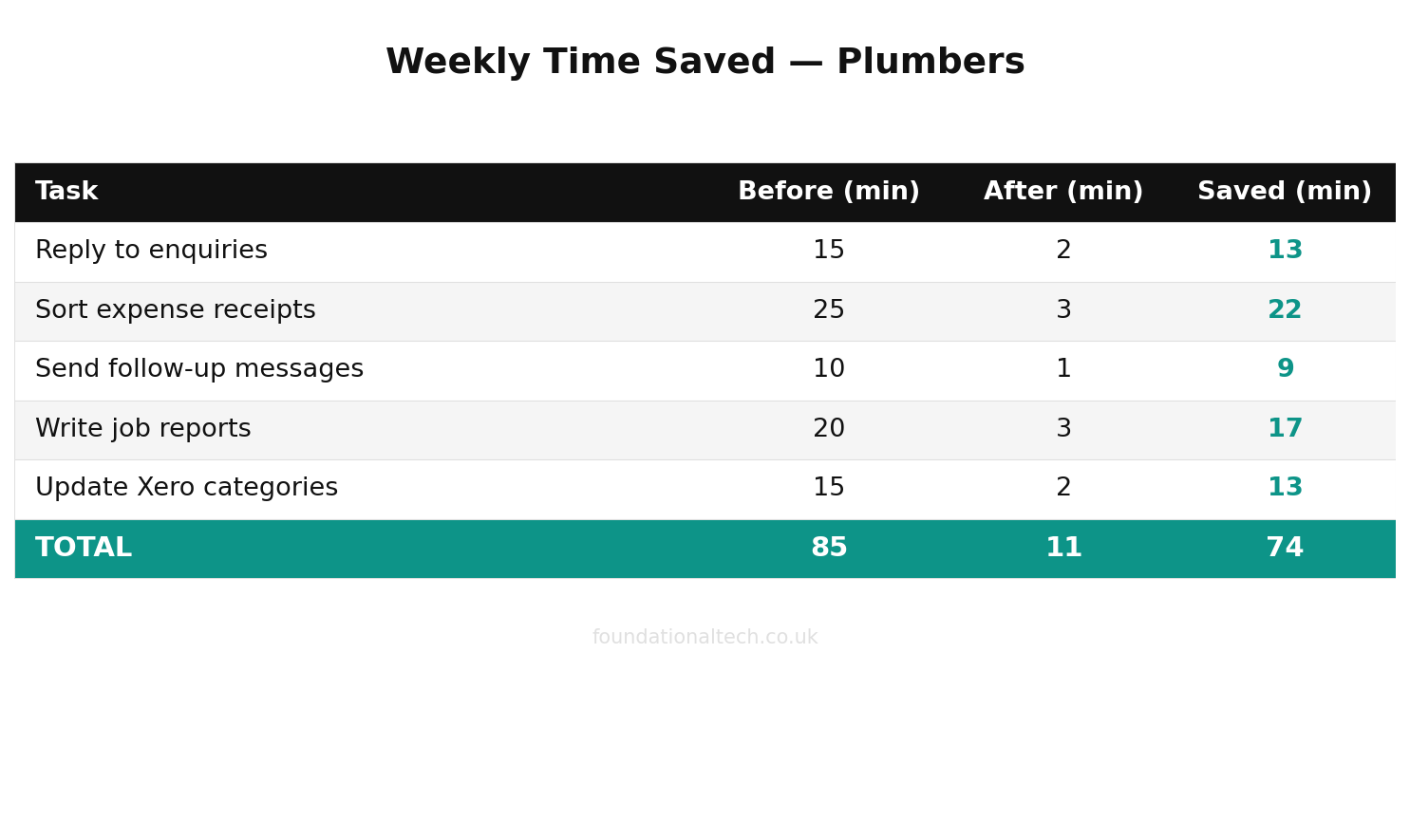
Don't expect a transformed business in a weekend. A sensible run looks like this: week one, build and test the enquiry-reply workflow until the tone is right and you trust it enough to send from drafts. Week two, add the review-request trigger on completed jobs. Week three, bring in the receipt triage. By week four you're spending a few minutes a day approving drafts instead of an hour an evening writing them from nothing — and the only thing you've spent is one AI subscription and a free automation account.
Which of these three would save you the most time right now — the instant enquiry replies, the self-sorting receipts, or the automatic review and service reminders? Tell me which, and what's stopping you setting it up this week.