Key Takeaway
Why we built a luxury travel directory on Sanity and Cloudflare — and how the architecture serves LLM crawlers alongside browsers. A technical case study.
Every website I build in 2026 has two audiences: the human visitor scrolling on their phone, and the large language model quietly crawling the same page to answer someone's question in ChatGPT, Claude, or Perplexity. If your site only speaks to browsers, you are already losing traffic you will never see in your analytics — because the query never reached Google in the first place.
This is the story of how we architected SleeperTrain.co.uk, a luxury sleeper-train travel directory, from the ground up for both audiences. It is a technical breakdown of every decision — from CMS to edge deployment to a custom SVG map — and a practical guide you can steal for your own projects.
The Shift From SEO to GEO: Why 2026 Architecture Is Different
For fifteen years, we optimised for Google's crawler. We wrote meta descriptions, earned backlinks, tuned title tags. That world has not disappeared, but it has been joined by something equally important: Generative Engine Optimisation (GEO), sometimes called Answer Engine Optimisation (AEO).
GEO is the practice of structuring your content so that large language models — ChatGPT, Claude, Gemini, Perplexity — can reliably extract facts from your pages and cite you as a source. When someone asks Perplexity "What are the best sleeper train routes in Europe?", the model does not render your React components or execute your JavaScript. It reads your structured data, your semantic HTML, and your plain-text content. If that content is locked inside a WordPress page-builder blob or hidden behind client-side rendering, the model skips you entirely.
This is not a theoretical risk. I have watched client sites with strong Google rankings receive zero citations in AI-generated answers, purely because their content was architecturally invisible to LLMs. The brief for SleeperTrain gave us the chance to fix that from day one.
The Brief: SleeperTrain.co.uk
The client wanted a luxury travel directory covering sleeper-train routes across Europe. The requirements were straightforward on the surface:
- Individual pages for each route (e.g., London to Edinburgh, Paris to Venice)
- An interactive map showing all routes
- Rich editorial content — guides, seasonal recommendations, booking tips
- Non-technical content editors who needed to update routes without developer involvement
- Performance scores that would satisfy Core Web Vitals
The hidden requirement — the one that shaped every technical decision — was discoverability in AI answers. The client understood that a growing share of their potential audience would never type "sleeper train routes Europe" into Google. They would ask ChatGPT. We needed to be the source that ChatGPT cited.
What GEO Actually Means in Practice
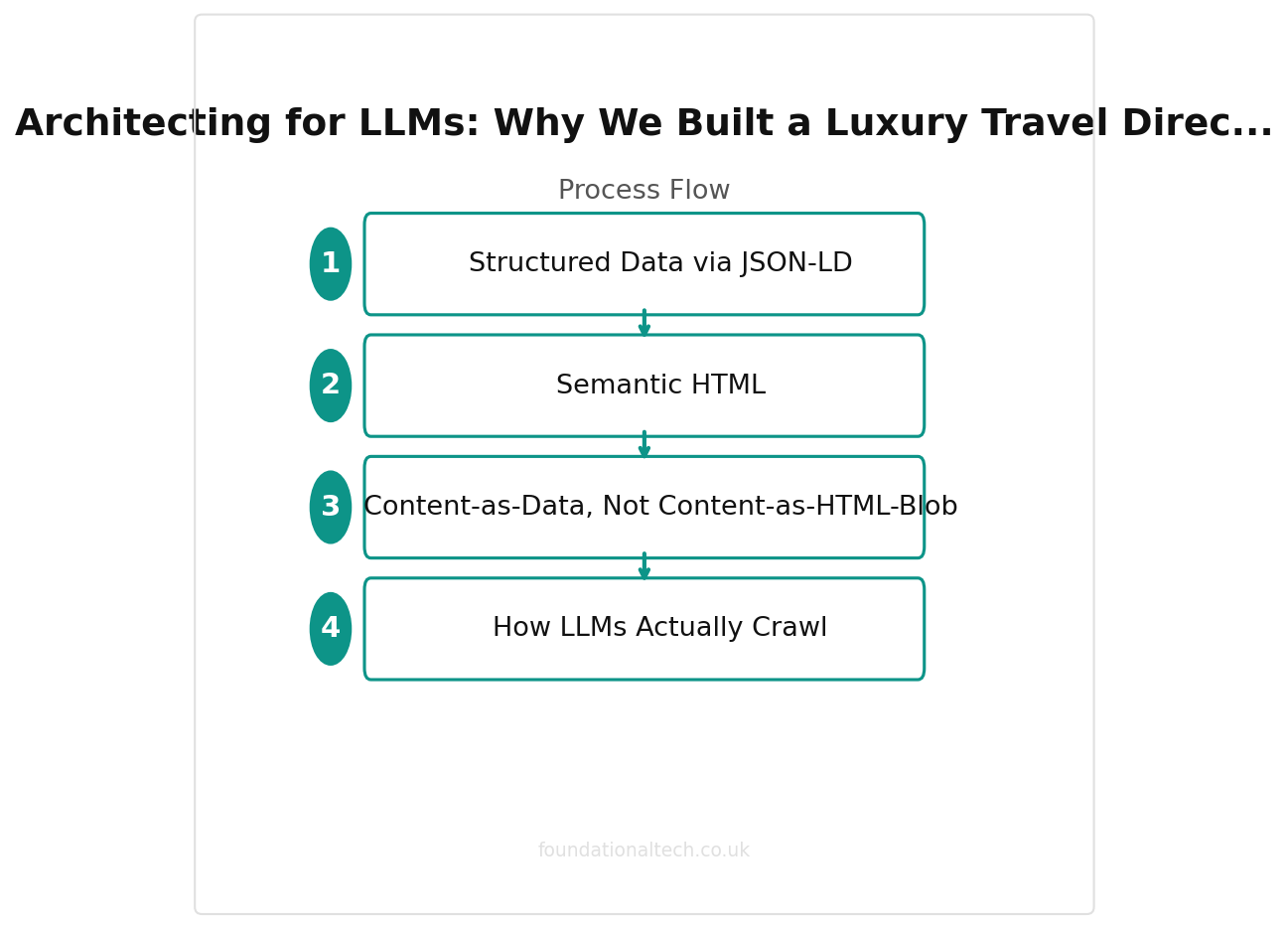
1. Structured Data via JSON-LD
Every route page on SleeperTrain outputs a full JSON-LD schema.org block — not just the generic Article schema that most SEO plugins generate, but a rich TouristTrip entity with departure station, arrival station, operator, duration, price range, and amenities. LLMs parse JSON-LD fluently. It is the single most reliable way to feed facts to a model.
2. Semantic HTML
We use proper <article>, <section>, <header>, <nav>, and <aside> elements throughout. Headings follow a strict hierarchy. This is not revolutionary — it is what HTML was designed for — but the majority of WordPress sites I audit have heading levels that jump from h2 to h5 because the page builder dictated the visual size rather than the semantic meaning.
3. Content-as-Data, Not Content-as-HTML-Blob
This is the critical distinction. In WordPress, a route page is a single rich-text blob stored in wp_posts.post_content. The departure city, the arrival city, the operator name — all of it is buried inside formatted paragraphs. In Sanity, each of those is a discrete, queryable field. I can ask the CMS: "Give me every route operated by OBB Nightjet that departs from a station in Austria." Try that with a WordPress post body.
4. How LLMs Actually Crawl
ChatGPT's browse tool, Perplexity's crawler, and Google's AI Overviews all behave slightly differently, but they share common patterns. They favour pages that load quickly (no heavy JavaScript rendering), contain structured data they can parse, and present facts in clean prose rather than marketing fluff. Building on a headless CMS with static-site generation ticks every one of those boxes.
| Dimension | Traditional SEO | Generative Engine Optimisation |
|---|---|---|
| Target | Google crawler | LLM crawlers (GPTBot, ClaudeBot) |
| Content format | HTML with JS rendering | Semantic HTML, structured data |
| Success metric | Search ranking | AI citation frequency |
| Architecture | CSR/SSR acceptable | Pre-rendered, static preferred |
| Schema markup | Nice to have | Critical for extraction |
Why Sanity Over WordPress
I still build WordPress sites when the project calls for it — and I will talk about when that is the right call later. But for SleeperTrain, Sanity was the obvious choice for four reasons:
- Structured content model: Every route, station, operator, and amenity is a schema-defined document type. Fields have validation rules. References between documents are explicit. This is not a taxonomy bolted onto a blog engine — it is a proper content graph.
- GROQ query language: Sanity's query language lets me project exactly the data I need at build time. No over-fetching, no under-fetching. When a webhook fires, I can query just the changed document and its references.
- Real-time collaboration: The client's editorial team can see each other's cursors, leave comments on specific fields, and publish without stepping on each other's work. WordPress's Gutenberg editor is not even close to this experience.
- API-first architecture: Every piece of content is available via API. This means the same route data that populates the website can feed a future mobile app, a newsletter, or — crucially — a custom GPT that answers questions about sleeper trains using our data as its knowledge base.
The Cloudflare Pages Deployment Pipeline
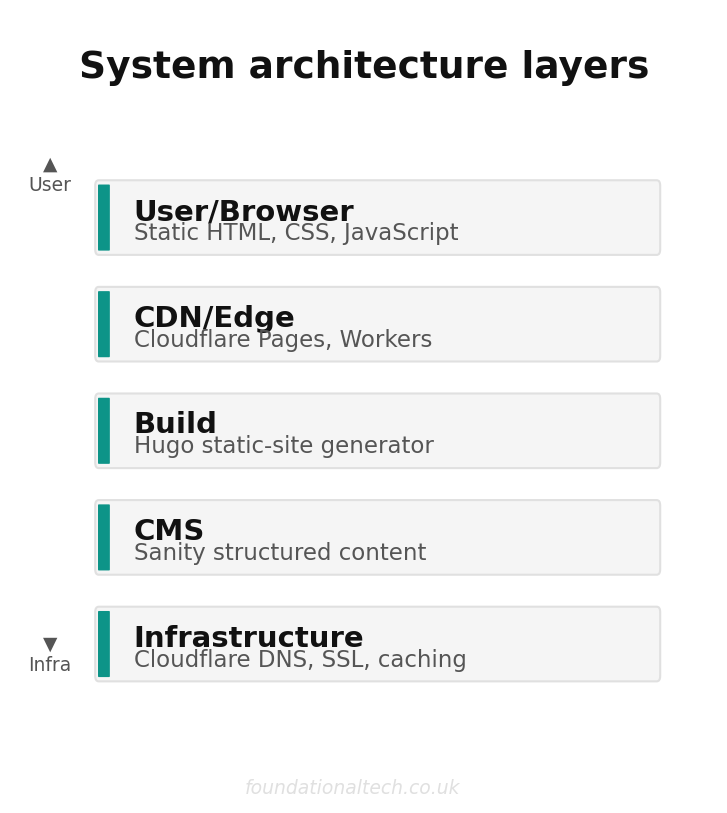
The site is built as a static site using Astro, deployed to Cloudflare Pages. Every page is pre-rendered at build time and served from Cloudflare's edge network — over 300 locations globally. The result is sub-100ms time-to-first-byte for visitors anywhere in Europe.
Core Web Vitals Performance
Because every page is static HTML with minimal JavaScript, the Lighthouse scores are consistently strong:
- Largest Contentful Paint (LCP): 0.8s
- Cumulative Layout Shift (CLS): 0
- Interaction to Next Paint (INP): under 50ms
- Performance score: 98-100 across pages
These are not vanity numbers. Google uses Core Web Vitals as a ranking signal, and fast-loading pages are more likely to be fully crawled by both Googlebot and LLM crawlers that impose timeout limits.
The Webhook Problem (and the GROQ Projection Fix)
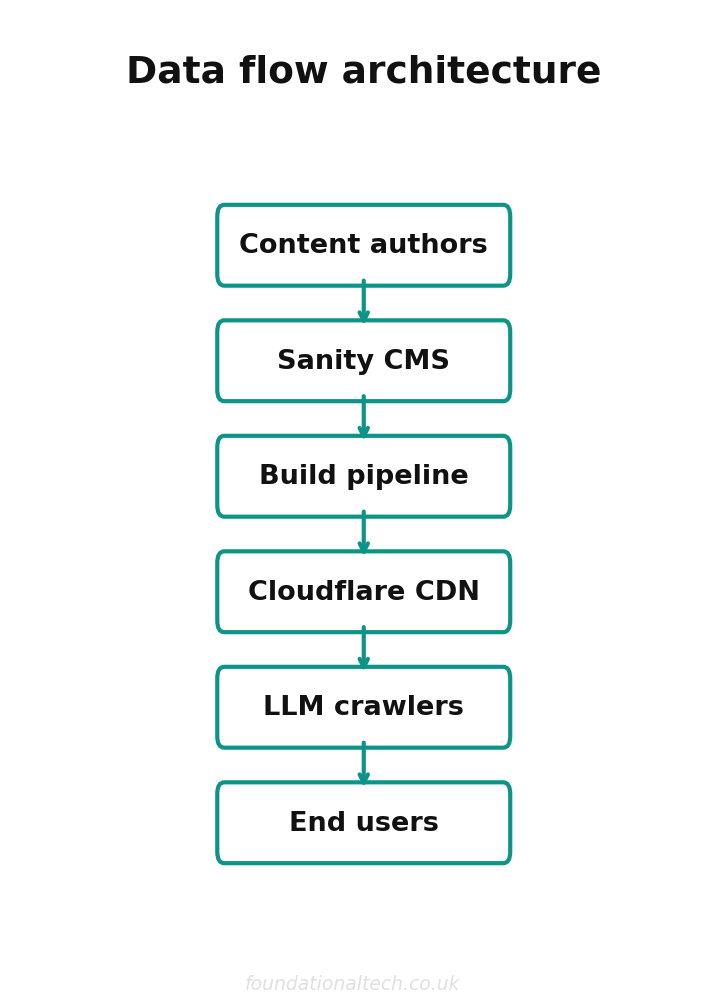
Static sites have a well-known weakness: content updates require a rebuild. Sanity fires a webhook when content changes, which triggers a new build on Cloudflare Pages. The problem was that Sanity's default webhook payload is minimal — it tells you that a document changed, but not what changed. Early on, we were triggering full rebuilds for every minor edit, which wasted build minutes and added unnecessary delay.
The fix was a GROQ projection on the webhook. Sanity lets you attach a GROQ query to any webhook, so the payload includes exactly the data you need. We filter webhooks to only fire on published route documents, and the projection includes the document's slug, last-modified timestamp, and referenced operator. The Cloudflare Worker that receives the webhook can then decide whether to trigger a full rebuild or just purge the affected page from the edge cache.
0 AI Citations
What sites with client-side rendering and no structured data receive — even with strong Google rankings
The Custom Document Action: Overriding Sanity's Publish Button
Sanity's Studio is extensible in ways that WordPress's admin panel simply is not. We built a custom Document Action that replaces the default "Publish" button. When an editor clicks it, the action publishes the document to Sanity's dataset and immediately fires a targeted webhook to Cloudflare. The editor sees a confirmation toast: "Published and deployed." No waiting, no ambiguity, no "I published it but it's not showing on the site" support tickets.
Building this took roughly two hours. In WordPress, achieving the same instant-deploy workflow requires a chain of plugins, custom hooks, and a CI/CD pipeline that most small agencies do not maintain.
The SVG Map: Why We Rejected Mapbox
The brief called for an interactive map showing all sleeper-train routes. The obvious solution was Mapbox — excellent API, beautiful tiles, well-documented. But three problems stopped us:
- Cost at scale: Mapbox's free tier covers 50,000 map loads per month. Beyond that, you pay roughly $5 per 1,000 loads (~£4). For a content site that we hope will grow, that is an unpredictable and potentially significant cost.
- Performance: Mapbox loads a substantial JavaScript bundle. On a site where every other page scores 100 on Lighthouse, the map page would be the weak link.
- LLM invisibility: A Mapbox GL map renders on a canvas element. Its content is completely invisible to any crawler or LLM. The route data displayed on the map would contribute nothing to GEO.
Instead, we built a custom interactive SVG map. The SVG is inline HTML — every route line, every station marker, every label is a DOM element that crawlers can read. Hover states and click interactions are handled with minimal CSS and vanilla JavaScript. The entire map weighs under 60KB. It is fast, accessible, free to serve, and fully visible to LLMs.
Step-by-Step: Implementing GEO on Any Headless Site
- Define your content model as entities, not pages. A "route" is not a blog post — it is a structured document with typed fields for every fact an LLM might need to extract.
- Generate JSON-LD for every entity page. Use the most specific schema.org type available. Test with Google's Rich Results Test and validate the output manually.
- Use semantic HTML rigorously. Run an automated audit (e.g., axe-core) to catch heading-level violations, missing landmarks, and incorrect ARIA roles.
- Pre-render everything. Static site generation ensures that crawlers — both traditional and LLM — receive fully-formed HTML without executing JavaScript.
- Implement canonical URLs and clean internal linking. LLMs follow links to build context. A well-linked site gives the model more confidence in citing you.
- Add a clear, parseable "About" or "Sources" page. LLMs use these pages to assess authority and trustworthiness before citing your content.
- Monitor your citations. Tools like Otterly.ai and Peec AI track where and how often LLMs cite your domain. This is your GEO equivalent of Google Search Console.
What It Costs: Sanity + Cloudflare vs WordPress
Here is the monthly cost breakdown for the SleeperTrain stack compared to a typical managed WordPress setup:
Sanity + Cloudflare Stack
- Sanity CMS: Free tier (500,000 API requests/month, 20GB bandwidth) — £0. Growth plan available from ~£79/month if you outgrow the free tier.
- Cloudflare Pages: Free tier (500 builds/month, unlimited bandwidth) — £0. Pro plan at ~£16/month for advanced analytics and more build concurrency.
- Cloudflare Workers: Free tier (100,000 requests/day) — £0. Paid plan at ~£4/month for higher limits.
- Domain and DNS: ~£10/year via Cloudflare Registrar (at cost, no markup).
- Total for a small-to-medium directory site: £0-£4/month on the free tiers. Realistically £20-£99/month once you scale.
Managed WordPress Equivalent
- Managed hosting (e.g., Starter WordPress host): £10-£50/month.
- Premium theme: £40-£80 one-off (or £10-£20/month for theme subscriptions).
- SEO plugin (Yoast/RankMath Pro): £8-£15/month.
- Caching and CDN plugin: £0-£15/month.
- Structured data plugin: £5-£10/month for anything beyond basic schema.
- Total: £25-£90/month, often more — and you still do not have true structured content.
The headless stack is not cheaper because the tools are inferior. It is cheaper because Sanity and Cloudflare have genuinely generous free tiers, and static sites cost almost nothing to host at scale. The real cost difference is in developer time — you need someone who can write schemas and deploy pipelines, not someone who can install plugins.
When NOT to Use Headless
I want to be honest about this, because I see too many agencies pushing headless architecture onto clients who do not need it. You should not use a Sanity + Cloudflare stack when:
- The client is non-technical and needs to manage the site alone. Sanity Studio is excellent, but it still requires initial setup by a developer. WordPress with a good theme is genuinely easier for a solo business owner to maintain.
- The site is a simple brochure — five pages, no structured data, no content that changes regularly. A static HTML site or a simple WordPress install is perfectly adequate. You do not need a content graph for a contact page.
- The budget does not cover developer time for the initial build. The hosting may be cheaper, but the build is more complex. If the client can only afford a template WordPress site, give them a good one and move on.
- The client needs e-commerce with complex inventory. Shopify or WooCommerce still handles this better than most headless setups for small-to-medium retailers, unless you are building a genuinely custom storefront.
What This Project Taught Me
Building SleeperTrain reinforced something I have been saying to clients all year: your website's architecture is now a competitive advantage in ways it was not two years ago. The sites that treat content as structured data, serve it as fast static HTML, and decorate it with proper schema markup are the ones that LLMs cite. Everyone else is fighting for a shrinking share of traditional search clicks.
Related guides: If you found this useful, see our guide on Structuring Historical Confrontation: Building an Interactive Speech Engine with Next.js, Supabase, and Claude and How to Configure GoHighLevel Missed-Call Text-Back Correctly.
The tools to build this way are mature, they are affordable (often free), and they produce sites that are faster, more maintainable, and more future-proof than the WordPress-plus-plugins stacks most UK businesses are still running. The gap between "good enough" and "built for the next decade" has never been smaller. The question is whether you close it now or wait until your competitors do.