Key Takeaway
3 automation workflows connecting Claude AI to Shopify. Replace a part-time hire for product listings in 2026.
The Shopify Store Running on Borrowed Time
I've sat across the table from enough small trade and retail businesses now to recognise the pattern within the first five minutes. The Shopify store went live eighteen months ago, full of ambition. The product catalogue has since crept to 400 SKUs. The founder is still writing product descriptions at 11pm, still drafting the same three customer emails by hand every day, and still exporting sales reports into a spreadsheet they don't have time to read properly. They've usually mentioned, almost in passing, that they're thinking about hiring someone part-time — fifteen, maybe twenty hours a week — just to keep the shop ticking over.
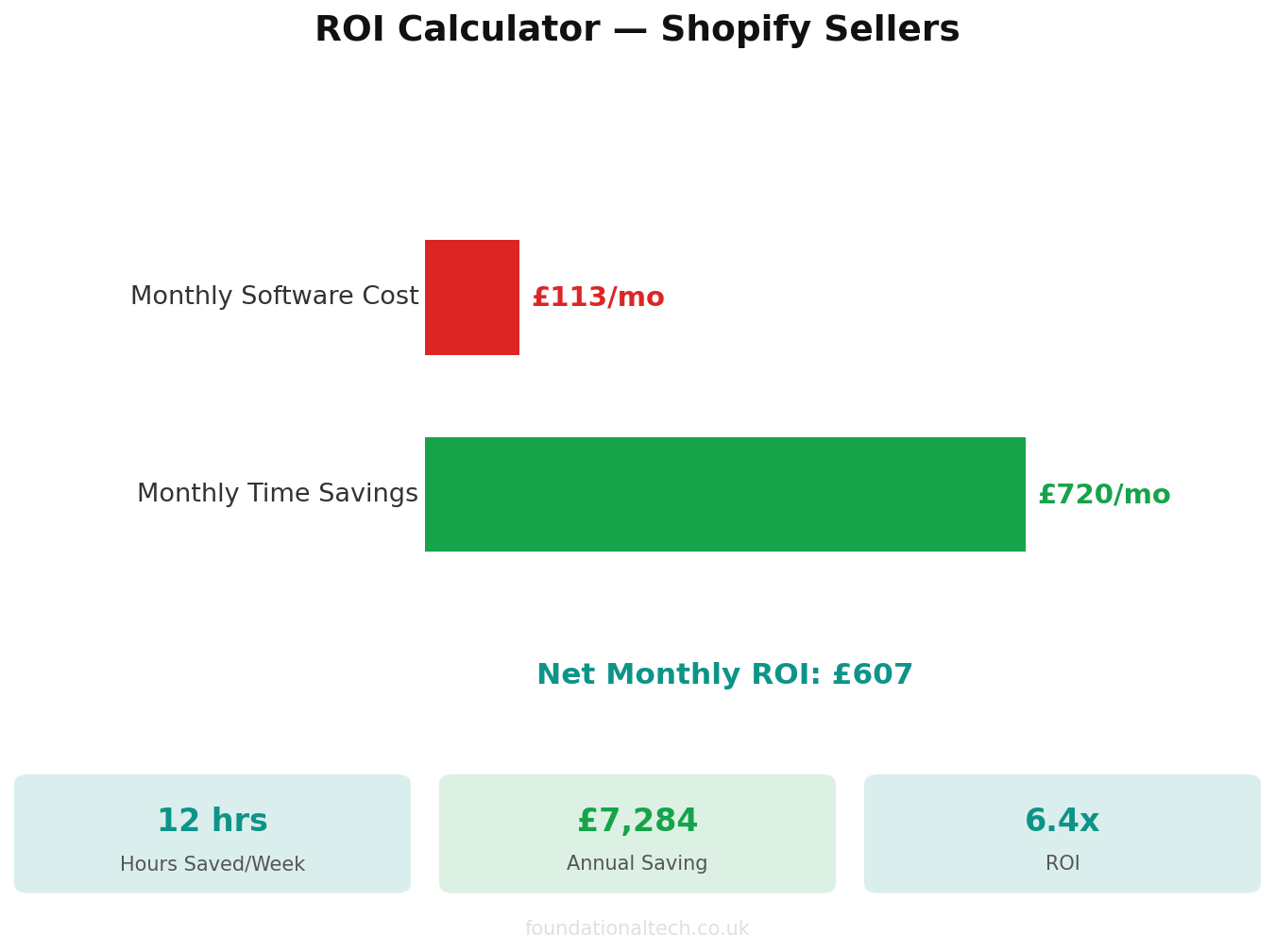
That hire typically costs £12–£15 an hour in the UK once you account for holiday pay and employer's National Insurance, which works out to roughly £780–£975 a month for a 15-hour week. Before you've paid a penny in training time, or dealt with the inevitable churn when a part-time hire moves on after eight months, you're looking at close to £1,000 monthly for tasks that are, frankly, repetitive and well-defined enough to hand to an AI system with proper guardrails.
What follows are three workflows I've built or helped Shopify merchants build using Claude AI, connected either through the Shopify admin API or through simple no-code middleware. None of this requires a developer on retainer. It requires an afternoon of setup and a willingness to review the output for the first few weeks until you trust it.
Workflow 1: Product Description Generation at Scale
The scenario I see most often: a merchant imports 60 new SKUs from a supplier's spreadsheet — say, a garden furniture wholesaler bringing in a new rattan range for spring. The supplier feed gives you a product name, a set of dimensions, a material spec, and nothing else. Shopify's default behaviour is to leave the description blank or copy the manufacturer's flat, keyword-stuffed paragraph verbatim, which does nothing for your SEO and even less for conversion.
Writing 60 unique, on-brand descriptions by hand takes a competent copywriter roughly four to five hours. Outsourced, that's typically £15–£25 per description on a freelance platform, so £900–£1,500 for one product batch — money that most stores importing new ranges quarterly simply don't have.
How the workflow runs
- Export the raw product data. Use Shopify's built-in product export (Products > Export) to generate a CSV containing the supplier's raw specs, SKU, variant options and current pricing.
- Feed the CSV to Claude with a structured prompt template. I build a reusable prompt that specifies brand tone, target reader (usually a homeowner or trade buyer depending on the client), a maximum word count, and instructions to include specific SEO terms and any regulatory disclosures relevant to the category — for example, flammability labelling requirements under the Furniture and Furnishings (Fire) (Safety) Regulations 1988 for upholstered garden furniture, or CE/UKCA marking references for anything electrical.
- Batch process through the API rather than the chat interface. For anything over 20 products, I use a simple Python script or a Zapier/Make.com flow that calls the Claude API row by row, writing the output description back into a new CSV column. This avoids the copy-paste fatigue of using Claude Pro's chat window for bulk work.
- Re-import via Shopify's CSV import with matching enabled. Shopify matches on SKU or product handle, so the new descriptions overwrite the blank or placeholder ones without touching pricing or inventory data.
- Spot-check 10% of the batch manually before publishing, particularly for any product making a safety or compliance claim — Claude is good, but it isn't liable if a description misstates a certification.
One client, a Yorkshire-based outdoor lighting retailer, ran their entire 340-SKU catalogue through this workflow over a weekend. Their organic search impressions for product pages rose 34% over the following two months, largely because every page finally had unique, keyword-relevant copy instead of duplicate manufacturer text that Google was quietly deprioritising.
What it costs: Claude Pro is £18 a month and covers the chat-based drafting and template refinement. If you're processing in bulk via the API, expect to pay on usage — a typical 150-word product description costs a fraction of a penny in API tokens, so even a 400-SKU catalogue refresh runs to a few pounds in raw compute. The real cost is the hour or two spent building the prompt template properly the first time.
Workflow 2: Customer Email Drafts That Don't Sound Robotic
Every Shopify store owner I've worked with has the same inbox pattern: 70% of incoming customer emails fall into five or six categories — where's my order, can I exchange this size, do you ship to Northern Ireland, my discount code isn't working, can I cancel before dispatch. These aren't complicated questions. They're just numerous, and answering each one individually, even briefly, eats twenty or thirty minutes a day that adds up to real hours by the end of the month.
The mistake I see merchants make is either ignoring this entirely (bad for reviews and repeat custom) or trying to solve it with a rigid chatbot that customers immediately recognise and resent. The middle path is using Claude to draft personalised email responses that a human still reads and sends, cutting drafting time from minutes to seconds.
How the workflow runs
- Connect your helpdesk or shared inbox to Shopify's order data. If you're using Gorgias (from £75/month) or Zendesk with a Shopify integration, order status, tracking number and customer history are already visible alongside the email. If you're running a plain Gmail inbox, a Zapier flow can pull the relevant order record automatically when a new email arrives.
- Build a prompt template per query category. For a "where's my order" query, the template instructs Claude to pull in the tracking number, expected delivery window, and a brief, warm acknowledgement — no generic filler. For a returns query, it references your actual returns policy (link it in the prompt so Claude doesn't invent terms) and the relevant Consumer Contracts Regulations 2013 cooling-off period where applicable.
- Route the draft to a human review queue. This is the step people skip and shouldn't. Claude drafts; a team member reads for ten seconds and hits send, or edits first. This keeps you compliant with your own returns and refund commitments and catches the rare case where Claude has misread context.
- Track which categories get the fewest edits. After a month, you'll usually find that order-status and shipping queries need almost no editing — those can graduate to auto-send with a clear "AI-assisted" disclosure if you're comfortable with that, while anything touching refunds, damaged goods or complaints stays firmly human-reviewed given the consumer protection obligations involved.
What it costs: Assuming you're already paying for a helpdesk tool, the incremental cost is the £18/month Claude Pro subscription plus, if you automate the routing, a Zapier plan starting around £19.99/month for the Starter tier. Against a part-time hire's £780+ monthly cost for equivalent email-handling hours, this is typically the fastest payback of the three workflows — most merchants recoup the setup time within the first week.
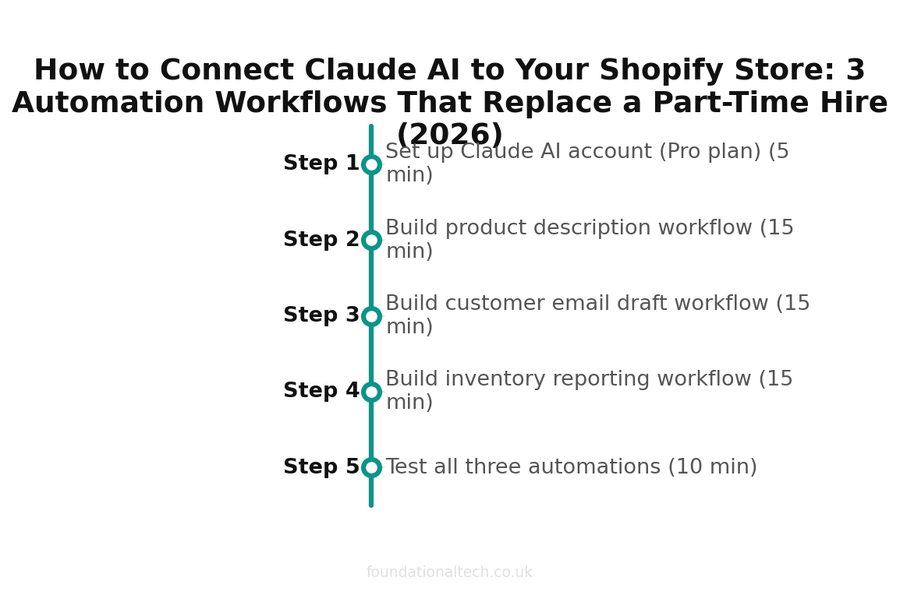
| Step | Action | Time |
|---|---|---|
| 1 | Set up Claude AI account (Pro plan) | 5 min |
| 2 | Build product description workflow | 15 min |
| 3 | Build customer email draft workflow | 15 min |
| 4 | Build inventory reporting workflow | 15 min |
| 5 | Test all three automations | 10 min |
Workflow 3: Inventory and Sales Reporting Without the Spreadsheet Wrestling
This is the workflow founders most underestimate the value of, because they've normalised doing it badly. The typical routine: export orders and inventory from Shopify admin every Monday morning, paste into a spreadsheet, eyeball it for anything obviously wrong, and move on. Slow-moving stock doesn't get flagged until it's six months old and taking up warehouse space. Best-sellers run out because nobody connected last week's sales spike to this week's reorder point.
How the workflow runs
- Set up a scheduled data pull. Using Shopify's Admin API (available on all plans) or an app like Report Pundit (from £9/month) or Shopify's native analytics export, pull a weekly CSV covering units sold by SKU, current stock levels, and days-of-cover based on the last 30 days of sales velocity.
- Feed the raw numbers to Claude with an analysis prompt rather than a writing prompt. Ask it to flag SKUs with fewer than 14 days of stock cover at current velocity, SKUs with more than 90 days of stock and no sales in the last fortnight, and any variant where sell-through has changed by more than 30% week-on-week.
- Ask for the output as a plain-English summary, not just a table. This is where Claude earns its keep over a static spreadsheet formula — it can write "your 3-seater rattan sofa is on track to sell out in nine days at current velocity, and your last reorder lead time from the supplier was 21 days, so you need to place this order by Thursday" rather than just a red cell in Excel that you have to interpret yourself.
- Automate delivery to Monday morning. A simple scheduled script or Make.com scenario can run this every Sunday night and drop the summary into Slack or email before the working week starts, so decisions get made at the start of the week rather than being discovered on Wednesday when it's already too late to reorder in time.
- Layer in a monthly deep-dive. Beyond the weekly stock alert, run a monthly prompt asking Claude to identify seasonal patterns, margin outliers (products selling well but at thin margin after discounting), and category-level trends worth discussing at a monthly review.
What it costs: The Claude Pro subscription again covers the analysis work at £18/month. A reporting app like Report Pundit adds roughly £9–£29/month depending on tier, and Make.com's free tier handles most single-store scheduling needs, with paid plans starting around £8/month if you need higher run volumes. Total incremental spend: typically under £50/month for a level of visibility that previously required either a spreadsheet obsessive on the team or that same part-time hire spending several hours a week just pulling numbers together.
What This Actually Costs Each Month
Pulling the three workflows together against a typical small-to-mid Shopify store, here's the realistic monthly spend once everything is running:
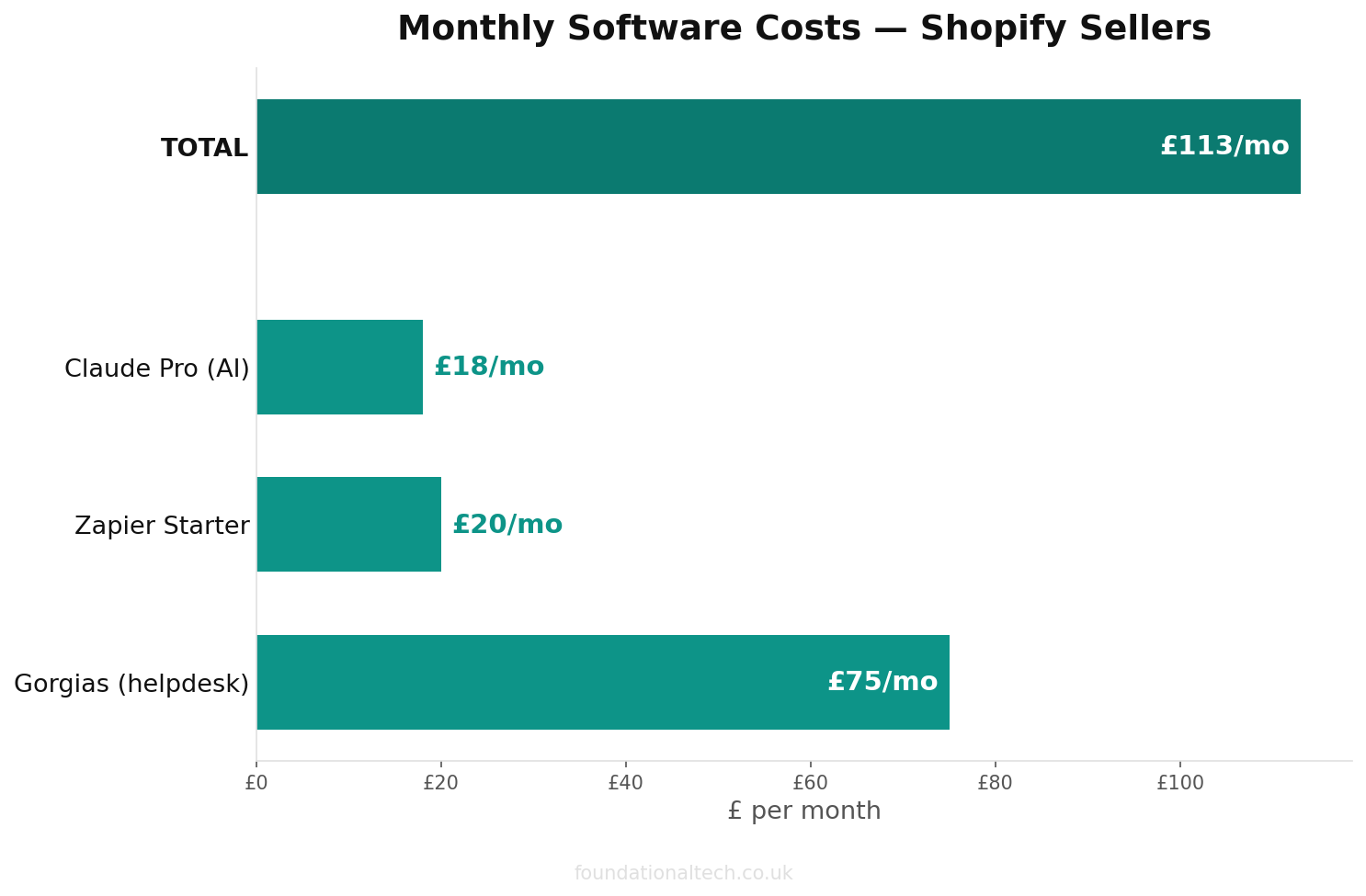
- Shopify plan: £25/month (Basic) up to £344/month (Advanced), depending on your order volume and need for lower card processing rates — most stores running these workflows sit on the Shopify or Advanced tier once they're past the startup phase.
- Claude Pro: £18/month, covering the chat interface for prompt building, ad-hoc queries and lower-volume tasks.
- Claude API usage for bulk batch jobs (product description runs, weekly reporting): typically £5–£20/month for a mid-sized catalogue, billed on actual token usage rather than a flat fee.
- Helpdesk tool (if not already in place): from £75/month for Gorgias' Starter plan, though many stores already have this cost sunk.
- Automation middleware (Zapier or Make.com): £8–£20/month depending on task volume.
Even stacking every element together, you're looking at somewhere between £150 and £400 a month in tooling on top of your existing Shopify subscription — against a part-time hire that would cost £780–£975 a month and still need managing, training and covering for when they're on annual leave.
3 workflows
Product descriptions, customer emails, and inventory reports — replacing a part-time hire
Where to Start If You're Doing This for the First Time
Don't try to launch all three workflows in the same week. I always recommend starting with whichever one is causing the most visible pain right now. If you've got a product backlog sitting unpublished because nobody's had time to write descriptions, start there — it's the workflow with the clearest before-and-after, and the wins are visible within days. If your inbox is the bottleneck, start with the email drafting workflow, since it has the fastest time-to-value and the lowest technical setup.
Whichever you choose first, budget a proper afternoon to build the prompt template rather than improvising it query by query. The quality difference between a rushed, generic prompt and one that references your actual brand voice, your actual returns policy, and your actual product categories is enormous — and it's the difference between output you have to heavily edit and output you can trust with a light touch review.
Related guides: If you found this useful, see our guide on How to Create a GoHighLevel Workflow (Step-by-Step Beginner Guide) and A2X vs Link My Books vs Synder: Which Shopify to Xero Integration Fits Your UK Store? (2026 Guide).
Once the first workflow is bedding in and the team trusts the output, the second and third tend to follow naturally within a month or two, usually because whoever was doing the manual version has by then seen enough evidence to want their time back for something more useful.