Key Takeaway
12 AI prompts for UK Shopify sellers in 2026. Copy-paste ChatGPT and Claude templates for products, emails and ads.
Most Shopify sellers try AI exactly once. They open ChatGPT, type "write me a product description," get back something that reads like a department-store catalogue from 2004, and decide the whole thing is for big brands with marketing teams. The tool was never the problem. The instruction was.
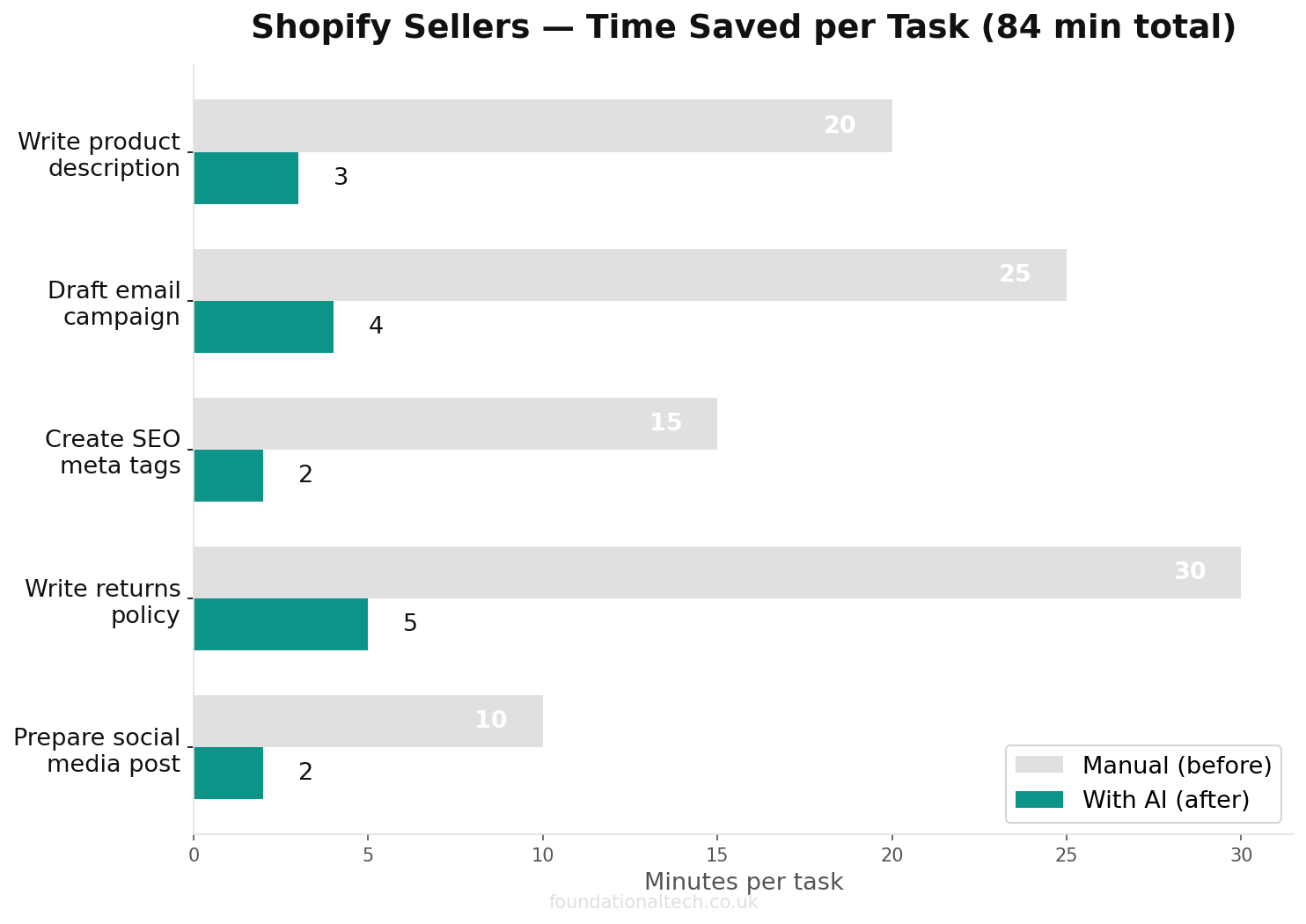
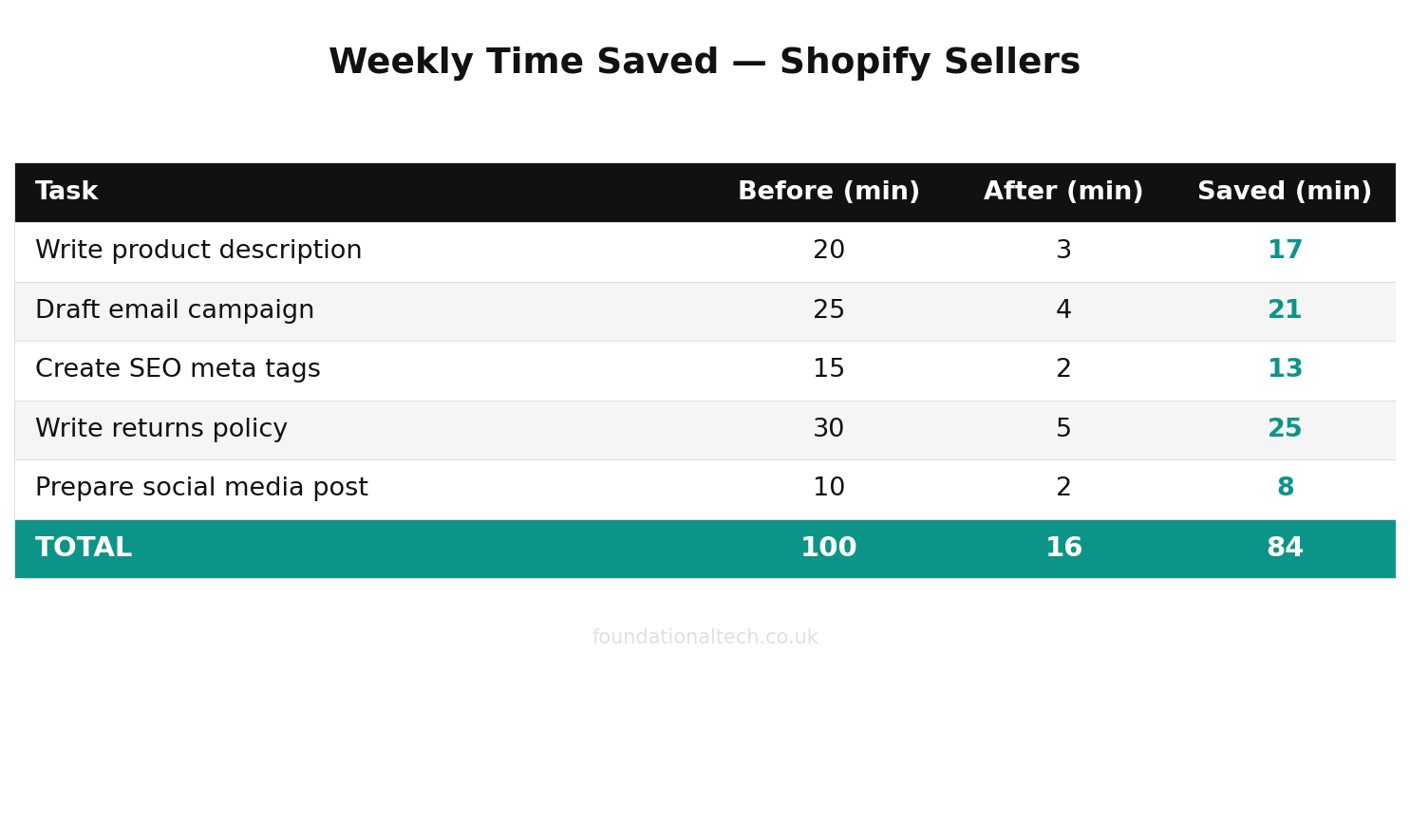
25 min → 3 sec
Average time to draft a professional e-commerce document — manual vs AI-assisted
A prompt is just a brief handed to a very fast assistant who knows nothing about your store until you tell it. Hand over a vague brief and you get vague work. Tell it your brand voice, the product, the customer and the rules, and it writes the listing you would have written yourself — in four seconds instead of thirty minutes. Below are twelve prompts built for a UK Shopify business. Paste them in, swap the bits in brackets for your own details, and skip the year of trial and error most people waste working out what to type.
The first five are free. The rest are the ones that save the most hours.
Why Generic Prompts Do Not Work for Shopify Sellers
"Write a product description" gives you generic rubbish because you handed over a generic instruction. The AI has no idea you sell hand-poured soy candles from a workshop in Bristol, that your customers care about sustainability, or that your brand voice is warm and understated rather than shouty. It does not know your average order value, your returns policy or your shipping cut-off. So it guesses, and its guesses read like everyone else’s guesses.
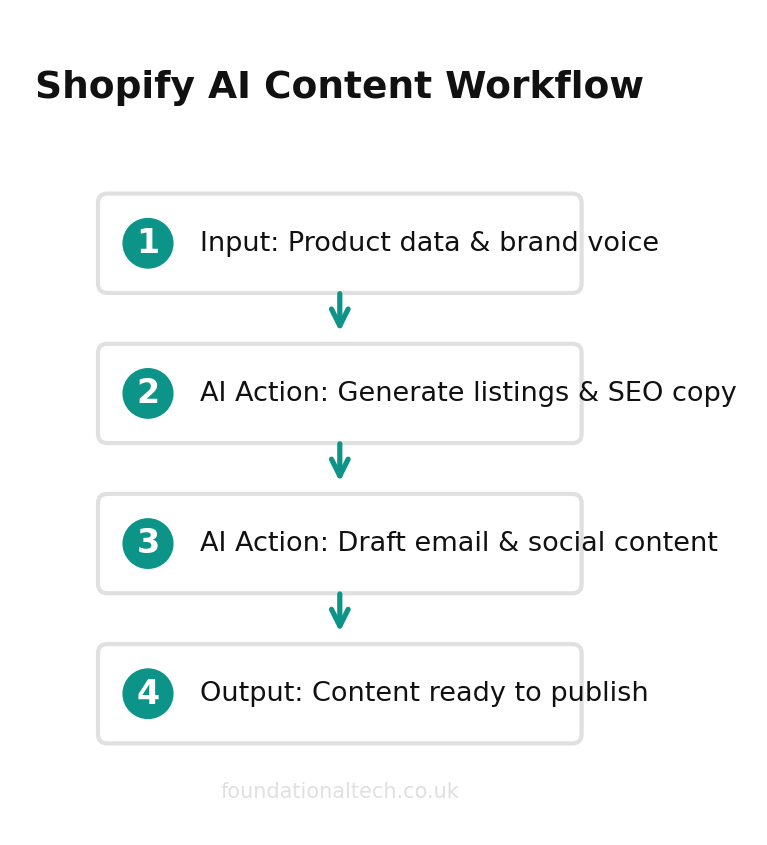
The fix is dull and it works: tell it who the customer is, what tone you use, what the product is, and what format you want back. A prompt that names the product, the buyer, the brand voice and three rules beats a one-line request by a mile. Every prompt below is built that way. They look long because the detail is the whole point — the detail is what stops the output sounding like a robot wrote it.
One rule sits over all of them, and it never changes: AI writes and reads; you decide and verify. Never ask these prompts to set a price, calculate your margins, or generate financial projections. It cannot see your supplier costs, your ad spend or your stock levels. Ask it to draft, rewrite, summarise and format. That is where it is brilliant, fast and safe.
Every prompt here works in the free version of ChatGPT, Claude or Google Gemini, so you can test all twelve this week without paying a penny. If you do upgrade, the paid tiers sit in the same ballpark. ChatGPT Plus is £20 a month. Claude Pro is around £18 a month, or about £14 a month if you pay for the year up front. You do not need more than one to run everything below.
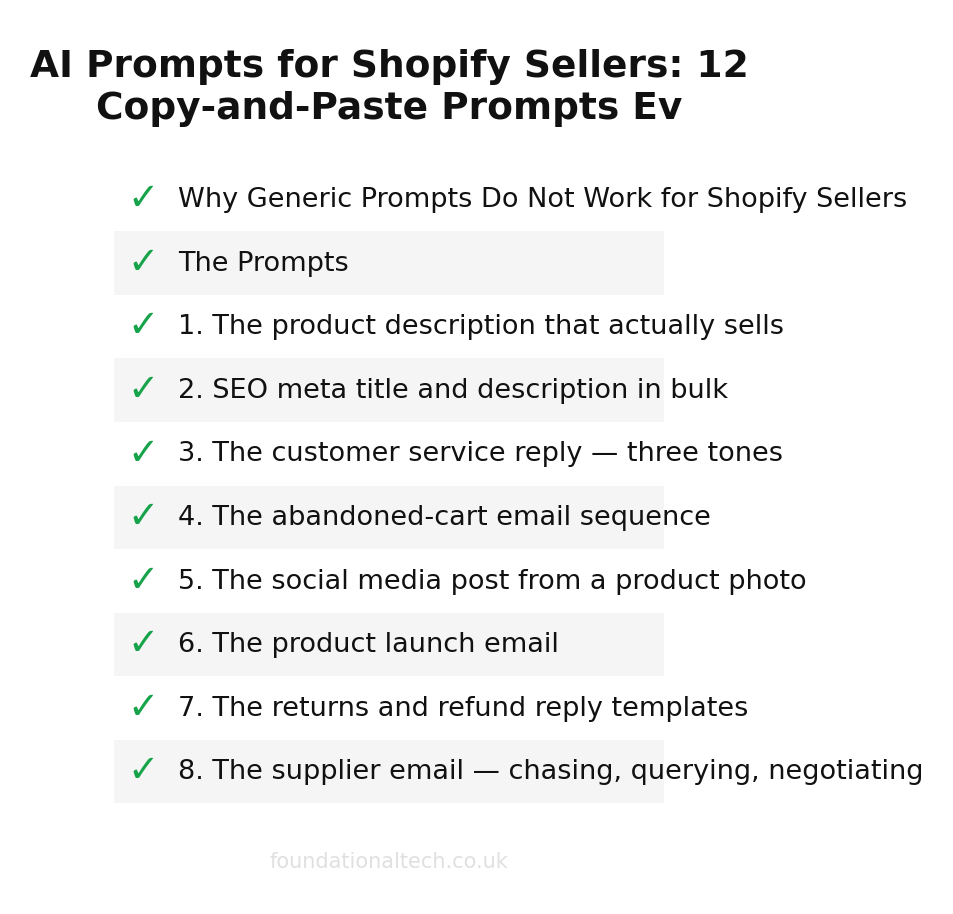
The Prompts
1. The product description that actually sells
Write a Shopify product description for the item below. Tone: [warm /
punchy / minimal / luxe — pick one], written for [target customer]. Lead
with the benefit, not the feature. Include a short paragraph for the
listing page and bullet points for the key details. Do NOT invent
specifications, dimensions or materials I haven't given you — leave
anything missing as a [SQUARE BRACKET] for me to fill in.

The product:
[e.g. hand-poured soy wax candle, 30-hour burn time, recycled glass jar,
scent is "Coastal Walk" — sea salt and driftwood, made in Bristol, price
£22, weight 220g]
When to use: every new product listing, and every old one that reads like you wrote it at midnight. Time saved: 20–30 minutes a listing — and a description that converts beats a blank one every time.
2. SEO meta title and description in bulk
Here are [X] products from my Shopify store. For each one, write an SEO
meta title (under 60 characters) and meta description (under 155
characters) that includes the main keyword naturally and makes a UK
shopper want to click. Do NOT keyword-stuff. Match my brand voice:
[describe your tone in a sentence].

The products:
[list product names, one per line, with a few words about each]
When to use: every time you add a batch of products and realise the meta fields are all still blank. Time saved: 15–20 minutes per batch, and filled meta fields mean Google actually shows your pages properly.
3. The customer service reply — three tones
A customer has sent the message below. Draft THREE reply options in my
brand voice ([describe tone]), each under 120 words:
1. Warm and apologetic — assumes genuine issue, offers a solution
2. Helpful but firm — acknowledges the concern, explains policy clearly
3. Going above and beyond — surprises the customer with generosity
Do NOT promise anything I haven't authorised — leave specific refund
amounts or replacements as [SQUARE BRACKET] for me to confirm.

Their message:
[paste the customer's email or message here]
When to use: the tricky customer messages where you stare at the screen for ten minutes trying to get the tone right. Time saved: 10–15 minutes per reply, and a faster, warmer response keeps the customer and avoids the negative review.
4. The abandoned-cart email sequence
Write a three-email abandoned-cart sequence for my Shopify store. Brand
voice: [describe tone]. Each email should be short (under 150 words) and
have a clear subject line.
1. Sent 1 hour after — gentle reminder, no discount
2. Sent 24 hours after — addresses common hesitations (shipping, returns)
3. Sent 48 hours after — creates urgency without being desperate, optional
   small incentive [e.g. free shipping or 10% off]
Include a clear call to action in each. Do NOT invent my policies — leave
specifics like delivery times and return windows as [SQUARE BRACKET].

Store details:
[store name, what you sell, average order value, shipping policy summary]
When to use: the email sequence you know you need and have been putting off since you launched. Time saved: an hour to write, and it recovers revenue on autopilot from the day you set it up.
5. The social media post from a product photo
I have a product photo I want to post. Write THREE social captions: one
for Instagram (with 3–5 relevant hashtags), one for Facebook (no
hashtags, conversational), and one for Pinterest (keyword-rich, under 100
words). Tone: [brand voice]. Sound like a real small-business owner, not
a marketing agency. Do not invent details I have not given you.

The product and photo:
[e.g. flat-lay of three candles on a linen cloth, natural light, showing
the recycled glass jars — the "Coastal Walk" range]
When to use: every product photo sitting in your camera roll that never makes it to social media. Time saved: twenty minutes of staring at a blank caption box — and the post actually gets published.
6. The product launch email
Write a product launch email for my Shopify store's mailing list. Tone:
[brand voice] — excited but not shouty. Structure: subject line, preview
text, short body (under 200 words), and a single clear call to action.
Cover what the product is, why it is special, and any launch-only offer.
Do NOT invent prices, stock numbers or dates I have not given you.

The launch:
[product name, what it is, what makes it different, launch date, any
early-bird offer, any limited stock note]
When to use: every new product or collection drop — the announcement that drives your first wave of sales. Time saved: 30–45 minutes, and a polished launch email converts far better than a last-minute Instagram story.
7. The returns and refund reply templates
Write FOUR short, warm customer service templates for my Shopify store,
each under 100 words, in my brand voice ([describe tone]):
1. Approving a return — what to do next, how long the refund takes
2. Declining a return outside the window — empathetic but clear
3. Offering an exchange instead of a refund
4. Damaged item received — apologising and offering replacement
Leave any specific timeframes, costs or policy details as [SQUARE
BRACKET] for me to fill in. Sign off as [name/store name].

Store context:
[return window, refund method, who pays return shipping]
When to use: the replies you send every week but rewrite from scratch every time. Time saved: builds a reply library in five minutes that saves you hours across the year.
8. The supplier email — chasing, querying, negotiating
Draft THREE short, professional emails to a supplier:
1. Chasing a late delivery — polite but firm, asking for an update and
   revised ETA
2. Querying an invoice discrepancy — clear, factual, lists the issue
3. Requesting better terms — e.g. lower MOQ or better unit price based
   on order history
Each under 120 words. Professional but human — not corporate-speak.

Supplier and context:
[supplier name, what they supply, the specific issue for each email]
When to use: the supplier emails you put off because they feel awkward, especially the negotiation one. Time saved: 15 minutes each, and the negotiation email alone can pay for itself many times over.
9. The collection page copy
Write the description for a Shopify collection page. Tone: [brand voice].
The description should be 80–120 words, SEO-friendly (include the main
keyword naturally, do not force it), and tell the customer what the
collection is and who it is for. End with a line that encourages browsing.
Do NOT invent product names or details.

The collection:
[collection name, what products are in it, who buys them, the main
keyword you want to rank for]
When to use: every collection page that currently has no description — which is most of them. Time saved: ten minutes a page, and filled collection descriptions improve both SEO and conversion.
10. The Google and Trustpilot review reply pack
Here are some recent reviews of my Shopify store. Draft a short, warm,
personal reply to each — thank them, mention something specific from
their review, and sound like a real person not a template. For any
negative review, draft a calm, professional reply that takes the issue
seriously and offers to put it right offline. Keep each reply under 60
words.

Reviews:
[paste reviews]
When to use: the review replies you mean to do and never get round to — replied-to reviews build trust with every future visitor. Time saved: clears a backlog in one sitting and lifts your store's reputation across every platform.
11. The Facebook and Google ad copy
Write ad copy for a [Facebook / Google Shopping / Google Search] campaign
for the product below. Give me THREE variations so I can A/B test.
Each should have: a headline (under 30 characters for Google, under 40
for Facebook), body text (under 90 words), and a clear call to action.
Tone: [brand voice]. Focus on the benefit to the customer, not just the
feature. Do NOT invent prices or offers.

The product and campaign goal:
[product name, target audience, the specific goal — e.g. drive traffic,
convert cold audience, retarget cart abandoners]
When to use: every ad campaign where you are stuck on the copy and burning budget on a weak headline. Time saved: 20–30 minutes per campaign, and better copy means lower cost per click and more sales from the same spend.
12. The end-of-season sale email and banner copy
Write copy for an end-of-season sale for my Shopify store:
1. An email to my mailing list (under 200 words, subject line and preview
   text included) announcing the sale, creating urgency, with a clear CTA
2. A short banner headline (under 10 words) for the store homepage
3. A collection page intro for the sale collection (under 80 words)
Tone: [brand voice] — excited but not desperate. Do NOT invent discount
percentages, dates or product names I have not given you.

Sale details:
[what is on sale, discount percentage, start/end dates, any exclusions]
When to use: every seasonal sale, Black Friday, or clearance event — the copy that makes or breaks the campaign. Time saved: an hour of writing condensed into five minutes, and consistent copy across email and site converts better than a patchwork effort.
How to Get the Best Out of These
Two habits separate the sellers who get gold from the ones who give up. First, give the AI your brand voice once and reuse it — paste your About page, a product description you love, and an email you are proud of, then say "match this voice from now on." Every draft after that sounds like you, not a template. Second, treat the first answer as a draft, not a final copy: if the tone is off, tell it what to change ("warmer," "shorter," "less salesy") rather than starting again. The AI is a fast copywriter who needs your brief and your editing — not a replacement for knowing your product and your customer.
Start with one. Pick the prompt for the task you dread most — for most Shopify sellers that is product descriptions — and use it on your very next listing this week. Once it has saved you an evening, the rest will follow.
Related guides: If you found this useful, see our guide on How to Connect Claude AI to Your Shopify Store: 3 Automation Workflows That Replace a Part-Time Hire (2026), How UK Shopify Sellers Are Using AI to Cut Admin Hours (Without Losing Control of Their Numbers) and How to Create a GoHighLevel Workflow (Step-by-Step Beginner Guide).
Which of these twelve are you going to try first — and what is the one e-commerce task you would most want a prompt for that is not on the list? Reply and tell me; I am building the next batch from real requests.