Key Takeaway
How UK Shopify sellers are using AI to cut admin time in 2026. Real examples for quoting, invoicing, and client communications — without sounding robotic.
A seller I spoke to last month runs a £400,000 homeware store from a spare room and answers customer emails at 11pm because that's the only quiet hour she gets. She has never typed a prompt into an AI tool. She assumed it was for coders, or for cheating students, or for writing the kind of bland blog posts she'd never publish.
She was wrong on all three counts, and the cost of being wrong is roughly an evening a week. This is the practical guide to what AI actually does for a UK e-commerce business in 2026 — not the keynote version, the spare-room version. No code, no hype, and a clear line drawn around the things you should never hand over.
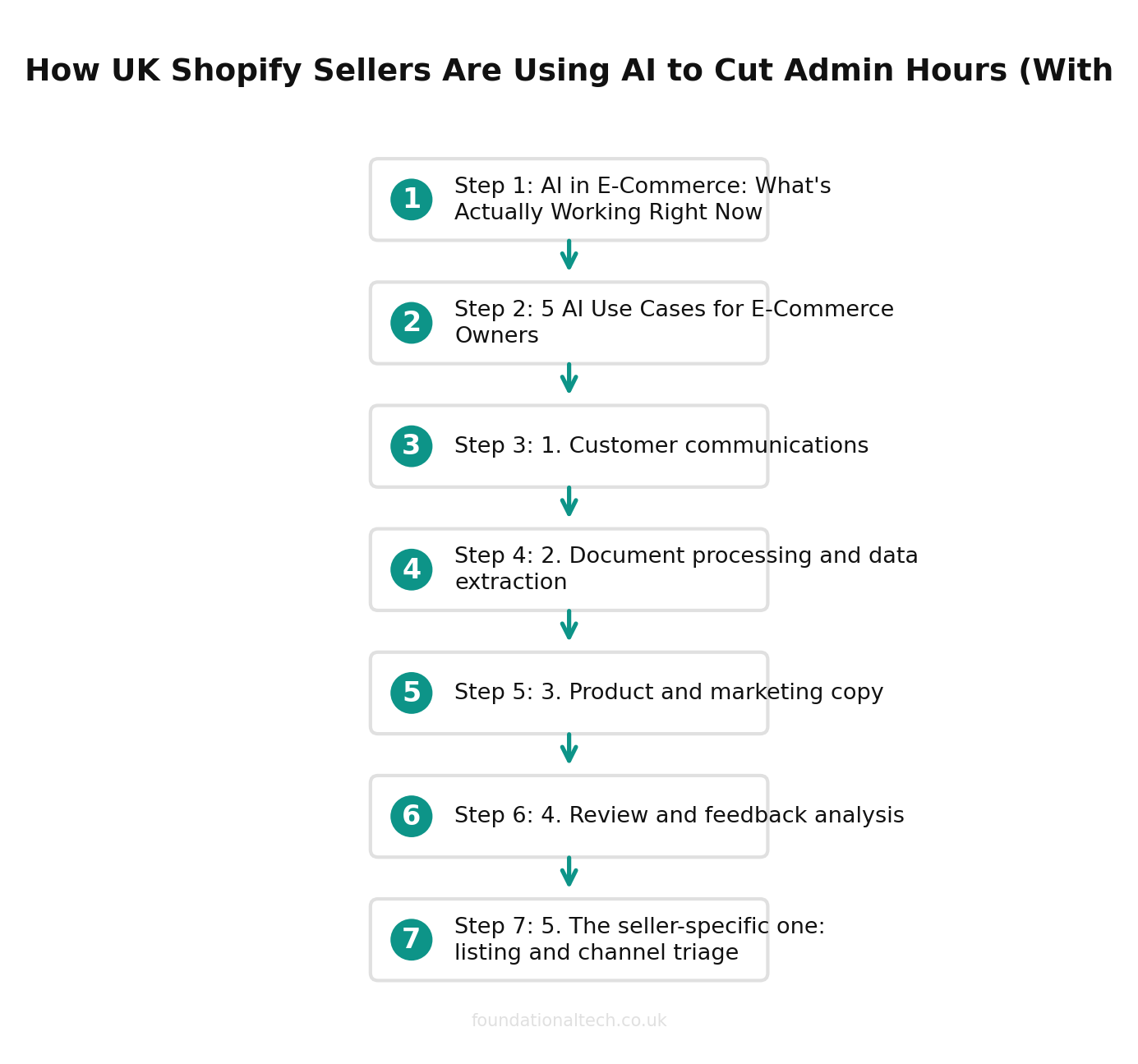
AI in E-Commerce: What's Actually Working Right Now
Strip away the noise and AI earns its keep in online retail in one specific way: it removes the writing and reading work that sits between you and a decision. Drafting the email, reading the supplier PDF, summarising the reviews, sorting the returns into reasons — these are the jobs that eat a founder's week and don't require judgement so much as time and literacy. That's exactly what a large language model is for.
What it is not good at, and where sellers get burned, is anything that has to be precisely right with no one checking — your VAT return, your reorder quantities, a refund decision on a specific customer. The split runs straight through the middle of an e-commerce business: AI drafts and reads; humans and your existing software decide and calculate. Keep that line clear and the tools are genuinely useful from week one. Blur it and you'll eventually send a confidently wrong number to a customer or HMRC.
Here are the five places it's working today.
5 AI Use Cases for E-Commerce Owners
1. Customer communications
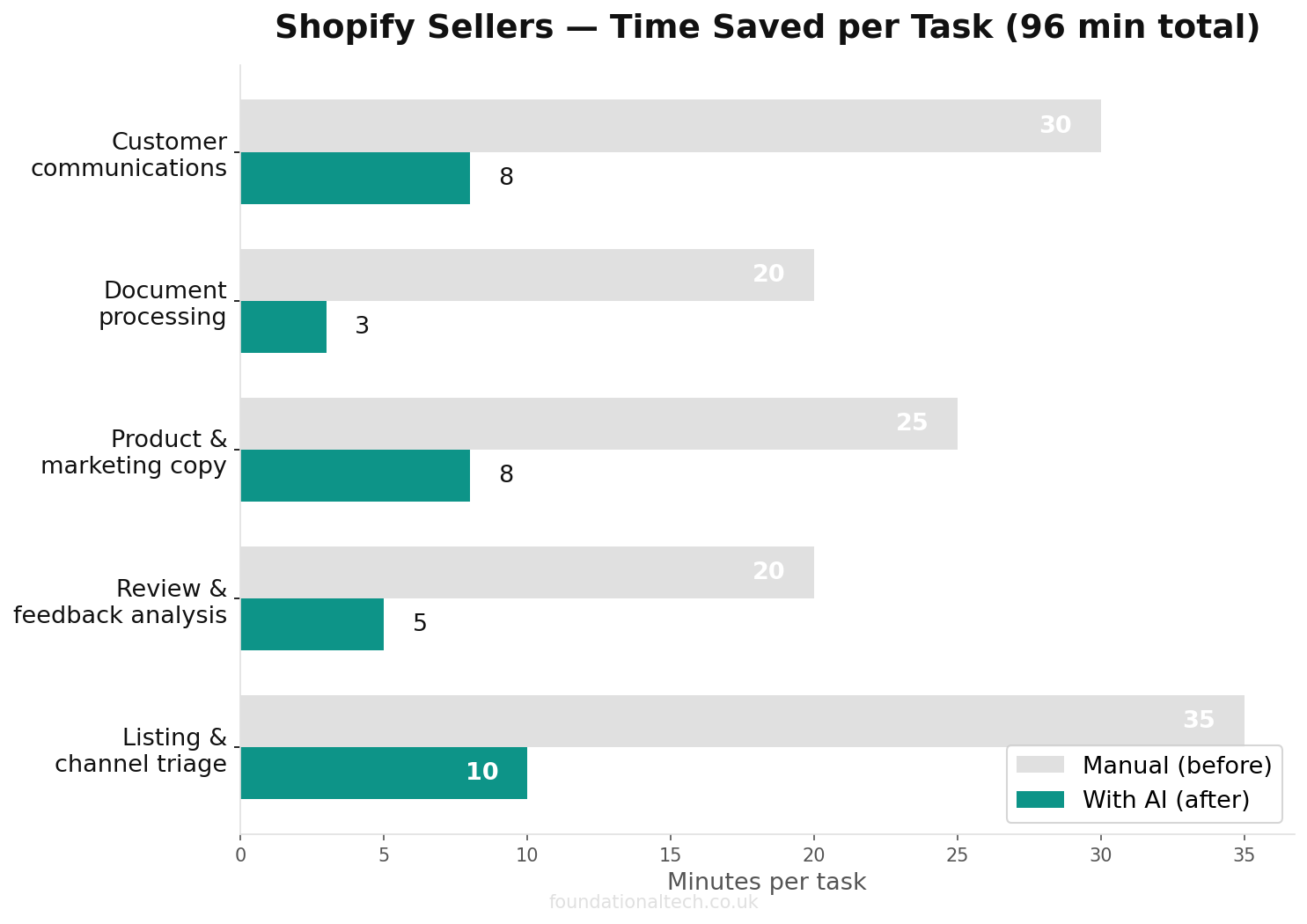
This is where most sellers start, and rightly. Customer service is relentless, repetitive and emotionally draining — "where's my order," "can I return this," "do you ship to Jersey" — and the answers barely change. An AI tool drafts the reply in your tone, in seconds, and you press send after a glance.
63 hours/month
spent on admin by average UK Shopify sellers — AI cuts the repetitive half to minutes
The step up: paste a difficult complaint and ask for three possible replies — one apologetic, one firm, one that offers a partial refund — and choose. The blank-page paralysis of the angry-customer email disappears. You stay in control of what goes out; you just stop writing each one from scratch. A seller handling 30 enquiries a day typically saves an hour of it.
2. Document processing and data extraction
Your inbox is full of unstructured paperwork: supplier invoices, freight quotes in three formats, a customs statement, a spreadsheet of 200 SKUs a manufacturer sent in their own layout. AI reads these and turns them into something usable. Pull the line items out of this invoice into a table; summarise what changed between this quote and last month's; reformat this supplier's product list to match my Shopify import template.
This is quietly the biggest time-saver of the five, because it's the work that's too fiddly to systematise and too frequent to ignore. A caveat that matters: for anything that flows into your accounts, let your existing tools do the extracting — Hubdoc and A2X are built to be auditable and accurate. Use AI for the one-off, awkward documents that don't fit a connector.
3. Product and marketing copy
Three hundred product descriptions, each needing a title, a description and search keywords, is a job that breaks most founders' will by item forty. AI writes the first draft of all of them from your bullet points, in a consistent voice, and you edit rather than originate. Same for category pages, email campaigns, and the social captions you keep meaning to write.
Two warnings. First, edit everything — unedited AI copy reads like everyone else's unedited AI copy, and customers can smell it. Second, never let it invent a product claim. "Machine washable at 40°C" must come from you, not the model, because a hallucinated spec is a returns problem and potentially a trading-standards one.
4. Review and feedback analysis
You have 800 reviews and a vague sense that "some people mention the packaging." AI turns that vague sense into a decision. Paste a few hundred reviews and ask: what are the five most common complaints, ranked, with a representative quote for each. In thirty seconds you learn that 18% mention the box arriving crushed — which is a courier conversation worth having, and one you'd never have prioritised from gut feel.
The same trick works on returns reasons, support tickets and post-purchase survey answers. It's the cheapest market research a small store has ever had access to, and it surfaces the patterns hiding in text you already own.
5. The seller-specific one: listing and channel triage
Here's the use case unique to multi-channel retail. You sell the same catalogue across Shopify, Amazon and eBay, each with different title-length limits, formatting rules and keyword conventions. AI adapts one master listing into the right shape for each channel — trimming the Amazon title to its character limit, rewriting bullet points to eBay's style, generating channel-appropriate keywords — in one pass instead of three manual rewrites. For a seller launching 20 products across three channels, that's the difference between a morning and a week.
The Tools: Claude vs ChatGPT vs Gemini for E-Commerce
All three are good. The honest answer is that for everyday seller work the differences are smaller than the marketing suggests, and the free tiers of each are enough to start today. Where they diverge:
Claude (Anthropic) is the strongest writer of the three and the best at British English out of the box — it won't quietly turn your "colour" into "color" or your tone American. It handles long documents well, which suits review analysis and supplier paperwork. Claude Pro is around £18/month plus VAT (billed in US dollars at $20); a capable free tier covers light use.
ChatGPT (OpenAI) has the widest set of extras — image generation, voice, a large library of pre-built assistants — and the most third-party integrations, which matters if you later wire it into automations. ChatGPT Plus is £20/month; there's a free tier too.
Gemini (Google) is the natural pick if your business already lives in Google Workspace, because it reaches into your Gmail, Docs and Sheets directly. Gemini Advanced runs from about £18.99/month, and the free Gemini tier is generous enough for most light tasks.
The practical recommendation: start free with whichever sits closest to your existing tools, do real work in it for a fortnight, and only pay for the one you actually reach for. Paying £18 a month for a tool that saves four hours is the easiest maths in your business; paying for three you don't use is just a new drawer of chargers.
What AI Can't Do (Yet)
Being honest about the limits is what keeps you out of trouble.
It can't do your sums. A language model predicts text, it doesn't calculate, and it will state a wrong total with total confidence. Never ask it for your VAT figure, your margin or your reorder quantity — that's what Xero, A2X and a spreadsheet are for.
It can't be trusted with facts it wasn't given. Ask about your specific courier's Jersey surcharge and it may invent a plausible, wrong number. Give it the information and it's excellent; ask it to recall the world and it guesses.
It doesn't know your business unless you tell it. Out of the box it has no idea of your returns policy, your tone or your bestsellers. The sellers who get real value write a short standing brief — who we are, how we speak, the rules — and paste it in each time. That gap between "generic AI" and "AI that sounds like your shop" is entirely down to the instructions you give it.
And it shouldn't make customer-money decisions unsupervised. Drafting the refund email: yes. Deciding who gets the refund: you. A human stays on every loop that touches someone's money or your legal obligations.
How to Start This Week (Without Breaking Anything)
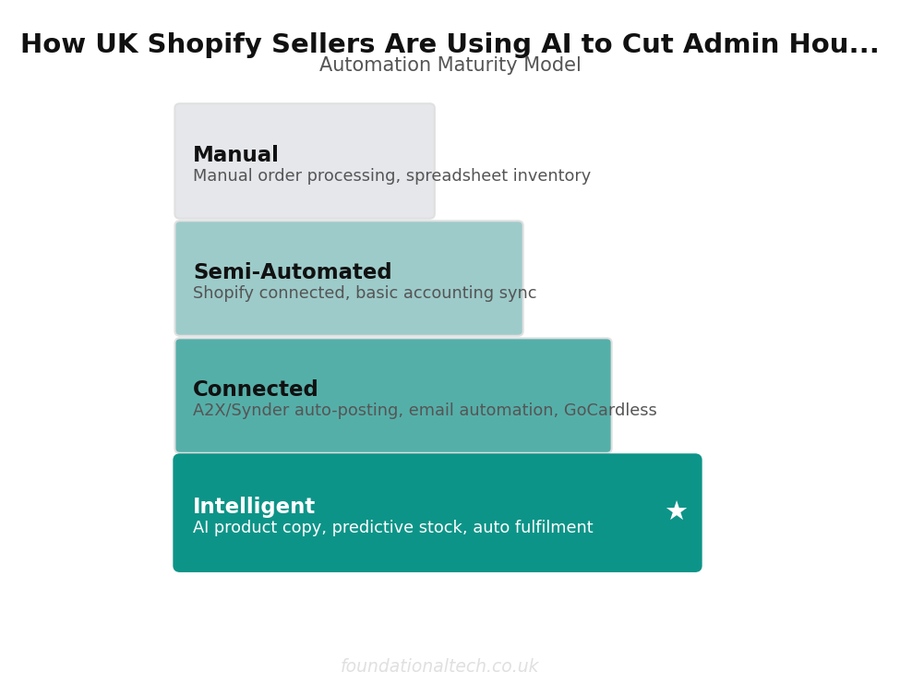
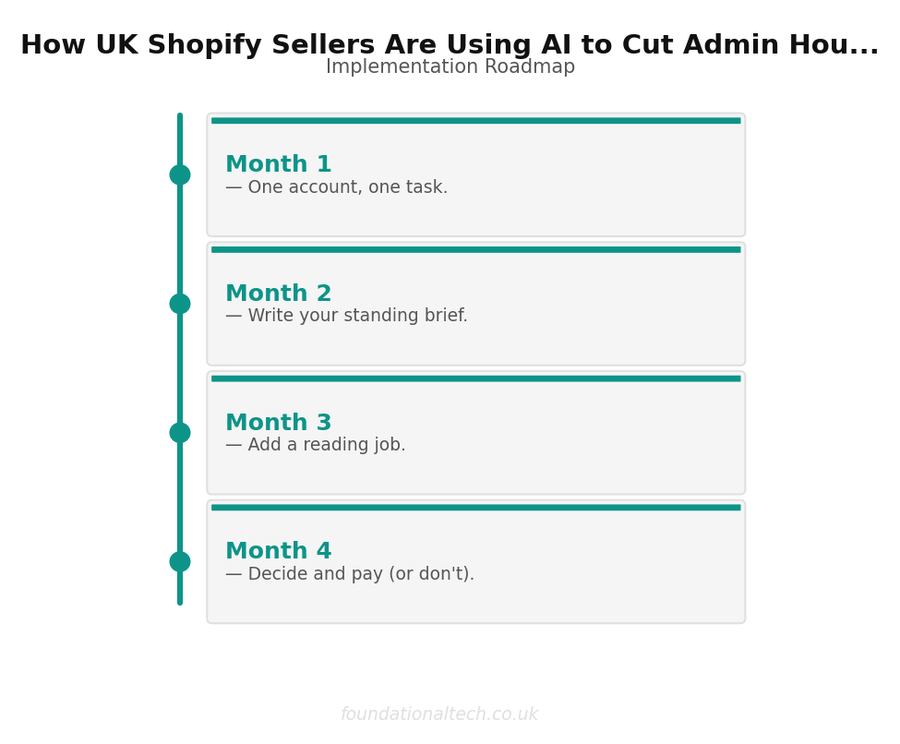
The mistake is trying to "adopt AI" as a project. You don't. You pick one task that annoys you and hand that single task over, then add another when the first one sticks. Here's a four-week version that turns a vague intention into a habit.
Week 1 — One account, one task. Open a free account with one tool — Claude if writing quality matters most, Gemini if you live in Google Workspace, ChatGPT if you want the most extras. Use it for exactly one job: drafting customer replies. Each time an awkward email comes in, paste it in, ask for a reply in your tone, edit, send. By Friday you'll have a feel for what it's good and bad at, at zero cost and zero risk.
Week 2 — Write your standing brief. Spend twenty minutes writing a short description of your business: what you sell, who you sell to, how you speak to customers (formal? warm? brief?), your returns and shipping rules, and three things you never say. Save it. Paste it at the top of any chat and the output stops sounding generic and starts sounding like your shop. This single document is the difference between "AI" and "AI that works for me."
Week 3 — Add a reading job. Move from writing to reading. Paste a batch of recent reviews or returns and ask for the top five themes with a quote each. Paste a messy supplier document and ask for a clean table. You're now using both halves of what the tool does — drafting and digesting.
Week 4 — Decide and pay (or don't). Look back at how often you actually opened the tool. If it earned its place, pay for the one tier you reached for and bin the experiments. If it didn't, you've lost nothing but a few hours and gained a clear answer. Most sellers who follow this end the month paying for exactly one subscription and using it daily.
A worked example of the standing brief in action: instead of typing "write a reply apologising for a late order," you keep your brief pinned and type "reply to this customer — late order, our fault, courier delay; offer free next-time shipping, not a refund; keep it under 80 words, warm not grovelling." The output needs almost no editing because the tool already knows your voice and your rules. That's the whole skill — not magic words, just clear instructions and a business it understands.
What's Coming Next
This article is the map. The next two go deep on the route.
The Prompt Playbook — landing soon as the first paid post in this series — is the copy-and-paste kit: the exact prompts for customer replies, product descriptions, review analysis and supplier-document extraction, each one tuned for a UK store and ready to use without learning a thing about "prompt engineering."
After that, the AI Worker Setup shows how to build a reusable assistant that already knows your policies, tone and catalogue — so you stop re-explaining your business every morning and start with a tool that turns up knowing the job.
Start this week with one use case — customer replies is the easiest win — and one free account. An hour of trying beats a month of wondering.
Have you tried using AI in your e-commerce business yet — and if so, what for? Reply and tell me the one task you'd most want to hand over. I'm collecting real seller examples to shape the Prompt Playbook, and the most common request gets written first.
Related guides: If you found this useful, see our guide on A2X vs Link My Books vs Synder: Which Shopify to Xero Integration Fits Your UK Store? (2026 Guide) and AI Prompts for Shopify Sellers: 12 Copy-and-Paste Prompts Every UK E-Commerce Owner Should Use in 2026.
A & Y Financial Services helps UK e-commerce businesses implement AI alongside their automation stack. That's what we do.
For a real-world example, read how one UK homeware seller cut their working week from 63 hours to 35.