Key Takeaway
How to configure GoHighLevel missed-call text-back correctly for UK businesses. Step-by-step setup with trigger rules, timing, and message templates.
I have watched trade businesses lose thousands of pounds in revenue for the simplest reason imaginable: nobody replied to a missed call. A homeowner rings a plumber at half two on a Tuesday afternoon. The plumber is elbow-deep in a boiler repair. The phone rings out, no voicemail picks up, and the homeowner moves on to the next number in their search results. That lead is gone inside sixty seconds.
21×
more likely to qualify a lead when you respond within 5 minutes vs 30 minutes
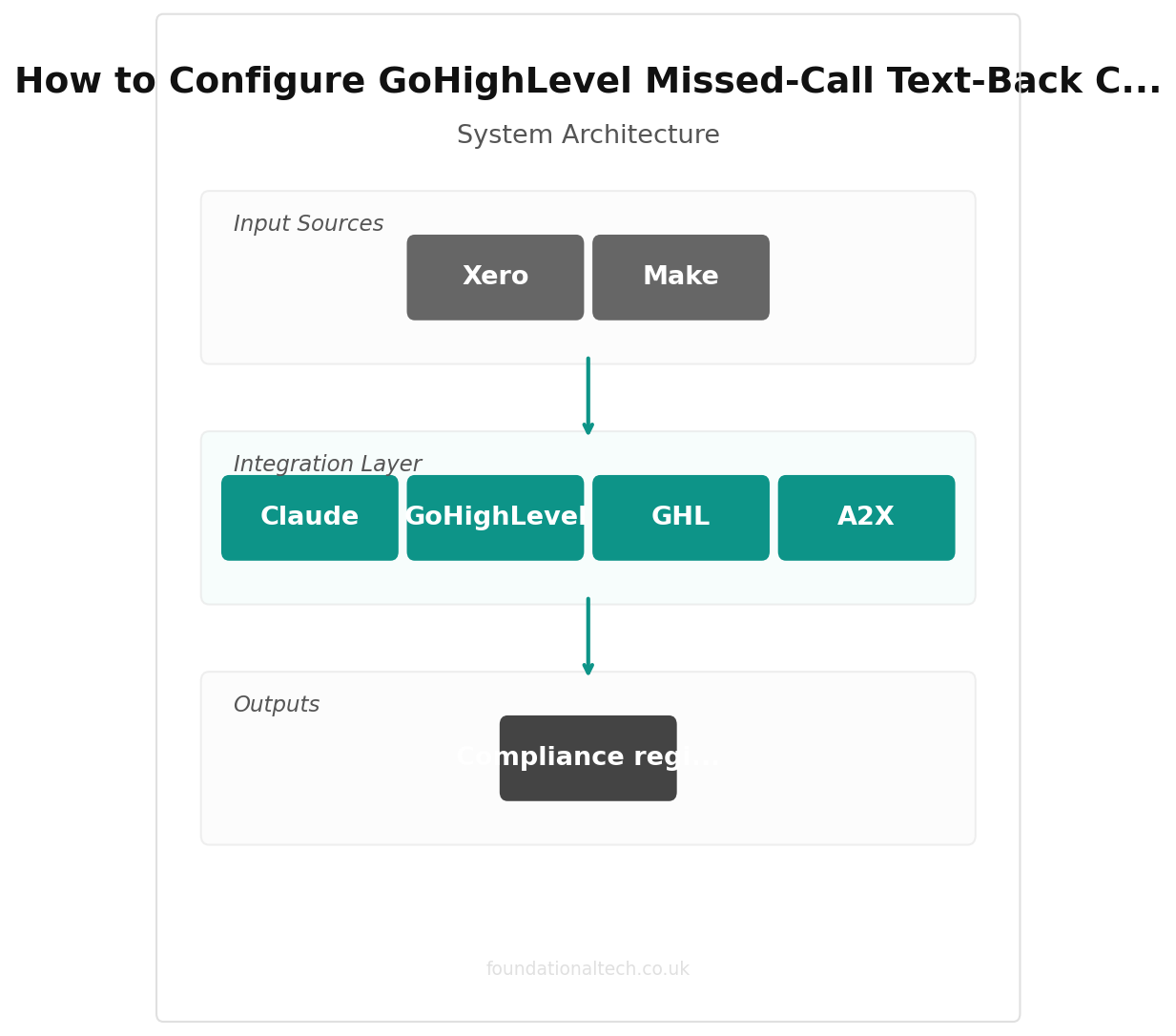
Research consistently shows that responding to a lead within five minutes makes you twenty-one times more likely to qualify them compared to waiting thirty minutes. For trade businesses and the agencies that serve them, missed-call text-back automation is one of the highest-ROI systems you can build. GoHighLevel makes it straightforward to set up, but I see the same configuration mistakes repeated constantly. This guide walks through the correct setup from scratch, with UK-specific considerations throughout.
What GoHighLevel Actually Is
If you are new to GoHighLevel (often abbreviated GHL), it is an all-in-one CRM, pipeline management, and marketing automation platform. It combines contact management, SMS and email automation, appointment booking, funnel building, and reputation management into a single dashboard. It is particularly popular with agencies that manage marketing for trade businesses because one account can serve multiple client sub-accounts.
GoHighLevel handles phone calls through an integration with Twilio, which provides the underlying telephony infrastructure. When a call comes in and is not answered, GoHighLevel can trigger an automated workflow that sends an SMS reply within minutes. That is what we are building here.
Pre-Requisites Before You Start
Before touching the workflow builder, you need three things in place:
- A Twilio-connected phone number with SMS capability. Go to Settings, then Phone Numbers in GoHighLevel. Your number must show SMS as enabled. If you are using a UK mobile or landline number, confirm it supports two-way SMS. A UK number through Twilio costs roughly one pound per month.
- Twilio account with sufficient credit. Each SMS segment in the UK costs approximately three to five pence through Twilio. Load at least ten pounds of credit to start so your testing and early sends are covered.
- Compliance registration. In the US context, this means A2P 10DLC registration. In the UK, you need to be aware of Ofcom guidance on automated messaging and ensure your SMS practices comply with GDPR and the Privacy and Electronic Communications Regulations (PECR). More on this in the UK-specific section below.
Step-by-Step Setup: Building the Workflow
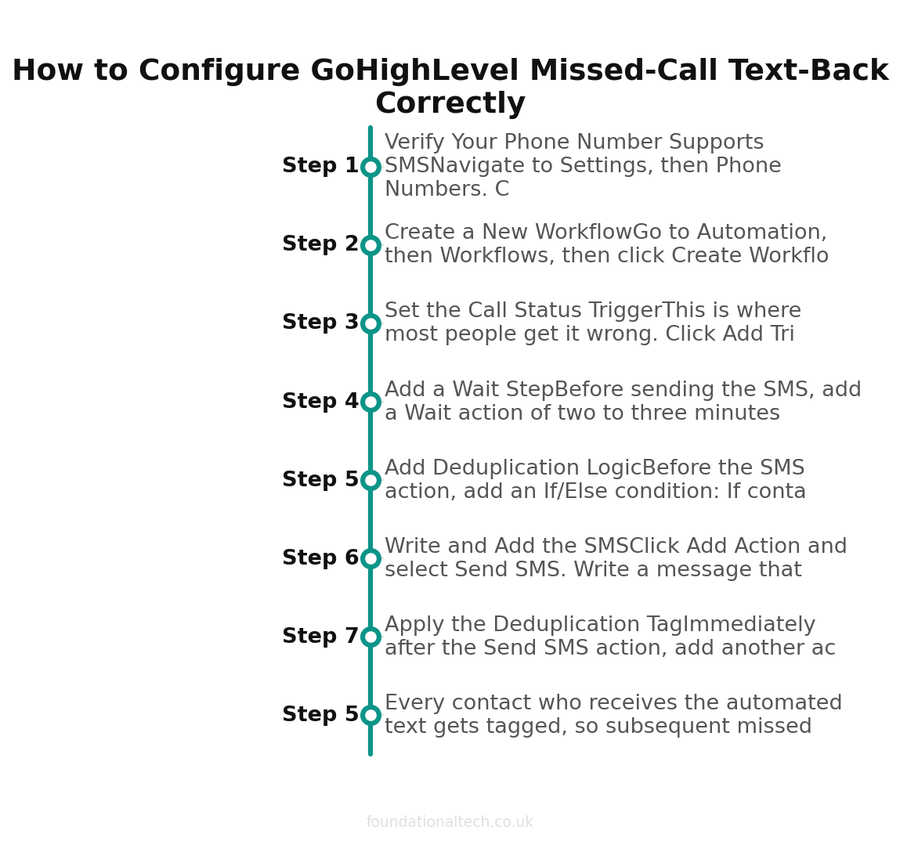
Step 1: Verify Your Phone Number Supports SMS
Navigate to Settings, then Phone Numbers. Click on the number you want to use for this automation. Check three things:
- The number is assigned to the correct sub-account or location
- SMS capability shows as enabled (not just voice)
- The number is not flagged or suspended
If SMS is not enabled, the entire automation fails silently. GoHighLevel will not throw an error; it simply will not send the message. I have seen agencies spend hours debugging a workflow that was perfectly configured, only to discover the phone number never had SMS turned on.
Step 2: Create a New Workflow
Go to Automation, then Workflows, then click Create Workflow. Select Start from Scratch. Name the workflow something clear and consistent, such as Missed Call Text-Back. Avoid vague names like "New Workflow 1" because you will end up with dozens of workflows and need to find this one quickly.
Step 3: Set the Call Status Trigger
This is where most people get it wrong. Click Add Trigger. You will see multiple trigger options including Customer Replied, Call Status, and others. Select Call Status and then set the status to Missed Call.
Do not use the Customer Replied trigger. That fires when someone sends you a message, not when a call is missed. I see this mistake in roughly half the broken workflows I audit. The trigger must be Call Status set to Missed Call, nothing else.
Step 4: Add a Wait Step
Before sending the SMS, add a Wait action of two to three minutes. This serves two purposes. First, it prevents the message from arriving while the caller is still deciding whether to leave a voicemail or call back immediately. Second, it gives your team a brief window to return the call manually before the automation fires. If someone on your team calls the lead back within two minutes, you can add a condition that checks whether the contact has been reached before the SMS sends.
Step 5: Add Deduplication Logic
Before the SMS action, add an If/Else condition: If contact tag does NOT contain "Missed Call Replied", proceed to the SMS step. If the tag exists, end the workflow. This prevents the same person receiving multiple automated texts if they ring several times in a row. Without this, a frustrated caller who tries you three times in ten minutes gets three identical automated messages, which looks unprofessional and can trigger carrier spam filters.
Step 6: Write and Add the SMS
Click Add Action and select Send SMS. Write a message that sounds human, is appropriate for a UK audience, and avoids spam trigger words. Here is a template I use with trade clients:
Hi {contact.first_name}, sorry we missed your call. We are with a customer right now but wanted to get back to you quickly. Reply here with what you need and we will get back to you shortly, or book a time that suits you: {booking_link}
Keep the message under 160 characters if possible to avoid multi-segment charges. Use the contact’s first name through a merge field to personalise it. Avoid all-caps, excessive exclamation marks, or phrases like "ACT NOW" or "LIMITED TIME" which carriers flag immediately.
Step 7: Apply the Deduplication Tag
Immediately after the Send SMS action, add another action: Add Tag with the value "Missed Call Replied". This closes the loop on the deduplication logic from Step 5. Every contact who receives the automated text gets tagged, so subsequent missed calls from the same person do not trigger duplicate messages.
Step 8: Add a Booking Link Action (Optional)
If you included a booking link in your SMS, make sure the GoHighLevel calendar is configured and the link is live. You can also add a subsequent action to create an Opportunity in your pipeline when the SMS is sent, so you have a visible record in your sales pipeline of every missed-call lead.
Step 9: Publish and Test
Click Save, then toggle the workflow to Published. Test it by calling the number from a personal mobile and hanging up before anyone answers. Wait two to three minutes (accounting for your wait step), and the SMS should arrive. Check the contact’s activity timeline in GoHighLevel to confirm the workflow fired correctly and the tag was applied.
| Component | Required | Cost |
|---|---|---|
| GoHighLevel account | ✓ | From £79/mo |
| Twilio UK number | ✓ | ~£1/mo |
| Twilio SMS credit | ✓ | 3-5p per SMS |
| A2P registration (UK) | ✓ | Free |
| GDPR-compliant opt-in | ✓ | Free |
Advanced Configuration
Business Hours Conditions
You likely do not want this automation firing at eleven o’clock at night. Add a condition early in the workflow that checks the current time against your working hours. GoHighLevel supports time-based conditions within workflows. Set it to only proceed if the missed call occurred between, say, 07:00 and 19:00 Monday to Saturday. For out-of-hours calls, you can either suppress the SMS entirely or send a different message acknowledging the time and promising a morning callback.
Multi-Step Follow-Up Sequences
A single SMS is good. A sequence is better. After the initial text, add a wait step of four hours, then send a follow-up email. After twenty-four hours, consider a voicemail drop if the lead has not responded. A typical three-step sequence looks like this:
- Immediately (after 2-minute wait): SMS with a brief apology and booking link
- 4 hours later: Follow-up email with more detail about your services
- 24 hours later: Voicemail drop thanking them for reaching out and offering another opportunity to connect
Pipeline Stage Automation
Add an action to automatically create an Opportunity in your CRM pipeline when a missed call triggers the workflow. Set the pipeline stage to something like "Missed Call - Awaiting Response". This gives you visibility across all missed-call leads and lets you track conversion rates from this specific automation.
Staff Notification Workflows
Add an internal notification action that sends an email or SMS to the business owner or office manager whenever a call is missed. This creates accountability and ensures someone follows up manually if the automation does not convert the lead on its own.
Common Errors and Troubleshooting
- Workflow not triggering: Almost always caused by using the wrong trigger. It must be Call Status set to Missed Call. Check that the workflow is published, not just saved as a draft.
- SMS not sending: Verify the phone number has SMS enabled in Settings, then Phone Numbers. Also check your Twilio balance as insufficient credit silently stops messages.
- Duplicate messages: Missing deduplication logic. Add the tag check before the SMS action and apply the tag after it sends.
- Messages blocked by carriers: UK carriers actively filter automated SMS. Avoid including URLs in your first message if possible. Keep the language conversational. Do not use URL shorteners like bit.ly, which are heavily flagged.
- Wrong phone number responding: If you have multiple numbers, make sure the SMS sends from the same number the caller dialled. Check the Send SMS action’s "From" field.
UK-Specific Considerations
Operating in the UK adds specific regulatory requirements that you cannot ignore:
- GDPR consent: When someone calls your business, you have a legitimate interest basis for responding to their enquiry. However, your follow-up sequence (emails, subsequent marketing) requires proper consent. The initial missed-call SMS is generally covered under legitimate interest as it is a direct response to their action, but ongoing marketing messages are not.
- PECR regulations: The Privacy and Electronic Communications Regulations govern unsolicited electronic marketing in the UK. A response to a missed call is not unsolicited marketing; it is a service response. But if your follow-up sequence transitions into promotional content, you cross into PECR territory and need explicit opt-in consent.
- Ofcom guidance: Ofcom monitors automated messaging practices. Ensure your messages clearly identify your business, provide a way to opt out of further communication, and do not send at antisocial hours.
- ICO enforcement: The Information Commissioner’s Office can and does fine businesses for non-compliant electronic communications. Keep records of how contacts entered your system and what consent basis you are relying on.
What It Costs
Here is a realistic monthly cost breakdown for a UK trade business running this automation:
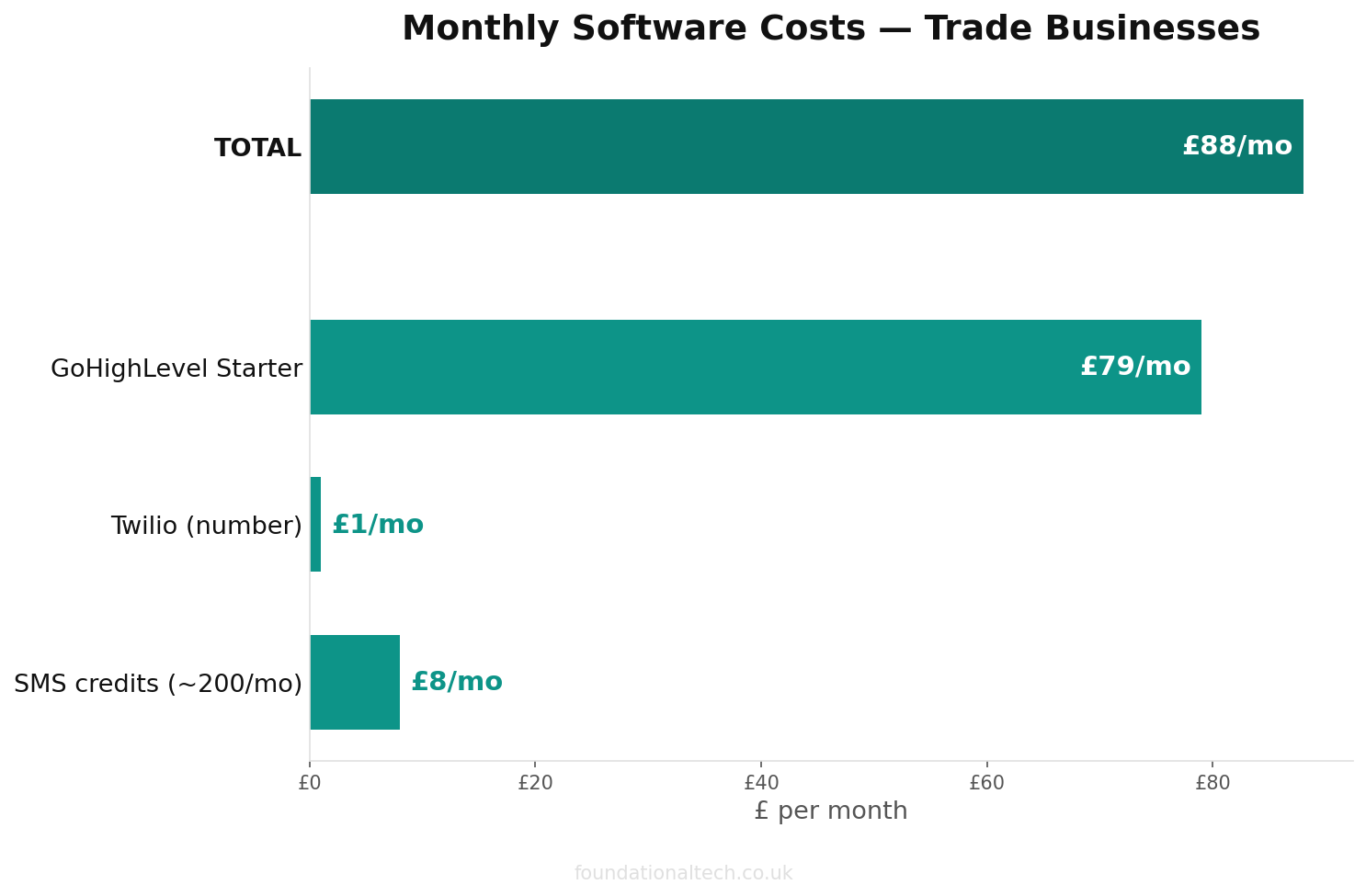
- GoHighLevel Starter plan: £79 per month (equivalent to approximately $97). This is sufficient for a single trade business with one sub-account.
- GoHighLevel Unlimited plan: £239 per month (approximately $297). Better for agencies managing multiple trade clients.
- GoHighLevel SaaS Pro plan: £399 per month (approximately $497). For agencies wanting to white-label the platform.
- UK phone number via Twilio: approximately £1 per month
- SMS costs: 3p to 5p per SMS segment. If you handle 200 missed calls per month and send one SMS each, that is £6 to £10 in SMS costs.
- Total for a single trade business: approximately £86 to £90 per month on the Starter plan
Compare that to the value of even one recovered job. A single boiler installation, bathroom refit, or rewiring job is typically worth £1,500 to £5,000 or more. The automation pays for itself many times over with a single conversion per month.
Real-World Scenario: How This Recovers a Lead
Consider a plumbing business in Birmingham. It is Tuesday at 14:12 and the plumber is underneath a kitchen sink replacing pipework. A homeowner in Solihull rings about a leaking radiator valve. The phone rings six times and goes unanswered.
Without automation, that homeowner opens Google, calls the next plumber on the list, and books with them instead. The original plumber never knows the call happened until they check their missed calls at five o’clock, by which time the job is gone.
With missed-call text-back configured, this happens instead: two minutes after the missed call, the homeowner receives a text saying sorry we missed your call, reply here or book a time. The homeowner replies with a description of the problem. GoHighLevel logs the conversation, creates a pipeline opportunity, and notifies the plumber via a push notification. The plumber finishes the current job, checks the message at 15:30, and books the radiator valve replacement for the following morning. A £180 job that would have gone to a competitor is recovered through a three-pence text message.
Calculating Your ROI
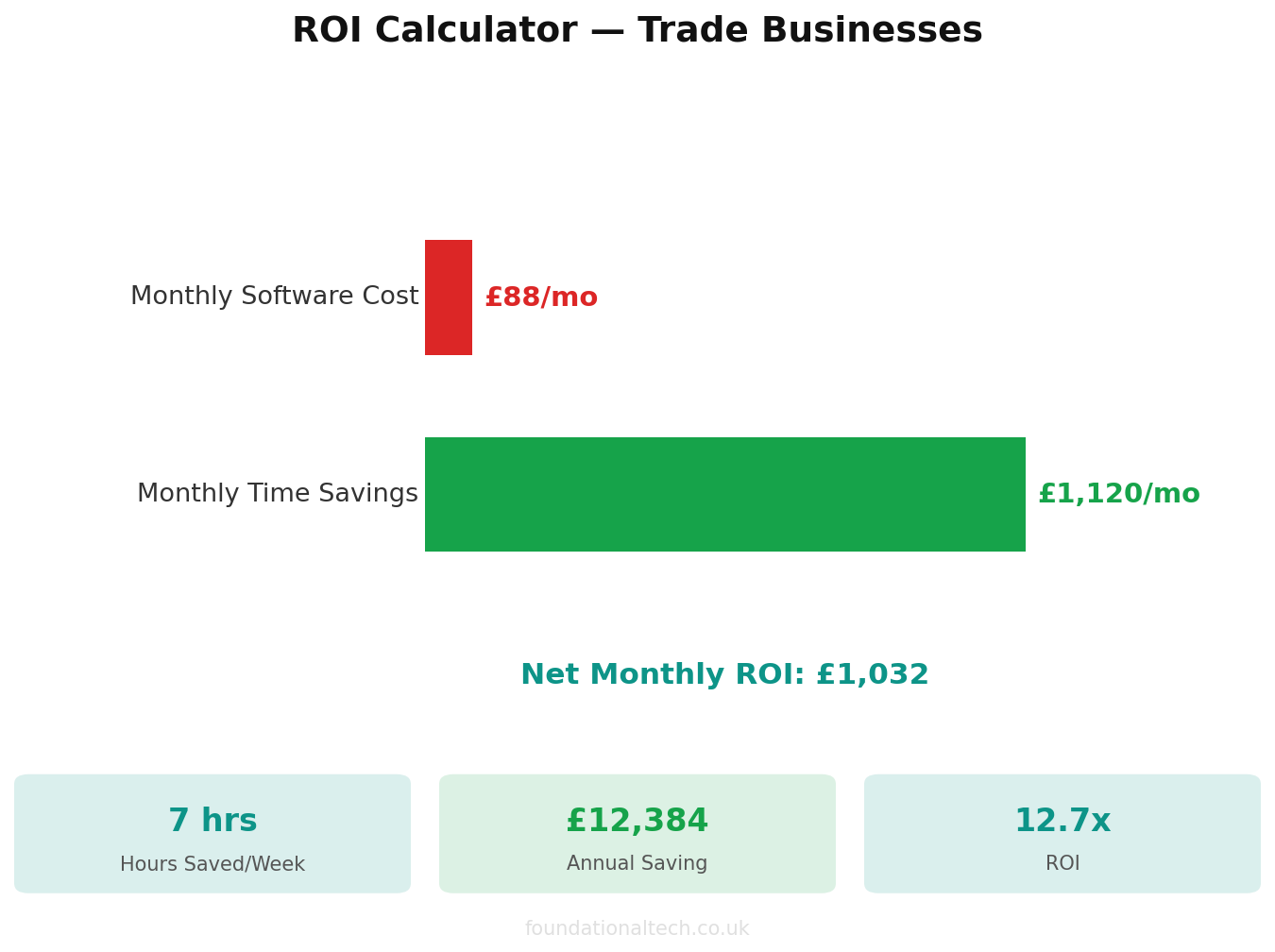
Work backwards from your numbers. If your business misses an average of 30 calls per month and your missed-call text-back converts even 20 percent of those into booked jobs, that is 6 additional jobs per month. If your average job value is £500, that is £3,000 in recovered revenue against a total automation cost of under £90. That is a return of over thirty to one.
Even at a conservative 10 percent conversion rate, you are still recovering 3 jobs worth £1,500 per month for less than £90 in costs. There are very few investments in a trade business that deliver this kind of return with this little ongoing effort.
Summary
Missed-call text-back is not a nice-to-have feature. For trade businesses and the agencies that serve them, it is a fundamental piece of lead recovery infrastructure. The setup takes less than thirty minutes when done correctly. The most common mistake is using the wrong trigger, and the most common omission is failing to add deduplication logic. Get those two things right, add a sensible wait step, write a human-sounding SMS, and publish the workflow. Then move on to the advanced configurations like business hours conditions and multi-step follow-up sequences once the basics are proven.
Related guides: If you found this useful, see our guide on How to Connect Claude AI to Your Shopify Store: 3 Automation Workflows That Replace a Part-Time Hire (2026) and A2X vs Link My Books vs Synder: Which Shopify to Xero Integration Fits Your UK Store? (2026 Guide).
Every missed call that goes unanswered is money walking out the door. This automation makes sure someone is always there to catch it.