Key Takeaway
Complete 2026 integration map for UK landscapers: Xero, Tradify, Dext connected. Data flow diagrams, sync settings, and troubleshooting included.
A landscaping business runs on five tools, and the difference between a stack that saves you a day a week and one that quietly creates new work is a single thing: the wiring. Connect them properly and a quote you raise on a phone in someone's front garden becomes a scheduled job, a costed timesheet, an invoice, a collected payment and a reconciled line in your accounts — without you typing the same thing twice. Wire them badly and you've bought five subscriptions to do the job of one.
The four previous articles in this series picked the tools: Tradify to run the jobs, Xero to keep the books, GoCardless and Stripe to collect the money, Xero Payroll to pay the crew, Dext to swallow the receipts. This article is the wiring diagram. It shows exactly how those tools talk to each other, which connections are built-in, which ones need a bridge, and where the joins tend to break for landscapers specifically. Keep it as the reference you come back to when something stops syncing.
The Integration Architecture
Picture the data flowing in one direction, left to right, with Xero sitting in the middle as the hub everything reports into.
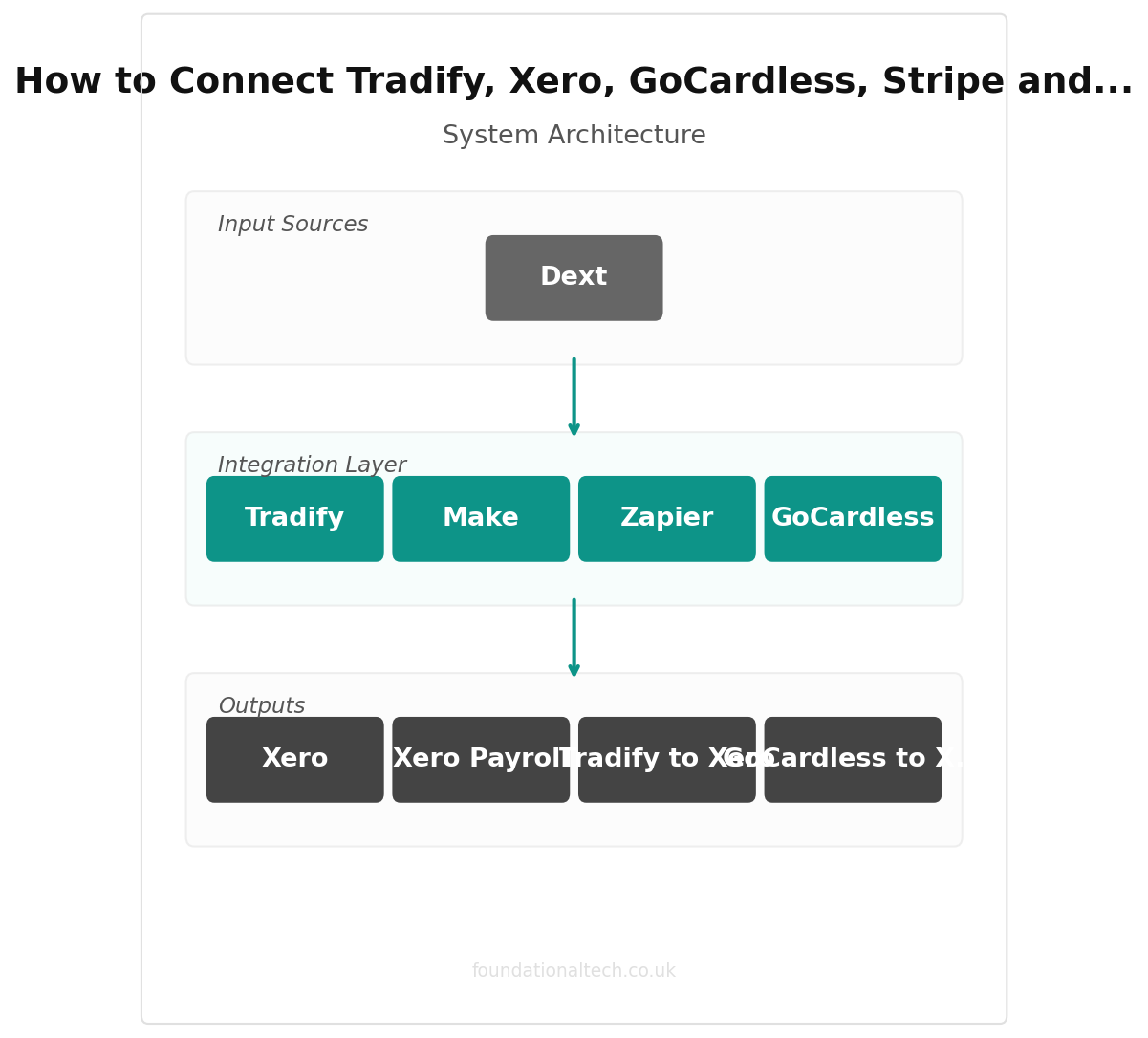
At the far left is Tradify, where the work lives. A quote is built, accepted, turned into a scheduled job, worked, and marked complete. The crew clocks their hours against that job from their phones. When the job is done, Tradify raises the invoice — pulling in the agreed price, the materials and the logged labour — and pushes it to Xero.
Xero is the hub. Every invoice from Tradify lands here. Both payment tools report here. Every receipt from Dext arrives here. Payroll runs from here. Xero is the single source of truth for what you're owed, what you've spent, and what's in the bank — and the reason it works is that nothing has to be entered into it by hand. It reads from everything around it.
On the collection side, GoCardless pulls Direct Debit payments from your recurring maintenance customers and reports each one back to Xero, which matches it to the open invoice and marks it paid. Stripe does the same for one-off card payments. Both close the loop automatically: money in, invoice settled, no statement to open.
Underneath sits Dext, capturing cost. Photograph a receipt at the builders' merchant or forward a supplier's email invoice, Dext reads the line items and pushes a coded bill into Xero, ready to reconcile against the bank feed.
And running alongside, Xero Payroll turns the hours captured in Tradify into wages, payslips and the RTI submission HMRC expects on payday.
The whole architecture has one job: make sure a piece of information is entered once, at the moment it's created, and then flows everywhere it's needed on its own. Hours are captured on site, not rebuilt on a Sunday. Invoices are raised at job completion, not in a weekly batch. Payments reconcile themselves. Receipts file at the till. Done right, the back office becomes a by-product of the work instead of a second job.
Native Integrations
The good news for landscapers is that most of this stack connects directly, with no middleware, no monthly bridge fee and no developer. These are the joins that come built-in.
Tradify to Xero is the backbone, and it's native and two-way on every Tradify plan. Connect it once in Tradify's settings: find the accounting integration, log in to Xero, and map your invoice and payment accounts. From then on, invoices raised in Tradify appear in Xero automatically, and payment status flows back the other way. This is the connection that makes everything else possible, so set it up first and test it with one real invoice before you build anything on top.
GoCardless to Xero is also native. Link GoCardless to Xero and Direct Debit collections reconcile against the matching invoice on their own. There's a useful refinement here: Xero's own "pay by Direct Debit" feature, powered by GoCardless, lets you attach a Direct Debit mandate to a customer so that invoices Xero sends are automatically collected on their due date. For a maintenance round, that's the dream — the invoice generates in Tradify, syncs to Xero, and collects itself through GoCardless without a single manual step.
Stripe to Xero connects natively too. Add a Stripe "Pay now" button to your Xero invoice templates and a customer can settle a one-off job by card from their phone; the payment then reconciles back to the invoice automatically.
Dext to Xero is a native, purpose-built connection — Dext exists to feed Xero. Set the publish target to your Xero organisation once and every receipt you photograph lands as a coded draft bill.
Xero Payroll isn't a separate integration at all; it's a module inside Xero, so the wages, pension contributions and RTI filings sit in the same ledger as everything else with nothing to connect.
The pattern is clear: because every tool in this stack was chosen partly for its native Xero link, the spine of the system needs no glue. That's not an accident — it's the reason these five were picked over alternatives that bill in dollars or need a paid connector.
| Step | Action | Time |
|---|---|---|
| 1 | Connect Tradify to Xero (native sync) | 5 min |
| 2 | Connect GoCardless to Xero | 5 min |
| 3 | Connect Stripe to Xero | 5 min |
| 4 | Connect Dext to Xero | 3 min |
| 5 | Set up weather and crew alert workflows | 15 min |
Zapier/Make Workflows
Native connections handle the money and the books. Where a landscaper gains the extra hour is in the small, human handovers between tools — the "someone needs to be told" moments. That's where a no-code automation tool like Zapier or Make earns its place. Both work on the same idea: a trigger in one app fires an action in another. Here are three worth building.
Workflow 1: Accepted quote, instant crew alert
Trigger: A quote is marked "accepted" in Tradify (or a new job is created).
Action: Post a message to your team's WhatsApp or a Telegram group, and add the job to a shared Google Calendar with the address and access notes.
Setup time: About 20 minutes.
The point of this one is speed of communication. A customer says yes on Tuesday; the crew shouldn't find out on Sunday when you build the rota. This pushes the new job in front of the team the moment it's confirmed, so nobody's waiting on you to relay it. It doesn't replace Tradify's own scheduling — it just removes the lag between "won" and "everyone knows."
Workflow 2: New customer, automatic Direct Debit invite
Trigger: A new customer is added in Tradify (or tagged "maintenance").
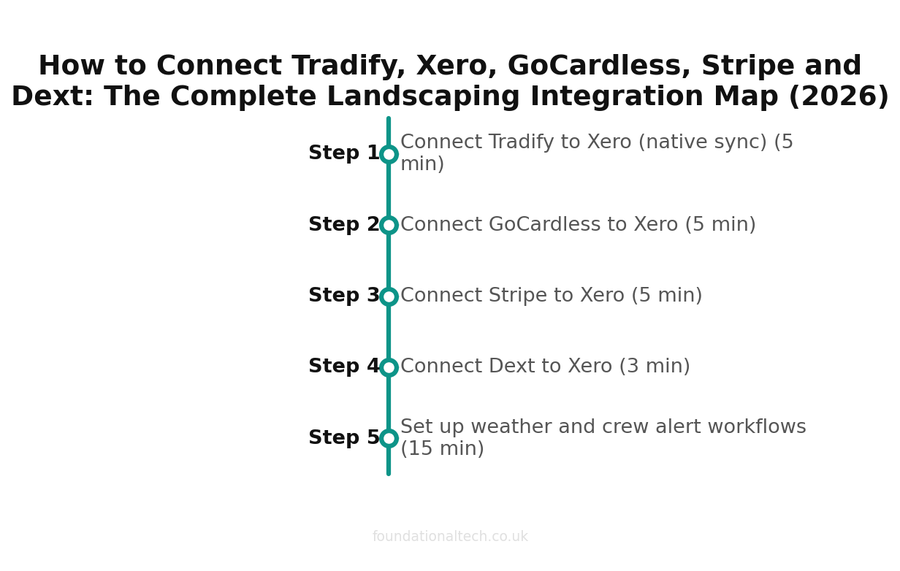
Setup timeline — estimated time for each step 
Monthly cost breakdown across the recommended tool stack 
Estimated ROI from automating admin tasks Action: Create the customer in GoCardless and email them a Direct Debit sign-up link.
Setup time: About 30 minutes.
The single biggest cash-flow win for a landscaper is getting recurring customers onto Direct Debit — but only if you actually send the invite. Tie it to the moment you add the customer and it never gets forgotten. Every new fortnightly client is asked to set up Direct Debit on day one, when they're keenest, instead of three unpaid invoices later.
Workflow 3: Weather-triggered schedule warning
Trigger: A weather API (free tier) reports rain forecast above a threshold for tomorrow in your area.
Action: Send you a morning alert listing tomorrow's scheduled outdoor jobs so you can reshuffle early.
Setup time: About 30 minutes.
This is the landscaping-specific one no generic guide will suggest. Rain moves work, and the cost of a washout isn't just the lost day — it's the scramble to tell customers and re-slot the crew at 7am. A heads-up the evening before lets you drag the affected jobs in Tradify to a dry day calmly, and warn customers before they're standing at the window waiting for you.
A note on cost: both Zapier and Make have free tiers that cover a low volume of these tasks, with paid plans from around £20 a month once you're running thousands of steps. For most one- or two-van landscaping firms, the free or cheapest tier is plenty. Don't pay for capacity you won't use.
3 automated workflows
Quote acceptance alerts, Direct Debit invites, and weather-triggered schedule warnings
The Gotchas
Every integration stack has places where it silently breaks. Here are the ones that catch landscapers, and how to get ahead of them.
The duplicate-invoice trap. If you raise an invoice in Tradify and in Xero for the same job, you'll end up with two — and near the £90,000 VAT registration threshold, phantom invoices can quietly inflate your turnover and tip you over. Rule: raise invoices in Tradify only. Let Xero receive them. Never create a sales invoice directly in Xero for work that came through Tradify.
Direct Debit timing. GoCardless isn't instant — a Direct Debit collection takes a few working days to clear from the customer's account to yours. That's fine for predictable maintenance billing, but don't expect same-day money. For a one-off job where you want the cash fast, use the Stripe card link instead; for recurring work where reliability beats speed, GoCardless wins. Match the tool to the urgency.
The contact-matching mess. When the same customer exists in Tradify, GoCardless and Xero with slightly different names or emails — "Mrs J Smith" in one, "Jane Smith" in another — automatic reconciliation can fail and you'll get unmatched payments. Keep one clean version of each customer's name and email, set it the same in every tool, and fix mismatches the day they appear rather than letting them pile up.
Dext coding drift. Dext learns your suppliers, but early on it can mis-code a receipt — putting a fuel purchase against the wrong account, for instance. For the first month, glance at each batch before you publish it to Xero. After it's learned your regular nurseries, merchants and fuel stations, it gets reliable and you can trust it.
The "who owns the schedule" confusion. If you build Workflow 1 above, be clear that Tradify remains the master schedule, and the WhatsApp/Calendar copy is only a notification. The day someone starts moving jobs in the calendar instead of in Tradify, your timesheets and invoices stop matching reality. One master, many mirrors — never two masters.
Trial-mode payroll. Before you let Xero Payroll file a real RTI submission, always run one trial pay cycle against the hours from Tradify and check the totals by hand. A wrong tax code or a mis-mapped account is cheap to fix before filing and expensive after.
Get these six right and the stack runs for months without you thinking about it. The wiring, once it's correct, is the most boring part of the business — which is exactly what you want from the part that handles your money.
What's the one integration you wish existed for your landscaping business — the handover between two tools that still costs you time every week?
A & Y Financial Services builds these exact automation stacks for landscaping businesses across the UK. If you've read the architecture and want someone to implement it — that's what we do.