Key Takeaway
12 copy-and-paste AI prompts for UK landscapers — client quotes, planting schedules, seasonal plans and invoicing. Works with ChatGPT and Claude.
Most landscapers try AI exactly once. They open ChatGPT, type "write me a quote," get back something that reads like an estate agent's brochure, and decide the whole thing is for marketing people with too much time. The tool was never the problem. The instruction was.
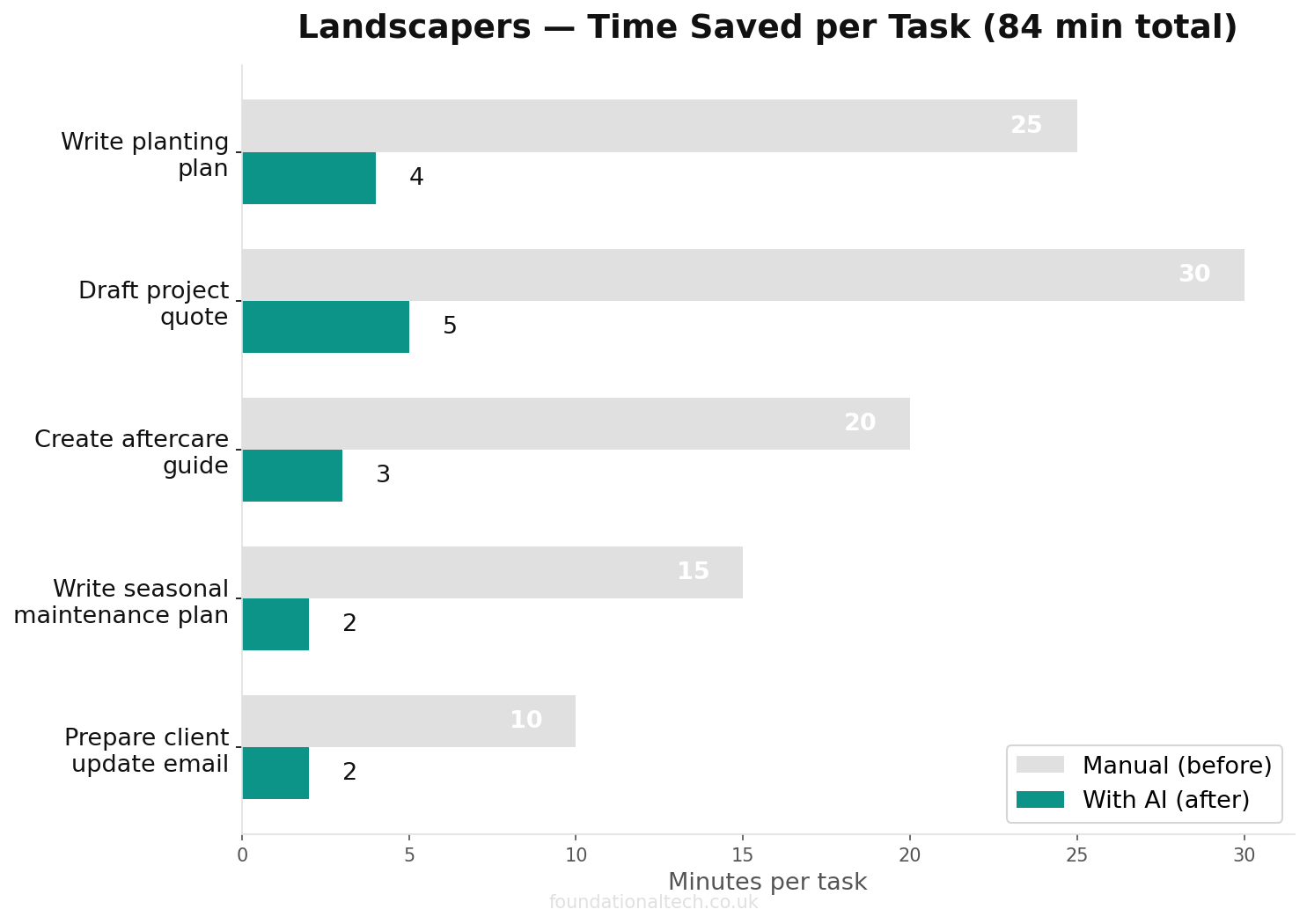
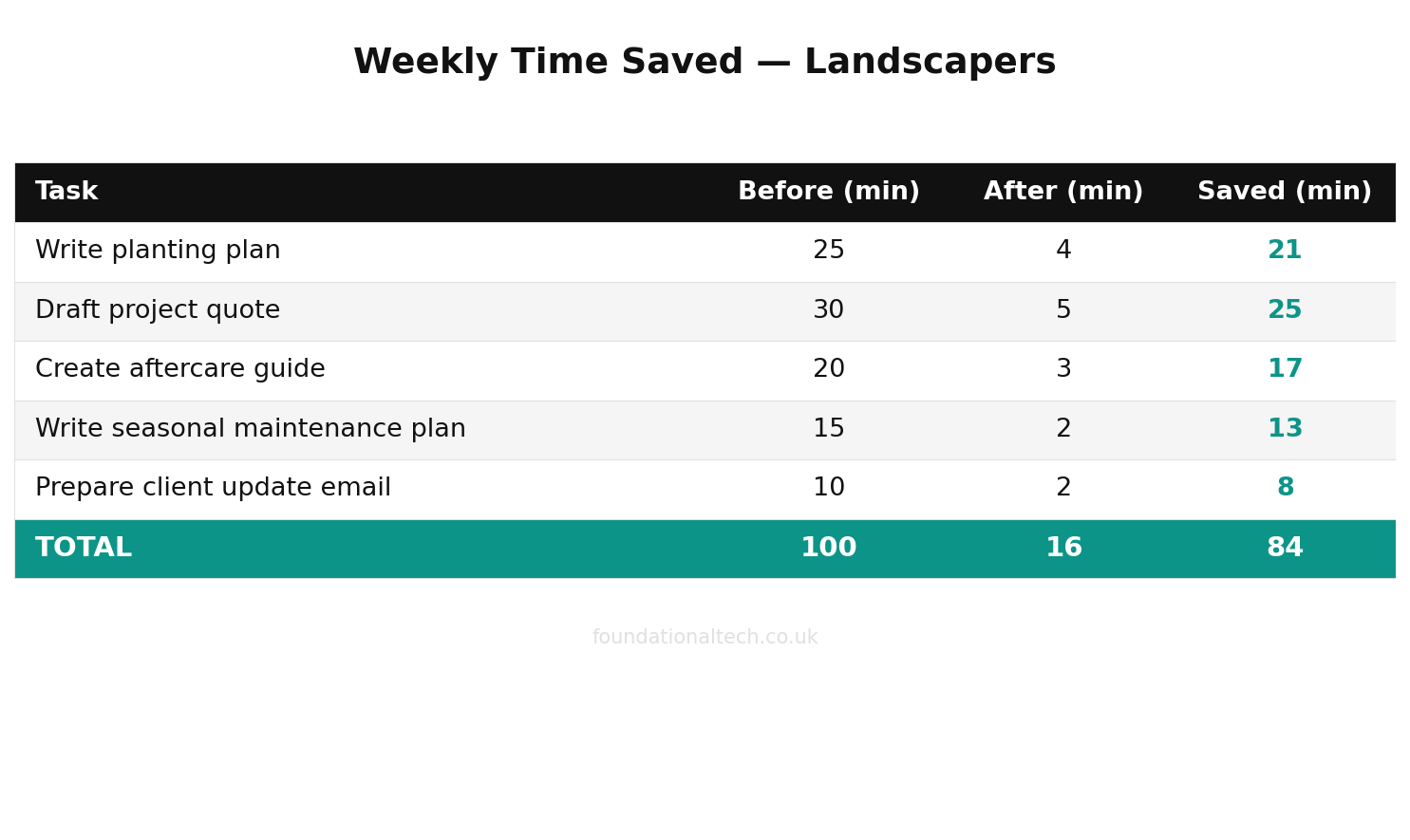
35 min → 3 sec
Average time to draft a professional landscaping document — manual vs AI-assisted
A prompt is just a brief handed to a very fast assistant who knows nothing about your business until you tell it. Hand over a vague brief and you get vague work. Tell it the customer, the job, the tone and the rules, and it writes the quote you'd have written at the kitchen table — in four seconds instead of forty minutes. Below are twelve prompts built for a UK landscaping business. Paste them in, swap the bits in brackets for your own details, and skip the year of trial and error most people waste working out what to type.
The first five are free. The rest are the ones that save the most hours.
Why Generic Prompts Don't Work for Landscapers
"Write a quote" gives you generic rubbish because you handed over a generic instruction. The AI has no idea you charge £35 for a fortnightly cut, that you itemise green waste removal separately, or that a full garden clearance on a terraced property means barrowing everything through the house because there's no side access. It doesn't know your customers are mostly homeowners who want plain English and a clear price, not a lecture on soil pH. So it guesses, and its guesses read like everyone else's guesses.
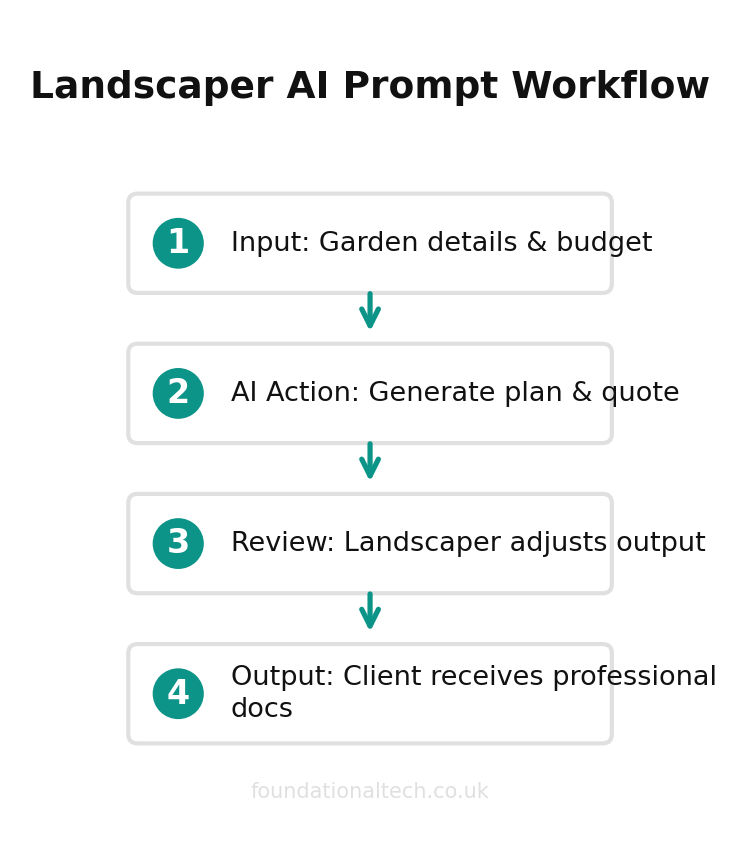
The fix is dull and it works: tell it who the customer is, what tone you use, what the job involves, and what format you want back. A prompt that names the customer, the work, the price structure and three rules beats a one-line request by a mile. Every prompt below is built that way. They look long because the detail is the whole point — the detail is what stops the output sounding like a robot wrote it.
One rule sits over all of them, and it never changes: AI writes and reads; you and your tools decide and calculate. Never ask these prompts to set a price, work out your VAT, or invent a measurement. It can't see the slope, the clay, or the neighbour's gate you have to carry the turf through. Ask it to draft, summarise, reformat and chase. That's where it's brilliant, fast and safe.
Every prompt here works in the free version of ChatGPT, Claude or Google Gemini, so you can test all twelve this week without paying a penny. If you do upgrade, the paid tiers sit in the same ballpark. ChatGPT Plus is £20 a month. Claude Pro is around £18 a month, or about £14 a month if you pay £160-odd for the year up front. Google's AI Pro tier is £18.99 a month, billed in pounds. You don't need more than one to run everything below.
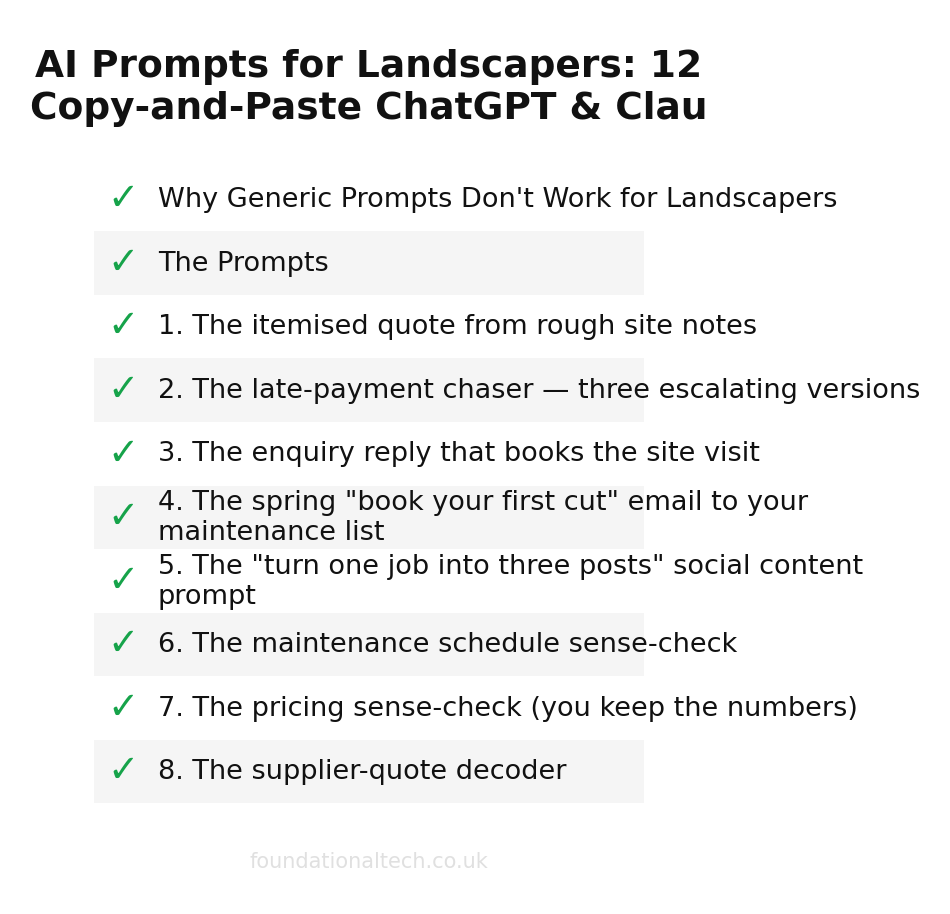
The Prompts
1. The itemised quote from rough site notes
Write a clear, itemised quote for a domestic landscaping customer from the
rough notes below. Tone: friendly and professional, plain English, no
jargon. Lay out labour, materials and waste removal as separate lines.
Leave any price I haven't given as a [SQUARE BRACKET] for me to fill in —
do NOT invent prices, measurements or VAT. End with how long the quote is
valid and how to accept it.

My notes:
[remove old decking approx 15m², level and turf approx 60m², new border
with topsoil, two crew, two days, terraced house no side access so all
waste barrowed through, customer worried about cost]
When to use: every quote you'd otherwise scribble on a flyer and put off until 9pm. Time saved: 30–40 minutes a quote — and you win more of them, because a tidy quote sent today beats a rushed one sent Friday.
2. The late-payment chaser — three escalating versions
A customer hasn't paid an invoice. Draft THREE reminder emails in my
voice (polite but firm, never aggressive), each under 120 words:
1. Gentle nudge — assumes they simply forgot
2. Firmer — states the invoice is now [number of] days overdue
3. Final reminder before late-payment charges and pausing the
   maintenance visits
Don't threaten legal action or invent figures. Here are the details:
[invoice number, amount, date due, what the job was, sign off as Dave]
When to use: the reminder you can never find the right words for when you're annoyed. Time saved: the twenty minutes of staring at a blank screen — and the awkward email actually gets sent, which means the money actually comes in.
3. The enquiry reply that books the site visit
Reply to this customer enquiry in my voice: warm, plain English, no
jargon, sign off as Dave. Goal: book a site visit, not give a price over
email. Confirm I cover their area, give a rough timescale for when I could
visit, and ask the two or three questions I need answered to quote
properly. Keep it under 150 words.

Their message:
[paste the customer's email or text here]
When to use: the fifteenth "do you cover my area / can you also do my hedge" message of the week. Time saved: ten to twelve minutes an enquiry, and a faster reply wins the job — most customers hire whoever answers first and sounds organised.
4. The spring "book your first cut" email to your maintenance list
Write a short, warm email to my garden maintenance customers announcing
that the new growing season is starting and inviting them to book their
first cut. Tone: friendly, like a local tradesperson they already know and
trust — not a marketing blast. Plain English. Include a clear call to
action to reply or call to get booked in. Under 200 words. Sign off as Dave
from [BUSINESS NAME].

Optional detail to include if it fits:
[any price change for the season, any new service like hedge-cutting,
limited availability so book early]
When to use: the seasonal outreach that fills your book — and always slips to the bottom of the list because writing it is a chore. Time saved: the whole afternoon you'd lose rewording it; now it's five minutes.
5. The "turn one job into three posts" social content prompt
I've just finished a job I'm proud of. Turn the details below into THREE
pieces of social content I can post: one short Facebook post, one even
shorter Instagram caption, and one "before and after" post. Tone: proud
but not salesy, plain English, local. Add 3–5 relevant hashtags only to
the Instagram one. Don't invent details I haven't given you.

The job:
[full garden makeover in [TOWN], removed overgrown shrubs, laid new patio
and turf, planted a mixed border, took 3 days, customer thrilled]
When to use: every finished job that's currently just sitting in your camera roll doing nothing. Time saved: thirty minutes per job, and the marketing that wins your next three customers actually gets posted.
The first five clear the everyday admin. The next seven are where the real hours hide — the writing jobs that quietly eat your evenings and the thinking jobs you'd normally do alone in the van. These are the prompts worth saving to a note on your phone.
6. The maintenance schedule sense-check
Act as a scheduling sounding board for a UK garden maintenance business.
I'll describe my week and a problem, and I want you to think it through
with me — options and trade-offs, not a final decision. Ask me anything
you need. Don't invent customer details.

This week:
[forty fortnightly maintenance customers, two crew, three days rained off
Monday to Wednesday, two of those customers are elderly and anxious if I'm
late — help me think through how to catch up without dropping anyone or
burning out the crew]
When to use: every washed-out week when the schedule falls apart in your head. Time saved: the headache, mostly — but it surfaces options you'd have missed at 6am.
7. The pricing sense-check (you keep the numbers)
Help me sense-check a price. Do NOT set the price or invent any figures —
work only with the numbers I give you, and show your reasoning so I can see
if I've missed anything. Walk through whether this still makes sense given
the time, travel and materials.

The job:
[fortnightly cut, medium garden, 45 mins on site, 20 mins round-trip
travel, green waste removal included, I currently charge £35 — is this
covering my costs and a fair margin, and what should I be asking myself?]
When to use: before you re-quote a long-standing customer, or when you suspect a job's been losing money for a year. Time saved: not time so much as money — it's the prompt that stops you carrying a loss-making round for another season.
8. The supplier-quote decoder
I've been sent a supplier quote and I want to make sure I understand it
before I commit. Summarise it in plain English: what's included, what's
NOT included, the total, any delivery or minimum-order conditions, and
anything that looks unusual or worth querying. Don't add figures that
aren't in the quote.

The quote:
[paste the supplier's email or quote text]
When to use: every aggregate, turf or plant order where the small print costs you on delivery. Time saved: ten minutes, and the occasional nasty surprise avoided at the gate.
9. The plant and planting-plan first draft
Draft a planting suggestion for a customer border. This is a FIRST DRAFT
for me to check and adjust with my own knowledge of the site — flag clearly
that final plant choice depends on seeing the soil, light and drainage.
Suggest plants suited to the conditions I describe, group them by sun/shade,
and note rough spacing. Use common names, not just Latin.

The border:
[north-facing border, 6m long, partial shade, clay soil that holds water,
customer wants low-maintenance, year-round interest, no thorns because of
kids, budget is modest]
When to use: the design-y part of a quote that takes you ages to write up even when you know the plants. Time saved: twenty to thirty minutes of typing — your expertise stays in charge, the AI just does the write-up.
10. The polite "no" and the upsell
Write two short, warm replies in my voice, sign off as Dave:
A) Politely declining a job I can't take (too far / not my line of work),
   while leaving the door open and, if natural, suggesting they search for
   a specialist — don't recommend a named competitor.
B) Gently offering an extra service to an existing customer who's only
   booked one thing, without being pushy.
Plain English, under 120 words each.

Details:
[A: customer 40 miles away wants a one-off tree felling, I don't do trees.
B: fortnightly mowing customer whose hedges are getting wild — offer to add
hedge-cutting.]
When to use: the awkward jobs you turn down badly, and the easy extra revenue you never ask for. Time saved: the dithering — and the upsell email that earns its keep many times over.
11. The review request that actually gets a reply
Write a short, friendly message asking a happy customer for a Google
review. Plain English, in my voice, sign off as Dave. Make it easy: one
clear ask, mention it genuinely helps a small local business, and keep it
under 80 words. Give me one version for text and one slightly warmer
version for email.

The customer:
[just finished a garden makeover, they were delighted, I've worked for them
twice before]
When to use: straight after every job that went well, while the goodwill is fresh. Time saved: five minutes — and reviews are the single cheapest way to win the next customer, so this one pays you back for years.
12. The end-of-season customer update
Write a short seasonal email to my maintenance customers as the growing
season winds down. Cover: what I'll do over autumn/winter (reduced visits,
leaf clearance, tidying), reassure them their garden's in hand, and remind
them to book any one-off jobs (hedge-cutting, clearance) before I get busy.
Tone: warm, reassuring, like the tradesperson they trust. Under 200 words,
sign off as Dave from [BUSINESS NAME].
When to use: the September message that keeps customers on the books through the quiet months instead of drifting off. Time saved: half an hour, and a winter that isn't a cliff edge.
How to Get the Best Out of These
Three habits separate the landscapers who get gold from the ones who give up. First, give the AI your tone once and reuse it — paste a couple of your own real emails and say "match this voice from now on," and every draft comes back sounding like you. Second, treat the first answer as a draft, not a verdict: if it's not right, tell it what to change ("shorter," "warmer," "drop the bit about pricing") rather than starting again. Third, never paste a customer's bank details, full card numbers, or anything you wouldn't want stored — treat these tools like a sharp assistant you've only just met.
Save the five you'll use most to a note on your phone. The whole point is that the next time you're sat in the van after a site visit, the quote is written before you've finished your tea.
Related guides: If you found this useful, see our guide on The Landscaping Business That Runs Itself: How UK Landscapers and Gardeners Automate Quoting, Scheduling and Invoicing in 2026 and How UK Landscapers Are Using AI to Cut Admin Time (Without Sounding Like a Robot).
Which of these twelve are you going to try first — and what's the one admin job you'd most want a prompt for that isn't here? Reply and tell me; I'm building the next batch from real requests, and the most-asked-for one gets written up next.