Key Takeaway
3 no-code AI workflows for UK landscapers in 2026. Automate quotes, scheduling using Xero, Tradify, ChatGPT. Copy the setup in under an hour.
Most landscapers think AI and automation are two different things to learn. They are not. They are two halves of the same machine, and the gap between them is exactly where your evenings disappear. Automation moves data between your tools; AI writes the words a human used to write. Bolt them together and a customer's vague text message becomes a priced quote, sent in your voice, logged against a scheduled job — while you are still on the previous site.
The first five articles in this series built the plumbing: Tradify running the jobs, Xero keeping the books, GoCardless and Stripe collecting the money, Dext swallowing the receipts. The AI articles taught you to write prompts and build an assistant that knows your business. This piece is the join. It shows you three specific, no-code workflows that wire an AI like ChatGPT or Claude into the tools you already pay for, so the writing and the admin happen on their own. No code. No developer. An afternoon each, at most.
Where AI Meets Your Existing Stack
Your stack already passes data around without you. A job finishes in Tradify, the invoice lands in Xero, GoCardless collects the Direct Debit, the payment reconciles itself. That is automation: structured information moving between apps through connections that are either built-in or wired up once.
What automation cannot do on its own is write. It can move a customer's enquiry from your inbox into a task, but it cannot read "can you sort the front garden before my daughter's christening on the 12th, nothing too fancy" and turn it into a polite, priced, on-brand reply. That is the job AI does — and until recently you had to do it by hand, copying the message into ChatGPT, editing the answer, pasting it back.
The bridge is a no-code automation tool. Make (formerly Integromat) and Zapier both work on the same simple idea: a trigger in one app fires a chain of actions in others, and one of those actions can now be "ask an AI to write something." That single addition is what turns a data-shuffling robot into one that drafts. You build the chain once in a visual editor — boxes joined by lines, no typing of code — and it runs every time the trigger fires, day or night.
A note on cost before you build anything. Make's free tier gives you 1,000 credits a month across two active scenarios, where each step in a workflow uses roughly one credit per run; that is enough to test all three workflows below and run a low volume in production. Its paid Core plan is about £7 a month, Pro about £13 a month. Zapier is pricier once you scale but slightly gentler to learn. The AI itself runs on your existing Claude Pro or ChatGPT Plus subscription — around £18 to £20 a month — through an API key, which is just a password that lets Make talk to the AI on your behalf. For most one- or two-van firms the whole setup costs less than a tank of diesel a month. (All prices web-verified June 2026; AI subscriptions billed in USD so the GBP figure moves with the exchange rate.)
Workflow 1: Enquiry In, Draft Quote Out
This is the one that pays for the rest. It connects your inbox to your AI to Tradify, so an enquiry never sits unanswered while you are up a ladder.
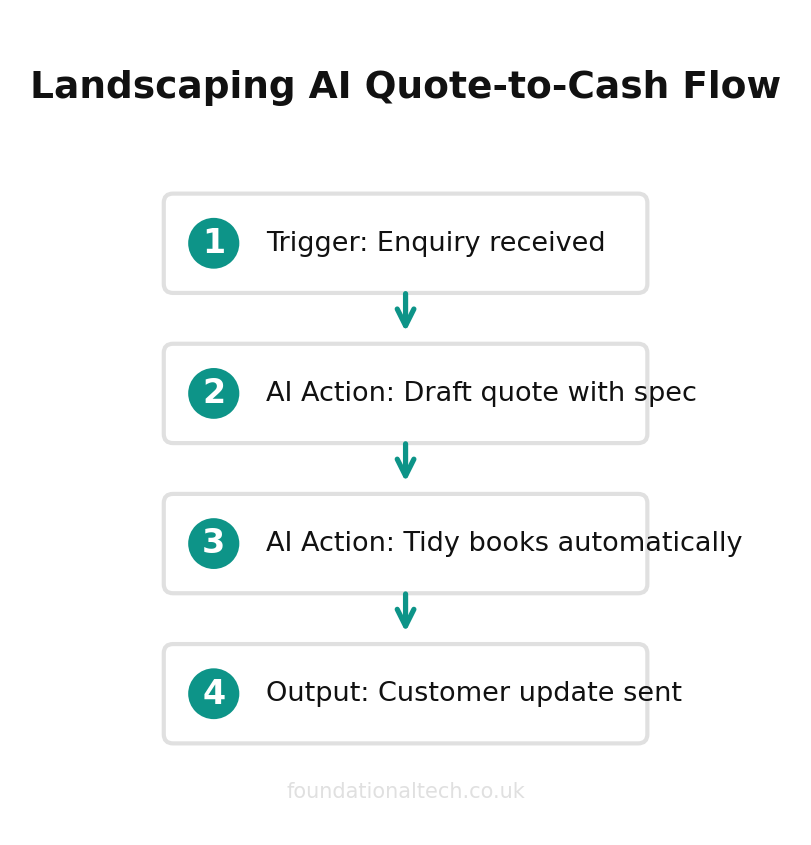
Trigger: A new email arrives in your quotes inbox (or a web form on your site is submitted).
Action 1: Make passes the message text to your AI with a standing instruction: read this enquiry, identify the service, the location and the timeframe, and draft a friendly reply with a ballpark price range using my rate card.
Action 2: The AI's draft is emailed straight to you — not the customer — so you read it, adjust the number, and hit send yourself.
Action 3: A new lead is created in Tradify with the customer's details and the enquiry attached, ready to turn into a proper quote.
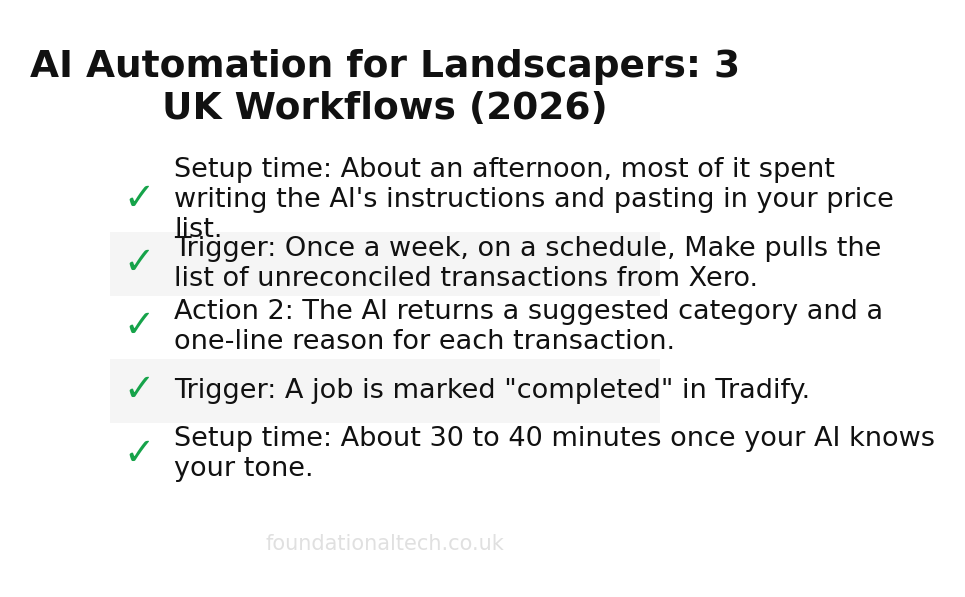
Setup time: About an afternoon, most of it spent writing the AI's instructions and pasting in your price list.
The discipline that makes this safe is keeping a human in the loop. The AI drafts; you approve. A landscaping price depends on access, slope, what is already in the ground and how much green waste is coming out — things a model guessing from a two-line email will get wrong. So it gives you a starting point in your tone, in seconds, and you bring the judgement. The win is not that the quote writes itself. It is that you reply in five minutes instead of five days, and the customer who messaged three landscapers hires the one who answered first.
Workflow 2: Money In, Books Tidy
Your bank feed already pours transactions into Xero. What it does not do is explain the odd ones. This workflow uses AI to read your uncategorised transactions and suggest where each belongs, so your weekly reconciliation goes from an hour of squinting to a five-minute review.
40 minutes
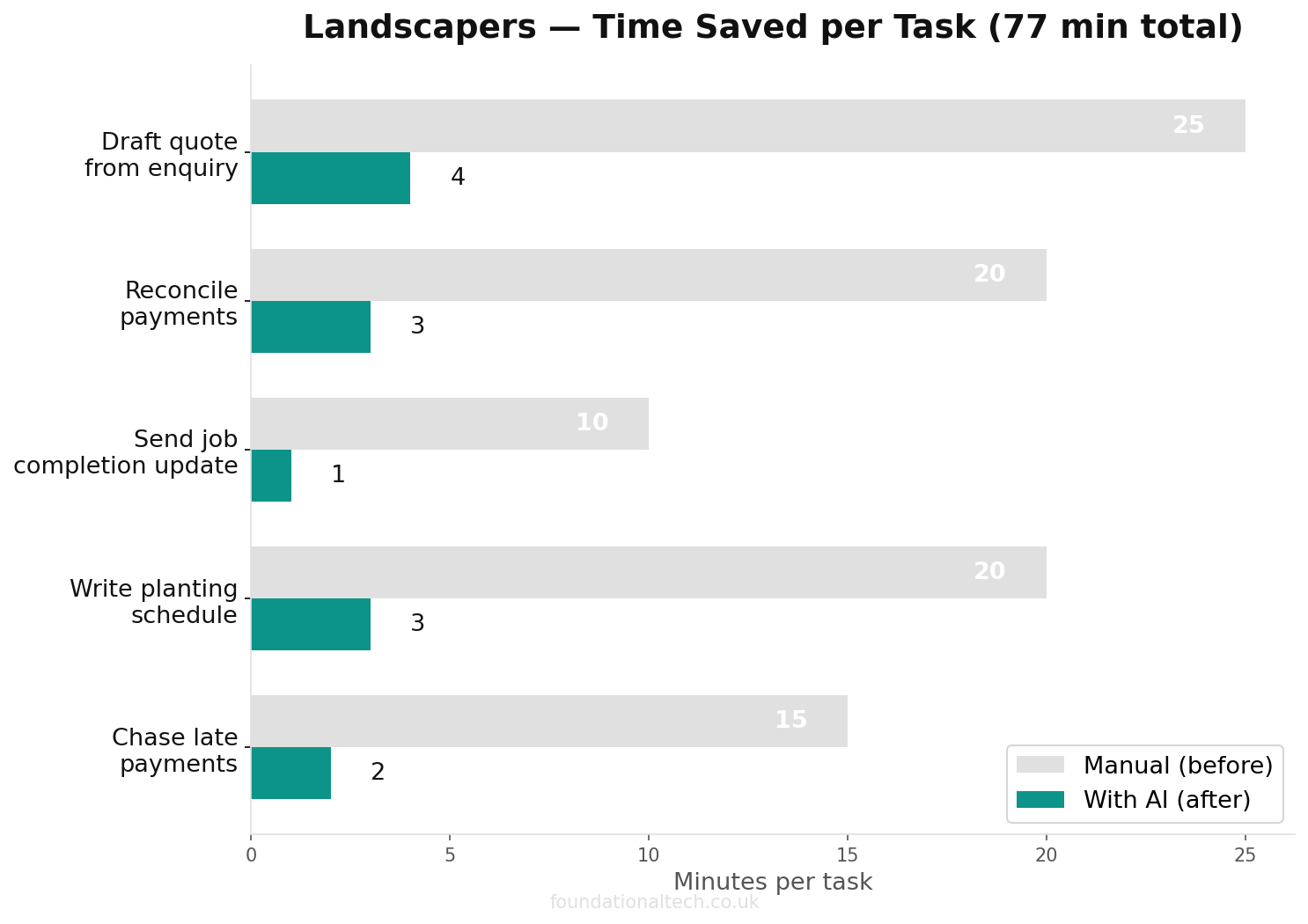
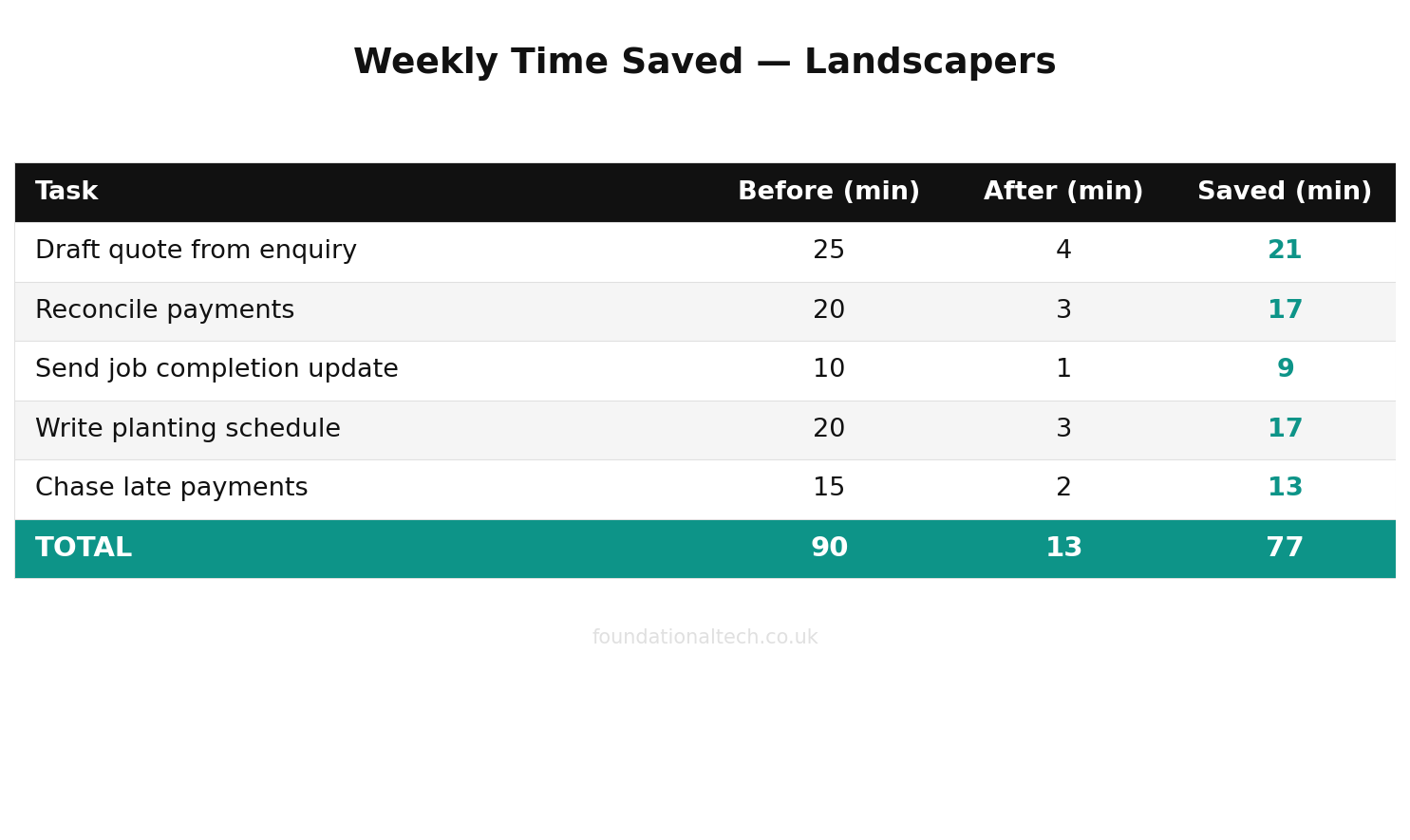
saved per enquiry when AI drafts the quote and automation handles invoicing and reconciliation
Trigger: Once a week, on a schedule, Make pulls the list of unreconciled transactions from Xero.
Action 1: It sends that list to your AI with your chart of accounts and a note on how your business works — "fuel and plants are cost of sales, anything from this builders' merchant is materials, payments from these names are maintenance customers."
Action 2: The AI returns a suggested category and a one-line reason for each transaction.
Action 3: Make drops the suggestions into a simple shared spreadsheet (or emails them to you) for a quick yes/no pass before you reconcile in Xero.
The point here is not to let AI touch your accounts directly — it should never post entries on its own, because a wrong category at year end is your problem, not the robot's. The point is anomaly-spotting and first-draft sorting. The model is very good at noticing the payment that does not match any invoice, the duplicate charge, the supplier you have never used before. It flags the three transactions worth a second look and pre-sorts the forty that are obvious, so you stop doing the boring part and keep doing the judgement part.
Workflow 3: Job Done, Customer Updated
Maintenance customers churn for one reason more than any other: silence. They do not see you come, they are not sure you came, and when the invoice arrives they resent it. This workflow turns a job marked complete into a short, warm, personalised message — without you writing forty of them every Friday.
Trigger: A job is marked "completed" in Tradify.
Action 1: Make sends the job details — customer name, what was done, any note your crew left — to the AI with an instruction to write a brief, friendly "we've been today" message in your voice, mentioning the actual work.
Action 2: The message is sent by email or SMS to the customer, or queued for your approval first if you would rather check the early ones.
Setup time: About 30 to 40 minutes once your AI knows your tone.
The reason this works is specificity. A generic "your job is complete" template reads like a robot and customers know it. An AI fed the crew's note can write "tidied the front beds, cut back the hedge along the drive and took two bags of green waste — the roses by the gate are coming on nicely" in your style, and it lands like you texted it yourself from the van. That small touch is the difference between a customer who cancels in November and one who recommends you to their neighbour. You are not buying a mailshot. You are buying the appearance of attention you genuinely have but never have time to express.
Setup Guide
Here is the order to build in, so you never have a half-wired workflow doing something you cannot see.
Start by creating a free Make account and connecting your apps one at a time — Gmail or Outlook, Tradify, Xero — using Make's built-in connectors. Each asks you to log in once and approve access; there is nothing to configure beyond that. Then add your AI: in your Claude or ChatGPT account settings, generate an API key, and paste it into Make's OpenAI or Anthropic module. Treat that key like a bank card — it can spend your AI credits, so never share it.
Build Workflow 1 first, because it delivers the most and teaches you the pattern. In Make's visual editor you will drag in an email trigger, then an AI module, then a Tradify module, and draw the lines between them. Spend your real effort on the AI module's prompt: tell it who you are, paste your rate card, give it two examples of a good reply, and instruct it to send drafts to you and never to the customer directly. Run it in test mode against a real old enquiry and read what it produces. Tune the instruction until the drafts need only a number changed, then switch it live.
Only once that one is running well should you build the second and third. Add them one at a time, test each against real data before going live, and keep every workflow set to send to you rather than the customer until you trust it. The whole point is help you can see working. Build slowly, keep a human on the approve button for anything a customer reads, and within a fortnight you will have an admin assistant that costs less than your phone bill and never takes a Friday off.
Which of these three would claw back the most time in your week — the instant quote drafts, the self-sorting books, or the automatic job updates? Tell me which one you'd build first and I'll send you the exact prompt to start it.