Key Takeaway
Set up Claude AI as your construction business assistant in 40 minutes. Free system prompt template, Xero connection and daily workflow for UK builders.
A chatbot answers a question and forgets you the moment you close the tab. An AI worker remembers your firm — your prices, your subbies, your tone, the fact that you deduct CIS and your customers pay 40% up front. It turns “write me a quote” into a quote with your margin already built in. The difference is about 40 minutes of setup, and most builders never do it.
This guide builds that persistent assistant for a UK construction firm using Claude Projects. By the end you’ll have a workspace that knows your business, drafts the admin that eats your evenings, and — if you want — reads your live job and accounts data instead of you copying it across by hand.
What an AI Worker Actually Is
Open Claude cold and type a question, and it starts from nothing. It doesn’t know you’re a builder, doesn’t know your day rate, doesn’t know you work in Leeds and price in pounds. Every chat is a blank slate, and you spend half your message explaining yourself before you get to the point.
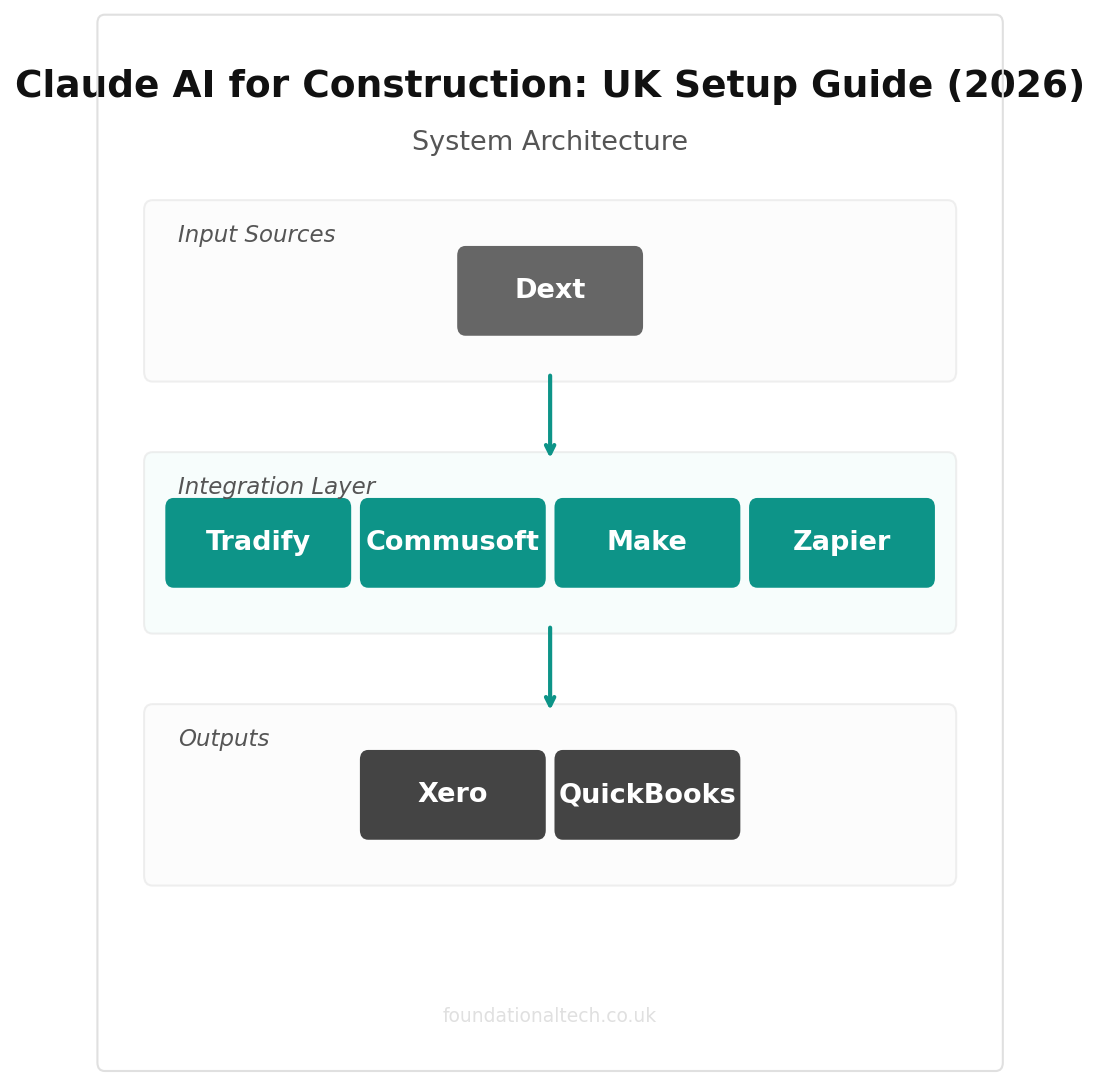
A Claude Project fixes that. You write one set of standing instructions — a system prompt — that loads automatically before every conversation in that project. You upload a few reference documents. You can connect it to your accounting or job-management software so it reads real figures. The result behaves like an office manager who’s read your procedures, knows this year’s tax rules, and writes the way your firm talks.
One honest note before you build. The slick “official AI connector” some software companies advertise is often thinner than it sounds. As of 2026 there is no official Xero connector for Claude — the connections that exist are community-built or run by third parties like Composio, CData and Zapier. They work, but you set them up yourself or pay a service. We’ll cover what’s realistic below, not the marketing version.
Step 1: Choose Your Platform
Three real options. One clear answer for most trades.
Claude Pro — around £18-20/month (billed in US dollars, plus VAT) The right starting point for a sole trader or small firm. You get Projects with custom instructions, a large memory for uploaded documents, web search and file uploads. This is where you begin, full stop.
Claude Max — from around £80/month, with a higher tier at roughly £160/month Only worth it if you’re genuinely living in the tool — several hours of back-and-forth a day. It lifts the usage limits well above Pro. Most building firms won’t need it for a long while, if ever.
Claude Team — around £20-24 per seat/month, five-seat minimum The move once two or more people — you, your partner, the office manager — are using AI daily. It adds a shared workspace, admin controls, and an agreement that your data isn’t used to train the model. That last point matters once you’re handling customer details.
ChatGPT — Go around £5/month, Plus around £20/month A fair alternative. ChatGPT’s cheap Go tier is tempting and fine for quick drafting. Claude tends to hold a professional tone better and reasons more carefully through messy, multi-part jobs, which is why this guide uses it. If budget is tight, start with one — don’t pay for both.
The recommendation: Claude Pro to start. Move to Team when a second person is on it daily. You’re looking at the price of a couple of bags of plaster a month.
Step 2: Write Your System Prompt
This is the step that does the heavy lifting. Your system prompt tells Claude how to behave in every conversation inside the project. Get it right and every reply starts from competence instead of a cold start.
Here’s a complete system prompt for a UK construction firm. Copy it, then change the bits in square brackets:
You are an AI assistant for [FIRM NAME], a UK [building / electrical / plumbing / roofing] firm based in [TOWN]. You help with quotes, customer messages, supplier emails, scheduling and paperwork.

ROLE AND BOUNDARIES
- You draft. The owner decides. Always leave the final call to a human.
- NEVER invent prices, measurements or dates. If a figure is missing, leave a clear [GAP] for me to fill.
- NEVER admit legal liability in a customer message or promise something I haven't agreed to.
- You are not a solicitor, accountant or surveyor. Flag anything that needs proper professional advice.

HOW WE PRICE
- My day rate: £[X]. Typical margin on materials: [X]%.
- Standard payment terms: [e.g. "40% deposit, 40% at first fix, 20% on completion"].
- Quotes valid for [X] days. Always show VAT separately.

UK TRADE CONTEXT (2025/26)
- We operate under the Construction Industry Scheme (CIS): 20% deduction from registered subcontractors, 30% if unregistered, materials excluded.
- The VAT domestic reverse charge applies to most CIS construction work between VAT-registered businesses — the customer accounts for the VAT, not us. Flag when it applies.
- Making Tax Digital for Income Tax starts April 2026 for sole traders with income over £50,000 — quarterly digital updates.
- VAT registration threshold: £90,000.

OUR VOICE
- Customer messages: friendly, plain English, no jargon. Talk like a person, not a corporate.
- Supplier and subbie messages: short and direct — working messages between tradespeople.
- Complaints: calm, professional, never defensive, never admitting fault.

OUR TOOLS
- Job management: [Tradify / ServiceM8 / Commusoft / paper]
- Accounts: [Xero / QuickBooks / Sage]
- Payments: [GoCardless / Stripe / bank transfer]
- Receipts: [Dext / Xero capture]

FORMATTING
- Pounds (£), not dollars. Dates as DD/MM/YYYY. Tax year as 2025/26.
- Keep messages short enough to read on a phone on site.
- Default sign-off: "Cheers, [YOUR NAME]" for customers; "[FIRM NAME]" for formal letters.
Why it works: every line you add is a line of editing you skip later. The pricing section means Claude builds your margin in. The CIS and reverse-charge lines mean it won’t make a tax blunder in front of a customer. The voice section means it writes like you, not like a call centre.
Keep it current: review this prompt each April. Rates change, thresholds shift, you swap a tool. Treat it like servicing the van — once a year, no excuses.
Step 3: Load Your Knowledge Base
A Claude Project lets you upload documents — PDFs, Word files, spreadsheets — that it then “remembers” in every chat. Upload the few that matter, not everything you own.
Worth uploading:
Your price list or rate card — labour rates, common material mark-ups, standard job prices. Now Claude quotes with your real numbers instead of guessing.
Your standard terms and conditions and a blank quote template. Claude learns your scope, your exclusions, your payment terms, and copies them into every quote.
Your best three or four past quotes (winning ones). Claude picks up your structure and tone and reuses it.
A RAMS template or two if you do commercial work. Claude adapts them to each new job instead of starting blank.
A one-page list of your regular subbies and suppliers — trade, typical price, CIS status. Now Claude can draft a booking message with the right details already in it.
Don’t upload:
Anything with customer bank details, full addresses tied to names, or staff personal data — until you’re on a Team plan with a data agreement, keep that out of uploads.
Hundreds of pages you’ll never reference. A bloated project is a slower, vaguer one. Upload the sharp essentials.
The test: would you hand it to a new office junior on day one? If yes, upload it. If not, leave it out.
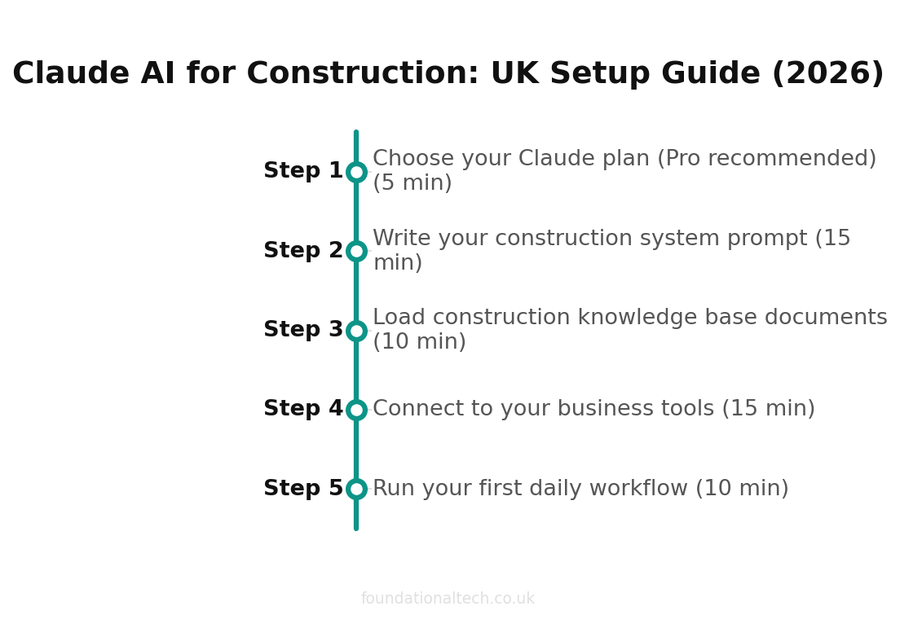
| Step | Action | Time |
|---|---|---|
| 1 | Choose your Claude plan (Pro recommended) | 5 min |
| 2 | Write your construction system prompt | 15 min |
| 3 | Load construction knowledge base documents | 10 min |
| 4 | Connect to your business tools | 15 min |
| 5 | Run your first daily workflow | 10 min |
Step 4: Connect to Your Tools
This is where the assistant stops being a clever notepad and starts reading your actual business.
Be realistic about what exists. There is no official one-click Xero-to-Claude button in 2026. What works today:
Community and third-party MCP connectors. Model Context Protocol (MCP) is the standard that lets Claude read another app’s data. For Xero, there’s an open-source server on the XeroAPI GitHub, plus managed options from Composio and CData that handle the fiddly authentication for you. Once connected, you can ask “show me unpaid invoices over 30 days” and Claude reads it live from Xero. Setup is a couple of hours for someone comfortable with config files, or a few days through a managed service. If that’s not you, this is exactly the kind of job to hand to a bookkeeper or a service like ours.
Zapier. The simplest route for most trades. Zapier connects Claude to thousands of apps — Gmail, Outlook, Google Sheets, Xero, and many job-management tools — without touching a config file. Practical wins: auto-file a quote when you mark a job won, or draft a reply when a customer fills in your website form. A Starter plan runs around £16/month.
Job-management software. Tradify, ServiceM8 and Commusoft already hold your jobs, quotes and timesheets. Most connect to Xero directly and to Claude via Zapier. The aim is one flow: quote in the job app, money in the accounts app, and Claude reading both rather than you re-typing numbers between them.
On security: an MCP or Zapier connection reads data inside the source app’s own security — it isn’t bulk-copied to Anthropic to keep, and on Team and Enterprise plans your inputs aren’t used to train the model. That’s a different thing from pasting a customer’s details into a public chat. Until you’ve set the proper connection up, keep sensitive data out.
Step 5: Your Daily Workflow
Here’s how the assistant fits a real working day on the tools.
6:30 — On the van, before you drive off. “Turn this week’s job list into a day plan, flag any clash, tell me what to order today.” Paste your jobs. Claude hands back a one-screen plan. You know where everyone’s going before the engine’s warm.
Lunchtime — quote from this morning’s visit. Open your firm’s project, type the job, your costs and margin, and Claude drafts the quote while you eat your sandwich. You check the figures and send it before you’re back on site — not three days later when the customer’s already called someone else.
4:00 — a snag and a chaser. A customer’s texted about a cracked tile and another’s two weeks late paying. Two prompts from the Playbook: a calm snag reply and a firm-but-polite invoice chase. Both drafted in under two minutes, both in your voice.
6:00 — the evening admin you used to dread. Three customer messages, one supplier order, a subbie to book with their CIS details. Twenty minutes with the assistant instead of an hour and a half at the kitchen table.
Sunday — the week ahead. Ask it to plan next week from your job list and outstanding quotes. Close the laptop knowing Monday’s already sorted.
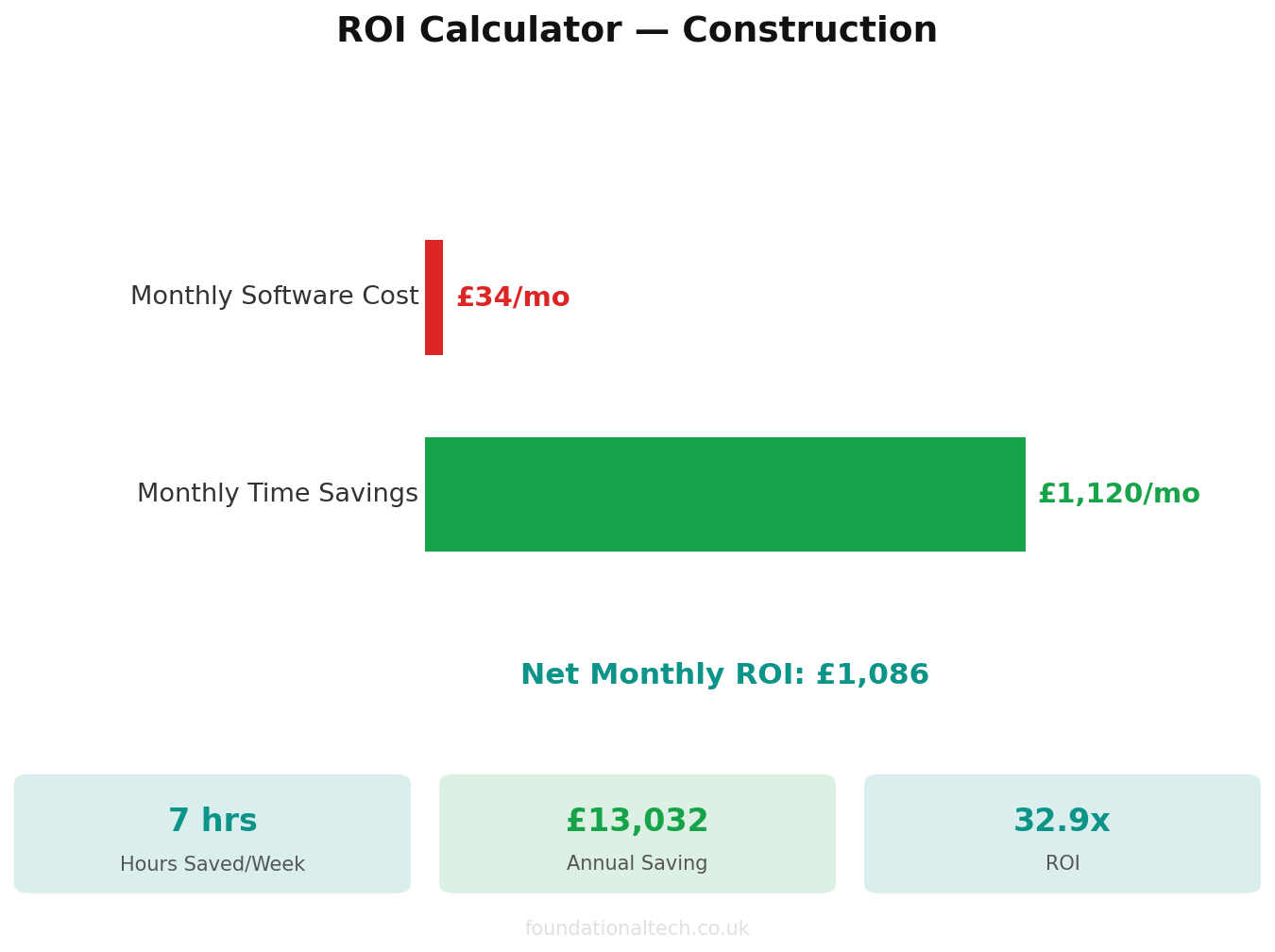
The realistic saving: 60 to 90 minutes a day, almost all of it the admin that currently steals your evenings. Not a sales figure — it’s what firms report after a month of actually using it.
What This Costs
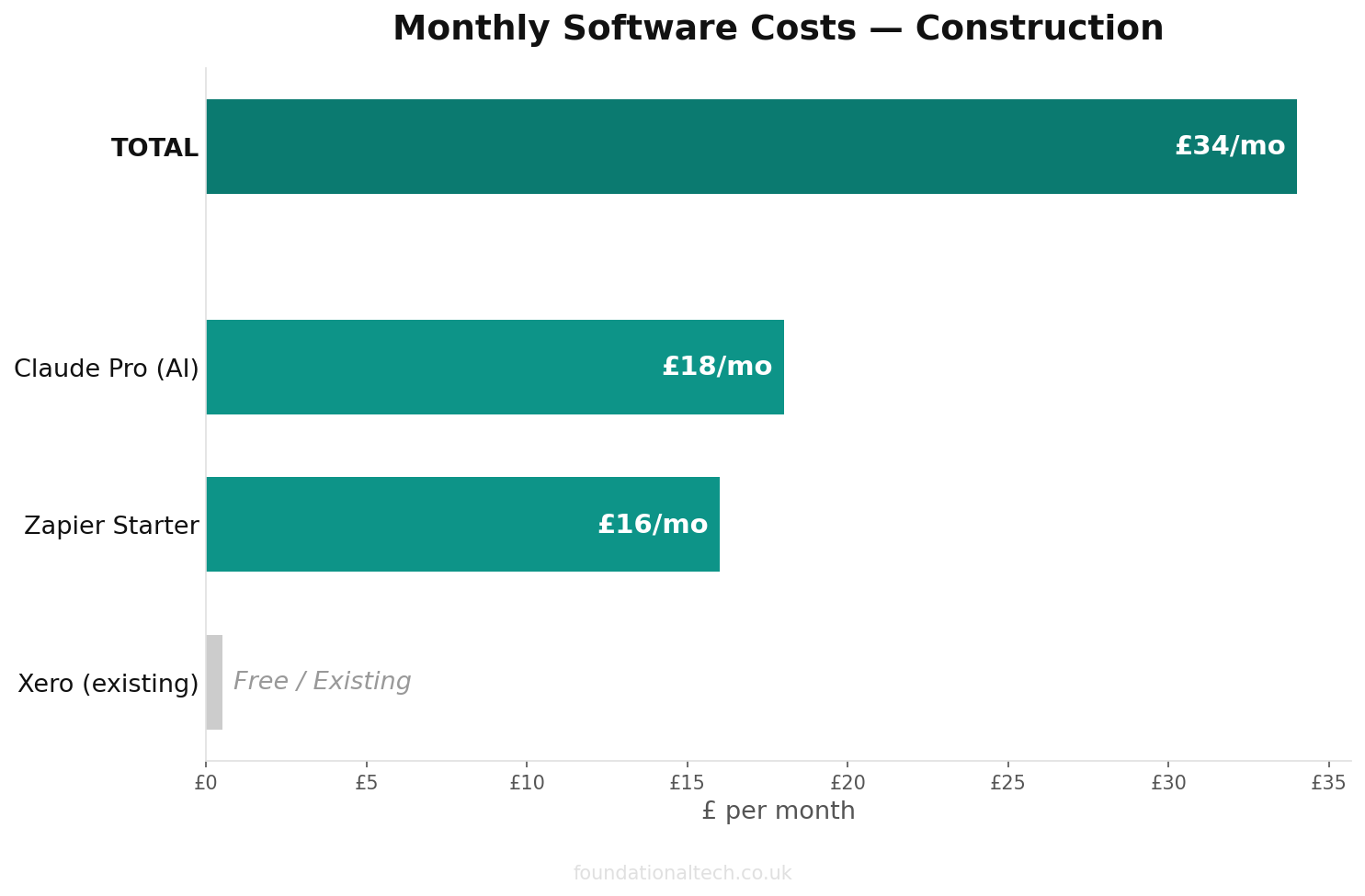
| Item | Monthly Cost |
|---|---|
| Claude Pro (1 seat) | ~£18–20 |
| Claude Team (5 seats) | ~£100 |
| Xero (already paying) | £0 extra |
| Zapier (Starter, if automating) | ~£16 |
| Sole trader total | ~£16–20 |
| Small firm (5 seats) total | ~£116 |
Set that against the hours — a sole trader claws back 25-30 hours a month, a small team far more. The maths isn’t close.
Under 1 hour
Total setup time to get Claude running as your construction AI assistant
Common Mistakes to Avoid
Pasting customer data into a public chat. Until you’re on a Team plan with a data agreement, strip names, full addresses and bank details from anything you paste. Claude doesn’t need them to draft a quote — “the customer” works fine.
Letting the system prompt go stale. The tax rates and thresholds in it are 2025/26. Come next April, update them — or it’ll quote a customer last year’s numbers.
Sending output without reading it. The first time you fire off a quote you didn’t check is the day you promise a price you didn’t mean. It drafts; you sign it off. Every time.
Building the perfect setup before you use it once. Don’t spend a weekend configuring. Write the system prompt, upload three documents, and use it for a week. You’ll quickly see what’s missing — add that. The firms that fail with AI are the ones still “getting it ready” a month later.
Set up your Claude Project this week — it’s a 40-minute job, less than a tea break per day to run. Reply and tell me one line you added to your system prompt for your trade. I’m building a library of real setups, and yours might save another firm an hour.
A & Y Financial Services configures AI workers for UK construction and trade firms and connects them to the tools you already use. That’s what we do.