Key Takeaway
How to connect Xero, Tradify, Claude for UK construction firms in 2026. Step-by-step integration guide with data flow, sync settings, and troubleshooting.
Your software stack already moves data on its own: a quote accepted in Tradify becomes an invoice in Xero, a payment lands matched, a receipt photographed in the van books itself. What it cannot do is write. Every email, every chaser, every “thanks for having us, here’s what we did” still comes out of your head, usually at 9pm.
This article closes that gap. It connects the AI assistant from articles 6–8 to the automation stack from articles 1–5, so the writing happens inside the plumbing — drafted by AI the moment something happens in your tools, not typed by you hours later. Three workflows, one bridge tool, total running cost under £15 a month on top of what you already pay.
Where AI Meets Your Existing Stack
So far this cluster has built two separate machines. The automation block (articles 1–5) moves data: Tradify runs jobs, Xero runs money, Dext captures costs, GoCardless and Stripe collect payments. The AI block (articles 6–8) handles language: Claude drafts your quotes, emails and certificates when you ask it to.
The missing piece is the trigger. Right now, you are the trigger — you notice a job finished, open Claude, paste the details, ask for the email. The workflows below remove you from that loop. An event in Tradify or Xero fires automatically, the relevant details flow to Claude, Claude writes the words, and the result lands in your outbox or inbox ready to approve.
The bridge is Make — the same tool from article 5’s integration map. Its Core plan is $12 a month (roughly £10) for 10,000 credits, where each step in a workflow costs one credit; the free plan’s 1,000 credits will even cover light use while you test. Make has an official Anthropic Claude module, so plugging AI into a workflow is a drag-and-drop step, not a coding job. You’ll also need an Anthropic API key (different from your Claude Pro login — more on that in the setup guide), which bills by usage and costs pennies per run at trade-business volume.
One honest caveat before the recipes: Tradify has no official Make or Zapier app. What it does have is webhooks — it can send a message the instant something happens (job completed, quote accepted, invoice raised) to a web address you choose. Make’s webhook module receives those messages natively, so everything below works today; it just means Tradify can talk to Make, while Xero (which has full native modules) can both talk and listen.
Workflow 1: AI + Tradify — the review request that writes itself
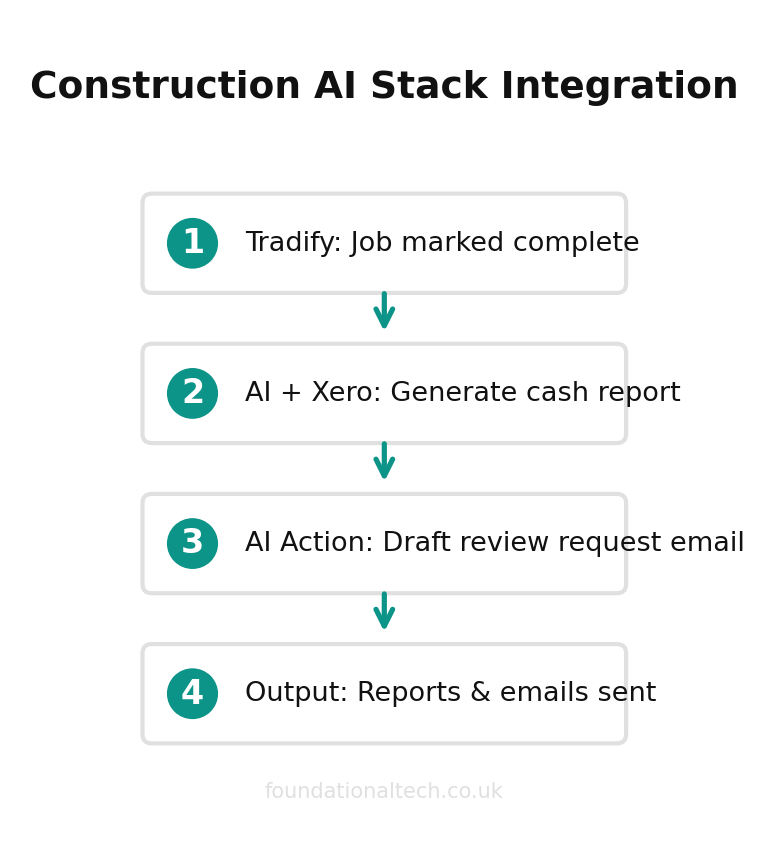
Trigger: a job is marked completed in Tradify. Result: a personalised thank-you email with a Google review link, written by Claude, sitting in your drafts within two minutes of your team leaving site.
Reviews are the cheapest marketing a trade business has, and almost nobody asks for them, because asking is one more task at the end of a long day. Article 5 built a plain-text version of this workflow. This is the upgrade: instead of a template that says the same thing to everyone, Claude writes each message from the actual job details — the work done, the customer’s name, how long it took.
The chain in Make: Webhook (from Tradify) → Anthropic Claude → Gmail/Outlook (create draft). The webhook carries the job data. Claude gets a standing instruction — your prompt from article 7’s playbook works here almost verbatim: “You write for [firm name], a [trade] business in [town]. Tone: friendly, plain English, no exclamation marks. Write a short thank-you email for the job described below, mention the specific work done, and ask for a Google review with this link...” The Gmail step saves the result as a draft rather than sending, so you stay the final check.
Why a draft and not an auto-send? Because article 6’s line still holds: AI drafts, you approve. A review request that mentions the wrong boiler model reads worse than no request at all. Approving a good draft takes ten seconds; writing one takes ten minutes you don’t have.
Workflow 2: AI + Xero — the Friday cash report in plain English
Trigger: a schedule — every Friday at 4pm. Result: a three-paragraph email in your inbox: who owes you what, what changed this week, and anything odd in the numbers.
Xero holds all of this already; the problem is that it holds it across four screens, and reading dashboards is one more job. This workflow makes the numbers come to you, written like a colleague would write them.
The chain: Schedule → Xero (list invoices, status: overdue) → Xero (bank summary) → Anthropic Claude → Email. Claude’s standing instruction: “You are the finance assistant for a UK [trade] firm. From the data below, write a short Friday report: total outstanding, the three oldest debts with customer names and days overdue, anything unusual versus a normal week. Plain English. No jargon. If a customer is over 30 days, say so bluntly.”
The anomaly line is the quiet gem. Claude is good at “this doesn’t look right” — a supplier invoice twice its usual size, a customer who always pays in a week suddenly at day 25, a duplicate. None of that replaces your accountant; it gets the oddity in front of you on Friday instead of at quarter-end, while it’s still a conversation rather than a problem.
Because Xero has full native modules in Make, this one is pure drag-and-drop — no webhooks, no code, about twenty minutes to build.
Workflow 3: AI + Client Communications — the inbox that sorts itself
Trigger: an email arrives in your business inbox. Result: enquiries get a drafted reply with your real availability question; chasers and complaints get flagged to the top; circulars get filed.
Under £15/month
total cost to automate review requests, cash reports and inbox sorting on top of your existing stack
For most trade firms the inbox is the front door and the biggest leak. An enquiry answered the same hour converts at a different rate from one answered on Thursday — by Thursday they’ve booked whoever replied on Tuesday.
The chain: Gmail/Outlook (watch inbox) → Anthropic Claude (classify and draft) → router. Claude’s instruction does two jobs: first classify — enquiry / existing job / invoice query / supplier / junk — then, for enquiries only, draft a holding reply in your voice: thanks, one or two clarifying questions (photos, postcode, access), and when you’ll come back with a price. The router then files each type: drafted reply into drafts, invoice queries forwarded to whoever does your books, junk archived.
The payoff is responsiveness without interruption. You check drafts twice a day at times you choose, hit send on the good ones, and the customer experiences a firm that replies within the hour.
Setup Guide
The first workflow takes the longest because of one-time setup. Budget an hour; the next two take twenty minutes each.
Step 1 — Get the accounts. A Make account (free plan to start — make.com) and an Anthropic API key. The key comes from console.anthropic.com, not your claude.ai login: sign up, add £5 of credit, create a key under “API Keys” and copy it somewhere safe. That £5 will last months at this volume — each workflow run costs well under a penny using the cheaper Haiku model, a few pence on the stronger Sonnet models.
Step 2 — Build the skeleton. In Make, create a new scenario. Add your trigger module: “Webhooks → Custom webhook” for Workflow 1 (Make gives you a URL — paste it into Tradify’s webhook settings under the “job completed” event), the schedule trigger for Workflow 2, or “Gmail → Watch emails” for Workflow 3.
Step 3 — Add Claude. Add the “Anthropic Claude” module, action “Create a Prompt”. Paste your API key once; Make stores the connection. In the message field, write your standing instruction first, then map the data fields from the trigger (Make shows them as draggable chips — job title, customer name, amounts) into the bottom of the prompt.
Step 4 — Add the output. Gmail or Outlook module, “Create a draft”. Map Claude’s reply into the body. Run the scenario once with a test record, read what arrives, and tighten the prompt — the first draft of the prompt is never the final one, exactly as in article 7.
Step 5 — Turn it on and cap it. Set the scenario live. On Make’s free plan you have 1,000 credits a month; each run of these workflows uses 3–5. When a workflow proves itself, the $12 Core plan removes the ceiling.
Build them in the order above. Workflow 1 delivers the most obvious win, Workflow 2 is the easiest, and Workflow 3 is the one you’ll wonder how you lived without.
What This Costs and What It Returns
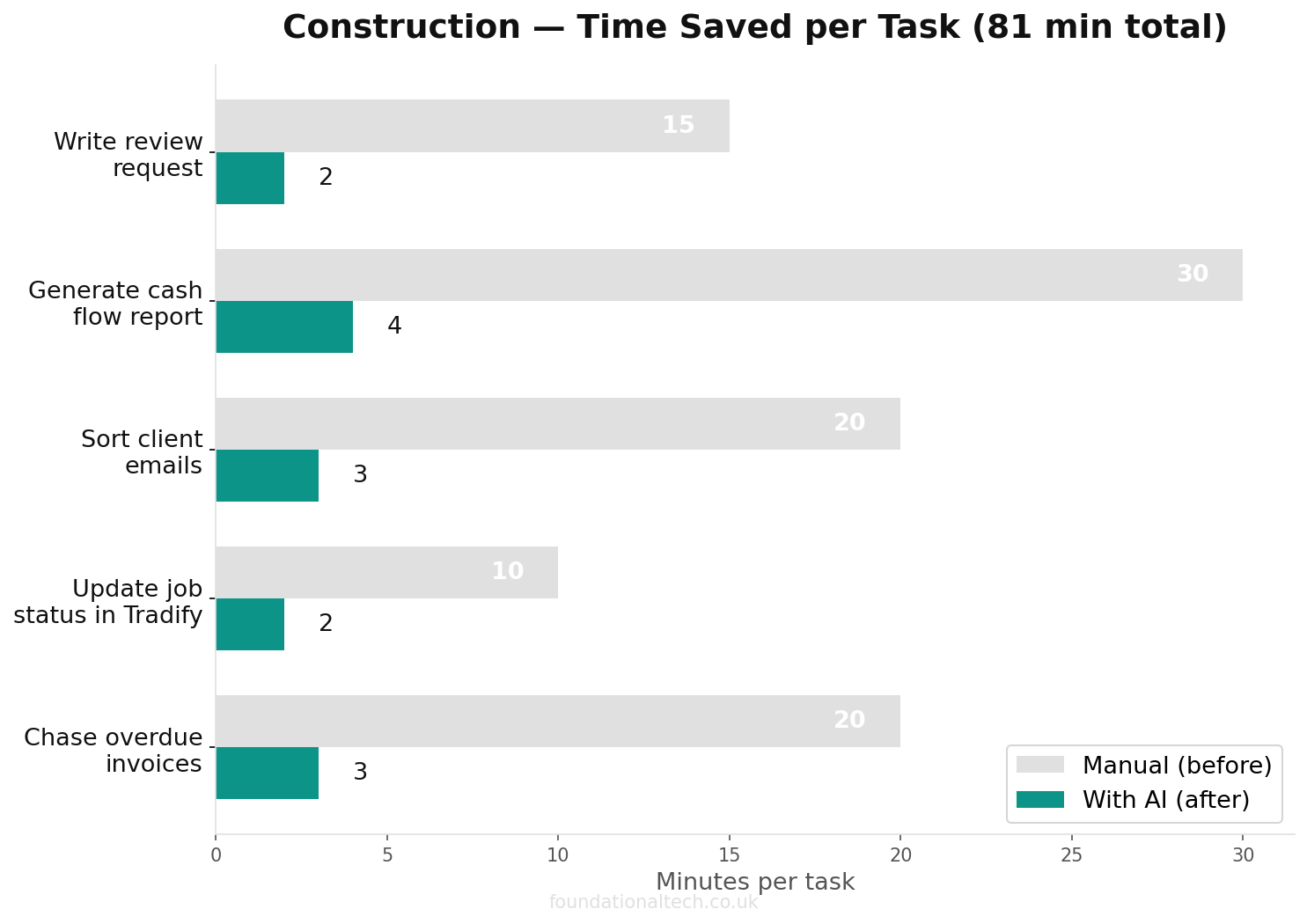
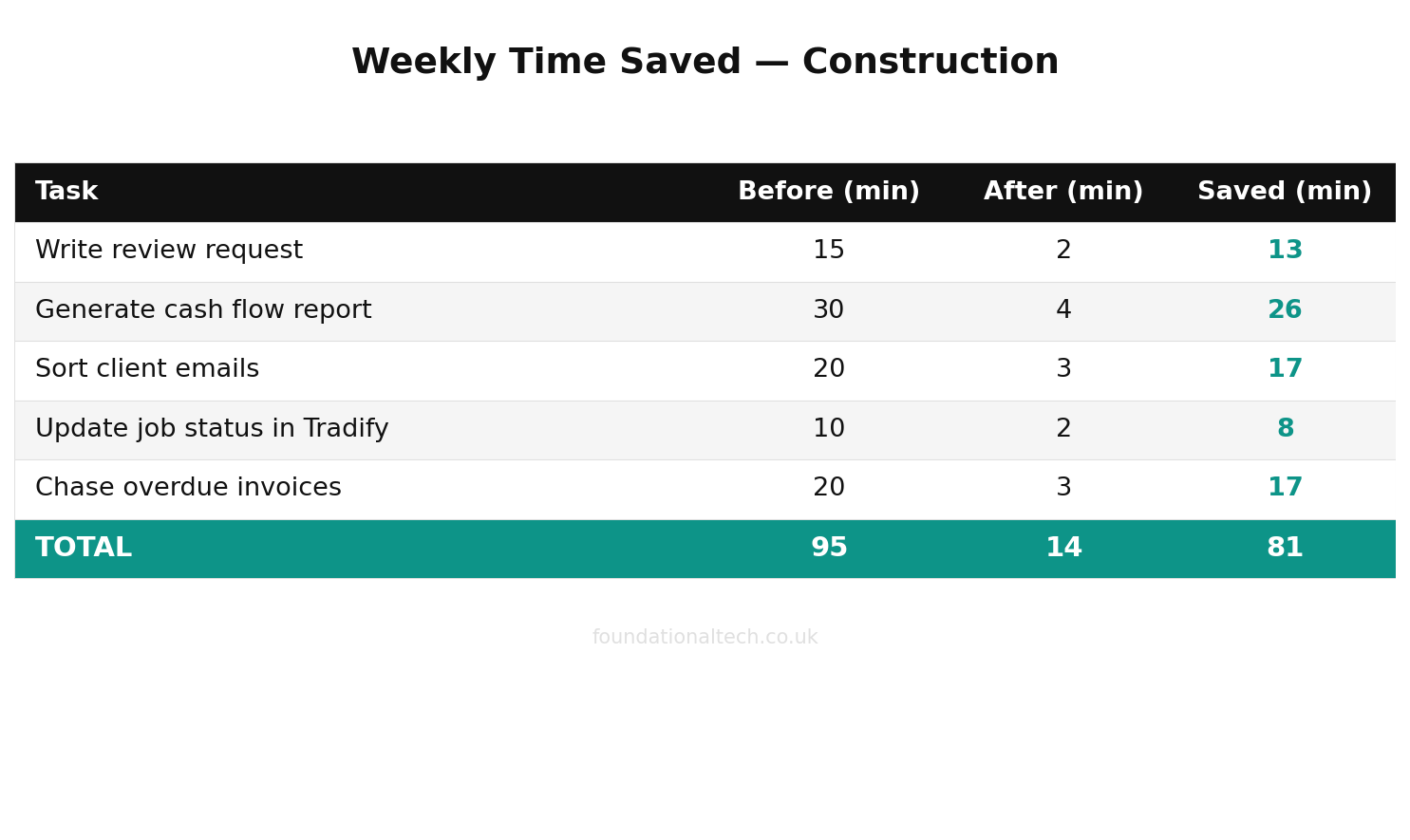
Running all three: Make Core at about £10/month, Anthropic API usage of £1–3/month, on top of the Tradify and Xero subscriptions you already pay. Call it £13.
Against that: review requests actually sent (most firms send none), a weekly cash picture without opening a dashboard, and same-hour replies to every enquiry. If the inbox workflow wins you one extra job a month, it has paid for itself a hundred times over. The machine from articles 1–5 moved your data so you stopped re-typing it. This layer moves your words — and the words were always the part that kept you up latest.
Which of these three would save you the most hours — the review request, the Friday cash report, or the self-sorting inbox? Reply with the one you’d switch on first and I’ll send you the exact Make blueprint for it.
A & Y Financial Services connects AI to your existing tools. That’s what we do.