Key Takeaway
3 no-code AI workflows for UK roofers in 2026. Automate quoting, invoicing, and follow-ups using Make.com and Xero. Copy the setup in under an hour.
It's 2:47 AM on a Tuesday in November. Storm Eowyn has just ripped across the Midlands. Your phone has already pinged fourteen times — three voicemails, six web form submissions, five WhatsApp messages with photos of missing ridge tiles, lifted flashings, and one kitchen ceiling that looks like a waterfall. By 7 AM there will be forty more. You know from experience that roughly a third are active leaks needing same-day attention, and a third are cosmetic damage that can wait a fortnight. The final third are existing customers whose insurance company has finally authorised remedial work from the last storm six months ago. The roofer who triages fastest wins the urgent jobs. The one who replies to all forty personally burns out by Thursday.
This is the article where we stop talking about AI in the abstract and start wiring it into your roofing operation. In articles 7 and 8 we covered how to write prompts that actually work for trade businesses and how to set up AI workers that handle repetitive tasks. Now we connect those AI workers to the roofing-specific tools you already use — AccuLynx or JobNimbus for job management, EagleView and RoofSnap for aerial measurement, Xero for accounts — and build three automated workflows that solve problems only roofers have.
Not "small business" problems. Roofing problems.
Where AI Meets Your Existing Stack
If you've followed this series, you already have the bones of a connected system: AccuLynx or JobNimbus handling your pipeline, Xero managing your books, and payment automation tracking staged invoices on re-roofs. The missing piece is an AI layer that sits between these tools and makes decisions — or at least makes recommendations fast enough that you can act on them before your competitor does.
The connection layer is a no-code automation platform: Make (formerly Integromat) or Zapier. These let you build "if this, then that" workflows without writing code. The AI layer is an API connection to Claude or ChatGPT, which reads incoming data, classifies it, drafts responses, and flags what needs human attention.
Think of it as hiring a night-shift admin who never sleeps, reads every email the moment it arrives, and has your pricing structure memorised. Except this one costs £25 a month and doesn't need a CIS verification.
Workflow 1: Storm Enquiry Surge Handler
The Problem
Every roofer in the UK knows the pattern. A named storm crosses the country on a Wednesday night. By Thursday morning, your phone, email, and web forms are buried. The enquiries fall into three distinct categories, each needing a completely different response speed:
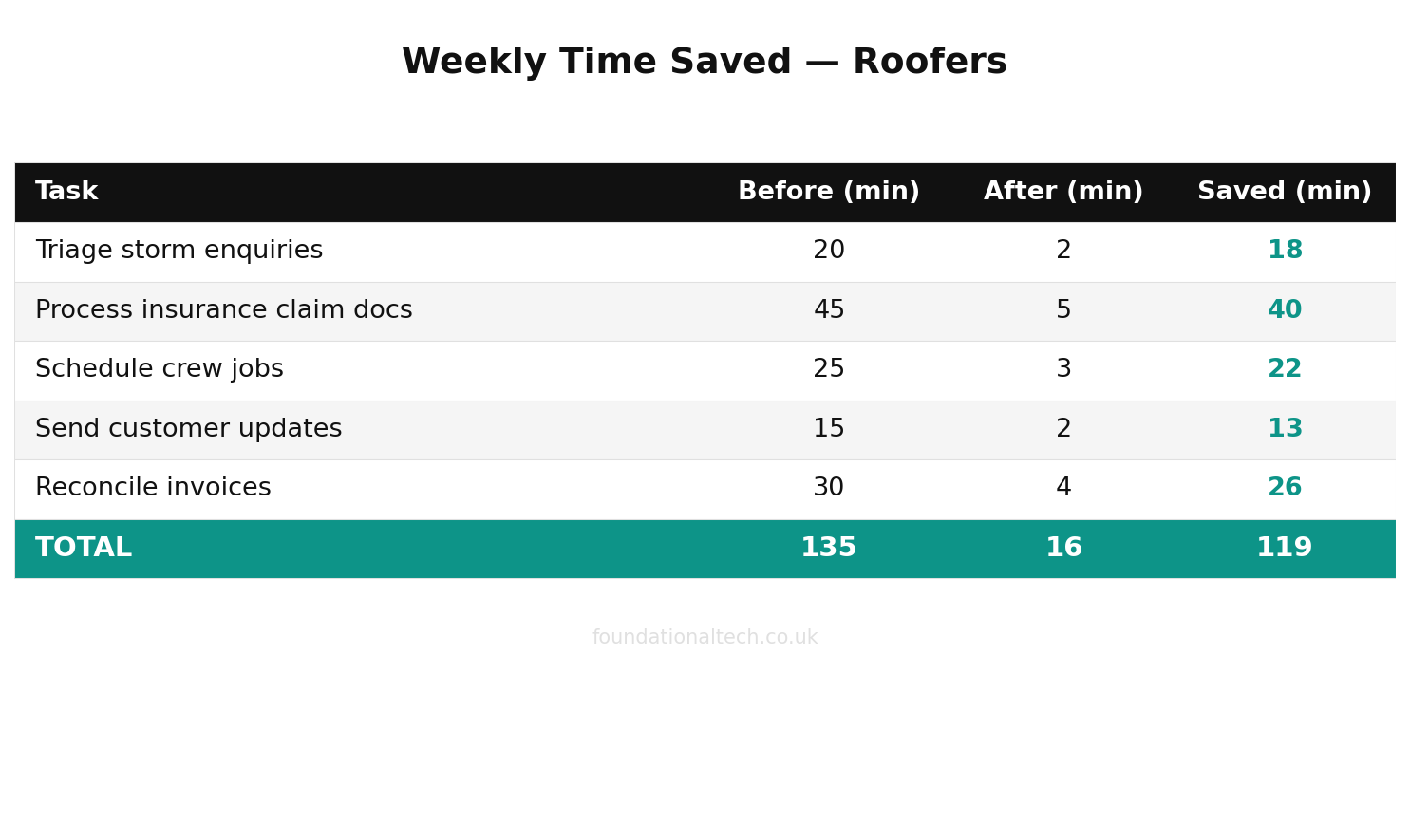
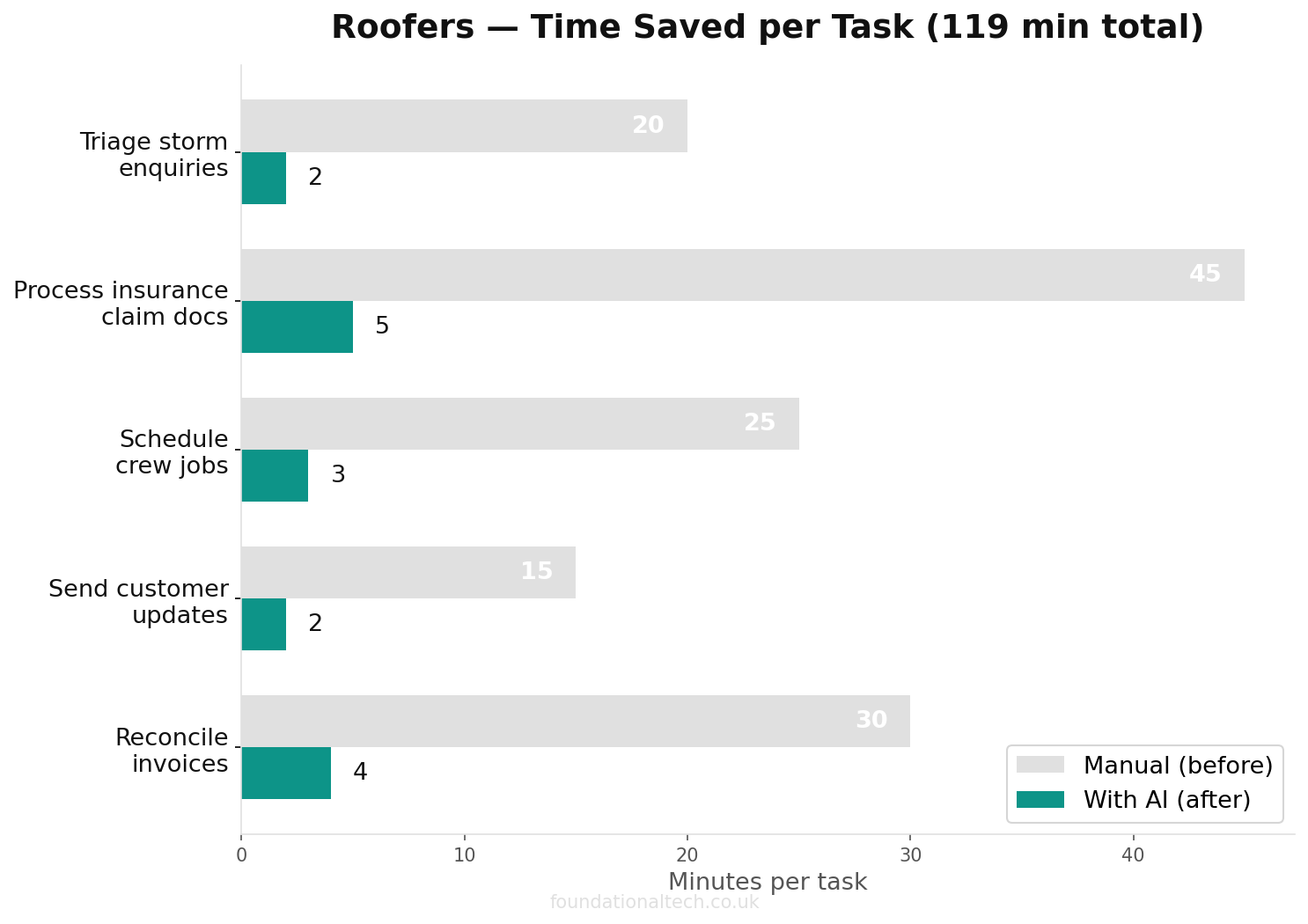
24-hour turnaround
on storm-damage enquiries when AI triages, drafts scopes and compiles insurance documents automatically
Active leaks — water coming through the ceiling right now. These customers need a same-day callback. Delay by 24 hours and they've already called three other firms and accepted whoever answered first.
Storm damage, no leak — missing tiles, lifted lead, cracked ridge. Needs attention within a week or two, but nobody's mopping a kitchen floor at 3 AM. These customers are comparing quotes methodically. You have a window.
Insurance re-quotes — customers whose insurer has finally agreed to fund repairs from a previous event. The loss adjuster's letter has just arrived, and they want you to re-quote against the authorised scope. These can wait days, but the paperwork needs to be precise.
The brutal truth: you cannot quote a roof from a photograph. Every job needs a proper survey. But you can do an initial assessment using EagleView or RoofSnap aerial imagery before committing to a site visit — and that distinction is worth hours of driving time after a storm when you have thirty open enquiries and one van.
The Workflow
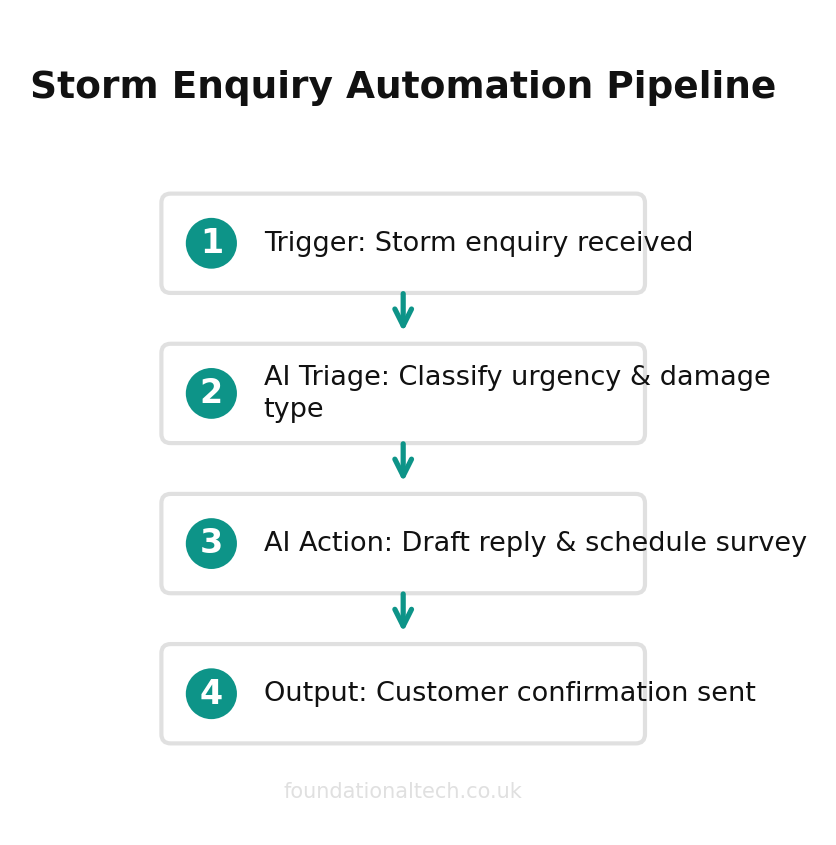
Trigger: New enquiry arrives (web form submission, email to your enquiries address, or WhatsApp message forwarded to email via WhatsApp Business API).
Step 1 — AI Classification. The automation sends the enquiry text to Claude or ChatGPT via API with a classification prompt. The AI categorises the enquiry into one of three buckets:
RED — Active leak. Keywords and context: water ingress now, ceiling damage, buckets, emergency, "pouring in." Flag for same-day callback. Estimated response window: under 2 hours.
AMBER — Storm damage, no active leak. Missing tiles, ridge displacement, flashing lifted, fascia damage. Schedule for callback within 24 hours. Candidate for remote aerial assessment before site visit.
GREEN — Insurance/re-quote. References to loss adjusters, policy numbers, authorised works, previous claims. Schedule for callback within 48-72 hours. Route to your insurance work pipeline.
Step 2 — Intelligent Response Drafting. Based on the classification, the AI drafts an appropriate response:
For RED enquiries, the draft confirms receipt, states a callback is coming within the hour, and asks the customer to contain the leak if safe to do so (bucket under the drip, towels on the loft floor). It does not promise a same-day repair — you know better than to commit to that before seeing the roof.
For AMBER enquiries, the draft confirms receipt, explains that you'll be conducting an initial aerial assessment using satellite imagery (referencing EagleView or RoofSnap by name builds credibility — customers are impressed when you explain you can see their roof before you arrive), and books them for a follow-up call to discuss a site visit.
For GREEN enquiries, the draft confirms receipt, asks the customer to forward the loss adjuster's correspondence if they haven't already, and explains your process for insurance remedial work.
Step 3 — CRM Entry. The automation creates a new lead in AccuLynx or JobNimbus with the classification tag, the original enquiry text, and the AI-drafted response attached as a note. RED enquiries are assigned to your urgent queue. AMBER and GREEN enter the standard pipeline.
Step 4 — Aerial Pre-Assessment Trigger. For AMBER enquiries where the customer has provided their address, the workflow queues an EagleView report order or flags the property for RoofSnap measurement. When the aerial data comes back, it's attached to the job record — so by the time you call the customer back, you already know the roof area, pitch, and approximate material quantities.
What this saves: On a heavy storm night, this workflow handles the first response to every enquiry within minutes. You wake up to a pre-sorted queue: three reds needing immediate callbacks, twelve ambers with aerial assessments already ordered, and eight greens filed for your insurance pipeline. Instead of spending Thursday morning triaging, you're on the phone to the active leaks by 8 AM.
Workflow 2: Insurance Claim Document Processor
The Problem
Insurance remedial work is some of the best-paying roofing work available. A full strip and re-roof authorised by an insurer at agreed rates, with a defined scope — it's clean, profitable work. But the administration is punishing.
Loss adjusters send formal correspondence that reads like it was drafted by a solicitor who charges by the subordinate clause. A single letter might contain the policy number, the authorised scope of works, the approved amount, specific exclusions, requirements for before-and-after photography, and payment terms — all buried in dense paragraphs. Miss a detail and you'll be chasing an underpayment six months later.
Payment terms compound the problem. Domestic customers pay in stages: 20-30% deposit, 30% after strip and felt, 30% after tile or slate, and the final 10-20% on completion. Insurance companies pay 60-90 days after completion. That's £10,000-£15,000 of your money tied up for three months per job. If you're running four insurance jobs simultaneously, that's £40,000-£60,000 in outstanding receivables. You need to track every single one.
And if you're using subcontractors on insurance work — an extra labourer for the strip, a leadworker for the valleys — CIS deductions apply. The 20% (or 30% for unverified subbies) needs to be calculated against the right job and reported monthly to HMRC.
The Workflow
Trigger: Email arrives from a known loss adjuster domain or containing keywords like "authorised works," "policy number," "scope of repair," or "schedule of loss."
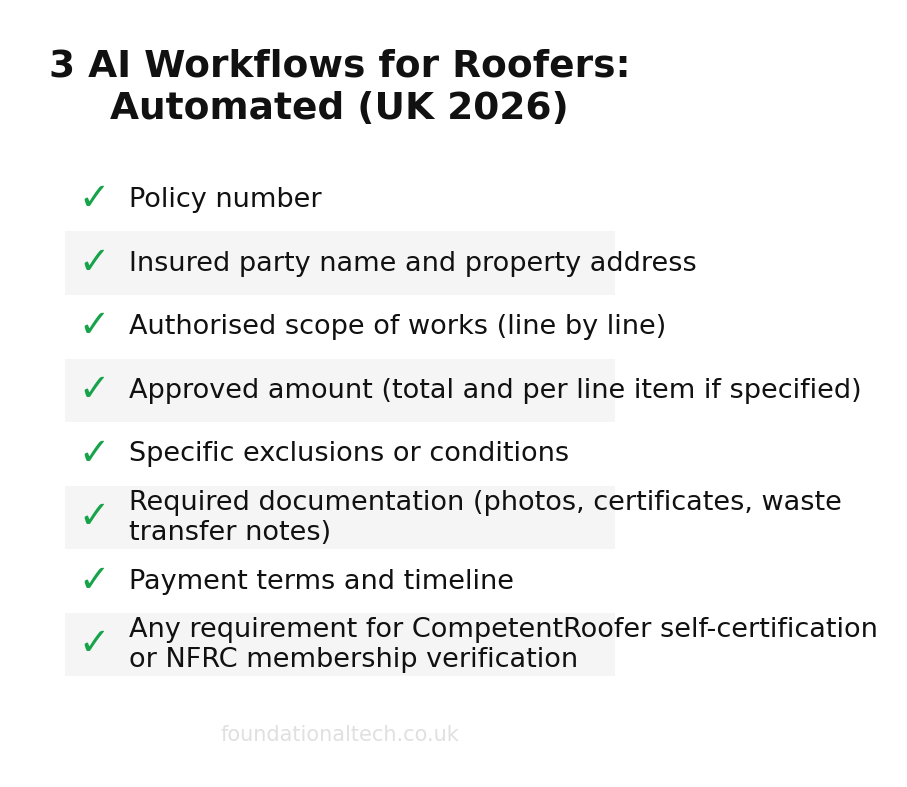
Step 1 — Document Parsing. The automation forwards the email (and any PDF attachments) to Claude or ChatGPT via API. The AI extracts structured data:
Policy number
Insured party name and property address
Authorised scope of works (line by line)
Approved amount (total and per line item if specified)
Specific exclusions or conditions
Required documentation (photos, certificates, waste transfer notes)
Payment terms and timeline
Any requirement for CompetentRoofer self-certification or NFRC membership verification
Step 2 — Job Matching and Filing. The automation searches AccuLynx or JobNimbus for an existing job at that property address. If found, the extracted data is attached as a structured note. If no existing job is found, a new job is created with the insurance classification tag, the customer's details, and the authorised scope pre-populated in the job description.
Step 3 — Scope Comparison. The AI compares the authorised scope against your original quote for the same property (if one e
Considering Tradify? Get 50% off for 3 months.