Key Takeaway
Complete 2026 integration map for UK roofers: Xero, Tradify, Dext connected. Data flow diagrams, sync settings, and troubleshooting included.
A roofer would never leave a valley unlined and hope the water finds its own way down. Yet most roofing firms run their business on exactly that principle — five apps, half-connected, each holding a different version of the same job, and the gaps patched by someone retyping numbers at 9pm.
Over the last four articles in this series we named the stack: Powered Now or Tradify for jobs and quotes, Xero for the books, GoCardless and Stripe for getting paid, and Dext for receipts, with Xero Payroll and CIS running the workforce underneath. Each tool is useful alone. Wired together properly, they stop being five things you feed by hand and start behaving like one system that moves a job from survey to paid invoice without you touching a keyboard twice. This is that wiring diagram — what connects natively, what needs a bridge, and where roofing specifically springs a leak.
The Integration Architecture
Picture the stack as one line that follows a job from the first phone call to the money landing in your account, with the weather, the stages and the Construction Industry Scheme built into every step.
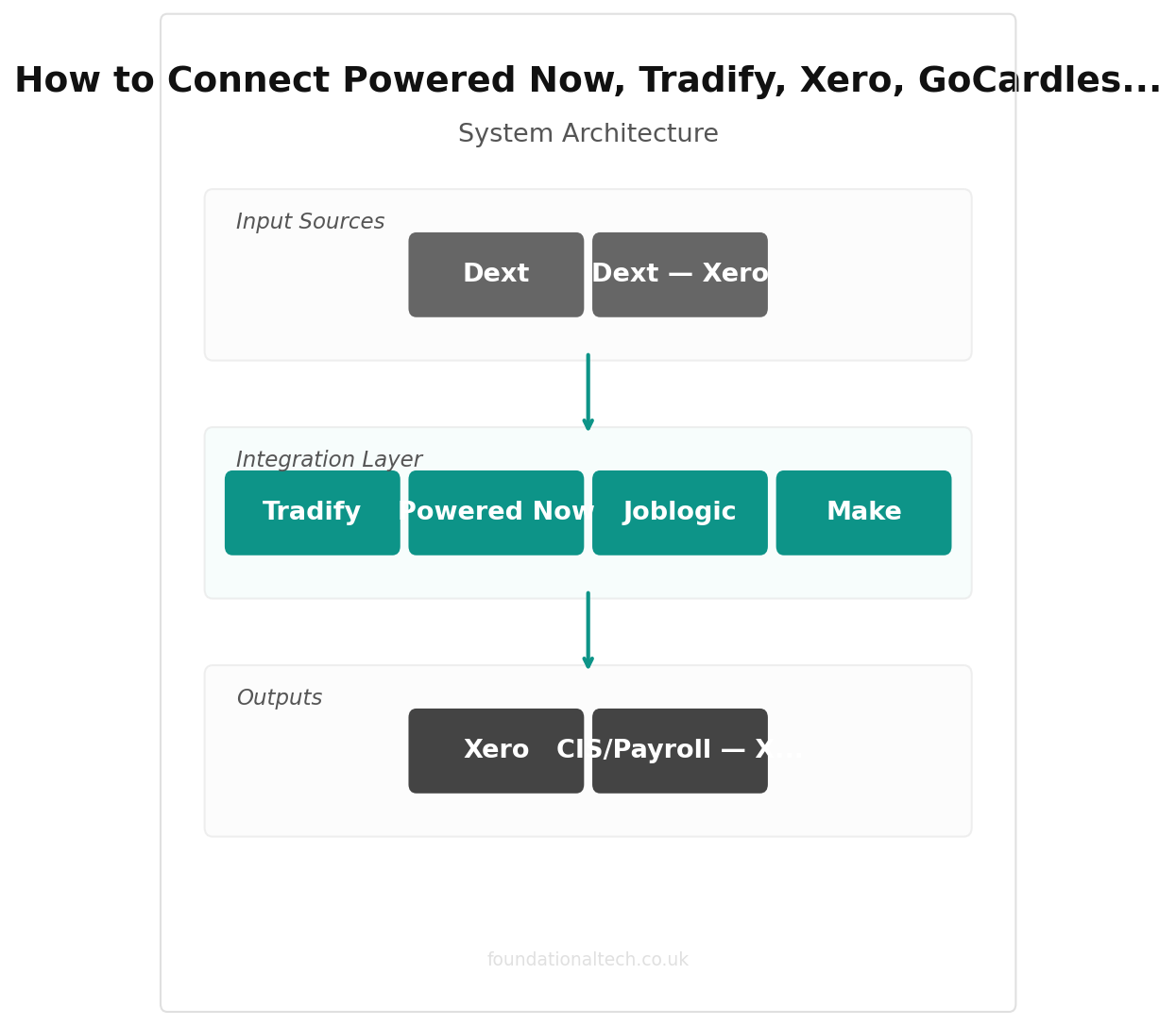
It starts in your job management software. A lead comes in, you survey it, quote it, the customer accepts and pays a deposit, you book the scaffold and schedule the crew around the forecast, and each stage — deposit, progress, completion — gets marked off as it happens. This is the centre of gravity: the one place holding the quote, the photos, the certificate and every invoice for that job.
From there, two things flow outward. The invoice for each stage needs to land in Xero, because that's where your real accounts, your VAT return and your accountant all live. And the payment request needs to reach the customer through GoCardless for staged Direct Debit or Stripe for one-off card payments.
When the customer pays, the money flows back the other way — GoCardless or Stripe tells Xero the invoice is settled, and the bank feed matches it automatically. Meanwhile Dext catches everything going out: merchant receipts, scaffold hire, skip hire, fuel, photographed on the forecourt and posted into Xero against the right job. And underneath all of it, Xero Payroll with the CIS add-on takes your crew's hours and your subcontractors' invoices and turns them into compliant pay, verified deductions and a monthly return that files itself.
So the healthy stack reads: job software — Xero — (GoCardless / Stripe) — back to Xero, with Dext — Xero and CIS/Payroll — Xero feeding in from the sides. Get those arrows moving on their own and a job that finishes on Thursday is invoiced, chased, paid, reconciled and CIS-compliant by the following Monday without a laptop in sight. Leave them as manual steps and you are the integration — the tired person bridging five screens by hand.
Native Integrations
The genuinely good news: most of this connects directly, no middleware, no extra monthly fee, no code. Set these up first, because they're the most reliable links in the chain.
Powered Now / Tradify — Xero is the backbone. Both job-management tools offer a native, two-way Xero sync — switch it on in Settings, and approved invoices push straight through as sales invoices, while Xero's chart of accounts and VAT rates appear back inside the job app, so every quote already carries the right tax treatment. Powered Now's sync sits on its Professional tier and above (from £28/month); Tradify's is included from its entry plan (from £34/user/month). This is the single most important connection in the whole stack — fifteen minutes of setup that removes the most dangerous piece of double-entry: retyping a stage invoice from one screen into another.
GoCardless — Xero is native too, and it's the connection roofers most often skip and later regret. Link it and a "Pay by Direct Debit" button attaches to your Xero invoices; the customer authorises once, and every subsequent stage — deposit, progress, balance — collects itself on the due date. GoCardless charges 1% + 20p per transaction, capped at £4, plus a small 0.3% fee on the portion of any Direct Debit above £2,000 (ex VAT). Even so, a £14,000 re-roof split across three staged payments costs somewhere around £35—£40 to collect in total, not the £210-plus a single card payment would take.
Stripe — Xero works the same way for the customers who won't set up a mandate. A "Pay now" card button appears on the invoice, and the payment reconciles automatically once it clears. Stripe's standard UK rate runs around 1.5% + 20p per transaction — the sensible fallback for one-off domestic jobs, not the default for staged work.
Dext — Xero is native as well. Photograph a merchant receipt at the trade counter and Dext reads the supplier, date, net, VAT and total, then posts it into Xero as a bill tagged to the right job, image attached. Dext's small-business plan starts from £24 a month (around five users, 250 documents), with about 20% off on annual billing.
Xero Payroll and CIS connect inside Xero itself rather than through an external link — add the Payroll module (£1.50 per employee/month on Grow and Comprehensive) and the CIS add-on (around £5/month) and your subcontractor verifications, deductions and monthly returns run from the same ledger as everything else, with no separate system to reconcile against.
Four native links and one built-in module — for a one or two-crew roofing firm, that may be the whole system. Set these up and most of the admin this series has covered simply stops needing you.
| Step | Action | Time |
|---|---|---|
| 1 | Connect Powered Now for field quoting | 10 min |
| 2 | Connect Tradify to Xero | 5 min |
| 3 | Connect GoCardless to Xero | 5 min |
| 4 | Connect Dext to Xero | 3 min |
| 5 | Build Zapier/Make workflows | 15 min |
Zapier/Make Workflows
Native integrations move the money. What they don't handle is the signals around a job — the reminders, the weather reshuffles, the compliance paperwork — and that's where a bridge tool like Zapier or Make earns its place. Zapier's Professional plan runs around £24/month for 750 tasks; Make's Core plan is roughly £8/month (billed annually) for 10,000 operations, and its free tier — 1,000 operations a month — covers everything below at no cost. Start free on Make; upgrade only once you outgrow it.
Workflow 1: Deposit paid — scaffold and materials booking triggered
Trigger: the deposit invoice in Xero is marked paid.
Action: post a reminder to you (or your scaffold and merchant contacts) to book the scaffold and confirm the materials delivery date, keyed to the job address.
Setup time: around 20 minutes.
This is the workflow that stops a job stalling because the scaffold was never actually booked once the deposit landed. The trigger is the money, not your memory.
Workflow 2: Weather forecast flags a rescheduling risk
Trigger: a weather API (via Zapier or Make's built-in weather module) flags rain or high wind for a job's scheduled date.
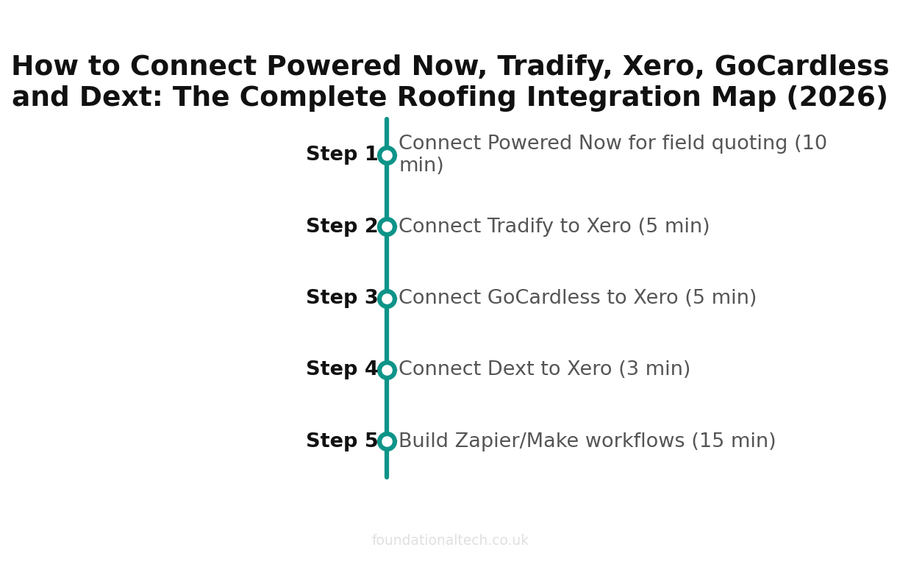
Setup timeline — estimated time for each step 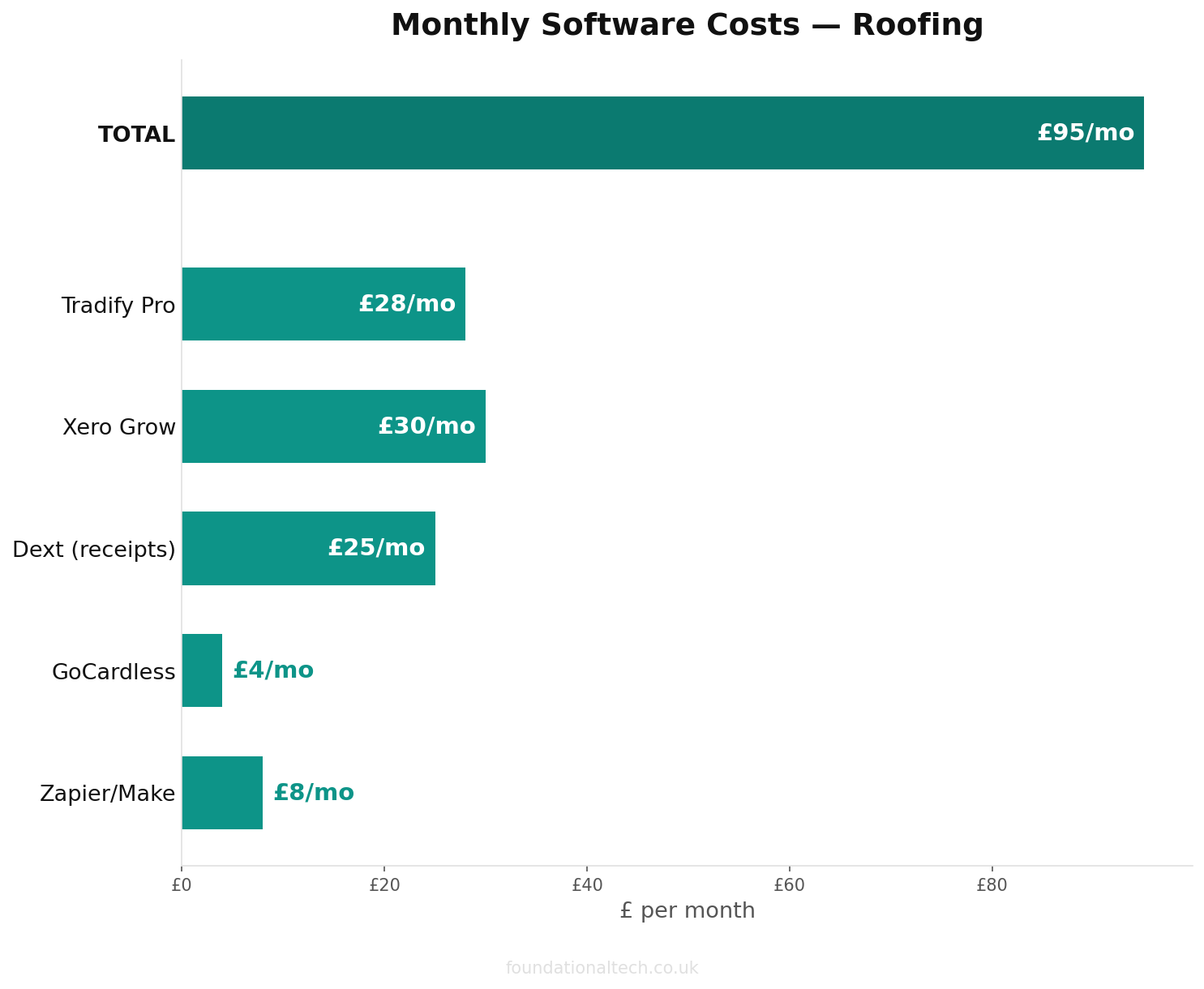
Monthly cost breakdown across the recommended tool stack 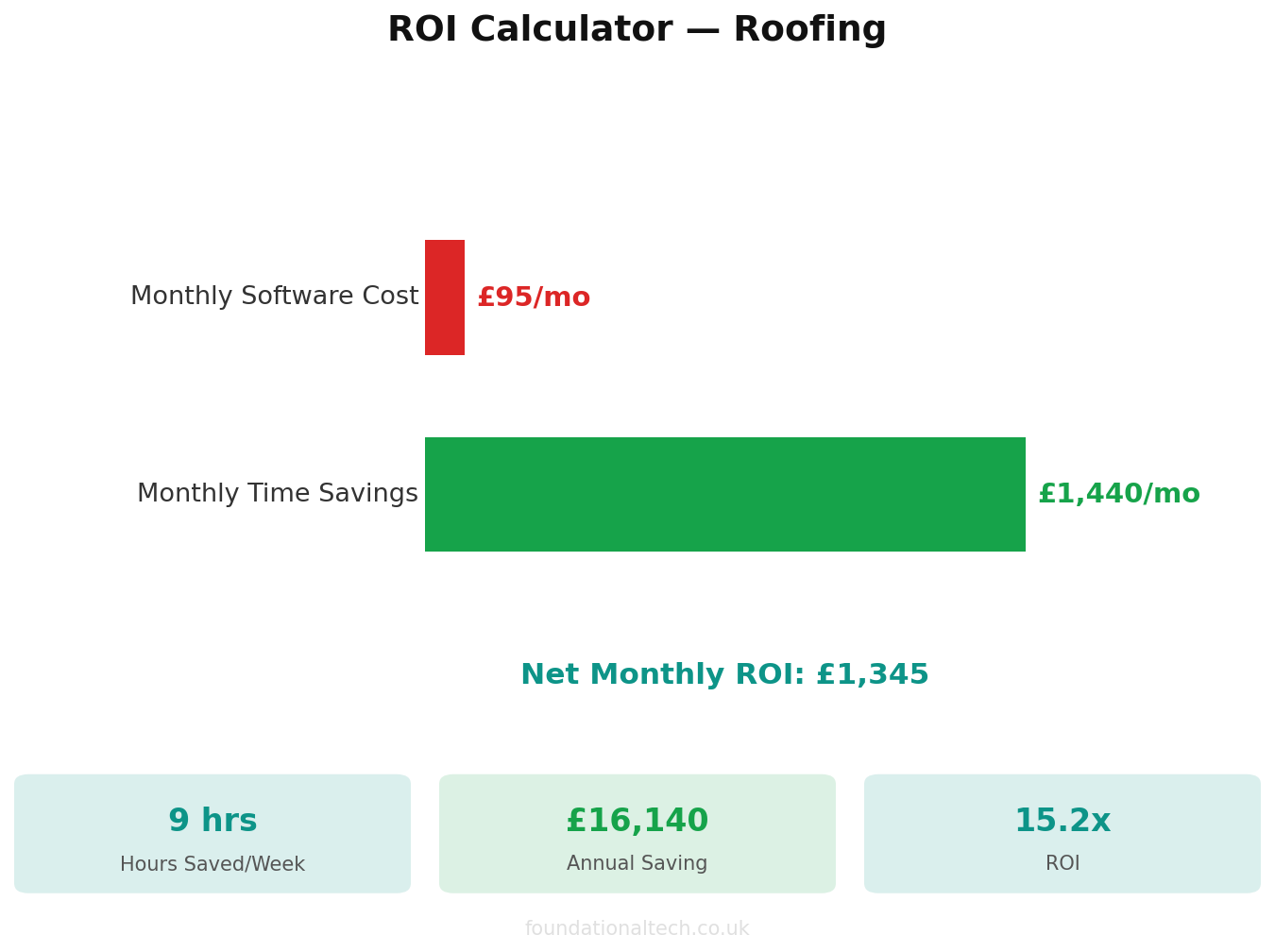
Estimated ROI from automating admin tasks Action: send you an alert the evening before, and optionally a pre-drafted "we may need to move your appointment" text ready to send the customer.
Setup time: around 30 minutes.
Roofing is the one trade where the job genuinely can't happen in the wrong weather. Getting the warning the night before — not the morning of, standing at the yard with a loaded van — is what turns a scheduling clash into a five-minute phone call instead of a wasted day.
Workflow 3: Certificate issued — filed and logged
Trigger: a job tagged with a workmanship guarantee, insurance-backed warranty or CompetentRoofer/TrustMark certificate is marked complete.
Action: save the certificate PDF to a dated folder in your cloud drive and add a row to a compliance log with address, date and certificate type.
Setup time: around 30 minutes.
Roofing sells on paperwork nobody reads until they need it. This builds the archive automatically, so when a customer or their solicitor asks for a warranty two years on, it's a search away instead of a dig through old emails.
5-tool roofing stack
Field quoting, job management, accounting, payments, and receipt capture in one flow
The Gotchas
Every wiring job has a few joints that come loose. Here's where this one does, specifically for roofing.
Don't let two systems raise the invoice. The commonest mess is a stage invoice created in the job app and manually in Xero, producing duplicates that never reconcile. Pick the job app as the only place invoices are born; Xero receives, never creates.
Match your CIS mapping before you connect subcontractor payments. If subbies invoice you and you deduct CIS before paying them, that deduction has to route to the right liability account in Xero automatically. Check the mapping during setup, not when HMRC queries your return — a wrongly mapped deduction is the kind of error that only surfaces at year end, when it's expensive to unpick.
Don't count a Direct Debit as landed the moment it's authorised. GoCardless payments take a few working days to clear. Treat the invoice as paid only when Xero's reconciliation confirms the cash has actually arrived — especially relevant when you're releasing a scaffold or ordering materials against that stage payment.
Keep Dext for costs only. Dext handles money going out — merchant receipts, hire, fuel. If customer invoices ever get photographed into it as well, you'll double-count income. Dext is the outgoings ledger, full stop.
Reconnect the bank feed after any bank change. Xero's feed drops silently when you switch cards or your bank updates its security, and nothing alerts you — you just notice weeks later that payments aren't matching. A monthly glance keeps this invisible.
Wire it in this order — job app to Xero first, then GoCardless and Stripe, then Dext, then CIS and Payroll, then the three bridge workflows last — and the result is a stack that behaves the way a roof should: every layer doing its job, nothing left for water, or admin, to find its own way through.
Which connection in your stack is still done by hand — and how many minutes does it cost you on every single job?
A & Y Financial Services builds these exact automation stacks for roofing businesses across the UK. If you've read the architecture and want someone to implement it — that's what we do.