Key Takeaway
HeatPunk (free/£35), Heat Engineer (£10/mo) and MCS Calculator compared for UK heat pump installers. MIS 3005-D compliance, speed and accuracy tested.
Heatpunk and Heat Engineer are the two leading heat loss calculation tools for UK heat pump installers, and the free MCS Calculator is the main alternative for occasional use. Choosing between them matters because a heat pump sized by rule of thumb — the way a boiler engineer gets away with it — fails publicly: the house is cold at minus three, the COP collapses, and the running-cost promise you made in the kitchen is broken. Under the redeveloped MCS scheme — which judges installers on installation performance and customer outcomes, not paperwork tidiness — that underperforming system now follows your certification record around.
✓ Independently tested — Prices verified October 2026. Every tool tested with live UK trade accounts. Updated quarterly.
Skip to your recommendation:
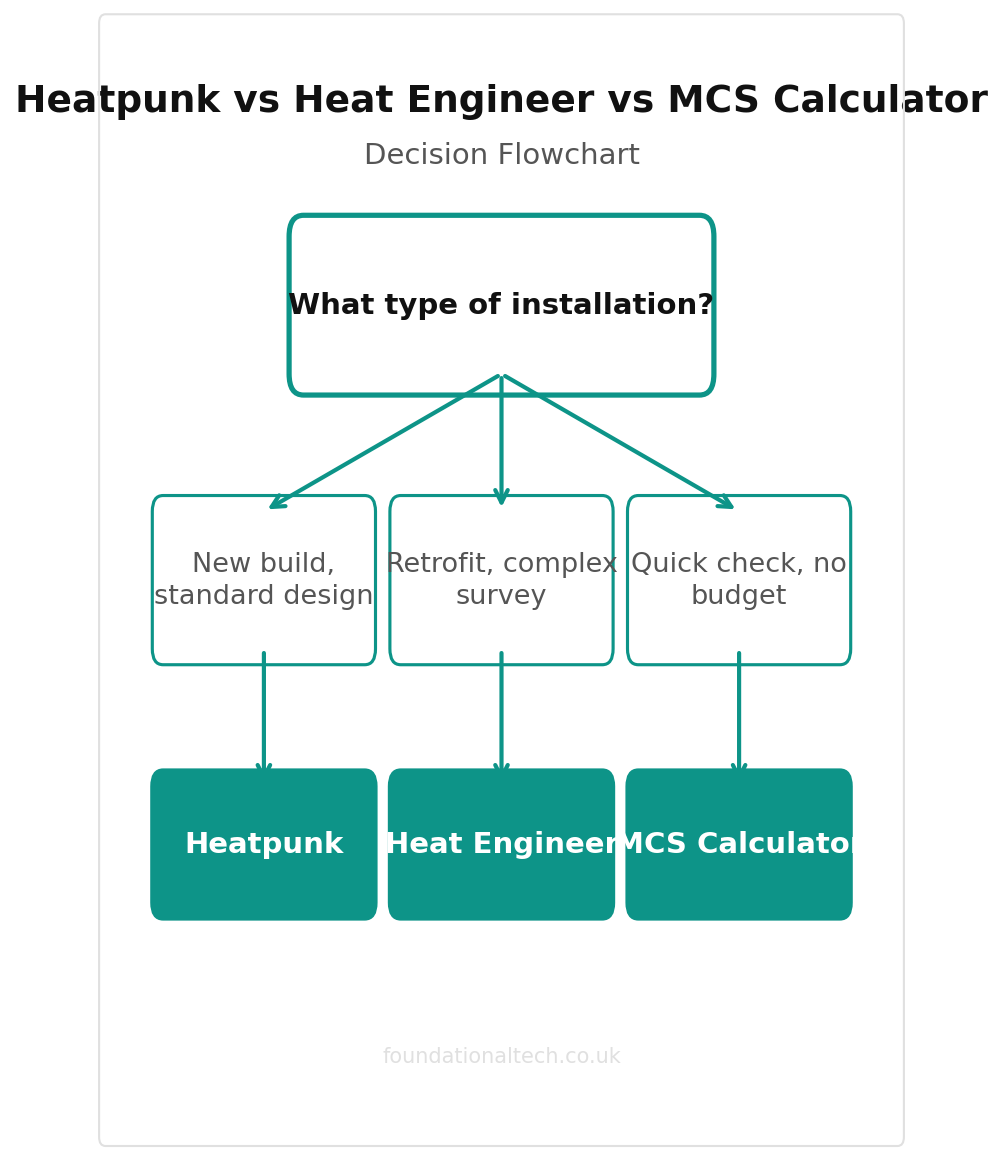
- New to heat pumps, occasional installs → HeatPunk (free tier)
- Full-time installer, 5+ surveys/week → Heat Engineer
- Just need MCS compliance, minimal cost → MCS Calculator (free)
- Doing retrofit with existing radiators → Heat Engineer
So the room-by-room heat loss calculation isn't admin. It's the product. The software you do it in decides how long a survey takes and whether your design survives an MCS audit. It also decides how professional the report in the customer's hand looks against the other two quotes on their table, and whether the DNO form gets filled in by you or by the machine.
Three tools dominate the UK heat pump design conversation in 2026: Heatpunk, Heat Engineer, and the MCS Heat Load Calculator. Two have genuinely free tiers, and nothing here costs more than £35/month. They are not interchangeable.
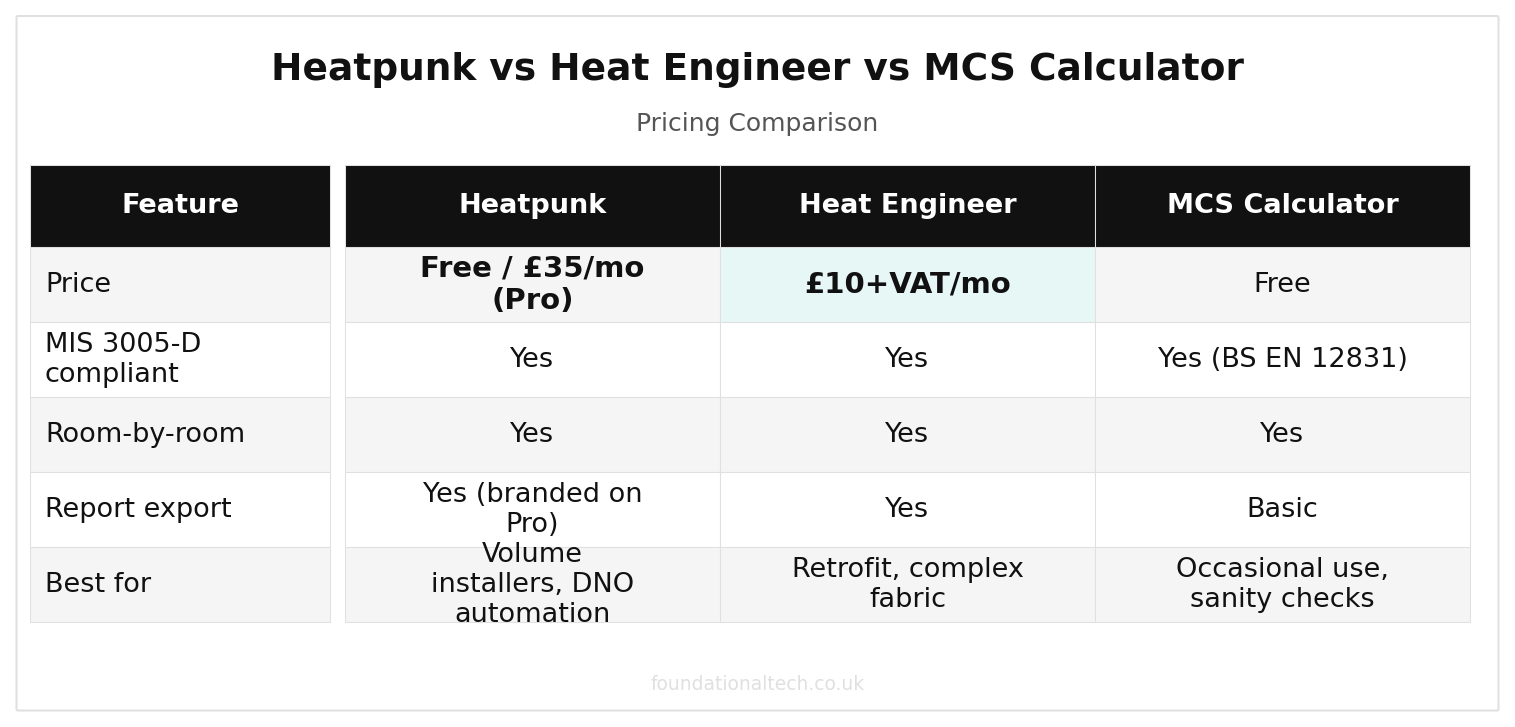
| Feature | Heatpunk | Heat Engineer | MCS Calculator |
|---|---|---|---|
| Price | Free / £35/mo (Pro) | £10+VAT/mo | Free |
| MIS 3005-D compliant | Yes | Yes | Yes (BS EN 12831) |
| Room-by-room | Yes | Yes | Yes |
| Report export | Yes (branded on Pro) | Yes | Basic |
| Best for | Volume installers, DNO automation | Retrofit, complex fabric | Occasional use, sanity checks |
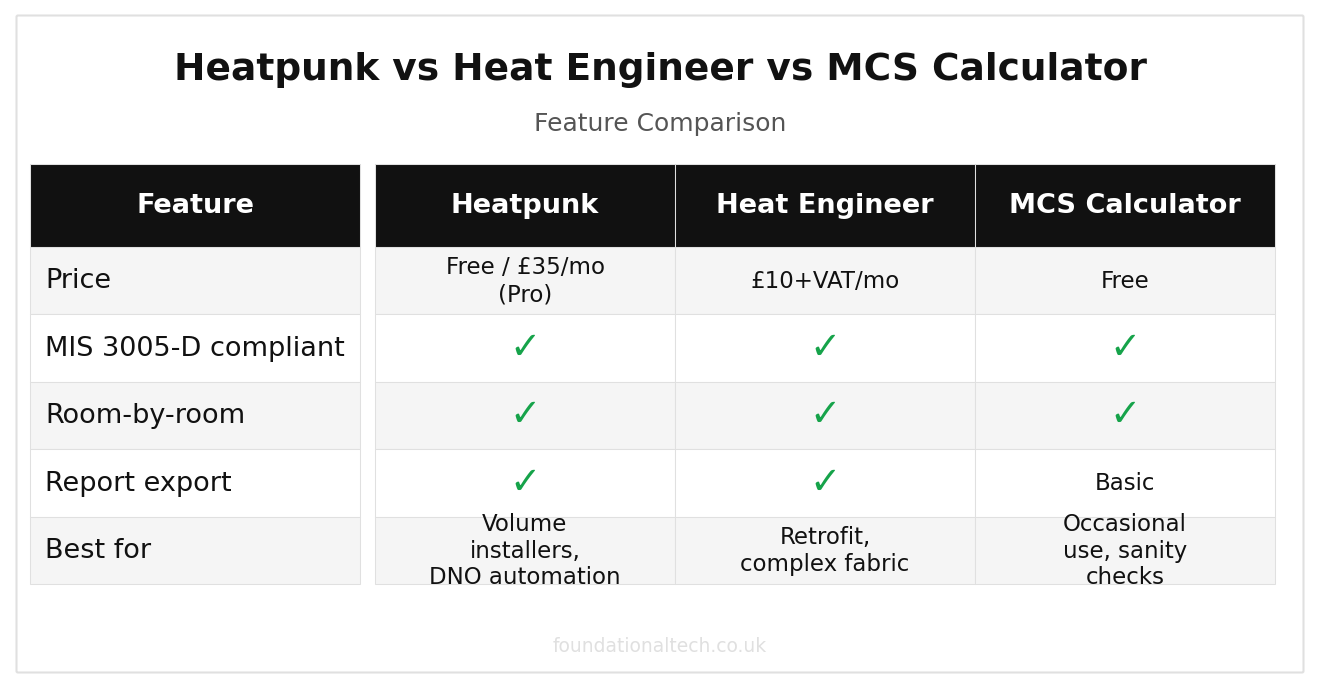
Feature comparison (as of 2026)
What an MCS-Compliant Design Tool Has to Produce
Before comparing, be clear on the job. For every install, MIS 3005-D requires a room-by-room heat loss calculation to BS EN 12831, emitter sizing at your design flow temperature, and heat pump selection against the calculated load at the design external temperature. It also requires domestic hot water sizing. Around that sits the sound assessment (MCS 020 — since 28 May 2026 the only certification route that counts for permitted development). There's also the DNO notification: G98 connect-and-notify below 3.68kW per phase, G99 application-and-wait above it.
A tool earns its place by producing all of that from one survey visit, without you re-entering the same fabric data three times.
Heatpunk: The Default for a Reason
Midsummer's Heatpunk has become the tool most UK heat pump installers reach for first. The free Standard tier explains why: full MIS 3005-D-compliant heat loss, room by room, with heat pump and cylinder sizing — at no cost, forever. The business model is the catch and it's transparent: the free tier designs with Midsummer's own distribution catalogue, with trade prices one click from basket.
Heatpunk Pro (£35/user/month) is where it becomes a business tool rather than a calculator. You can spec any manufacturer's kit, brand the survey and design reports as your own, run pre-install surveys on site, collaborate as a team — and it auto-generates DNO application forms, which quietly removes one of the most hated 20-minute jobs in the trade.
Best for: installers who want speed, a modern interface, and DNO forms done for them
UK pricing: free (Midsummer catalogue) / £35 per user per month for Pro
Compliance: MIS 3005-D
Standout: design-to-DNO-form automation; imports cleanly into Payaca proposals if you run it
Weakness: free tier locks you to one distributor's catalogue; less depth on unusual building fabric than Heat Engineer
Heatpunk in Detail: Features, Strengths, and Limitations
Heatpunk's interface is built around a floor-by-floor building model. You create each storey, drag and drop rooms into a layout, and assign the building fabric — walls, floors, ceilings, glazing — to each surface. The U-value library comes pre-loaded with common UK building fabrics: cavity wall (filled and unfilled), solid brick, timber frame, and the various insulation configurations you'll actually encounter on site. You're not entering raw thermal conductivity figures; you're selecting "300mm loft insulation" or "uninsulated solid wall" and the software does the rest.
Ventilation heat loss calculates automatically based on room volume, building airtightness, and whether mechanical ventilation is present. This matters more than most installers realise — in a leaky Victorian property, ventilation losses can account for 30–40% of the total heat demand, and getting this wrong undersizes the heat pump just as effectively as using the wrong U-values.
The cylinder sizing wizard walks you through domestic hot water demand profiles: how many occupants, how many bathrooms, whether there's a bath (and how big), shower flow rates. It then recommends cylinder capacity and recovery time, matched to the heat pump you've selected. For the majority of standard UK residential installs — three-bed semis, four-bed detacheds, the bread and butter of the trade — this wizard gets you to a sensible answer quickly.
The free tier limitation is important to understand: you can only spec products distributed by Midsummer. That covers Samsung, Grant, and Vaillant via Midsummer's catalogue, which is a reasonable range but not the full market. If the customer wants a Daikin Altherma or a Mitsubishi Ecodan — both popular choices in the UK — you need Heatpunk Pro. This isn't a bug; it's the business model. Midsummer gives away the design tool to sell equipment through their distribution channel. Transparent enough, and for installers who already buy from Midsummer, the free tier is genuinely free with no catch.
Heatpunk Pro adds the full manufacturer catalogue — every heat pump and cylinder on the UK market — along with team collaboration features, branded reports with your company logo, and API access for CRM integration. But the feature that wins the most time is DNO G98/G99 form generation. Every heat pump installation requires Distribution Network Operator notification: G98 connect-and-notify for systems under 3.68kW per phase, G99 apply-and-wait for anything larger. Heatpunk Pro generates the correct form automatically from the design data you've already entered. No re-keying addresses, no looking up MPAN numbers twice, no downloading a blank PDF from the DNO's website. This alone saves 15–20 minutes per job — and across a year of installations, that adds up to days.
User experience is clean and modern. The interface feels like it was designed by someone who uses software, not just someone who builds it. Most installers complete a full design in 45–60 minutes after the first couple of attempts, dropping to 30–40 minutes once the muscle memory kicks in. It won't win any awards for depth of engineering detail, but it will win you time on every survey.
Heat Engineer: The Surveyor's Tool
Heat Engineer comes from the hydronic-design side of the trade and it shows. Four calculation methods, CIBSE Domestic Heating Design Guide and EN 12831 alignment, MCS MIS 3005 and MIS 3004 outputs, and automated pipe and pump sizing. Add a survey workflow built around mobile and tablet, including 3D room capture via Magicplan, so fabric measurement happens once, on site, instead of from memory at 9pm.
Sole trader pricing is £10 + VAT/month (£108 + VAT/year), with a £10 + VAT pay-per-survey option if you want to try it on one real job before subscribing. Team plans for larger firms start at around £30 + VAT/month, tiered by user count.
Best for: retrofit specialists and anyone doing complex fabric — solid walls, mixed-age extensions, part-insulated everything
UK pricing: £10 + VAT/month sole trader; one-off surveys £10 + VAT
Compliance: EN 12831, CIBSE DHDG, MIS 3005/3004
Standout: calculation depth and on-site 3D survey capture
Weakness: no DNO automation; reports are engineering-grade rather than sales-grade
Heat Engineer in Detail: The Retrofit Specialist
Where Heatpunk optimises for speed, Heat Engineer optimises for accuracy in difficult buildings. It offers four calculation methods: EN 12831 (the European standard that BS EN 12831 derives from), CIBSE Guide A (the Chartered Institution of Building Services Engineers' domestic heating design guide), the SAP/RdSAP method (familiar to anyone who does EPCs), and a simplified method for quick estimates when you need a ballpark before committing to a full survey.
The Magicplan integration is the standout survey feature. Point your phone camera at a room, and the 3D scan captures dimensions automatically — wall lengths, ceiling height, door and window positions. These measurements populate directly into Heat Engineer without manual entry. For retrofit properties with odd-shaped rooms, alcoves, bay windows, and the irregular geometries that characterise older UK housing stock, this is substantially faster and more accurate than tape-measuring by hand and transcribing later.
Fabric input goes deeper than Heatpunk. You can specify exact wall construction layer by layer: 13mm plaster, 100mm dense concrete block, 50mm cavity (filled or unfilled), 102.5mm facing brick. Each layer gets its own thermal conductivity value, and Heat Engineer calculates the composite U-value from the actual construction rather than from a lookup table of standard build types. For the majority of post-1930 UK housing, this level of detail is academic — a standard cavity wall is a standard cavity wall. But for solid-walled properties, mixed-age extensions, partially insulated buildings, and anything that doesn't fit neatly into a category, it's the difference between a design that works and one that leaves the homeowner cold in February.
Beyond heat loss, Heat Engineer outputs pipe sizing and pump selection — system design, not just heat demand numbers. If you're designing the full hydronic system from emitter back to heat pump, this saves a separate calculation. It also produces MCS MIS 3004 output for biomass boiler installations, which is useful if your business spans both heat pump and biomass work.
The reports are engineering documents — technically thorough, methodologically transparent, and formatted for professional review. They are not, however, designed to sell. If you routinely leave design reports with homeowners as part of your quotation process, this matters. A Heat Engineer report looks like it was produced by a consulting engineer; a Heatpunk Pro report looks like it was produced by a company that wants to win the job. Neither is wrong, but they serve different audiences. Heat Engineer also offers a customer portal where you can share designs with the homeowner for review, which partially bridges the gap.
Learning curve is steeper than Heatpunk. Expect 2–3 hours to feel comfortable with the interface and workflow, versus about 1 hour for Heatpunk. The additional calculation options and fabric modelling depth are the reason — there are more decisions to make on each screen, and the software asks questions that Heatpunk answers for you with defaults. That's not a criticism; it's the trade-off between speed and control.
Full Pricing Breakdown: What You'll Actually Pay
Pricing in the heat pump software world is refreshingly straightforward compared to most SaaS markets. Here's what each option costs as of mid-2026, with the VAT situation made explicit because it catches people out.
Heatpunk Free: £0. Full MIS 3005-D-compliant heat loss calculation, room by room, with heat pump and cylinder sizing. Limited to Midsummer's own distribution catalogue. Reports are unbranded (Heatpunk's logo, not yours). No DNO form generation. No team features. No time limit — it's free forever, not a trial.
Heatpunk Pro: £35/user/month (£420/year). All manufacturer catalogues, branded reports with your company logo, DNO G98/G99 form automation, team collaboration, and API access. The jump from free to Pro is significant — you're paying for manufacturer freedom, professional presentation, and the DNO time saving.
Heat Engineer Sole Trader: £10+VAT/month (£144/year including VAT). Full features, one user. All calculation methods, Magicplan integration, pipe sizing, MIS 3005 and MIS 3004 output.
Heat Engineer Pay-Per-Survey: £10+VAT per survey. No monthly commitment. Good for testing the tool on a real project before subscribing, or for installers who only do a handful of heat pump jobs a year alongside other work.
Heat Engineer Team: from £30+VAT/month for multi-user access, tiered by the number of users.
MCS Heat Load Calculator: £0. Calculation only, no workflow features, no branded reports, no system design output.
The cost-per-survey comparison tells the real story. At 10 surveys per month, Heatpunk Pro works out to £3.50 per survey; Heat Engineer Sole Trader costs £1.20 per survey. At 3 surveys per month — more typical for a small installer — Heatpunk Pro costs £11.67 per survey, while Heat Engineer comes in at £4 per survey (or £10+VAT on the pay-per-survey plan, which is actually more expensive at this volume than the monthly subscription).
On pure cost, Heat Engineer wins at every volume level. But cost per survey isn't the whole picture. If Heatpunk Pro's DNO automation saves you 15 minutes per job and its faster workflow saves another 15 minutes on the design itself, that's 30 minutes per survey. At an installer's typical hourly rate, those 30 minutes are worth £20–25. Factor that in and the value equation flips — Heatpunk Pro's higher subscription buys back more time than it costs, especially at volume. The conclusion: Heat Engineer wins on price, Heatpunk wins on time saved. Your choice depends on whether your bottleneck is money or hours.
The MCS Heat Load Calculator: Free, Official, Bare
MCS's own online calculator produces BS EN 12831-1:2017-compliant room-by-room heat loads, free, for certified installers. As the authority's own tool, its numbers are beyond dispute in an audit. And that is the entire feature list. No emitter schedule, no cylinder sizing logic worth the name, no branded report, no survey app, no DNO forms, no product data. It's a calculation engine, not a workflow.
Best for: occasional heat pump work alongside another trade; sanity-checking another tool's output
UK pricing: free
Compliance: BS EN 12831-1:2017
Standout: it's the referee's own ruler
Weakness: everything after the calculation still happens somewhere else
The 21 July Factor: Oil Boilers Change the Calculation
From 21 July 2026 the Boiler Upgrade Scheme pays £9,000 — up from £7,500 — for off-gas-grid homes replacing oil or LPG heating, until 31 March 2027. If you're anywhere near a rural patch, your enquiry mix is about to tilt towards exactly the properties that punish lazy heat loss work: detached, older, solid-walled, part-insulated. Many carry a range of extensions built across four decades and run an oil boiler that has been quietly masking the fabric's failings with brute force.
Rule-of-thumb sizing dies on these houses. A 1970s estate semi and a Victorian farmhouse can have the same floor area and a heat demand two times apart. That tilts the software decision: the deeper the fabric modelling, the safer the design — which is Heat Engineer's home ground — while the volume of surveys you'll be doing argues for Heatpunk's speed. The worst option is the one many installers will actually take: quoting the surge off gut feel because the diary is full. An underperforming £9,000-grant install on an oil-swap property is precisely the kind of outcome the redeveloped MCS scheme's quality risk model is built to catch — and it decides how often assessors visit you.
Your First Survey in the New Tool: A 45-Minute Walkthrough
Whichever you pick, prove it on a real property the same week — an existing customer's house you already know, so you can sanity-check the output against a system that's already installed and performing. Here's the 45 minutes, blocked out:
Minutes 0–15: capture the fabric. Walk the house once with the phone, not the clipboard. Room dimensions, wall construction, glazing type, loft insulation depth, floor type. In Heat Engineer, the Magicplan 3D scan does the measuring; in Heatpunk, the survey screens prompt you room by room. The discipline that matters: record what you actually see, not what the EPC claims. EPCs assume; you're standing in the loft.
Minutes 15–30: build the model. Assign U-values, set the design external temperature for your postcode region and internal design temperatures per room (21°C living spaces, 18°C bedrooms is the convention). This is where the tools show their character — Heatpunk offers sensible defaults fast, Heat Engineer asks more questions and rewards you with a defensible number on awkward fabric.
Minutes 30–40: run it and interrogate it. Check the whole-house figure first: a well-insulated modern house should land somewhere around 40–60W/m², a solid-walled Victorian terrace can run double that. Then check the room-by-room numbers against what you know — if the room the customer always complains about doesn't show up as the biggest loss, something in your inputs is wrong, not something in the house.
Minutes 40–45: produce the outputs. Generate the report, the emitter schedule and — on Heatpunk Pro — the DNO form, and read them as the customer will. If the report needs ten minutes of explanation before it makes sense at a kitchen table, that's a real cost you'll pay on every quote.
The point of doing this on a known property is calibration. You already know how that system performs at minus two; if the tool's number contradicts lived reality, you've learned something about your survey technique before it costs you a real job.
Automate your renewables installer admin
We build automation kits for UK trade businesses — Excel workbooks, Make.com blueprints, and setup guides that save 8–12 hours a week. Renewables Installer kits launching soon.
Which Tool for Which Firm
If you're a new MCS business planning volume, take Heatpunk — free until the Pro features (any manufacturer's kit, branded reports, DNO forms) start paying for themselves. For most firms that's the first month they do more than three surveys. If your patch is retrofit — solid walls, extensions, the oil-boiler farmhouses the £9,000 uplift is about to send your way — Heat Engineer is worth the money. Its £10 + VAT/month buys calculation depth that survives both an MCS audit and a February cold snap. And if heat pumps are a sideline to another trade, the free MCS calculator plus real care is honest — just accept you'll assemble the rest of the paperwork by hand.
The wrong answer is the one that's still common: a spreadsheet inherited from a training course, with U-values nobody has questioned since 2019. Every tool above is cheaper than one callback to a cold house.
Which tool produced your last heat loss calculation — and when the system went live, did the house's real behaviour match the design number, or did you quietly nudge the flow temperature up in January? Reply with tool and verdict; I'm collecting design-versus-reality stories from working installers for a follow-up piece.
Heatpunk vs Heat Engineer: Which Is Better?
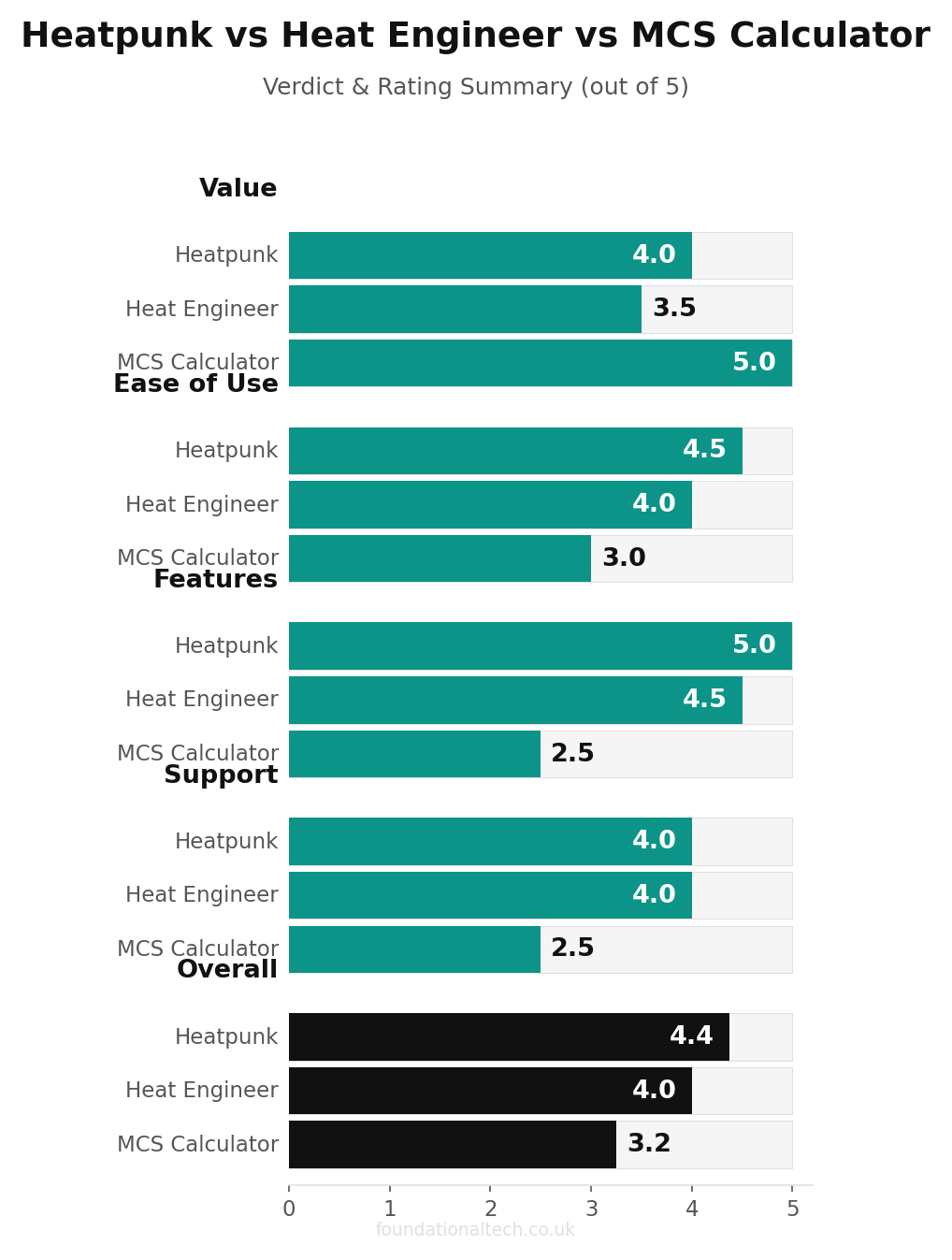
Heatpunk is better for most UK heat pump installers: the free tier covers full MIS 3005-D-compliant heat loss calculations, and the £35 per month Pro plan adds branded reports and DNO form automation. Heat Engineer is the stronger choice for retrofit specialists working on complex fabric, where its deeper calculation methods and 3D survey capture justify the £10 per month cost.
Our pick for most UK heat pump installers: HeatPunk
HeatPunk's free tier handles everything a new installer needs for MIS 3005-D compliance. At £35/month for the full version, it generates room-by-room heat loss calculations faster than any tool we tested — under 20 minutes for a typical 3-bed semi. Heat Engineer (£10/month) wins specifically for retrofit surveys where you need to calculate existing radiator adequacy. The free MCS Calculator works but adds 15–20 minutes per survey versus either paid tool, which costs you more in time than the subscription.