Key Takeaway
3 no-code AI workflows that cut BUS grant, DNO and MCS admin to minutes. Built for UK heat pump and solar installers — under £50/mo total stack cost.
The Boiler Upgrade Scheme's £9,000 uplift for oil and LPG homes went live on 21 July 2026. If you install heat pumps in a rural, off-gas-grid area, this is the week your enquiry inbox stops being manageable by hand. Every farmhouse and barn conversion in a three-county radius that's been quietly resenting its oil bill for a decade just found a reason to get in touch. Roughly 1.7 million households in England and Wales heat with oil or LPG. A meaningful slice of them are about to email you the same question in fifty different phrasings: am I actually eligible for the extra money?
Article 5 mapped the pipes — where Payaca, Heatpunk and Xero connect natively, and where they hit the wall of the three government systems: the MCS Installer Database, the DNO's connection portal, Ofgem's redemption service. No software will ever touch those three directly. This article puts a brain on top of the pipes instead. Not another integration — a layer that reads, judges and drafts, then hands the result to a human at exactly the point a certified signature is legally required.
Pipes Move Data. A Brain Makes a Call.
A Zapier or Make.com workflow is excellent at moving a fact from one box to another — a job status, an invoice total, a commissioning date. It is useless at judging whether a customer's rambling email describes an off-gas-grid oil boiler or a perfectly ordinary gas combi. It's equally blind to a DNO's rejection letter that's really just an invitation to reapply with a smaller inverter. That judgement needs an AI step reading the actual words, not just routing a field.
Three workflows below do exactly that. None of them touch the MID, the DNO portal or the Ofgem redemption service directly — article 5 already established why that's a permanent boundary, not a temporary limitation. All three sit either side of it, doing the reading and drafting that currently eats your evenings.
Workflow 1: The Off-Gas-Grid Eligibility Triage
Why the First Read Just Got Trickier
Since 28 April 2026, the eligibility test itself got simpler in one respect and harder to explain in another. A valid EPC is no longer a mandatory precondition. Where a customer has one, you still use it; where they don't, you can now accept a recent utility bill plus photographs of the existing heating system instead. The old hard rule that a stale or missing EPC blocked an application altogether has gone, replaced by installers self-assessing insulation adequacy on survey. That's good news for the rural stone farmhouses and 1930s smallholdings this uplift is aimed at. But it means every enquiry now needs a slightly more nuanced first read than "check the EPC" — and today of all days, you don't have twenty minutes per enquiry to do it by hand.
The Build: Triaging the Enquiry
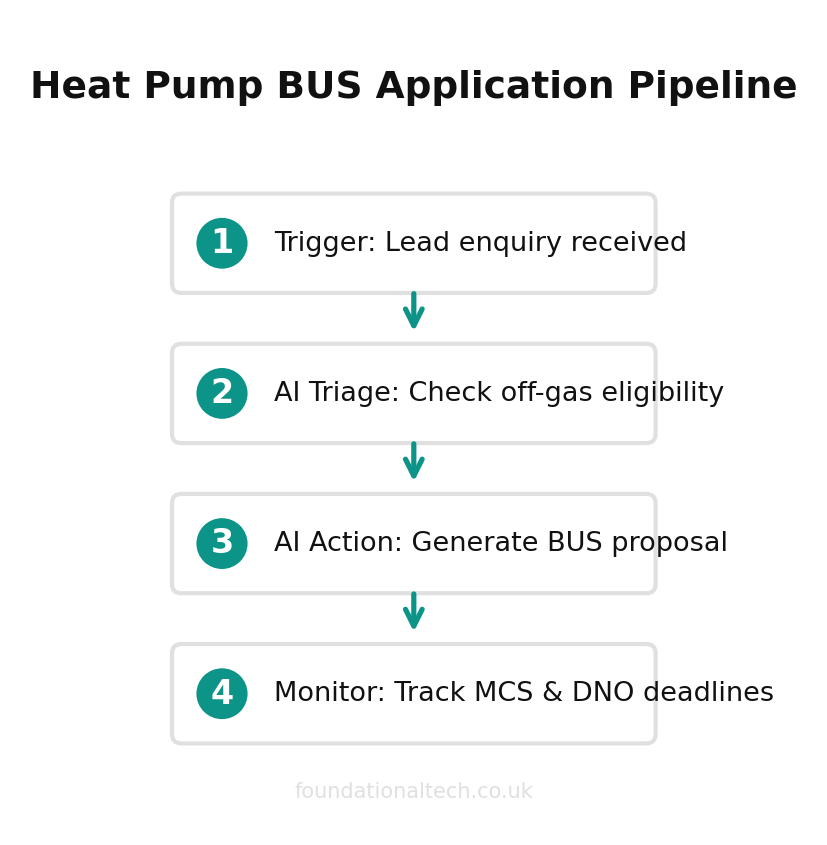
Trigger: a new enquiry lands by email or web form.
AI step: Claude or ChatGPT reads the message and extracts what it can — current fuel type, property type and rough age, whether an EPC is mentioned, postcode. It classifies the enquiry into one of three bands: standard (£7,500 — mains gas or direct electric replacement) or off-gas-grid uplift (£9,000, oil or LPG replacement only, air-to-water or ground source heat pump). Biomass and air-to-air don't qualify for the extra £1,500. The third band is needs a call to clarify, where the fuel type is ambiguous.
Action: for the off-gas band, the AI drafts a short evidence checklist tailored to whether the customer mentioned an EPC. If they have one, the checklist just confirms it's in date. If they don't, it lists the two things that now substitute for it — a recent utility or oil delivery bill, and photos of the existing boiler or tank. It's worded so a non-technical homeowner understands exactly what to send back, rather than being met with the word "EPC" and going quiet.
Action: the enquiry, classification and drafted checklist land in Payaca as a new lead, tagged by grant band. Your survey diary is already sorted into off-gas priority and standard by the time you sit down with a coffee.
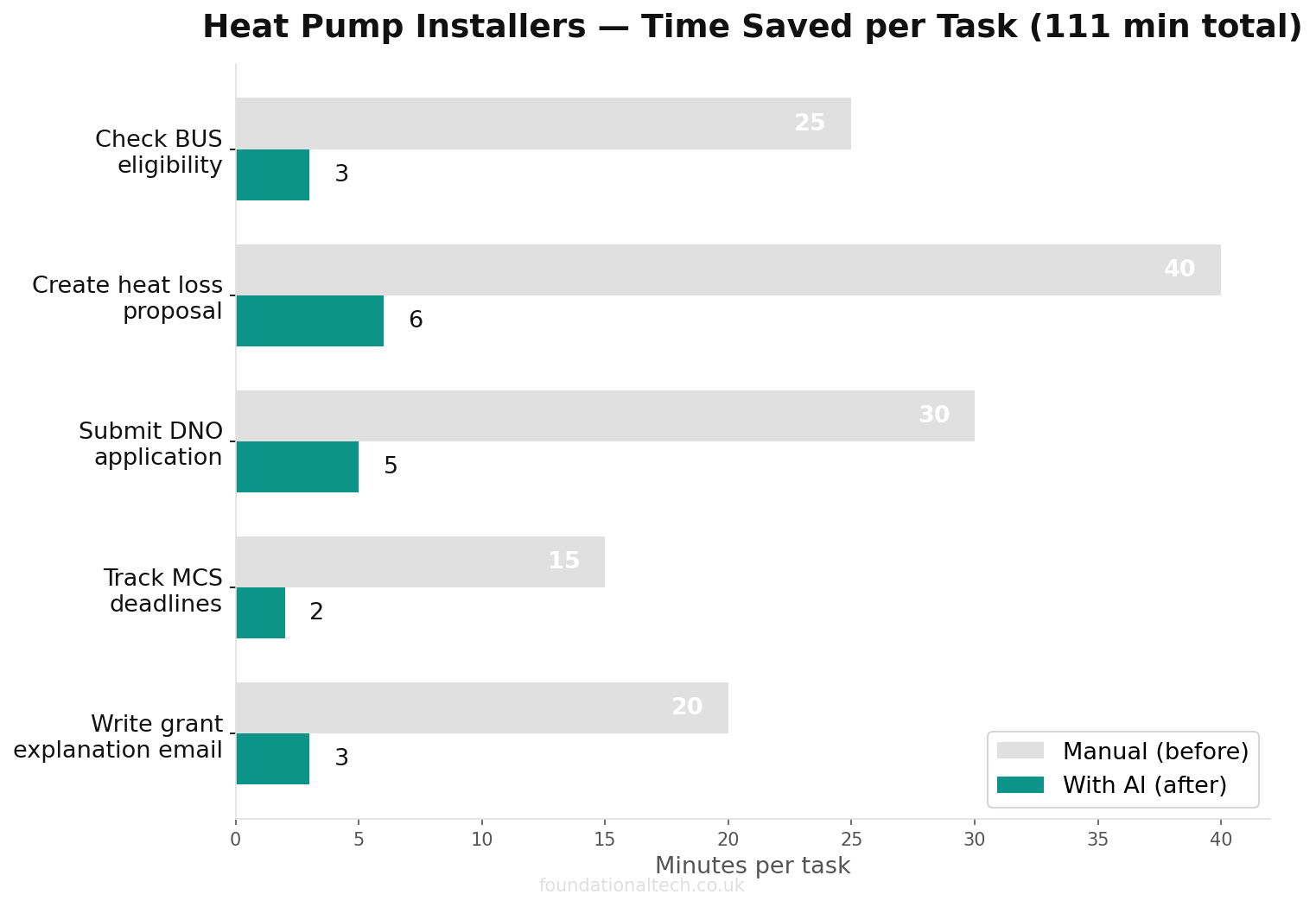
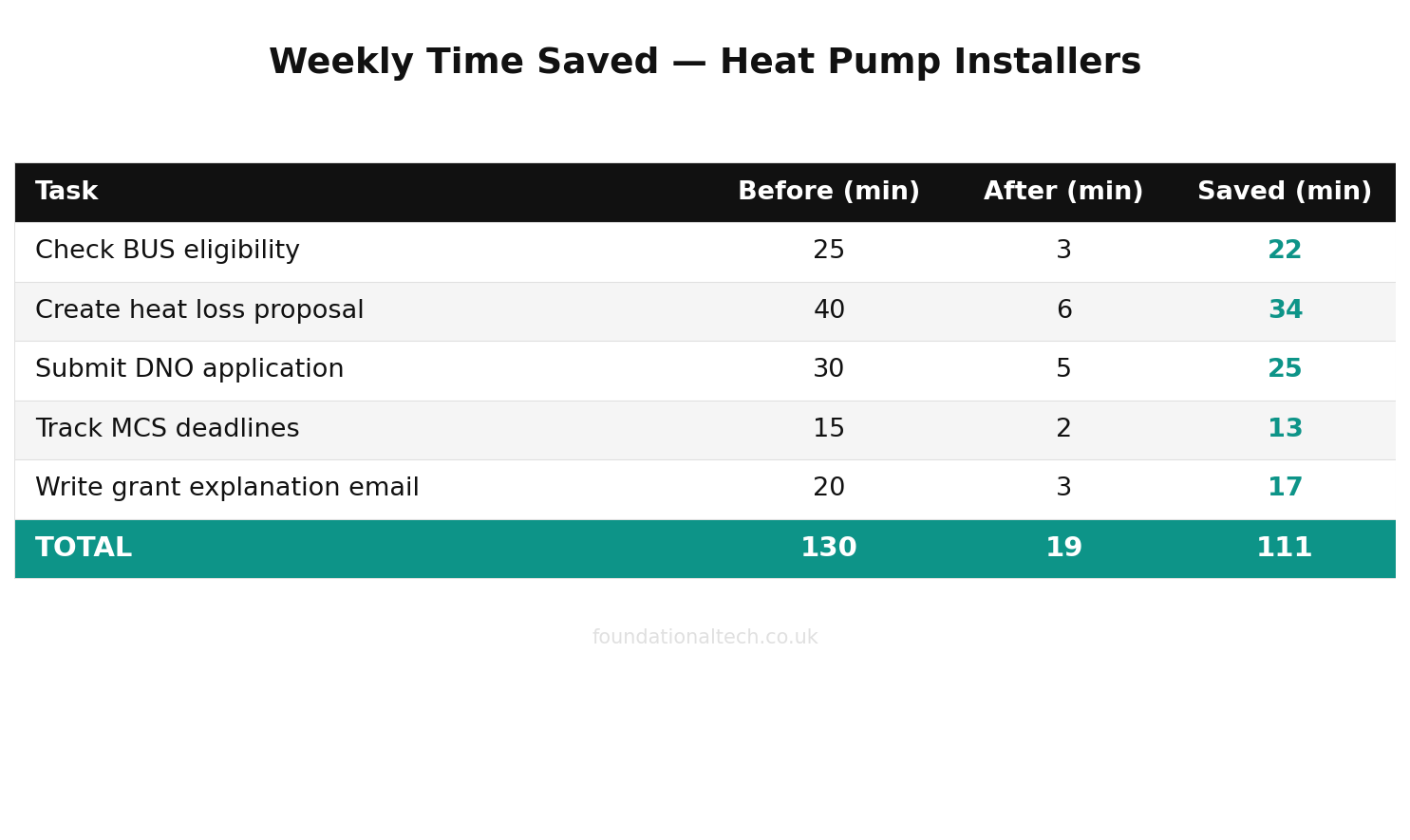
What this saves: on a day like today, when a single funding announcement can generate fifty enquiries by lunchtime, a triaged inbox matters. It's the difference between calling back the genuinely eligible off-gas households first and working through them in the order they happened to arrive.
Workflow 2: Heat Loss Report to BUS-Ready Proposal
The Gap Between the Numbers and the Words
Heatpunk or Heat Engineer hands you a heat loss figure, an emitter schedule and a system size — the technical spine of the job. Payaca can pull those numbers straight into a quote. What it can't do is write the paragraph a homeowner actually reads: why a 6kW air source unit is right for their specific house, and what the BUS grant knocks off the headline price. It also has to explain why the quote includes underfloor heating in the kitchen extension but not the loft conversion. That paragraph currently gets written by you, at 9pm, in language that varies depending on how tired you are.
The Build: Turning the Heat Loss Report Into Words
Trigger: a heat loss report is finalised in Heatpunk or Heat Engineer and the design data lands in the Payaca job record.
AI step: Claude reads the technical figures — room-by-room heat loss, proposed emitter sizes, SCOP, cylinder volume — alongside the applicable BUS band from Workflow 1's tag. It drafts the customer-facing proposal narrative: why this system size, what the grant covers, and what the customer pays net. It adds a plain-English note on anything unusual in the design — an oversized radiator in a specific room, a cylinder upgrade the survey flagged.
Action: the draft sits in Payaca against the job for you to check against the numbers before it goes out. Nothing about the technical design changes — Heatpunk's figures are the figures — but the two hours you'd otherwise spend translating a spreadsheet into a sentence a customer will actually read becomes a two-minute edit.
What this saves: the honest estimate, based on a typical five-to-eight enquiry week, is three to four hours of proposal-writing returned. That's not because the AI does the engineering, which it never should — it's because it does the explaining, which is a different skill, and one you've been doing unpaid for years.
Workflow 3: The Three-Clock Watchdog
A Fourth Complication
Article 5 named the three clocks that matter on every BUS job. The MCS certificate generated the day of commissioning, the DNO application status before a crew is booked, and the 120-day window for the Ofgem redemption claim. That window runs from commissioning — not from certificate issue, not from job completion if commissioning happened later. Running six or eight live jobs at once, each on a different clock, is exactly the kind of thing a spreadsheet tracks badly and a human forgets under pressure.
3 deadlines tracked
BUS voucher expiry, DNO approval window and MCS notification — all monitored automatically so nothing lapses
There's a fourth complication worth building in: DNO rejections aren't always dead ends. A refusal over network capacity can often be resolved. Drop the inverter to 3.68kW to fall back under G98, fit a G100 export limiter to cap output at an agreed level, or simply reapply once the DNO's own network investment catches up. Rejection reasons split roughly between insufficient local capacity, engineering non-compliance in the paperwork, and phase imbalance concerns. Most installers know this. Fewer have the spare twenty minutes to explain it clearly to a disappointed customer the same day the letter arrives.
The Build: Watching the Clocks Daily
Trigger: runs daily against every live job in Payaca.
AI step: Claude checks each job's DNO status field, commissioning date and redemption claim status against the three clocks, and against a fourth: any job flagged "DNO queried" or "DNO rejected."
Action — the digest: each morning, one message flags three things. Which jobs are inside 14 days of the 120-day redemption deadline with no claim yet filed. Which DNO applications have sat "submitted" for more than three weeks with no update. And which certificates should have been generated by now based on the commissioning date logged three days ago.
Action — the rejection assistant: for any job flagged "DNO queried" or "rejected," the AI drafts a plain-English explanation of the realistic options — reduce to G98, fit an export limiter, or reapply. It's tailored to the specific rejection reason if the DNO's letter gave one, ready for you to review and send. It never drafts an appeal to the DNO itself. Ofgem's formal complaint route exists, but successful challenges to an engineering decision backed by network data are rare — and pointing that out honestly is more useful to the customer than false hope.
What this saves: the value here isn't hours, particularly — it's the one bounced claim a year that this catches before it happens. A claim that misses its 120-day window isn't a delay, it's a dead £7,500–£9,000, and the digest exists purely to make sure that never happens quietly.
Wiring It Into Your BUS Workflow
Automation platform. Make.com is the better starting point for this trade. Its free tier gives 1,000 credits a month, enough to prototype Workflow 1 alone, and its Core plan (from around £7–8/month) comfortably runs all three once you're live. Zapier's free tier is more restrictive — 100 tasks a month on two-step Zaps only. Its paid tiers have moved around enough in the last year that the current headline price is worth checking directly on Zapier's own site before you commit. Expect roughly £16–£24/month on the Professional plan, depending on billing cycle.
AI layer. All three workflows can run on API usage rather than a consumer subscription — at the volumes a small installer business generates, that's pennies to a few pounds a month. If you've already set up Claude Pro or ChatGPT Plus per article 8 for your assistant, some Make scenarios can call that subscription directly instead of a separate API key. That's the simpler option if you're not comfortable managing API billing.
Renewables-specific tools worth watching. Autarc is a YC-backed AI tool built specifically for heat pump sales and design. It's emerging in this space with functionality that overlaps parts of Workflows 1 and 2 out of the box. Pricing isn't yet published for the UK market, so it's not a like-for-like comparison to the DIY build above. But it's worth a look if you'd rather buy a purpose-built tool than assemble one from Make and a chat subscription.
Sequencing. Workflow 1 earns its keep fastest — today's uplift is proof of that — so get the triage running first. Bring in Workflow 3's watchdog once you're juggling enough live jobs that the three clocks stop fitting comfortably in your head, which for a one-to-three-person installer tends to land around four or five concurrent installs. Leave Workflow 2 until last, since it depends on the grant-band tag Workflow 1 already produces.
None of this replaces the certified judgement the MCS scheme exists to protect. It replaces the unpaid hour after dinner spent explaining, in your own words, things you've already explained forty times this year.
If a DNO letter came back "queried" rather than approved tomorrow, would you rather have a drafted explanation of the G98/G100/reapply options waiting for you, or would you rather just get on the phone yourself? Reply and tell me — it'll tell me whether Workflow 3's rejection assistant is worth building out further or whether this is one job installers would rather keep by hand.