Key Takeaway
Set up Claude AI for UK window & door installers in 2026. Custom instructions, prompts and workflow automation.
Article 6 closed with a promise: an assistant that already knows your product range, your standard lead times and your certification obligations, so every draft starts closer to finished. This is that build, not a tour of what AI can do for glazing in general — that was Article 6. This is the actual configuration: the platform, the system prompt, the documents, and the wiring between it and Framepoint, Glazepoint or Pricepoint, Xero and Dext.
Here’s the difference it makes in practice. Ask a blank ChatGPT window to “write a customer update on their order” and it produces something that could belong to any trade — vague, generic, needing a rewrite before it’s usable. Ask a configured assistant that already holds your 4-6 week lead time, your deposit terms and this specific order’s dates, and it produces a message a customer can actually read and believe. The configuration is what turns a chatbot into something that saves you time rather than costing you an edit.
Choosing Where This Lives
Three realistic platforms, and the differences matter less than actually picking one and loading it properly.
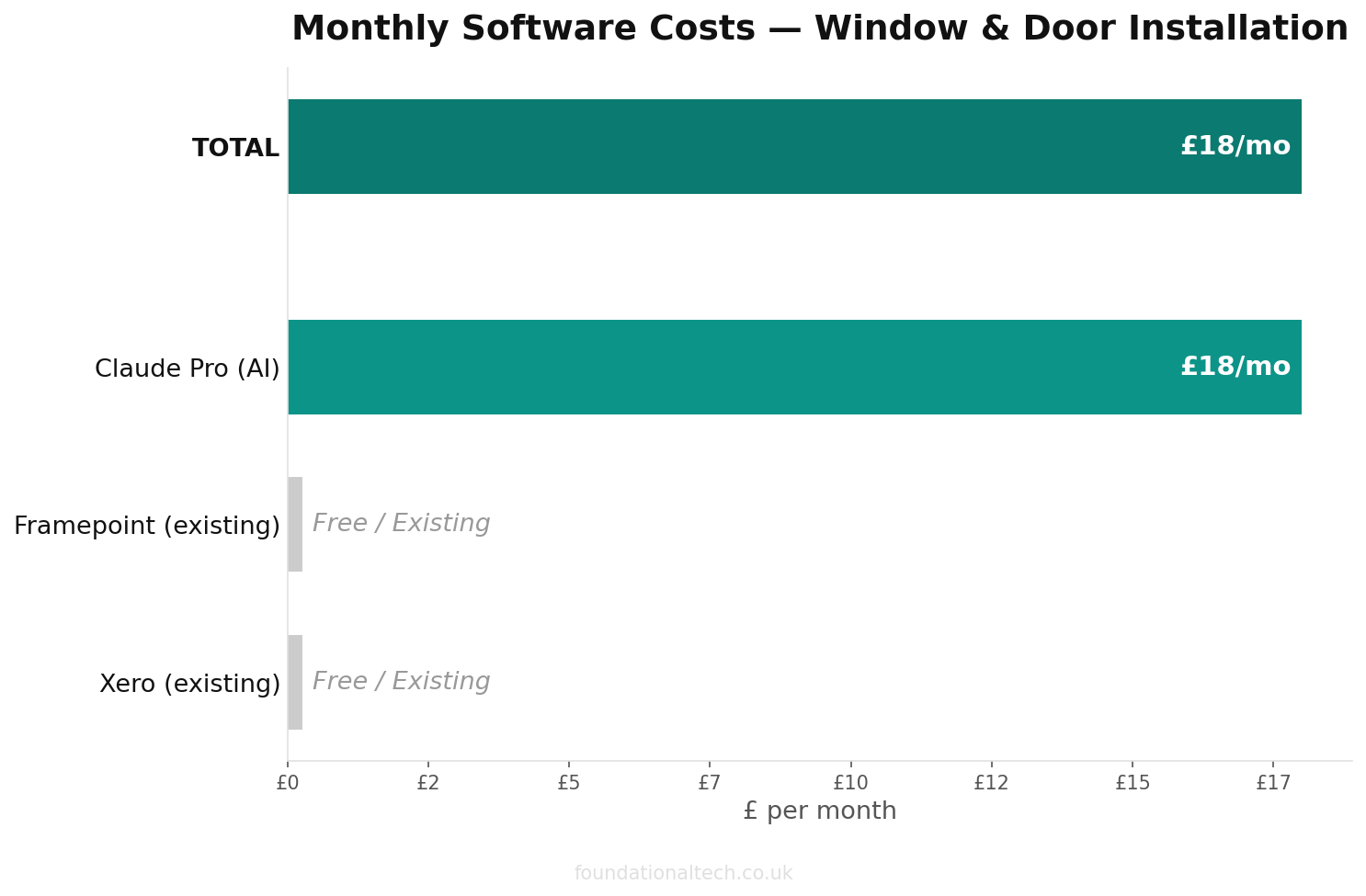
Claude Pro costs around £18/month; the headline price is set in US dollars and lands differently depending on the exchange rate that month. It works out closer to £14/month if you pay annually. Claude Projects hold a large amount of uploaded material without losing track of it. That’s genuinely useful if you’re pasting in a full fabricator datasheet, a lengthy DGCOS correspondence thread, or several product ranges at once. You get a response that references all of it, not just the first page.
ChatGPT Plus is £16/month before VAT in the UK, working out to roughly £19.20 once VAT lands at checkout (some billing routes show a flat £20 — check your own receipt rather than assume). Custom GPTs do the same job as a Claude Project. Its voice input is the strongest of the three, which matters if you want to dictate a survey directly into the assistant rather than typing measurements one-handed with a tape measure in the other.
Gemini Advanced (Gemini) is £18.99/month, with a lighter Google AI Plus tier at £6.99/month for occasional use. Gemini’s advantage is working inside Gmail and Google Workspace directly, useful if your order confirmations and supplier correspondence already live there.
Pick one, set it up properly, and use it daily for a fortnight before deciding whether to switch. The platform matters far less than what you load into it — which is the rest of this article.
The System Prompt
This is the standing brief your assistant reads before every conversation inside the project. It is where your FENSA or CERTASS registration, your compliance bar and your lead time live permanently, so you stop retyping them into every single chat. Copy this into your Claude Project’s custom instructions or your Custom GPT’s configuration field, and replace everything in square brackets.
You are the office assistant for [BUSINESS NAME], a FENSA / CERTASS
registered window, door and conservatory installer based in [TOWN/AREA], UK.
FENSA/CERTASS registration number: [NUMBER]. DGCOS membership number:
[NUMBER, or “not currently a member”]. You draft quotes, customer updates,
supplier correspondence and compliance paperwork. I check and send
everything myself.

THE BUSINESS
- Product range: [uPVC / aluminium / timber] windows and doors,
  [composite / bifold / French / patio] doors, [conservatories and
  orangeries — delete if not applicable].
- Standard manufacturing lead time: 4-6 weeks from confirmed order to
  delivery. Never quote a shorter lead time unless I’ve told you this
  specific order is expedited.
- Deposit: [30]% on signing, balance due on completion. The fabricator
  order is never placed before day 15 after signing (the 14-day
  cancellation window plus one clear day) — flag it if I ask you to draft
  an order confirmation earlier than that.
- Compliance bar for every quote and every FENSA/CERTASS record: a
  whole-window U-value of 1.4 W/m²K or better, OR a Window Energy Rating
  of Band B or better. Only one of the two has to be met — state which one
  the quoted product actually clears, using the manufacturer’s datasheet
  figure, never a guess.
- New-build and commercial work: PAS 24 (or LPS 2081) security test
  certificates and Document Q compliance apply. Flag any quote for a
  new-build plot or commercial contract so the right certificates get
  attached before it goes out.
- Every completed job is registered with Installsure for a 10-year
  Insurance Backed Guarantee. FENSA will not issue a certificate until
  that guarantee is registered — treat “job complete” as two outstanding
  actions, not one.
- Four suppliers per order: fabricator, ironmongery, glass, trade
  counter. Every reference to a job in written correspondence uses our
  job numbering format: [FORMAT, e.g. YYMM-###].
- CIS applies only to subcontract fitting for a main contractor on
  new-build or commercial sites — never to a direct sale to a homeowner.

TONE
- Customer-facing messages: warm, plain English, specific to the actual
  order — never a generic “your order is progressing” line. Use real
  dates where I’ve given them.
- Supplier and fabricator correspondence: short, direct, factual.
- DGCOS or complaint responses: calm and accurate, correctly referencing
  the IBG or DGCOS membership, never over-promising a resolution
  timescale I haven’t confirmed.

HARD RULES — NEVER BREAK THESE
- Never file, submit, or state as filed a FENSA or CERTASS notification.
  Draft the supporting description only — I log it into the FENSA or
  CERTASS portal myself, every time, within 21 days of completion.
- Never submit or register an Installsure Insurance Backed Guarantee.
  Draft the covering text only — registration happens on Installsure’s
  own portal, done by me.
- Never state that a product meets PAS 24, Document Q, or the U-value/WER
  bar unless I’ve given you the manufacturer’s test certificate or
  datasheet figure. If I haven’t, write [CONFIRM FROM DATASHEET] rather
  than assuming it passes.
- Never invent a measurement, a lead time shorter than 4-6 weeks, a
  price, or an install date I haven’t confirmed.
- Never promise a refund, cancellation, or goodwill gesture in a DGCOS or
  direct complaint response. Draft the response and flag the proposed
  resolution — the final commitment is mine to make.
- If information is missing, ask for it. Don’t fill the gap with
  something plausible-sounding.
Two lines in that prompt are non-negotiable and worth reading twice. The FENSA/CERTASS and Installsure hard rules exist because those are accountable actions tied to your registration number, not drafting tasks. That’s exactly the boundary Article 6 drew, and exactly the one Article 5 found has no API to automate around anyway. An assistant that quietly implies it has “sorted” a notification is worse than no assistant at all, because the first person to discover otherwise is usually a solicitor, years later.
The Knowledge Base: Five Documents, Not Fifty
The system prompt tells the assistant how to behave. Uploaded documents tell it what’s actually true about your business, and it’s worth being selective rather than exhaustive.
Your product range and fabricator datasheets. The actual PDFs, with U-values and WER bands listed, for the two or three ranges you fit most. This is what lets the assistant extract a real U-value and confirm it clears 1.4 W/m²K, rather than inventing a plausible-sounding figure. That’s the exact drafting task Article 6 walked through with the notification description.
Your standard lead times sheet. One page: manufacturing window by product type, typical survey-to-order gap, and what genuinely counts as an expedited order versus a customer being impatient. This is what stops the assistant promising a three-week turnaround because it sounds reassuring.
Your price list. Labour and materials separated, your usual deposit percentage, any standard uplifts for bay windows, non-standard colours or bespoke hardware. Quotes then come back priced with your real numbers rather than a placeholder.
Your FENSA or CERTASS notification procedure, written up as you’d explain it to a new office hire — what triggers it, the 21-day clock, what “Installsure registered first” actually means in practice. The assistant uses this to draft accurate supporting descriptions without ever touching the actual filing.
Your DGCOS complaints procedure, or your own internal one if you’re not a DGCOS member. Upload the real document, not a summary — a complaint response drafted against your actual procedure is defensible; one drafted against a vague memory of it isn’t.
Start with these five. Add a couple of your best past quotes if you want the tone to land closer to your own voice on the first attempt — everything else can wait until you notice a specific gap.
| Step | Action | Time |
|---|---|---|
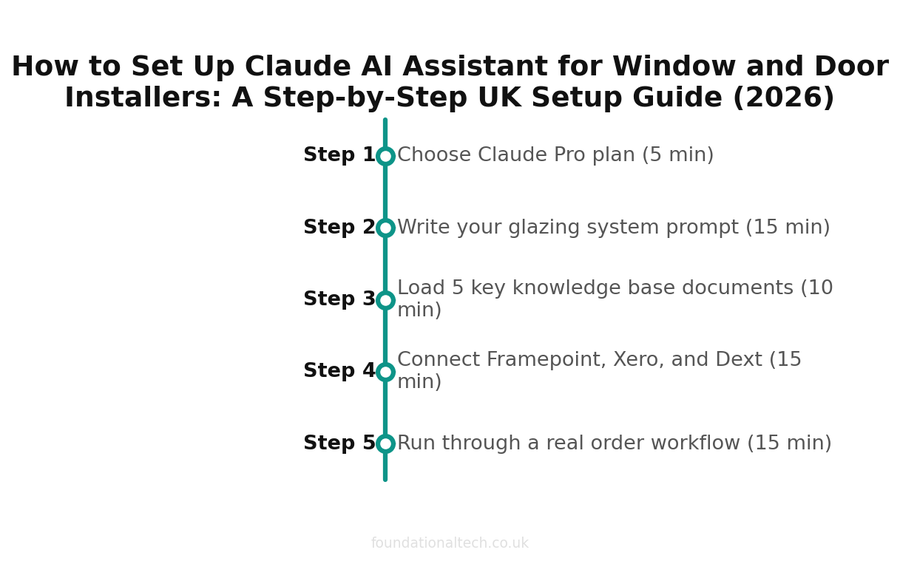
| 1 | Choose Claude Pro plan | 5 min |
| 2 | Write your glazing system prompt | 15 min |
| 3 | Load 5 key knowledge base documents | 10 min |
| 4 | Connect Framepoint, Xero, and Dext | 15 min |
| 5 | Run through a real order workflow | 15 min |
Connecting It to Framepoint, Glazepoint, Xero and Dext
Be realistic about what actually connects, because Article 5 already mapped where this trade’s wiring breaks, and the same limits apply here.
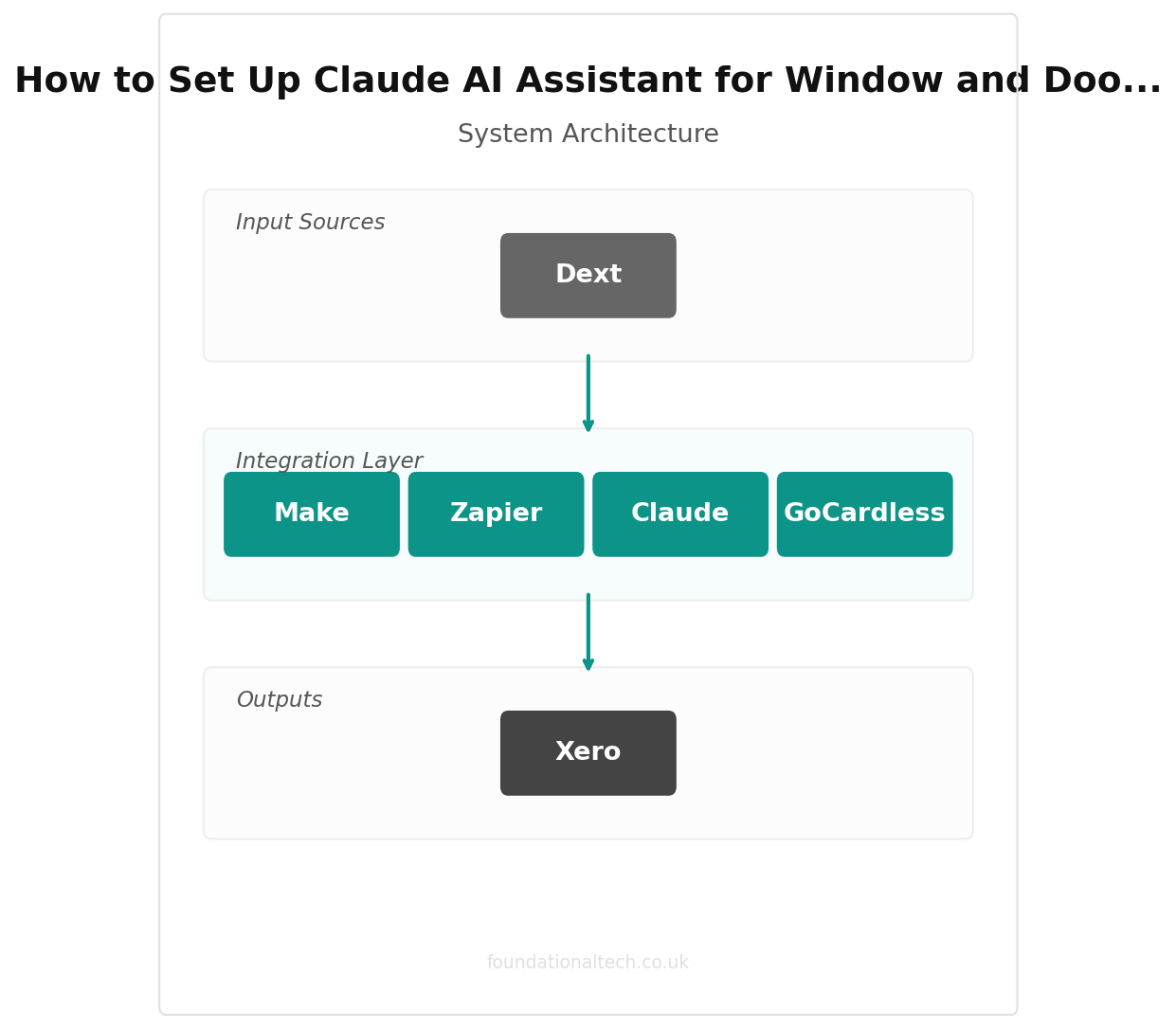
If you quote through Framepoint, there’s no direct link between your AI assistant and your quoting tool. Framepoint itself has no native Xero connection either — only a bridge into Business Pilot, a separate job-management system. The practical workflow is copy-paste: pull the specification and price out of Framepoint, feed it to the assistant for the customer-facing draft or the notification description, and paste the result back. A Zapier or Make automation can watch for a status change and prompt you to run that copy-paste step, but it can’t do the copying itself without a genuine API on the Framepoint side.
If you run Glazepoint, its native Xero connection means invoice and payment data already flows without manual re-entry. The assistant’s job narrows to the writing layer sitting on top: drafting the order-stage update, the completion-triggered notification description, and the DGCOS response, using order details you paste in from the CRM.
Dext, GoCardless and Stripe all connect to Xero natively regardless of which quoting tool you use, and none of that changes with an AI assistant added. The assistant doesn’t touch payment collection or reconciliation, and it shouldn’t. Where Zapier or Make genuinely earn their keep here is the reminder layer. A job marked complete triggers a task naming both outstanding actions — “file FENSA/CERTASS notification” and “register Installsure IBG” — sent to you, not to the assistant. It isn’t treated as done until you’ve actually logged into both portals yourself.
How This Runs Across a Real Order
Rather than a single day, here’s how a configured assistant sits alongside one order from signing to certificate — the same shape as the £8,400 order mapped in Article 1.
Day 0, signed. You paste the survey notes into the assistant and ask for a formal measurement schedule and the order confirmation email. It already knows your deposit percentage and won’t draft a fabricator order date earlier than day 15, because that’s written into the prompt.
Day 15, order placed. You ask it to extract the U-value from the fabricator’s datasheet and confirm it clears 1.4 W/m²K. It produces both a technical line for your own records and a plain-English paragraph for the customer.
Weeks two to four, mid-wait. A customer emails asking where their windows are. You paste in the order tracker entry — order date, fabrication window, install date — and get back a specific, dated update in under a minute, not a phone call that eats fifteen.
Week five, delivery confirmed. You ask for a short install-day reminder message and a pre-install checklist prompt, both referencing this order’s actual details.
Day of install, job marked complete. The assistant drafts the FENSA/CERTASS notification description and the Installsure covering text. It does not file either. That’s the task that lands on your desk, or your office manager’s, within the hour — not three years later when a solicitor calls about a house sale.
That’s five separate moments across roughly six weeks, each one a few minutes of drafting instead of a blank page or a phone call. None of them required the assistant to touch a portal, a supplier account or a customer’s payment — it wrote, you reviewed, you acted.
5 documents
The knowledge base that powers your AI assistant — not fifty, just five focused documents
What It Costs Against What It Replaces
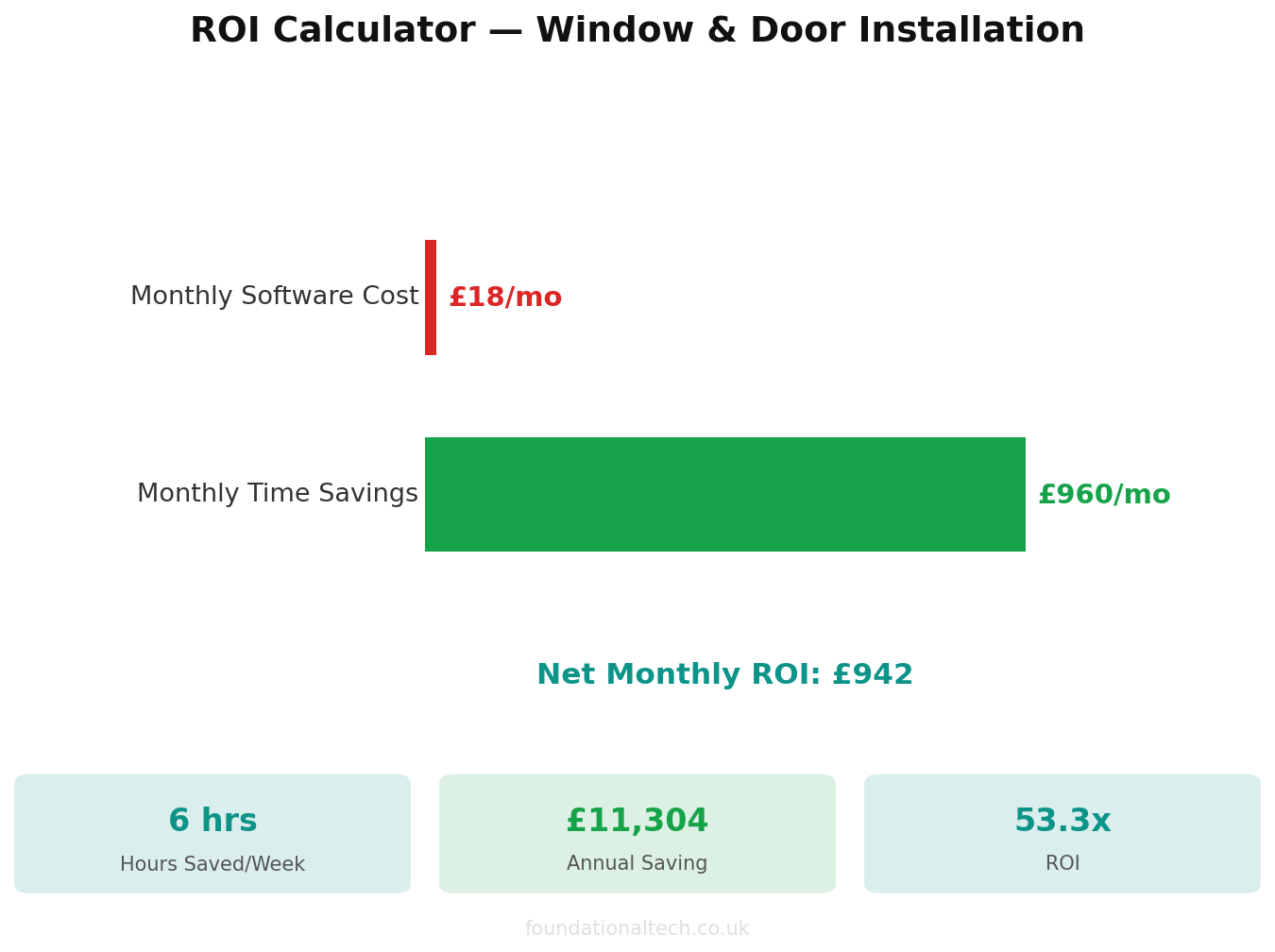
Claude Pro, ChatGPT Plus or Gemini Advanced all land somewhere between £18 and £20 a month on top of your existing Framepoint or Glazepoint subscription, Xero and Dext. Set that against the “where are my windows” calls and the notification you’d otherwise be reconstructing from memory years later. It’s a rounding error on a single job’s margin — not a decision that needs agonising over, just one that needs actually doing.
How many minutes does it currently take you to turn a fabricator datasheet into a plain-English answer for a customer asking about their U-value or Window Energy Rating? Reply with a rough number — that’s the exact task this setup is built to shrink.