Key Takeaway
Framepoint (£130/mo) vs Glazepoint (£100/user) vs Pricepoint (£80/user). Quoting software compared for UK window and door installers — features and pricing.
A roofer can quote from a site visit and email the figure over that evening. A window and door sale usually has to close in the room it starts in — on the customer's sofa, tablet in hand, while they're still deciding between white and anthracite grey. Hesitate, promise to "email it over," and a meaningful share of those customers get a second quote from the installer who called back first. The quoting tool isn't admin support in this trade. It's the sales floor.
Get the wrong one and the cost isn't just a monthly fee. It's slower closes, mismatched pricing between what you quoted and what the fabricator actually charges, and a business that can't see its own order book without a phone call to the office. Three tools dominate this decision for UK glazing firms in 2026: Framepoint, Glazepoint and Pricepoint. None of them do the same job.
What a Glazing Quoting Tool Actually Has to Do
Before comparing, be clear on the brief. It needs to price a bespoke, made-to-measure product — not a fixed catalogue item — accounting for glazing bars, obscure or toughened glass, colour, hardware and non-standard openings, live and in front of the customer. It needs to hand that specification to a fabricator without anyone retyping it. And because the order then disappears for four to six weeks of manufacturing, it ideally tracks what happens to it after the sale closes, not just the sale itself.
A tool that nails the quote but loses the order the moment production starts has only done half the job.
There's a second, quieter reason this choice matters more than it looks: switching mid-year is genuinely painful. Your product range, your default glazing specifications, your fabricator's price book and your standard terms all live inside whichever tool you pick. Migrate six months in and you're rebuilding that setup from scratch while still trying to quote on the doorstep. Get the choice right the first time and it's a one-hour setup job; get it wrong and it's a January spent untangling two systems at once.
The Contenders
Framepoint
Best for: solo installers and small teams who sell on the doorstep and need a fast, accurate, visual quote on the spot
UK pricing: subscriptions from around £130/month, with over 20% off on an annual plan; no long contract on the monthly rate, cancel any time
Xero integration: none native — quotes export for manual entry or via a third-party connector
Standout feature: free-draw design — sketch the actual window or door shape on screen, add bars, colours and hardware, and watch the price update live. Send the same spec to multiple suppliers for a price comparison in one tap
Weakness: it's a sales and pricing tool, not a job-management system — once the order is placed, tracking manufacturing, delivery and certification lives somewhere else
Glazepoint
Best for: an established installer running multiple fitting teams who needs one system covering the enquiry, the survey, the sale, the installation schedule and the customer record
UK pricing: £100 per user per month plus VAT, so a typical 3–4-person sales and office team runs to roughly £300–£400/month plus VAT, on a rolling monthly agreement
Xero integration: available via the platform's own accounting links
Standout feature: it's a full CRM built specifically for double glazing companies. Window design sits inside a system that also runs your diary, your leads and your installation calendar, so nothing has to be re-keyed between "the quote" and "the job"
Weakness: meaningfully more expensive than Framepoint, and more system than a one- or two-man outfit needs before it's actually generating that many leads a month
Pricepoint
Best for: installers who also fabricate their own units, or work closely enough with one fabricator that survey, design and manufacturing pricing need to sit in the same tool
UK pricing: from £80 per user/month excluding VAT on a pay-as-you-go basis, with published tiers for 3, 5 or 10 users and no long-term contract; the fabrication rules themselves are scoped and quoted individually against your product range
Xero integration: via export, dependent on configuration
Standout feature: window design, sales, survey and manufacturing pricing genuinely combined — useful where the same business is both quoting the customer and pricing its own production run
Weakness: the fabrication-first design means a pure installer buying finished units from a third party is paying for capability they won't use
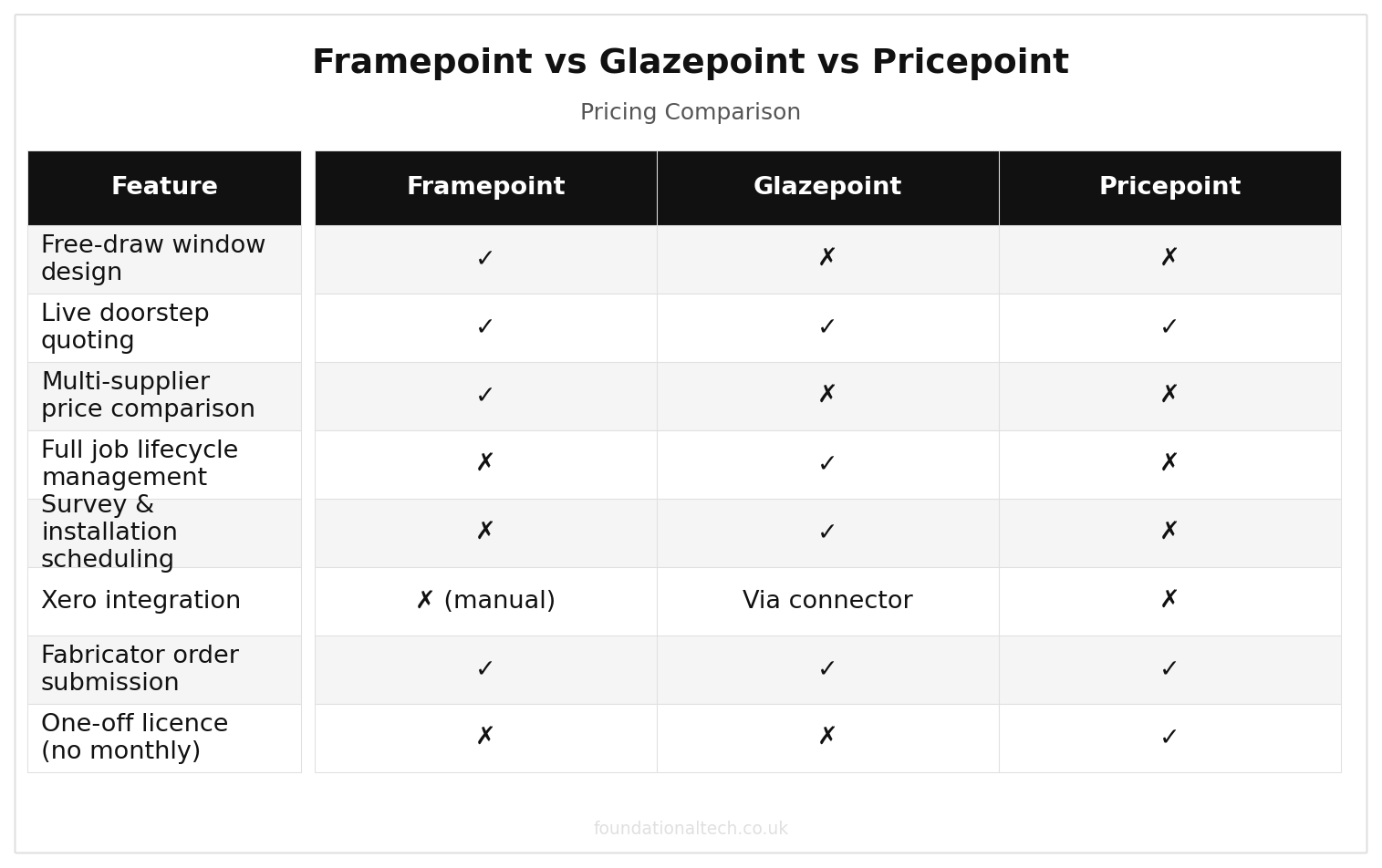
| Feature | Framepoint | Glazepoint | Pricepoint |
|---|---|---|---|
| Free-draw window design | ✓ | ✗ | ✗ |
| Live doorstep quoting | ✓ | ✓ | ✓ |
| Multi-supplier price comparison | ✓ | ✗ | ✗ |
| Full job lifecycle management | ✗ | ✓ | ✗ |
| Survey & installation scheduling | ✗ | ✓ | ✗ |
| Xero integration | ✗ (manual) | Via connector | ✗ |
| Fabricator order submission | ✓ | ✓ | ✓ |
| No long-term contract required | ✓ | ✓ | ✓ |
Head-to-Head: The Decision Matrix
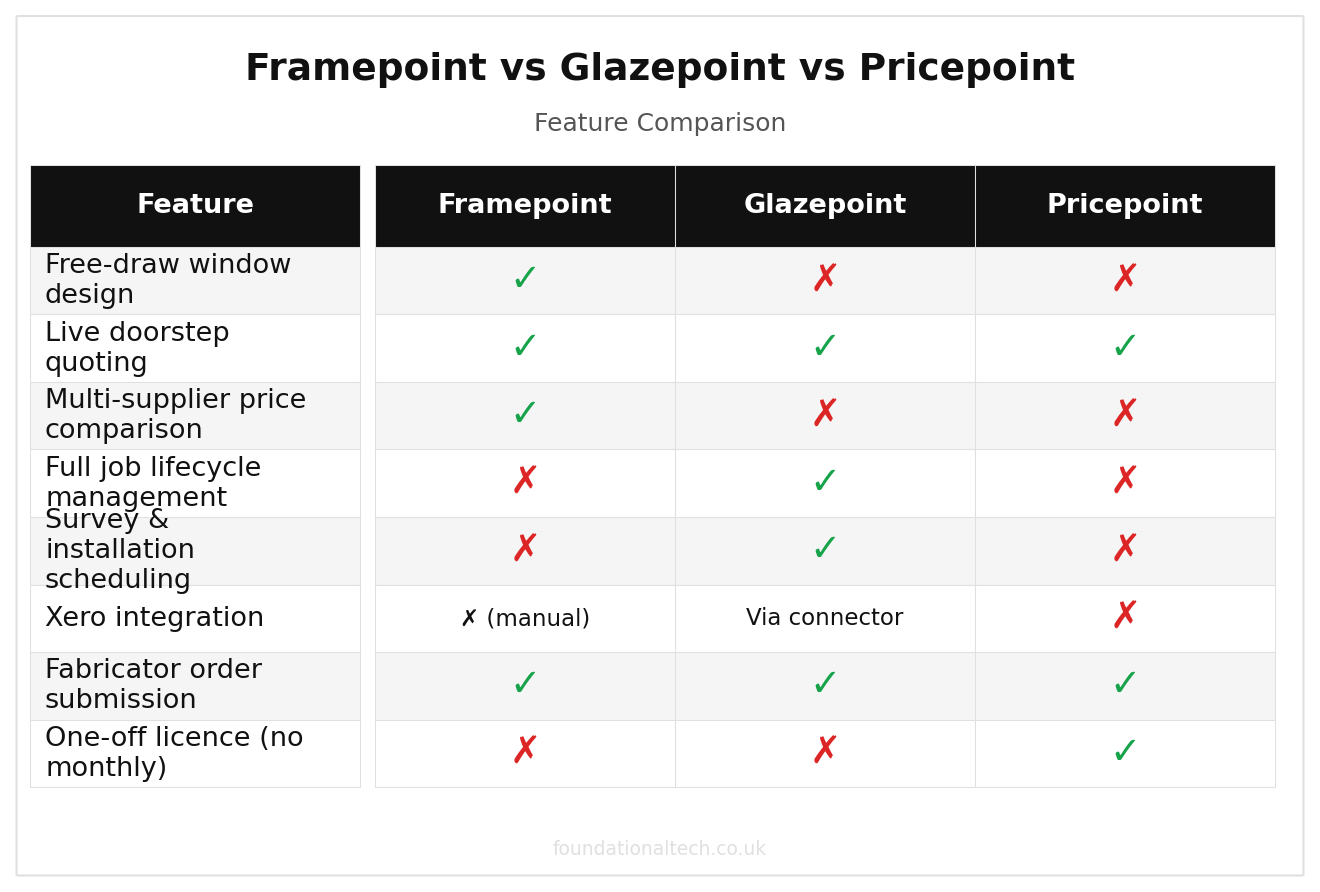
Monthly cost — Framepoint: ~£130; Glazepoint: ~£100/user + VAT; Pricepoint: From £80/user, excl. VAT
Free-draw design — Framepoint: Yes; Glazepoint: Yes; Pricepoint: Yes
Multi-supplier price comparison — Framepoint: Yes; Glazepoint: Limited; Pricepoint: No (single fabrication line)
Full CRM / lead tracking — Framepoint: No; Glazepoint: Yes; Pricepoint: Partial
Survey scheduling — Framepoint: No; Glazepoint: Yes; Pricepoint: Yes
Manufacturing pricing — Framepoint: No; Glazepoint: No; Pricepoint: Yes
Best team size — Framepoint: 1–3 fitters; Glazepoint: 4+ fitters, multiple crews; Pricepoint: Fabricator-installer hybrid
The Setup: Framepoint in Under an Hour
For most solo installers and small teams, Framepoint is the sensible starting point. It solves the highest-value problem — closing the sale, on the spot, at the right price — without asking you to migrate your whole business into a new system on day one.
Minutes 0–15: Load your product range. Set up your standard profile system — the uPVC or aluminium range you fit most — plus your usual glass specifications and hardware options as defaults. A typical quote then takes seconds rather than starting from a blank canvas each time.
Minutes 15–30: Connect your suppliers. Where Framepoint supports it, link the fabricators you buy from so a specification can be sent for a live trade price. That beats working from a static price list that's a month out of date the moment the supplier changes their rates.
Minutes 30–45: Build your quote template. Add your standard terms — deposit percentage, lead time estimate, FENSA/CERTASS registration number, Insurance Backed Guarantee details. Every quote should then leave looking like a proper commercial document, not a sketch with a number at the bottom.
Minutes 45–60: Run a real quote on a real enquiry. Draw the actual window from your next site visit, add the specification the customer wants, and send it before you leave the driveway. The habit worth building from day one: never leave a survey without the quote already sent.
Two pitfalls catch nearly every installer in their first fortnight on the platform. The first is quoting a specification your fabricator doesn't actually keep as standard stock — a chrome-effect handle, a particular bay post section, or a glass tint that looks identical to the standard option on screen. It can add several days to the lead time or a noticeable amount to the cost once the order reaches production. The fix is boring but effective: load only the hardware, colour and glass ranges your fabricator has confirmed as standard. Flag anything outside that list for a manual check before the quote goes out, not after the customer has signed. The second is glazing bar geometry on period-style properties. A Georgian bar pattern drawn as six panes when the customer's eye — and the neighbouring houses on the street — expects eight is the single most common reason for a remake in this trade. It's an expensive one once frames are cut. Before you leave the kitchen table, turn the tablet round and walk the customer through the on-screen drawing, not just the number at the bottom. It takes thirty seconds and it catches the mistake while it still costs nothing to fix.
What Framepoint won't do is track that order once it's placed. You'll still need your job-management system, or a simple spreadsheet, logging survey date, order date, fabrication date and install date — cross-referenced against the FENSA or CERTASS notification once the job completes. That gap is exactly why Article 5 in this series maps the full integration stack, rather than treating quoting software as the whole solution.
A common mistake worth naming: treating the quote as finished once it's sent. It isn't. A specification quoted on Monday and confirmed on Thursday needs re-checking against current supplier pricing before the order goes to the fabricator. Profile and glass costs move often enough that a three-day-old quote can already be a few pounds out. Build that re-check into the order-confirmation step, not into a supplier invoice you're surprised by six weeks later.
The Verdict
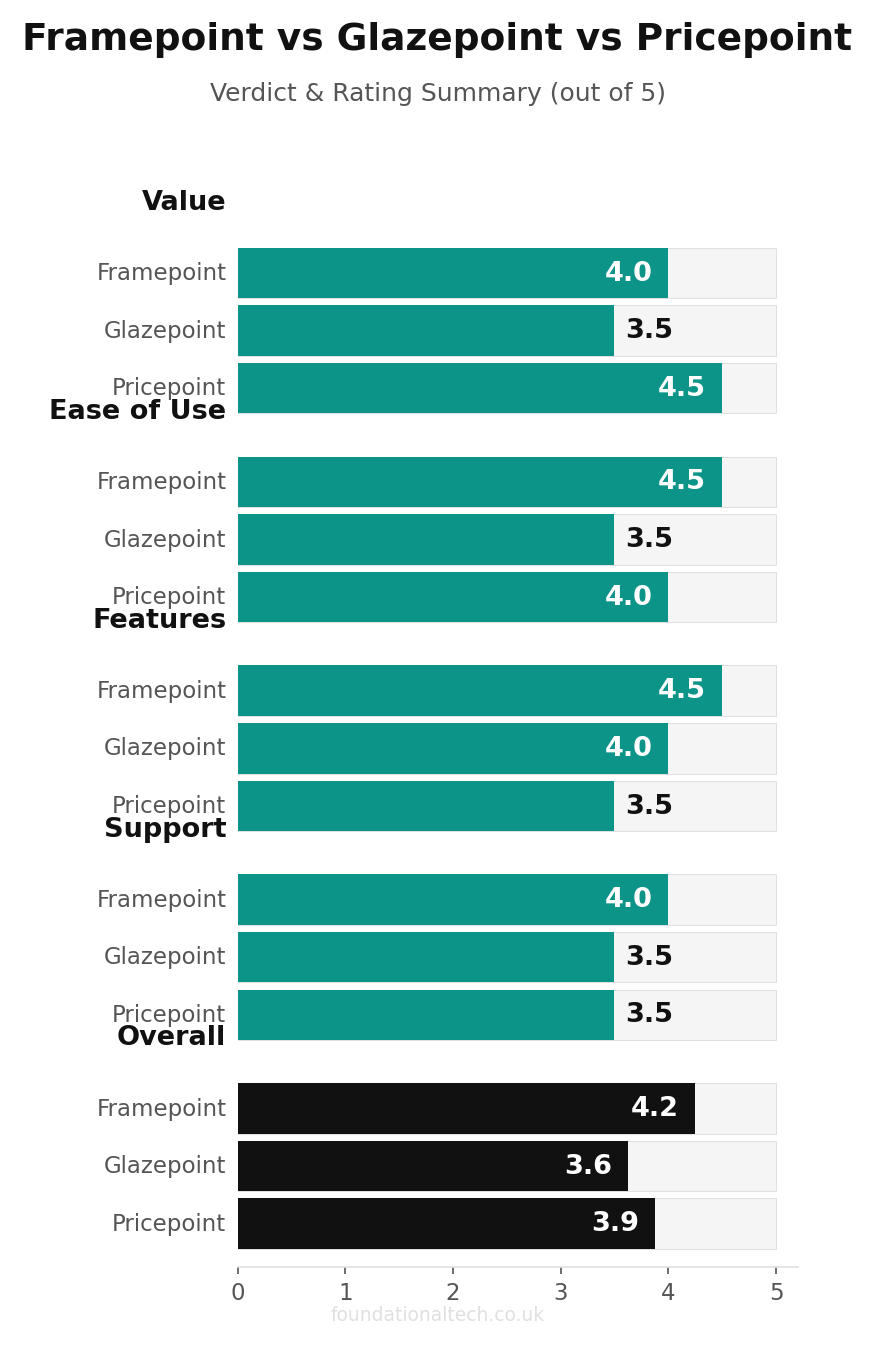
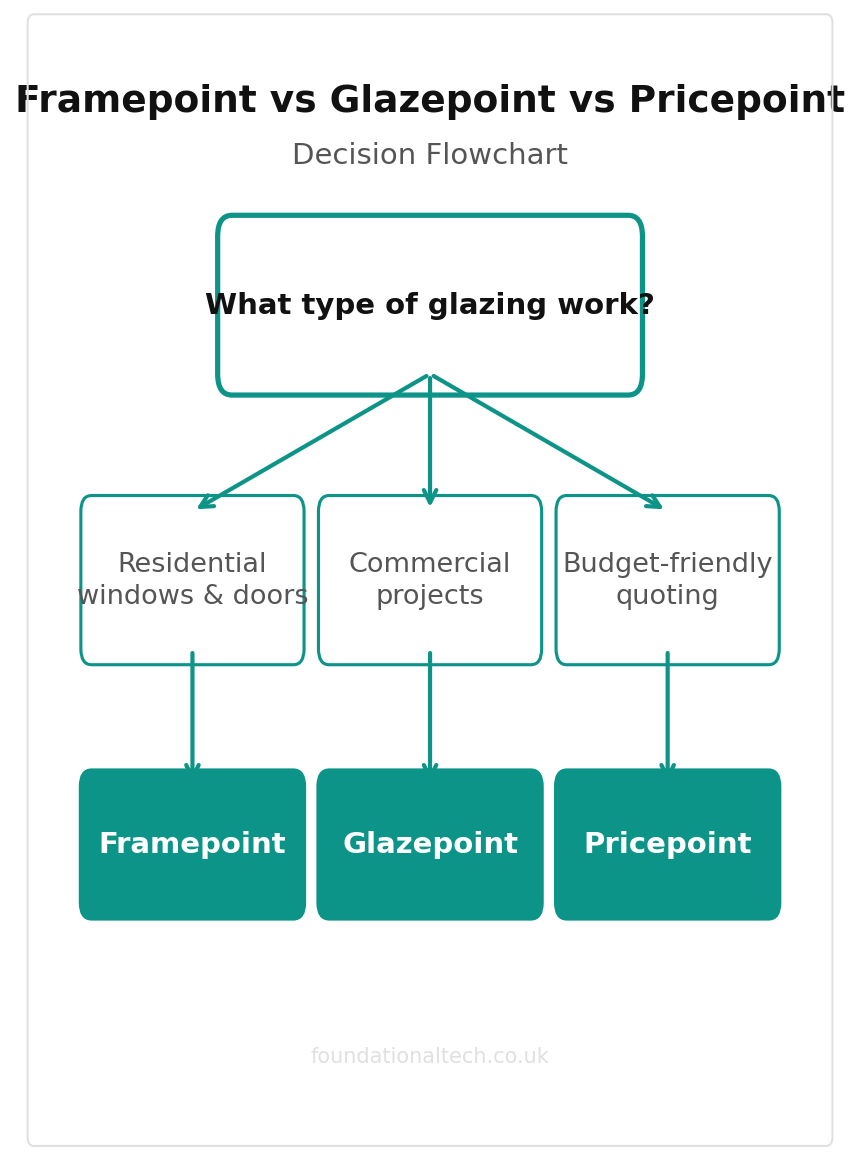
If you're a one- or two-person outfit selling primarily on doorstep visits, start with Framepoint. The cost is low enough that it pays for itself on the first job it helps you close faster than a competitor working from a paper price list. It also solves the single highest-stakes moment in the business — the live quote — without forcing a system migration you don't need yet.
If you're running four or more fitting teams and the enquiry-to-installation pipeline has outgrown a diary and a spreadsheet, Glazepoint's cost is justified by what it replaces. That's a separate CRM, a separate scheduling tool, and the hours spent keeping them in sync manually.
If your business fabricates its own units, or works so closely with one fabricator that survey and manufacturing pricing genuinely need to be the same conversation, Pricepoint is worth it. The per-user cost and the individual fabrication-setup work pay for themselves. The alternative is running two disconnected systems that were never designed to talk to each other.
There's a fourth scenario worth naming separately, because it doesn't map neatly onto any single tool: a business that splits its work between straightforward window and door replacements and conservatory, orangery or bi-fold structural builds. The structural element — roof loadings, box gutters, ridge beam sizing — usually needs pricing input beyond what a pure glazing quoting tool provides, whichever of the three you choose. If conservatories are a small side-line, don't let that tail wag the dog of your core software decision. Quote the structural element separately with your building supplier or a structural engineer, and keep Framepoint or Glazepoint doing what it does best on the window and door side. If conservatory and orangery work is becoming a third or more of the order book, that's effectively a different business with different software needs. It's worth revisiting this decision every six months rather than forcing one tool to do two jobs badly. The same logic applies to installers picking up commercial or new-build subcontract work: a system built for doorstep retail sales doesn't automatically handle CIS deductions or multi-plot pricing. Bolting that on later is exactly the kind of mid-year migration this article opened by warning against.
The wrong answer, still common in this trade, is quoting from memory and a static price list nobody has updated since the fabricator's last increase. Every tool above is cheaper than the margin lost re-pricing a job after the fact because the customer's confirmed price didn't match what the supplier actually charged.
One more factor worth weighing before you commit: how the tool ages with your business. A solo installer today is often a three-fitter outfit in eighteen months. The question isn't just "what fits now" — it's what you'll be re-platforming away from once the diary fills up. Framepoint's low cost makes outgrowing it a minor inconvenience rather than a sunk cost. Glazepoint's higher price is easier to justify once you're already carrying the overhead a full CRM is built to reduce. Buy for the business you have, but don't be surprised if the next decision comes sooner than you think.
Related guides: If you found this useful, see our guide on Heatpunk vs Heat Engineer vs the MCS Heat Load Calculator: Which Heat Loss Software Fits Your UK Heat Pump Business? (2026 Guide) and How to Automate a UK Heat Pump and Solar Installation Business: The Complete MCS-Compliant Software Stack (2026).
Which of these have you actually used — and how many quotes did it take before you trusted the price it gave you enough to say it out loud in the customer's kitchen?