Key Takeaway
Automate client onboarding for UK accountants. Step-by-step guide covering engagement letters, AML checks, Xero, Ignition, and fee proposals.
A new client says yes. What happens next determines whether your practice runs smoothly or drowns in admin for the next twelve months.
3-4 hours → 15 min
Time to onboard each new client — manual process vs Ignition + Xero automation
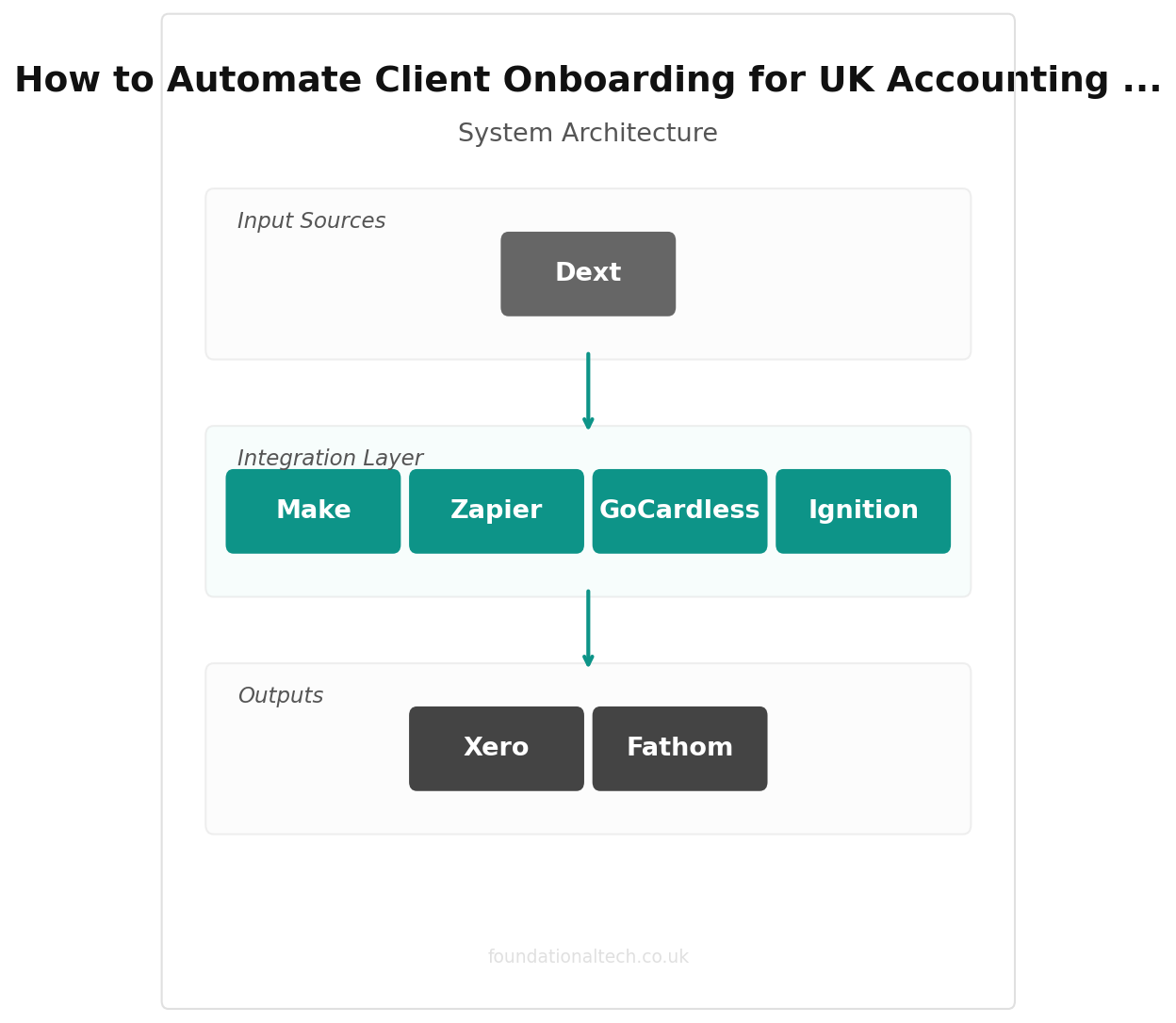
In most UK accounting firms, “onboarding” means a flurry of emails: send the engagement letter, chase the signature, request ID documents, set up the direct debit, create the client in Xero, add them to the practice management system, send the Dext invitation, and — three weeks later — realise nobody collected the anti-money-laundering (AML) verification.
The average UK practice spends 3-4 hours onboarding each client. Multiply by 30 new clients a year and you burn nearly two working weeks on paperwork that should take minutes.
Here is how to build an onboarding system that runs itself.
The Core Stack: Ignition + Xero + GoCardless
Three components. Ignition handles proposals, engagement letters, and payment mandates. Xero acts as the financial backbone. GoCardless collects fees. Configured correctly, a client signs one document and everything else triggers automatically.
Ignition: The Front Door
Ignition (formerly Practice Ignition) replaces your Word-document engagement letters, PDF proposals, and manual direct debit forms with a single digital workflow.
You build a proposal in Ignition containing your services, pricing, terms of engagement, and a payment mandate. The client receives a branded link, reviews the scope, signs electronically, and authorises direct debit — all in one sitting. No printing. No scanning. No chasing.
What triggers on signature:
The moment a client signs, Ignition can automatically create a contact in Xero, activate the GoCardless mandate, trigger a workflow in your practice management system (Karbon, Senta, or similar), and send the client a welcome email with next-step instructions.
UK pricing (2026): Solo plan from $39/month (approx. £31/month) billed annually — designed for solo practitioners earning under $150,000/year. Core plan from $99/month (approx. £79/month) for firms needing up to 3 users. Pro plan from $229/month (approx. £183/month) for up to 15 users and 350 active clients. All plans include unlimited proposals, e-signatures, engagement letters, and automated payment collection. Ignition also offers a new AI Price Insights feature that benchmarks your fees against anonymised data from 8,500+ firms.
Xero integration: Native. Client records sync on proposal acceptance.
Xero: The Ledger
Once Ignition pushes the client record to Xero, the new organisation is ready to receive bank feeds, Dext receipts, and invoices. The critical step most practices miss: configuring bank rules and chart-of-accounts templates before the first client data arrives.
Create a standard chart of accounts template for your typical client type (sole trader, limited company, partnership). When a new Xero organisation activates, import the template. This prevents the slow accumulation of inconsistent nominal codes across your client base — the single biggest cause of inefficiency in multi-client practices.
UK pricing (2026): Standard plan from £33/month. Growing plan from £37/month (unlimited invoicing and bills). Comprehensive plan from £42/month (multi-currency and expanded payroll). Additional users £1.50/month each.
GoCardless: The Payment Engine
GoCardless collects fees by direct debit on a fixed schedule. The client authorised this when they signed the Ignition proposal — so there is no separate payment setup, no card details to collect, no invoices to chase.
When a payment is due, GoCardless debits the client’s bank account automatically. Failed payments trigger a smart retry sequence (GoCardless’s Success+ feature recovers 70-76% of initially failed payments). The payment reconciles in Xero without manual intervention.
UK pricing (2026): Standard plan: 1% + 20p per transaction, capped at £4. No monthly fee, no setup fee, no contract. Advanced plan: 1.25% + 20p (capped at £5) — includes the Success+ AI retry tool.
The Setup: From Zero to Automated in Under an Hour
Step 1: Configure Ignition (20 minutes)
Create your Ignition account and connect it to Xero. Build your first proposal template:
Services section: List your standard service packages — annual accounts, bookkeeping, VAT returns, payroll, self-assessment. Set the pricing for each. Use Ignition’s packaging feature to bundle services into tiers (Essential, Growth, Premium) rather than listing line items.
Terms section: Upload your engagement letter terms or use Ignition’s pre-loaded, legally vetted UK templates. Include your practice’s cancellation terms, scope-of-work definitions, and GDPR data processing clause.
Payment section: Connect GoCardless. Set billing frequency (monthly is standard for bookkeeping clients; quarterly or annually for tax-only engagements). Enable the “collect payment details on acceptance” option — this captures the direct debit mandate at the moment the client signs.
Step 2: Configure Xero (15 minutes)
Ensure your Xero account has a standard chart of accounts template ready. Set up bank rules for your most common reconciliation patterns. Enable invoice reminders as a fallback for any clients not yet on direct debit:
Before due date: A gentle reminder 7 days before payment is due.
On due date: A notification that payment is due today.
After due date: Reminders at 7, 14, and 30 days overdue, with escalating tone.
Step 3: Connect the Apps (10 minutes)
In Ignition’s integration settings, connect Xero so that accepted proposals automatically create or update contacts. Connect GoCardless so that payment mandates activate on signature.
If you use a practice management tool (Karbon, Senta, TaxCalc), connect it via Ignition’s native integrations or through Zapier (free plan handles 100 tasks/month; Starter from £16.10/month for 750 tasks).
Step 4: Build Your Onboarding Workflow (15 minutes)
Create a post-signature workflow. This is the sequence of tasks that fires when a client accepts a proposal:
Client record created in Xero (automatic via Ignition)
Direct debit mandate activated (automatic via GoCardless)
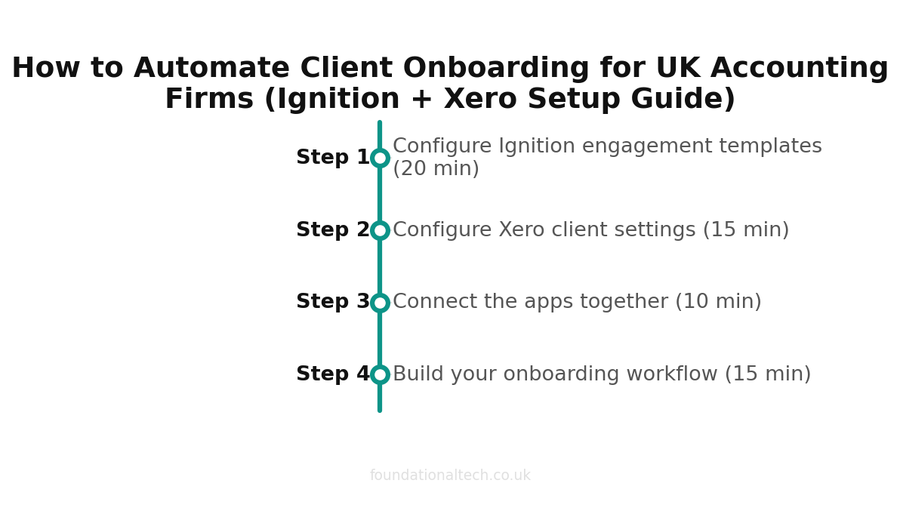
Setup timeline — estimated time for each step 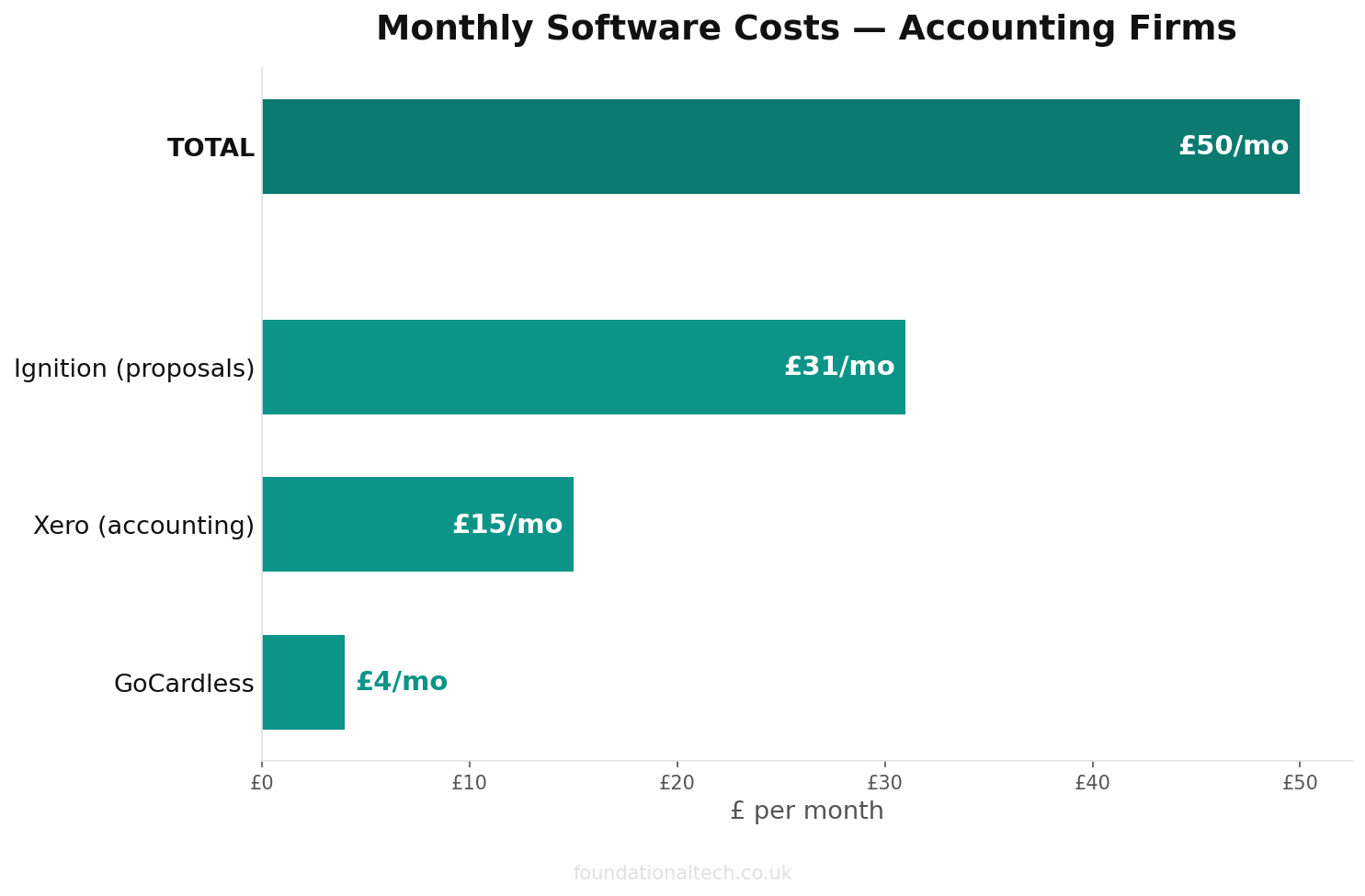
Monthly cost breakdown across the recommended tool stack 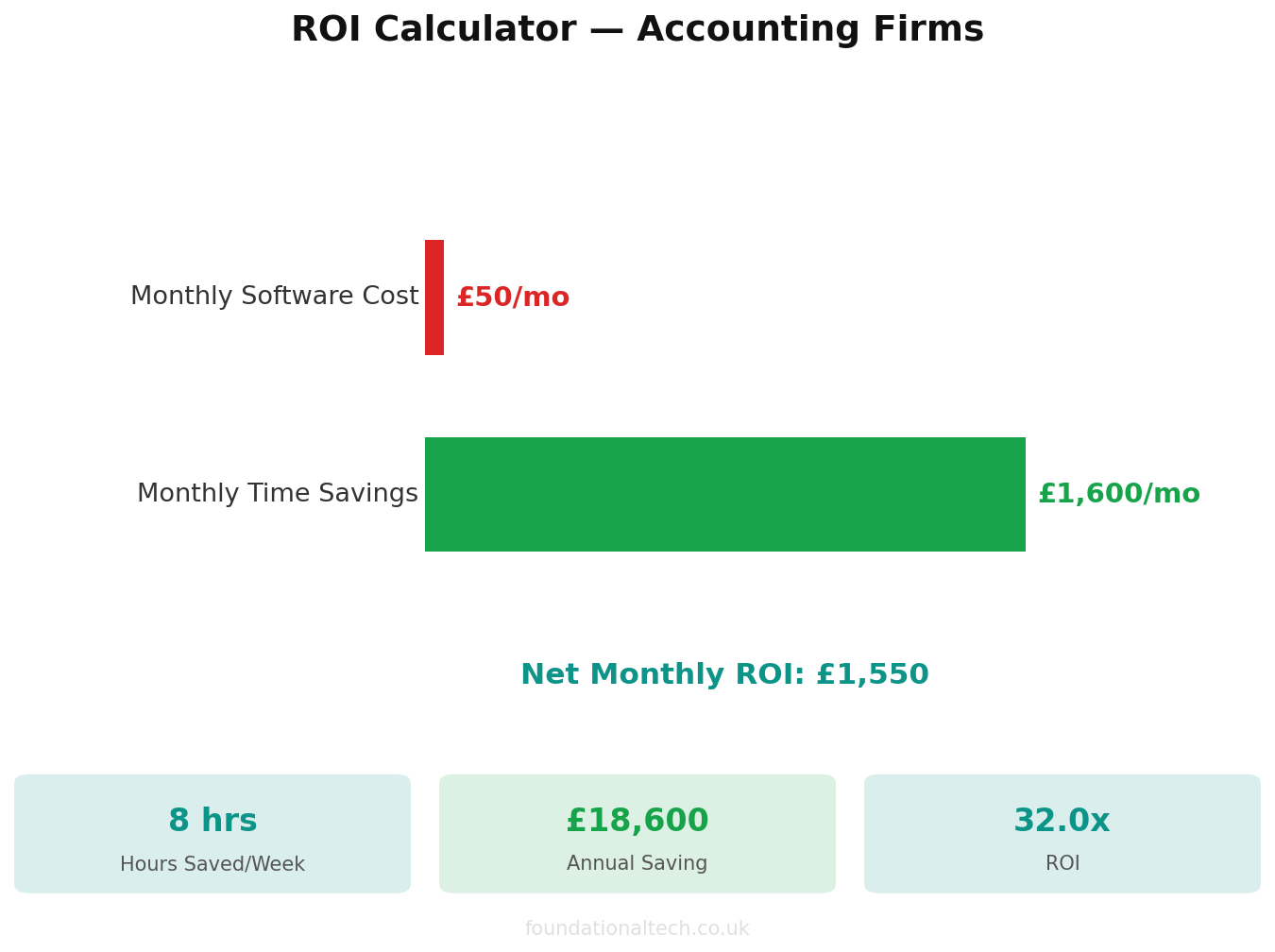
Estimated ROI from automating admin tasks Welcome email sent to client with Dext invitation link and document upload instructions
AML verification task created in your practice management system
Bank feed connection request sent to client via Xero
First bookkeeping review scheduled for 30 days after engagement start
Steps 1-2 are fully automatic. Steps 3-6 can be automated via Zapier or your practice management tool’s native workflow builder.
What This Replaces
The manual onboarding process for most UK practices looks like this:
Old process: Draft engagement letter in Word (20 min) → Email to client (5 min) → Wait for signature (3-10 days) → Chase signature (15 min, twice) → Receive signed letter (file manually) → Send direct debit form (10 min) → Chase direct debit form (15 min) → Set up client in Xero (15 min) → Send Dext invitation (5 min) → Set up in practice management (15 min) → Verify AML documents (30 min) → Confirm everything is done (10 min).
Total: 3-4 hours across 1-3 weeks.
New process: Send Ignition proposal link (2 min) → Client signs and authorises payment (instant) → Everything triggers automatically → Verify AML documents (30 min) → Review that all systems are configured (5 min).
Total: 37 minutes, same day.
The time saving compounds. At 30 new clients per year, you recover approximately 90 hours — more than two full working weeks. At an average billing rate of £75/hour for admin staff, that is £6,750 in recovered capacity annually.
| Step | Action | Time |
|---|---|---|
| 1 | Configure Ignition engagement templates | 20 min |
| 2 | Configure Xero client settings | 15 min |
| 3 | Connect the apps together | 10 min |
| 4 | Build your onboarding workflow | 15 min |
| Tool | Monthly Cost | Role |
|---|---|---|
| Ignition | From £59/mo | Proposals and engagement letters |
| Xero | From £33/mo | Financial backbone |
| GoCardless | 1-2% + 20p/txn | Direct debit collection |
| Karbon (optional) | From £59/user/mo | Practice management |
| Dext | From £24/mo per client | Receipt capture |
The Three Mistakes That Break Onboarding
Mistake 1: Not collecting payment details at the point of engagement. If you separate the engagement letter from the payment setup, you create a second friction point. The client forgets, you chase, and the entire purpose of automation collapses. Ignition solves this by embedding the payment mandate in the proposal.
Mistake 2: Inconsistent Xero setup across clients. Every client should use the same chart of accounts template for their entity type. If your team creates bespoke nominal codes for each client, your month-end processes become impossible to standardise — and standardisation is the prerequisite for automation.
Mistake 3: No AML compliance gate. Automated onboarding makes it easy to start work before compliance checks are complete. Build a hard gate: no bookkeeping begins until AML verification is marked done. Ignition’s workflow feature can enforce this by holding engagement status until the compliance task clears.
Scaling It
Once the system works for one client type, duplicate the template for others. A typical UK practice needs three proposal templates:
Sole trader / self-assessment only: Annual accounts + self-assessment. Billed annually or quarterly. Minimal ongoing bookkeeping.
Limited company (compliance): Annual accounts + corporation tax + confirmation statement + bookkeeping. Billed monthly.
Limited company (advisory): Everything above plus management accounts, cash flow forecasting (via Fathom), and quarterly advisory meetings. Billed monthly at a premium rate.
Each template has its own engagement terms, pricing structure, and post-signature workflow. Building the three templates takes an afternoon. Every future client onboards through one of them.
Under 1 hour
From zero to fully automated client onboarding for your accounting firm
The Stack Cost
For a sole practitioner onboarding 2-3 clients per month:
Ignition Solo: ~£31/month. Xero Standard: £33/month. GoCardless: £0/month (pay per transaction only). Zapier Free: £0/month.
Total fixed cost: ~£64/month.
For a firm with 3 staff onboarding 5-8 clients per month:
Ignition Core: ~£79/month. Xero Growing: £37/month. GoCardless: ~£20-40/month in transaction fees. Zapier Starter: £16.10/month.
Total: ~£152-172/month — less than the cost of two hours of admin staff time, replacing work that previously consumed days.
How long does your client onboarding currently take from first “yes” to first piece of work? Count honestly — the answer usually surprises people.
A & Y Financial Services builds automated onboarding systems for accounting practices across the UK. If you want this configured and running in your practice — that is what we do.
If you are evaluating your full tech stack, see our guide to the best accounting practice management software in the UK.