Key Takeaway
How Xero, Dext, Ignition and GoCardless connect for UK accountants. Full stack from £108/mo for a sole practitioner. See the integration map.
Your accounting practice runs on five or six apps. Each one does its job. But the value isn’t in the apps themselves — it’s in how they talk to each other.
This article maps every connection in the UK accounting practice automation stack. What connects natively, what needs middleware, and what breaks when you get the wiring wrong. Bookmark it. You’ll come back to this one.
The Integration Architecture
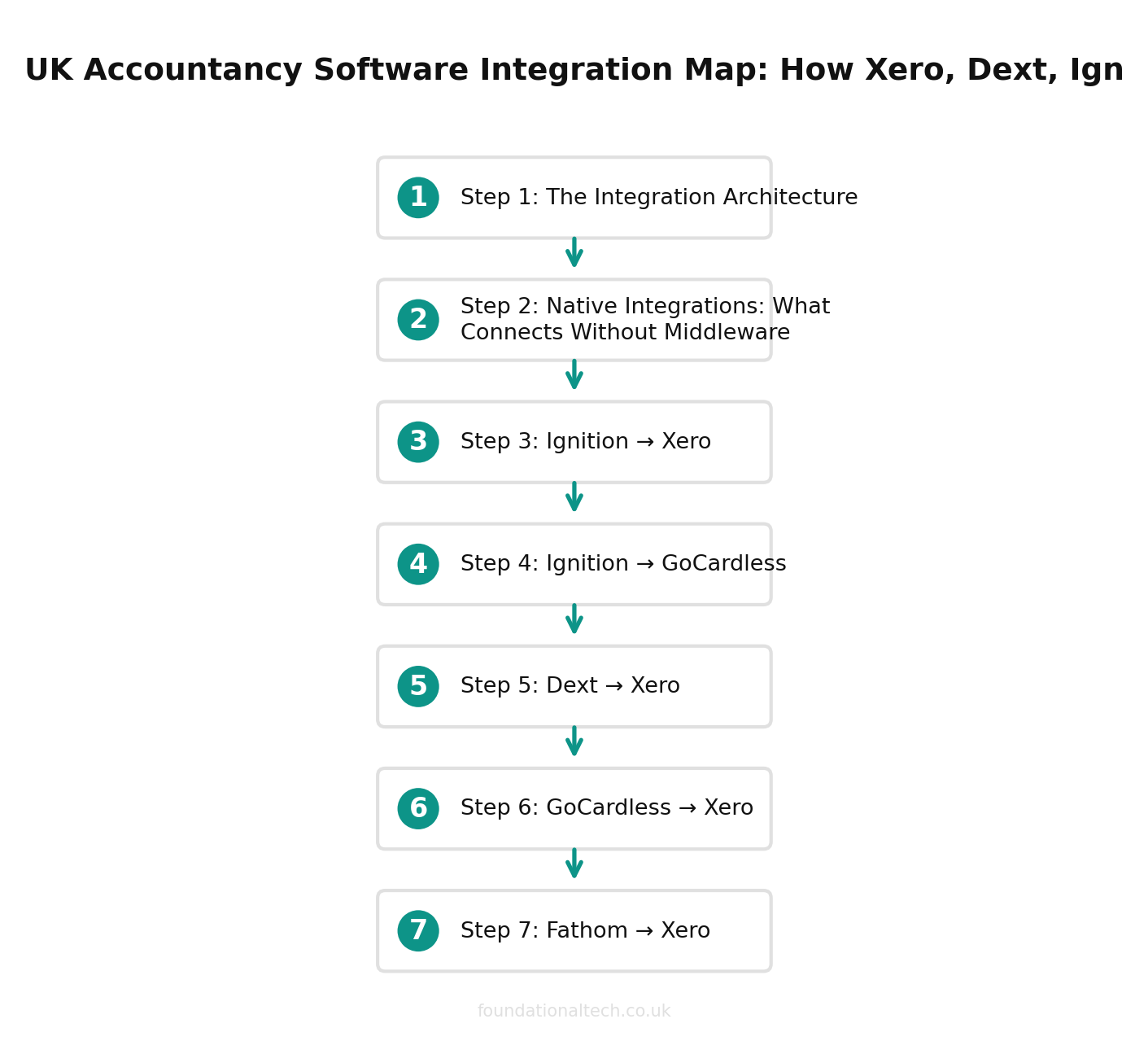
Here is how data flows through a properly connected UK accounting practice:
Client says yes → Ignition captures the signed engagement letter and payment mandate → pushes client record to Xero → activates GoCardless direct debit → triggers onboarding workflow in Karbon or Senta.
Receipt arrives → Dext extracts the data via AI (99%+ accuracy) → publishes the coded transaction to Xero → bank feed matches and reconciles → Xero’s JAX auto-reconciliation confirms.
Month-end closes → Fathom pulls Xero data → generates management reports and KPIs → practice sends advisory-ready output to the client.
Fee falls due → GoCardless debits the client’s bank account → payment reconciles in Xero automatically → failed payments retry via Success+ AI.
Every arrow in that chain is either a native integration or a single Zapier/Make workflow. No custom code. No CSV exports. No manual re-keying.
Native Integrations: What Connects Without Middleware
These connections work out of the box. One-time setup, then they run forever.
Ignition → Xero
What syncs: Client contacts, service descriptions, and invoice amounts. When a client signs an Ignition proposal, their record appears in Xero within seconds.
Setup: Connect Xero from Ignition’s integration settings. Map your Ignition service items to Xero revenue accounts. Takes five minutes.
Watch out for: Duplicate contacts. If the client already exists in Xero under a slightly different name, Ignition creates a second record. Clean your Xero contact list before connecting.
Ignition → GoCardless
What syncs: Direct debit mandates. The client authorises payment when they sign the proposal — GoCardless activates the mandate immediately.
Setup: Connect GoCardless from within Ignition. No separate GoCardless onboarding needed for the client.
Cost: GoCardless Standard: 1% + 20p per transaction, capped at £4. No monthly fee. Advanced plan (with Success+ AI retry): 1.25% + 20p, capped at £5.
Dext → Xero
What syncs: Coded transactions from receipts, invoices, and bills. Dext’s AI extracts supplier name, date, amount, VAT, and category — then publishes directly to Xero as a draft bill or expense.
Setup: Connect Xero from Dext’s integration settings. Map Dext categories to your Xero chart of accounts. Critical step: set default tax rates for each category to avoid VAT errors.
Note: Since Hubdoc shut down on 8 May 2026, Dext is now the primary third-party document capture tool for Xero practices. Xero’s built-in replacement (Xero Files) stores documents but does not extract data.
GoCardless → Xero
What syncs: Payment confirmations. When GoCardless collects a direct debit, the payment appears in your Xero bank feed and reconciles against the outstanding invoice.
Setup: Connect GoCardless to Xero directly. Payments reconcile automatically if invoice references match. Manually reconcile any mismatches via Xero’s bank reconciliation screen — or let JAX handle it.
Fathom → Xero
What syncs: Chart of accounts, trial balance, and transaction data. Fathom pulls this nightly to generate KPIs, management reports, and benchmarks.
Setup: Connect Xero from Fathom’s onboarding. Select which Xero organisations to track. Fathom handles multi-entity consolidation natively.
Pricing: Fathom Starter: $48/month (approx. £38) for 1 company. Silver: $250/month (approx. £200) for 10 companies. Gold: $360/month (approx. £288) for 25 companies.
Karbon ↔ Xero
What syncs: Client contact data and work items. Karbon pulls client details from Xero and lets you create workflow tasks triggered by Xero events (new invoice, overdue payment).
Pricing: Karbon starts at approximately $59/user/month (approx. £47) for the Team plan. UK firms can pay in sterling.
Senta ↔ Xero
What syncs: Client records and compliance deadlines. Senta’s workflow automation triggers emails and task sequences based on Xero filing dates.
Pricing: Senta: £32/month for the first user (£25.60 billed annually). All clients use it free. No per-module fees.
| Connection | Type | What Syncs |
|---|---|---|
| Ignition → Xero | Native | Contacts, invoices, services |
| Ignition → GoCardless | Native | Direct debit mandates |
| Dext → Xero | Native | Coded transactions, receipts |
| GoCardless → Xero | Native | Payment reconciliation |
| Fathom → Xero | Native | Management reports, KPIs |
| Karbon → Xero | Native | Client records, workflows |
| Ignition → Karbon | Zapier/Make | Onboarding triggers |
Zapier and Make.com Workflows: Bridging the Gaps
Some connections don’t exist natively. Here’s where middleware earns its keep.
Workflow 1: New Ignition Client → Karbon Onboarding Workflow
The problem: Ignition connects natively to Xero but not to Karbon. When a client signs, you want Karbon to automatically create the onboarding work item.
Trigger: New proposal accepted in Ignition.
Action: Create work item in Karbon with client name, service type, and due dates.
Setup time: 15 minutes in Zapier. Use the Ignition trigger “Proposal Accepted” and the Karbon action “Create Work.”
Workflow 2: Xero Overdue Invoice → Slack/Email Alert
The problem: Xero sends invoice reminders to clients, but your team doesn’t know which clients are falling behind unless they check manually.
Trigger: Invoice overdue by 14 days in Xero.
Action: Post a message to your practice’s Slack channel (or send an email) with client name, invoice number, and amount.
Setup time: 10 minutes. Use Xero’s “Invoice Overdue” trigger in Zapier. Filter by days overdue to avoid noise.
Workflow 3: Dext Document Published → Practice Manager Task
The problem: When Dext publishes a batch of transactions to Xero, someone needs to review them. But nobody gets notified.
Trigger: New item published in Dext.
Action: Create a review task in Karbon or Senta, assigned to the bookkeeper responsible for that client.
Setup time: 20 minutes. Requires mapping Dext client names to Karbon/Senta contacts — do this once during setup.
Workflow 4: GoCardless Payment Failed → Automated Client Email
The problem: GoCardless’s Success+ retries failed payments automatically, but the client doesn’t know their payment bounced until the retry happens. This damages trust.
Trigger: Payment failed in GoCardless.
Action: Send a templated email to the client explaining the issue and confirming the retry schedule. CC the account manager.
Setup time: 15 minutes via Zapier. Use GoCardless trigger “Payment Failed” and Gmail/Outlook action “Send Email.”
Middleware Costs
Zapier: Free plan: 100 tasks/month, 5 single-step Zaps. Starter: £16.10/month for 750 tasks. Professional: £45/month for 2,000 tasks with multi-step Zaps.
Make.com: Free plan: 1,000 operations/month, 2 active scenarios. Core: $9/month (approx. £7) for 10,000 operations. Pro: $16/month (approx. £13) for advanced features.
For most small practices, Zapier’s Starter plan handles everything. Larger practices running 10+ workflows benefit from Make.com’s Pro plan — it’s cheaper per operation and the visual workflow builder makes complex automations easier to maintain.
The Gotchas
Gotcha 1: Dext category mapping drift. You set up Dext categories to match your Xero chart of accounts perfectly. Then someone in your team creates a new Xero nominal code without updating Dext. Transactions start landing in the wrong accounts. Fix: audit your Dext-to-Xero mapping quarterly. It takes ten minutes and prevents hours of month-end corrections.
Gotcha 2: Ignition duplicate contacts. If a client exists in Xero before Ignition sends the record, you get duplicates. Xero doesn’t merge automatically. Fix: search Xero for the client name before sending the Ignition proposal. Or run a quarterly duplicate-contact cleanup.
Gotcha 3: GoCardless VAT on fees. HMRC confirmed GoCardless transaction fees are VAT-able. That 1% + 20p per transaction? Add 20% VAT on top. Factor this into your pricing model, especially if you’re passing payment processing costs through to clients.
Gotcha 4: Zapier task limits. Every data transfer counts as a “task.” A single Dext-to-Karbon workflow that fires 50 times a month uses 50 tasks. Stack four workflows and you’re at 200 tasks before you’ve automated anything meaningful. Monitor your Zapier dashboard monthly — upgrading mid-cycle costs more than starting on the right plan.
Gotcha 5: Fathom data lag. Fathom pulls Xero data overnight, not in real time. If you’re presenting management reports to a client at 9am, the numbers reflect yesterday’s close of business at best. For same-day reporting, run a manual Fathom sync before the meeting.
Zero CSV Exports
A properly wired UK accounting stack requires no manual data transfer between any tool
The Full Stack Cost
For a sole practitioner with 20 clients:
| Tool | Monthly Cost |
|---|---|
| Xero Ignite | £15 |
| Ignition Solo | ~£31 |
| GoCardless Standard | ~£15 (transaction fees) |
| Dext Business | ~£24 |
| Zapier Starter | £16.10 |
| Total | ~£108/month |
For a 3-person firm with 80 clients:
| Tool | Monthly Cost |
|---|---|
| Xero Grow | £30 |
| Ignition Core | ~£79 |
| GoCardless Standard | ~£40 (transaction fees) |
| Dext Practice | ~£200 |
| Karbon Team (3 users) | ~£141 |
| Fathom Silver | ~£200 |
| Zapier Professional | £45 |
| Total | ~£742/month |
That looks expensive until you calculate what it replaces. A full-time admin assistant costs £25,000-£30,000/year (£2,000-£2,500/month). This stack does 80% of what that person did — and it doesn’t take holidays.
Which integration in your practice causes you the most headaches? The one that almost works but doesn’t quite? Tell me — I’ve probably fixed it before.
A & Y Financial Services architects and maintains integration stacks for accounting practices across the UK. That’s what we do.
To stop chasing payments, see Zero-Chase Collections: How to Automate Invoice Follow-Ups for UK Bookkeepers.
Once your stack is connected, get the most from Claude with our 12 Claude prompts every UK accountant should be using.