Key Takeaway
3 AI automation workflows for UK accountants — receipt coding, anomaly detection and client emails. Full stack under £50/mo with Claude, Xero and Dext.
A chatbot sits in a browser tab and waits for you to type. An AI automation never opens a tab — it runs while you sleep, watches your inbox, reads your bank feed, and only interrupts you when a human judgement is actually required. That is the gap most accounting practices haven't crossed yet, and in 2026 it is the difference between a practice that scales and one that hires.
For the last eight articles in this cluster, we've built a stack: Ignition for onboarding, Dext for receipt capture, Xero for the ledger, GoCardless for collection, Fathom for reporting, and Claude as a configured AI worker. Each tool is useful alone. The money is in the wiring between them — and AI is now the wire. This article shows you exactly how to connect artificial intelligence to the tools you already pay for, with three workflows you can build this month.
Where AI Meets Your Existing Stack
Until recently, "AI for accountants" meant pasting a profit and loss statement into a chat window and asking for a summary. Helpful, but manual — you were still the courier, ferrying data from one app to a chatbot and back.
Two things changed in 2026. First, Xero released its official Claude integration in May, letting you query live financial data — invoices, contacts, P&L, balance sheet — without copying and pasting. QuickBooks shipped its own connector shortly after. Second, automation platforms like Make.com and Zapier added native AI steps, so a workflow can now pause mid-run, ask an AI model to read something or make a decision, and carry on based on the answer.
The result is a practice where AI doesn't sit on the side waiting to be consulted. It sits inside the pipes. A receipt arrives, an AI reads it and decides where it belongs. A client emails a question, an AI drafts the reply before you've had coffee. A bank line looks odd, an AI flags it before it reaches your reconciliation screen.
Here are the three workflows worth building first.
Workflow 1: AI + Document Capture (the receipt that files itself)
Dext already extracts the supplier, date, and total from a photographed receipt. What it doesn't do well is judge — deciding the correct nominal code when a supplier could plausibly sit in two categories, or spotting that an "Amazon" charge is actually office stationery rather than software.
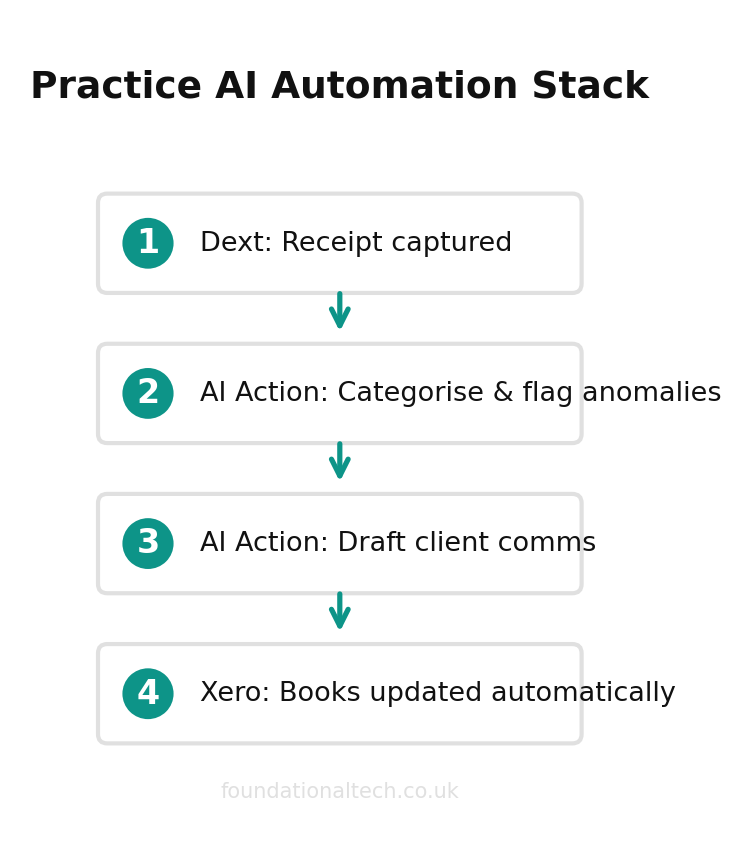
The build: Dext publishes the extracted data to Xero as a draft. A Make.com scenario triggers on that draft bill, sends the line description and supplier to Claude with a prompt like "Given this UK chart of accounts, return the single most likely nominal code and a one-line reason", and writes the suggested code back to Xero as a note for your review. Over three months, you correct it less and less. Eventually you trust it enough to auto-publish for your twenty most regular suppliers.
What it costs: Dext business plans start from £24/month, and Make.com's Core plan is roughly £8/month (billed annually) for 10,000 operations — comfortably enough for a small practice's receipt volume. Claude Pro is £18/month. The whole layer runs under £50/month and removes the single most tedious task in bookkeeping: deciding where things go.
Workflow 2: AI + Finance (anomaly detection on the bank feed)
Reconciliation is where errors hide. A duplicated supplier payment, a personal expense slipped onto the company card, a direct debit that jumped 40% without anyone noticing — these survive because no one has time to eyeball every line.
The build: a scheduled Make.com or Zapier scenario pulls the week's new bank transactions from Xero each Monday morning. It passes them to Claude with a prompt that asks three questions: Which transactions are more than 30% larger than the same supplier's three-month average? Which are duplicates within seven days? Which don't match any expected recurring pattern? Claude returns a short list with reasons. That list lands in your inbox or a Slack channel before you open Xero.
You're no longer reconciling blind. You're reviewing a pre-flagged exceptions report, which is how a finance director works and how a sole practitioner can now afford to. This matters more in 2026 than it did a year ago: with Making Tax Digital for Income Tax live since 6 April for clients earning over £50,000, you are filing quarterly, not annually. Errors you used to catch at year-end now need catching every quarter. AI anomaly detection turns that pressure into a five-minute Monday habit.
A note on trust: the AI flags, it never edits. Nothing is posted, voided, or changed automatically. You remain the only person who touches the ledger.
Workflow 3: AI + Client Communications (personalised, not robotic)
The fastest way to lose the warmth of a small practice is to automate client emails badly — generic, templated, obviously machine-written. The fix is to automate the drafting, not the sending.
40% fewer queries
from clients when AI-drafted comms explain what happened and why, instead of sending raw accounting jargon
The build: a client uploads their records late, or a VAT deadline approaches, or a quarterly MTD update is due. The trigger fires in your practice management tool. A Make.com scenario sends Claude the client's name, situation, and a snippet of your house style — formal or friendly, your sign-off, your firm's tone — and asks for a draft email. The draft drops into your Outlook or Gmail as a saved draft, never sent. You read it, add the one human detail only you know, and hit send. Thirty seconds instead of ten minutes, and it still sounds like you.
The principle running through all three workflows: AI handles the first 90%, you own the last 10%. The 10% is where your professional judgement, your client relationship, and your indemnity insurance live. Never automate that away.
How the Pieces Actually Connect
The reason these workflows are buildable today, and weren't two years ago, is that the tools now speak to each other natively. Xero, QuickBooks, Dext, GoCardless, Outlook, Gmail, and Slack all expose connectors that Make.com and Zapier plug into without code. Add a Claude or OpenAI step into that same canvas and you have a full loop: data leaves Xero, an AI reads it, a decision comes back, and the result lands wherever a human will see it.
Two architectural points worth understanding before you build. First, an AI step is just another node in the scenario — it receives text, returns text, and costs roughly one operation plus a few pence of model usage per run. Budget for it the way you'd budget for any step. Second, where the data lives matters for GDPR. Querying Xero through its official Claude integration keeps client figures inside Xero's security boundary; on Claude Team and Enterprise plans, a data processing agreement confirms your inputs aren't used to train models. Pasting a client's P&L into a free chat window does not carry the same protection. For anything touching identifiable client data, use the connector, not the clipboard.
Setup Guide
You can build the first workflow in an afternoon. Here is the sequence.
1. Pick your automation platform. Make.com (visual, cheaper at scale, around £8/month on Core) or Zapier (simpler, broader app library, Professional plan about £16/month for 750 tasks). For accountants starting out, Make.com gives more control per pound. Both connect natively to Xero, QuickBooks, Outlook, Gmail, and Slack.
2. Connect your accounts. In your chosen platform, authorise the connection to Xero (or QuickBooks) via OAuth — the standard "log in and approve" flow, no developer skills needed. Add your email and Dext connections the same way.
3. Add the AI step. Both platforms now offer a native Claude or OpenAI module. Drop it into your scenario. You'll paste in an API key (created free in the Anthropic or OpenAI console) and write the prompt the workflow will send each time it runs.
4. Write a tight prompt. Vague accountant-specific prompts produce vague output. Be specific: give the AI the exact chart of accounts, the exact format you want back ("reply with only the nominal code and a reason, no preamble"), and a clear boundary ("if unsure, reply UNCERTAIN"). Treat the prompt like an instruction to a trainee.
5. Test on real data, in safe mode. Run the scenario manually a dozen times against genuine transactions before scheduling it. Watch where the AI gets it wrong. Tighten the prompt. Only then turn on the schedule.
6. Keep the human gate. Every workflow above writes a suggestion — a note, a draft, a flagged line — and then waits for you. The model proposes; you dispose. Nothing posts to the ledger, sends to a client, or changes a figure without you reading it first. That boundary is not a limitation to engineer away later; it is the entire point. It is where your professional judgement, your client relationships, and your indemnity insurance live, and it is the reason you can run AI at speed without lying awake about it.
What This Looks Like in Practice
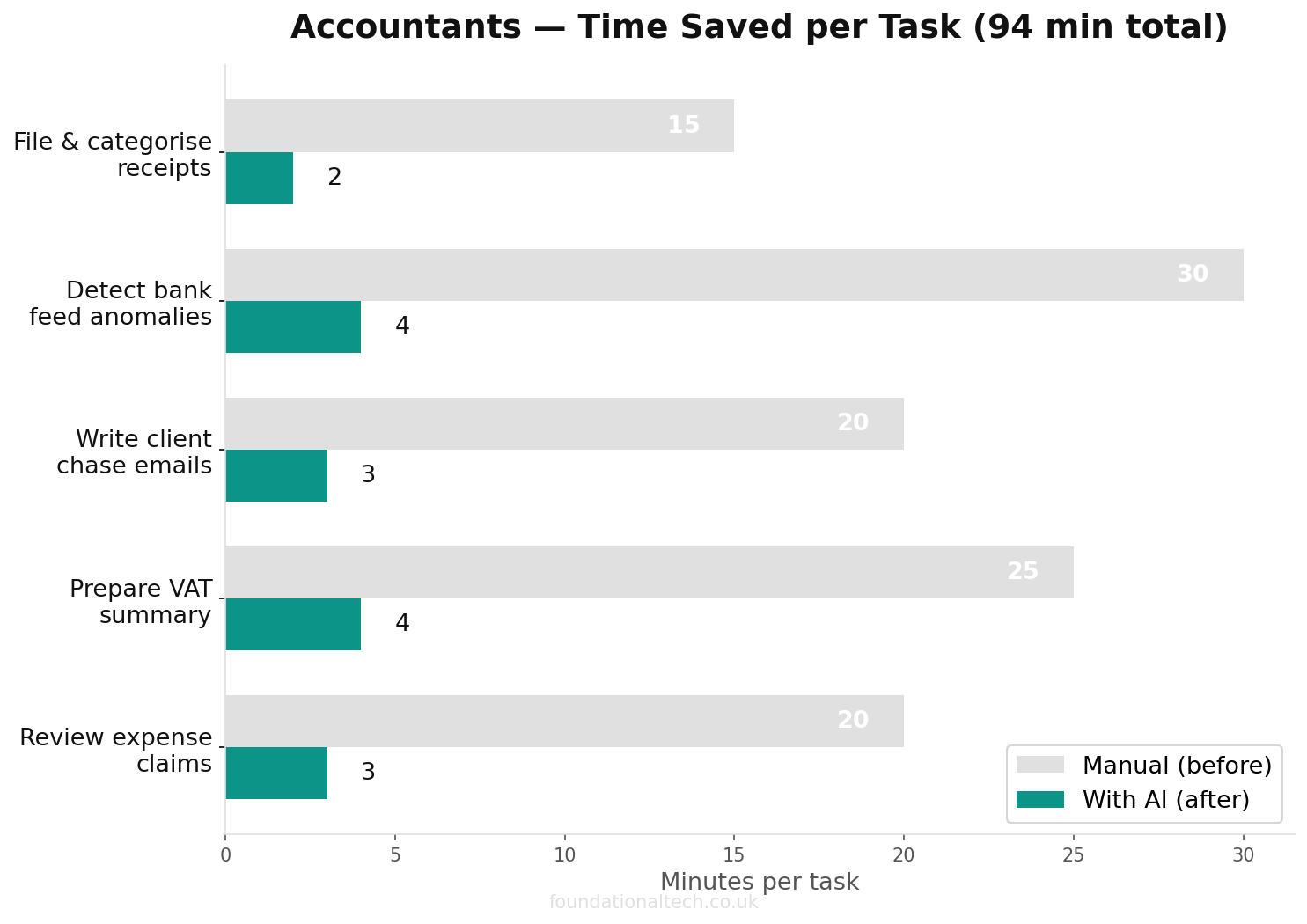
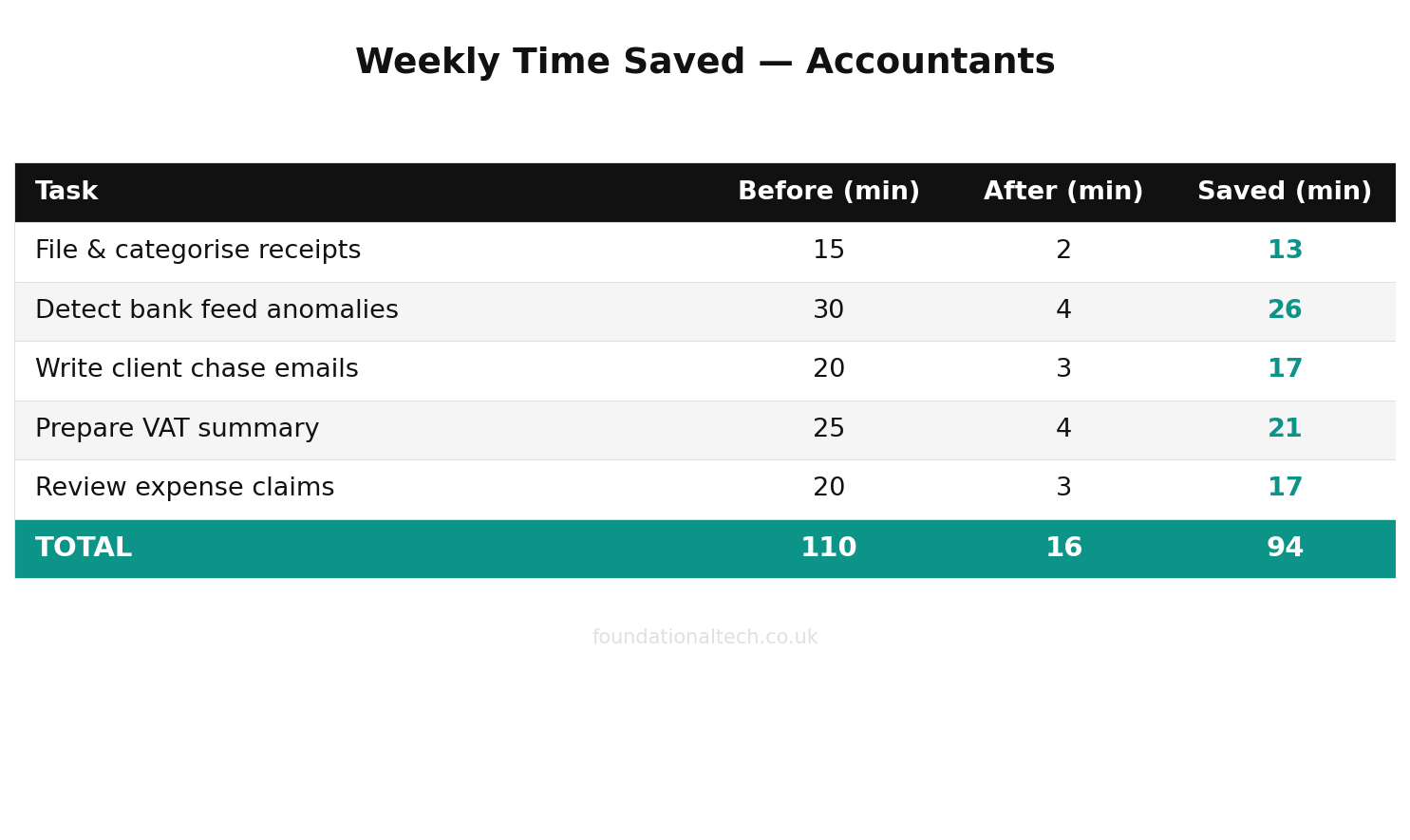
Put the three workflows together and the shape of the 2026 practice becomes clear. Receipts code themselves and arrive in Xero pre-sorted. The bank feed hands you a Monday exceptions report instead of a blank reconciliation screen. Client emails land in your drafts folder already written in your voice. None of it has removed you from the work — it has removed you from the typing. You spend your hours on the judgement calls, the advisory conversations, and the relationships clients actually pay a premium for.
Start with one workflow, not three. Build the receipt-coding scenario first, because it is the lowest-risk and the most satisfying — within a fortnight you will trust it, and that trust is what makes the next two easy. The practices that stall are the ones that try to wire the whole stack in a single weekend. The ones that pull ahead ship one scenario, watch it for a week, then add the next. Each small win compounds, and within a quarter you have a practice where the machine handles the first ninety per cent and you own the last ten.
Which of the three workflows would save you the most time this quarter — receipt coding, bank-feed anomaly detection, or client email drafting? Reply and tell me, and I'll send you the exact prompt I'd start with.
A & Y Financial Services builds these exact automation stacks for accountancy and bookkeeping practices across the UK. If you've read the architecture and want someone to wire it up for you — that's what we do.
See how one firm put this into practice: How a UK Accounting Practice Doubled Its Clients Without Hiring.