Key Takeaway
Complete 2026 integration map for UK electricians: Xero, Tradify, Dext connected. Data flow diagrams, sync settings, and troubleshooting included.
An electrician would never wire a board without knowing where every cable runs. Yet most run their business with software wired up by accident — five apps, half-connected, each holding a different version of the same job.
This is the wiring diagram nobody hands you. Over the last four articles in this series we named the five tools that run a modern electrical business: Tradify for jobs and quotes, Xero for the books, GoCardless and Stripe for getting paid, and Dext for receipts. Each one is useful on its own. Connected properly, they stop being five separate apps you have to feed by hand and start behaving like one system that updates itself. This article is the circuit diagram for that system: what plugs into what, which connections are built-in, which need a bridge, and where the wires tend to come loose.
The Integration Architecture
Picture your stack as a single line of data that follows a job from the first phone call to the money landing in your account.
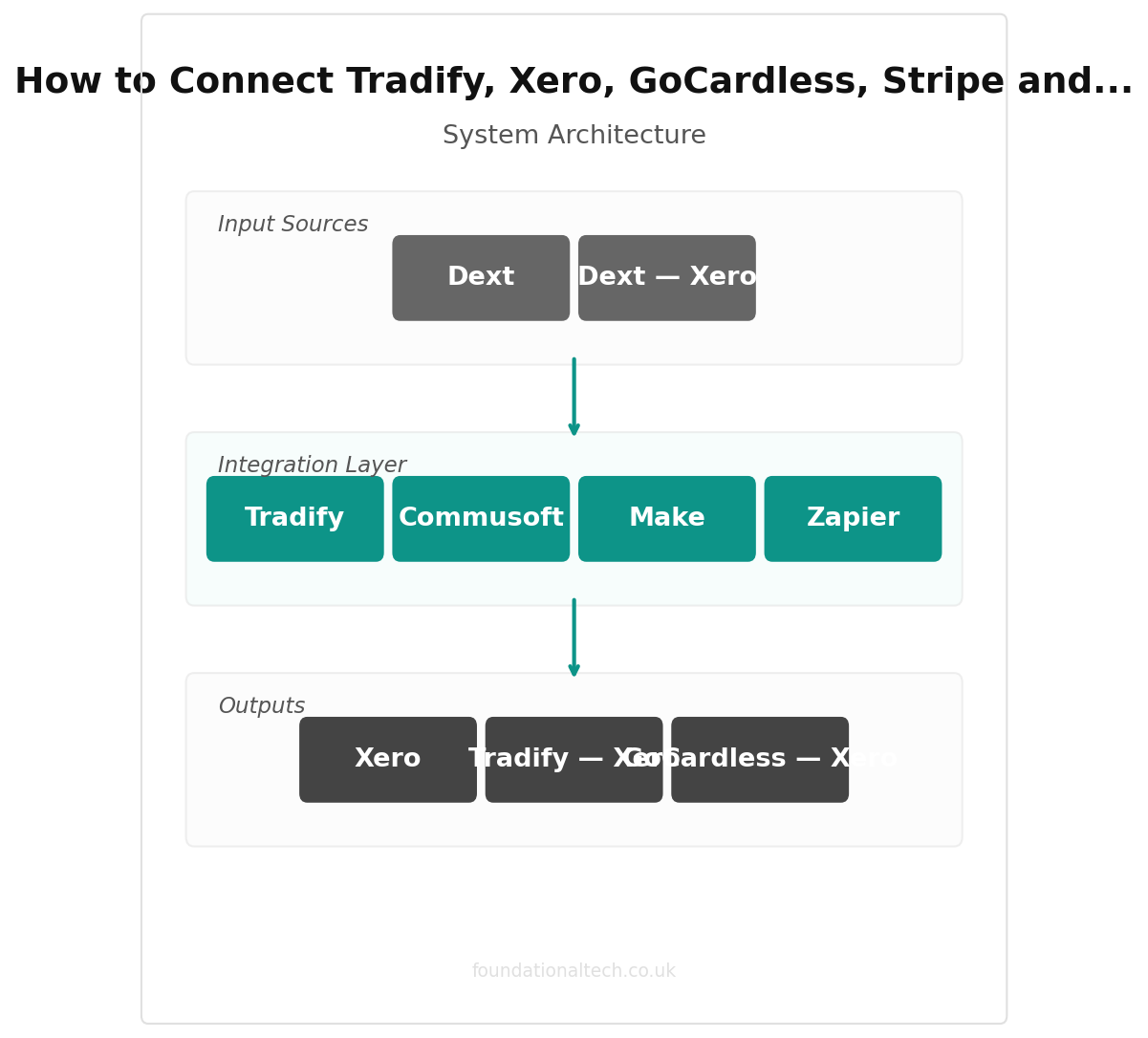
It starts in Tradify. You quote the job, the customer accepts, you schedule it, your engineer logs their hours against it on the app, and when the work is signed off you raise the invoice. Tradify is the centre of gravity — the place the job is born and where most of the day-to-day typing happens.
From Tradify, two things need to flow outward. The invoice needs to reach Xero, because Xero is where your real accounts live, where VAT is calculated, and where your accountant looks. And the payment request needs to reach your customer through GoCardless (for Direct Debit on repeat and commercial clients) or Stripe (for one-off card payments on domestic jobs).
When the customer pays, the money flows back the other way. GoCardless or Stripe collects it, tells Xero the invoice is settled, and Xero marks it paid. Meanwhile Dext sits to one side catching everything you spend — wholesaler receipts, fuel, parking, tool hire — photographed on your phone and pushed into Xero as a categorised bill.
So the healthy stack looks like this:
Tradify — Xero — (GoCardless / Stripe) — back to Xero, with Dext — Xero feeding in expenses from the side.
Get those arrows flowing automatically and the job that finishes on Tuesday is invoiced, requested, paid and reconciled without you opening a laptop. Get them wrong — or leave them as manual steps — and you are the integration: the human being who copies the invoice number from one screen to another at nine at night.
Native Integrations
The good news is that most of this stack connects directly, with no middleware, no monthly bridge fee, and no coding. These are the connections worth setting up first because they are the most reliable.
Tradify — Xero is the backbone, and it is a genuine two-way native integration built and maintained by both companies. Switch it on inside Tradify's settings and approved invoices flow straight into Xero as sales invoices, your Xero chart of accounts and tax rates appear inside Tradify so the VAT is right at source, and your customer contacts sync between the two. This is the single most important connection in the stack. Set it up before anything else. It takes about fifteen minutes and removes the most common and most dangerous piece of double-entry: retyping invoices.
GoCardless — Xero is also native, and it is the one most electricians skip and later regret. Connect GoCardless to Xero and you can attach a "Pay with GoCardless" link to your Xero invoices, so the customer authorises a Direct Debit once and future invoices are collected automatically on their due date. When the payment clears, GoCardless reconciles it against the invoice in Xero for you. On the Standard plan, GoCardless costs 1% + 20p per transaction, capped at £4 — so a £2,000 commercial invoice costs £4 to collect, not £40.
Stripe — Xero works the same way for card payments. Connect Stripe and a "Pay now" button appears on your Xero invoices; the customer taps it, pays by card, and the payment reconciles automatically. Stripe's standard UK rate is 1.5% + 20p per transaction. Stripe suits the one-off domestic jobs where the customer wants to pay on the spot; GoCardless suits the regulars and the commercial accounts where Direct Debit is cheaper and more predictable. Most electricians end up running both, and that is fine — they each connect to Xero independently.
Dext — Xero is native too. Photograph a wholesaler receipt in the Dext app, Dext reads the supplier, date, net, VAT and total, and publishes it to Xero as a bill or expense with the image attached. Dext's entry-level Sole Trader plan is around £24 a month, with roughly a fifth off on annual billing. That connection alone is what makes the glovebox-of-receipts problem disappear and protects the VAT you are entitled to reclaim.
Notice what the native connections give you: Tradify, Xero, GoCardless, Stripe and Dext can all be wired together without a single piece of third-party automation software. For a one or two-person firm, that may be the entire system. Set up these four connections and most of the admin vanishes.
| Step | Action | Time |
|---|---|---|
| 1 | Connect Tradify to Xero (native sync) | 5 min |
| 2 | Connect GoCardless to Xero for Direct Debit | 5 min |
| 3 | Connect Stripe to Xero for card payments | 5 min |
| 4 | Connect Dext to Xero for receipt capture | 3 min |
| 5 | Configure Zapier/Make automations | 15 min |
Zapier/Make Workflows
Native integrations handle the money. What they do not handle is the signals around a job — the texts, the reminders, the internal nudges that stop things falling through the cracks. That is where a bridge tool earns its place.
Two do the job: Zapier, which is the easier of the two to learn, and Make, which is cheaper and more powerful once you are comfortable. Zapier's paid Professional plan is around £24 a month billed monthly for 750 tasks; Make's Core plan is around £8 a month billed annually for 10,000 operations. For most electricians, Make's free tier — 1,000 operations a month — covers the workflows below at no cost. Start free.
Here are the three worth building first.
Workflow 1: New job booked — confirmation text to the customer
Trigger: a new job is scheduled in Tradify.
Action: send the customer an SMS — "Hi {name}, confirming {your firm} will be with you on {date} between {time window}. Reply if anything changes."
Setup time: about 20 minutes, including connecting an SMS service.
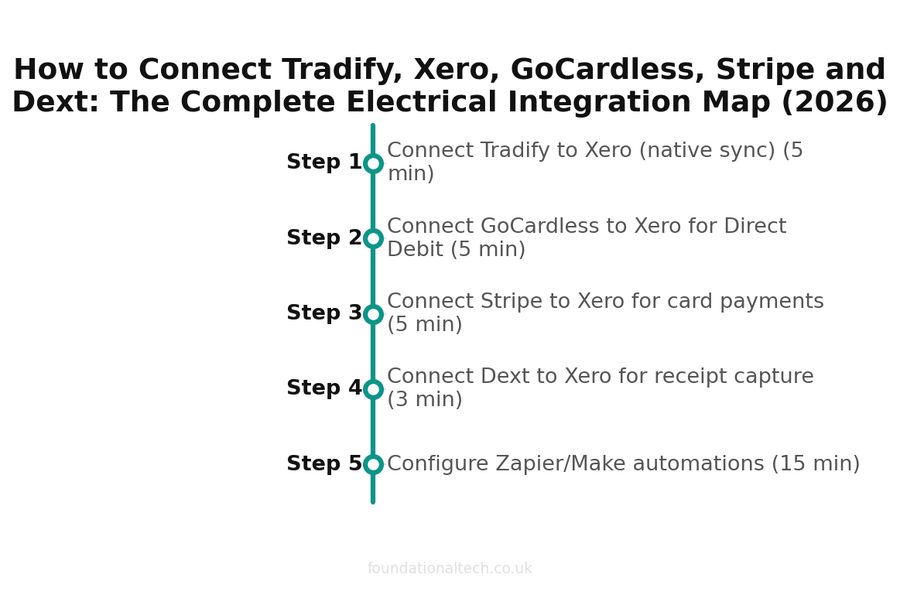
Setup timeline — estimated time for each step 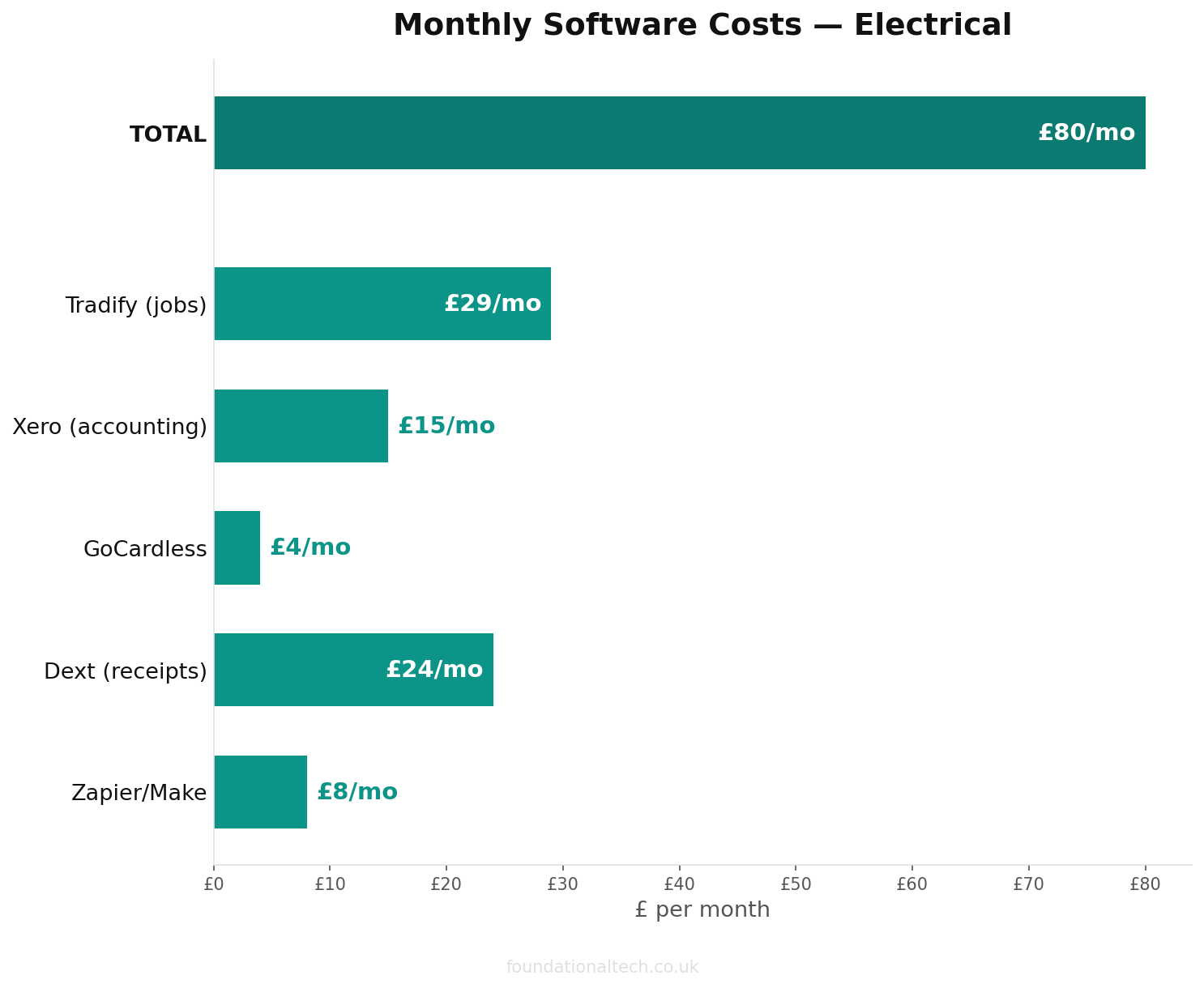
Monthly cost breakdown across the recommended tool stack 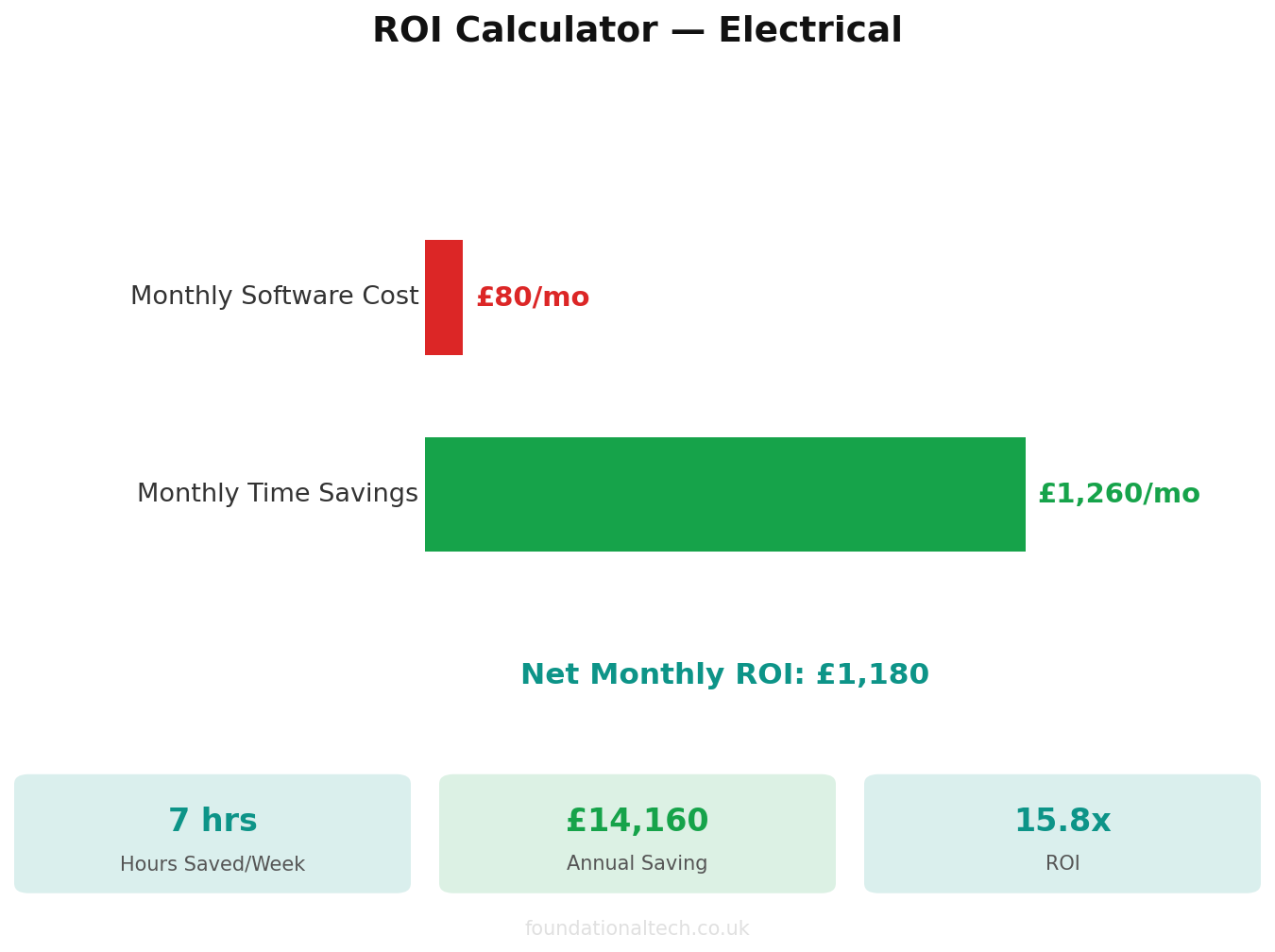
Estimated ROI from automating admin tasks
This is the cheapest no-show insurance you will ever buy. The text goes out the instant the job is booked, the customer feels looked after, and the slot you blocked out actually gets used.
Workflow 2: Invoice unpaid after 7 days — reminder text and internal alert
Trigger: an invoice in Xero is still marked unpaid seven days past its due date.
Action: send the customer a polite reminder by SMS and post a message to you (or your office) so you know who is dragging.
Setup time: about 30 minutes.
This is the workflow that quietly fixes late payment. The first chase happens on day seven, automatically, in a friendly tone, before the debt gets old and awkward. You stop being the person who has to remember to chase, and you stop being the person who forgets.
Workflow 3: Certificate issued — filed and logged
Trigger: a job tagged "EICR" or "certificate" is marked complete in Tradify.
Action: save the certificate PDF to a dated folder in your cloud drive and add a row to a compliance log with the address, date and certificate type.
Setup time: about 30 minutes.
Electrical work generates paperwork that has to be findable years later. This builds your compliance archive as you go, so when a customer rings in eighteen months asking for a copy, it is one search away rather than one panic away.
5 tools, 1 data flow
Complete electrical business stack with both Direct Debit and card payment options
The Gotchas
Every wiring job has a few places where it goes wrong. So does this one. Here are the loose connections to check.
Do not let two systems both create the invoice. The most common mess is raising an invoice in Tradify and manually in Xero, producing duplicates with different numbers. Decide that Tradify is the only place invoices are born. Xero receives them; it never creates its own. One source of truth, always.
Match your VAT scheme in both Tradify and Xero before you connect them. If you are on the Flat Rate or Cash Accounting VAT scheme, set it correctly in Xero first. Get this wrong and every invoice flows through with the wrong VAT treatment — a quiet error that compounds until your accountant finds it at year end. Five minutes of checking now saves a painful unpick later. This matters even more under Making Tax Digital, where HMRC expects a clean digital trail from invoice to return with no manual retyping in between.
Reconnect the bank feed after any bank change. Xero's bank feed silently drops when you change card, get a new account, or your bank updates its security. Payments stop reconciling and you do not get an alert — you just notice three weeks later that nothing matches. Check the feed is live once a month.
Watch the GoCardless timing. Direct Debit is not instant; it takes a few working days to clear. Do not treat an invoice as paid the moment the customer authorises it. Let the GoCardless—Xero reconciliation confirm the cash has actually landed before you count it.
Keep Dext and Tradify out of each other's way. Dext handles money going out (supplier bills, expenses). Tradify and your payment tools handle money coming in. If you start photographing customer invoices into Dext as well, you will double-count income. Dext is for costs. Full stop.
Wire it up in this order — Tradify to Xero first, then your payment tools, then Dext, then the three bridge workflows last — and you end up with a business that runs the way you wire a board: every circuit labelled, every connection deliberate, nothing left loose to trip later.
Which connection in your stack is still done by hand — and how long does it cost you each week?
A & Y Financial Services builds these exact automation stacks for electrical businesses across the UK. If you've read the architecture and want someone to implement it — that's what we do.