Key Takeaway
3 no-code AI workflows for UK electricians in 2026. Automate quotes, emails and reviews using ChatGPT and Tradify.
Most electricians who use AI are still copy-and-pasting. You open ChatGPT or Claude on your phone, type out what you need, wait, then paste the answer into a quote or an email by hand. It works, but it's a power tool left in the van — you have to stop, walk over, and pick it up every single time.
This article is about the next step: wiring that same AI into the tools you already run, so it works while your hands are on the job. An enquiry lands and a draft reply is waiting before you've coiled your leads. A job gets marked complete and a review request goes out on its own. No new app to learn, no code, about £16 a month plus a free automation account. Here are three workflows that do exactly that.
Where AI Meets Your Existing Stack
Everything in this cluster so far has come in two separate blocks. The first five articles built your operational stack — Tradify for jobs, quotes and certificates, Xero for the books, GoCardless for collecting payment, Dext for receipts. The AI articles, six to eight, showed how a single assistant, set up once with your prices and your voice, can draft quotes and replies that sound like you wrote them.
Those two blocks have been working side by side without talking to each other. You still carry the information across by hand: read the enquiry, ask the AI to draft a reply, paste it, send it. The piece that joins them is an automation tool. Make (free for 1,000 credits a month and two active scenarios; the Core plan is around £7 a month, billed annually) and Zapier (free for 100 tasks a month on two-step Zaps; the Professional plan is about £16 a month, billed annually) both connect apps with no code. You build a workflow once by clicking boxes together, and from then on it runs itself. Drop AI into one of those workflows and you have an assistant that acts without being asked.
One warning before we start. Automation is brilliant for drafting, sorting and chasing. It is not for anything that has to be exactly right by law or by safety. Never let AI set your final price, file your VAT, or go near a certificate. An EICR, an EIC, a Minor Works certificate or an EV charger sign-off is your name and your registration on the line — those stay with you, always. Every workflow below ends with a human, usually you, reading it over and pressing send.
Workflow 1: Enquiry In, Draft Reply Waiting (AI + Your Inbox)
The problem: enquiries arrive all day while you're up a ladder with both hands full. By the time you reach your phone at six, the customer has already rung two other electricians, and the fast one has the job. Speed wins work in this trade, and you can't be fast when you're terminating a board.
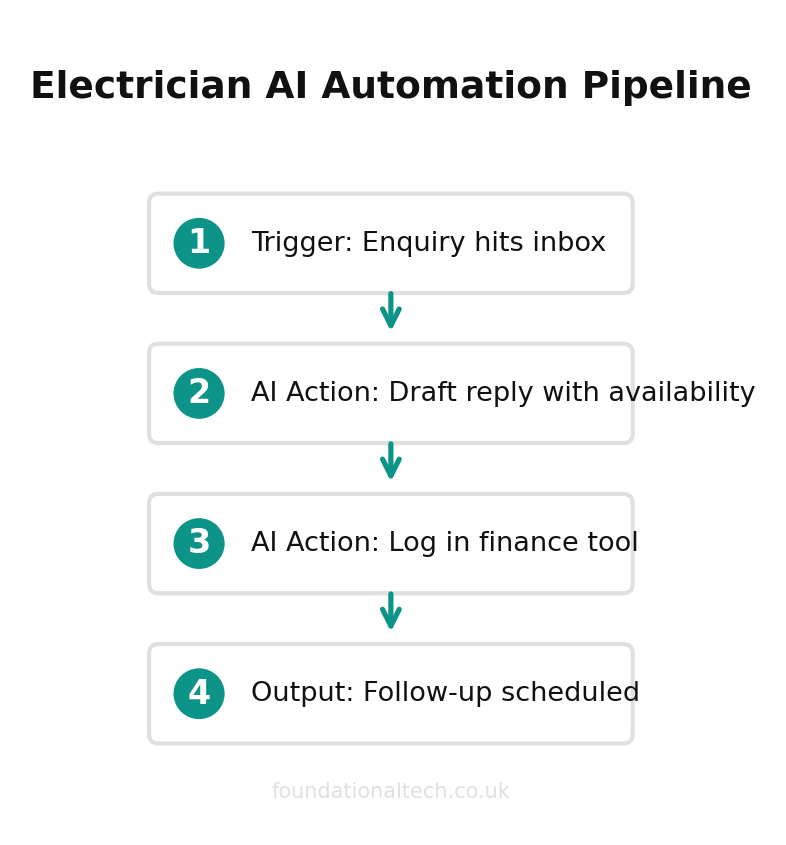
The fix: an automation that watches your enquiry inbox, reads each new message, and uses AI to draft a reply in your voice — sitting in your drafts folder ready for you to glance at and send.
Here's how it goes together, box by box, in Make or Zapier:
Trigger — "New email in Gmail or Outlook" matching a filter: your contact-form address, or a subject line containing "quote", "EICR" or "enquiry".
AI step — pass the email text to ChatGPT or Claude with a standing instruction: "You are the office manager for a Leeds electrical firm. Read this enquiry. Draft a warm, plain-English reply that thanks them, asks the two or three things we need to quote (property age, what's on the board now, photos of the consumer unit, access), and says we'll come back the same day. Never quote a price. Sign off as the team."
Action — save that draft to your Drafts folder, not send. You read it, tweak anything off, hit send.
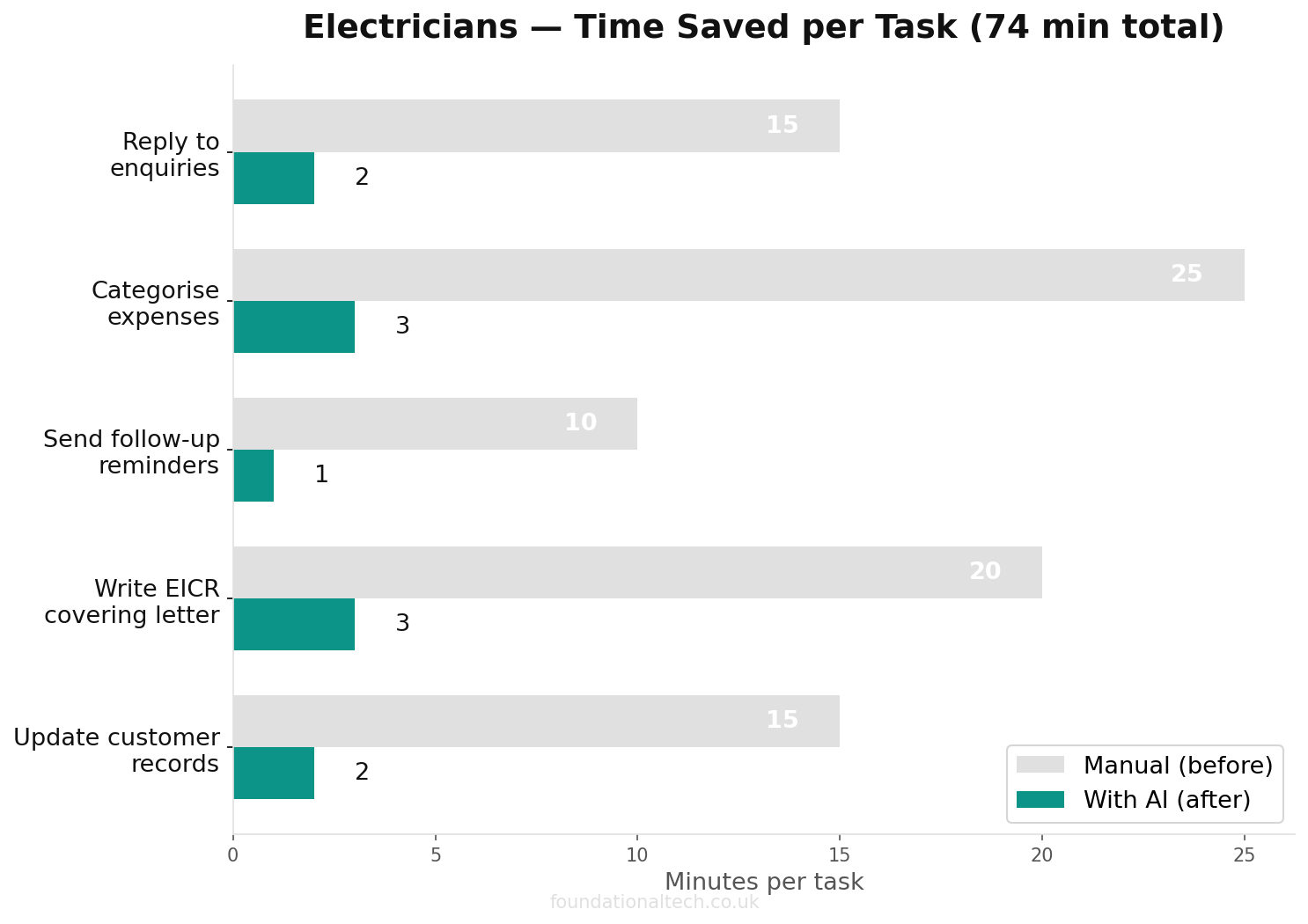
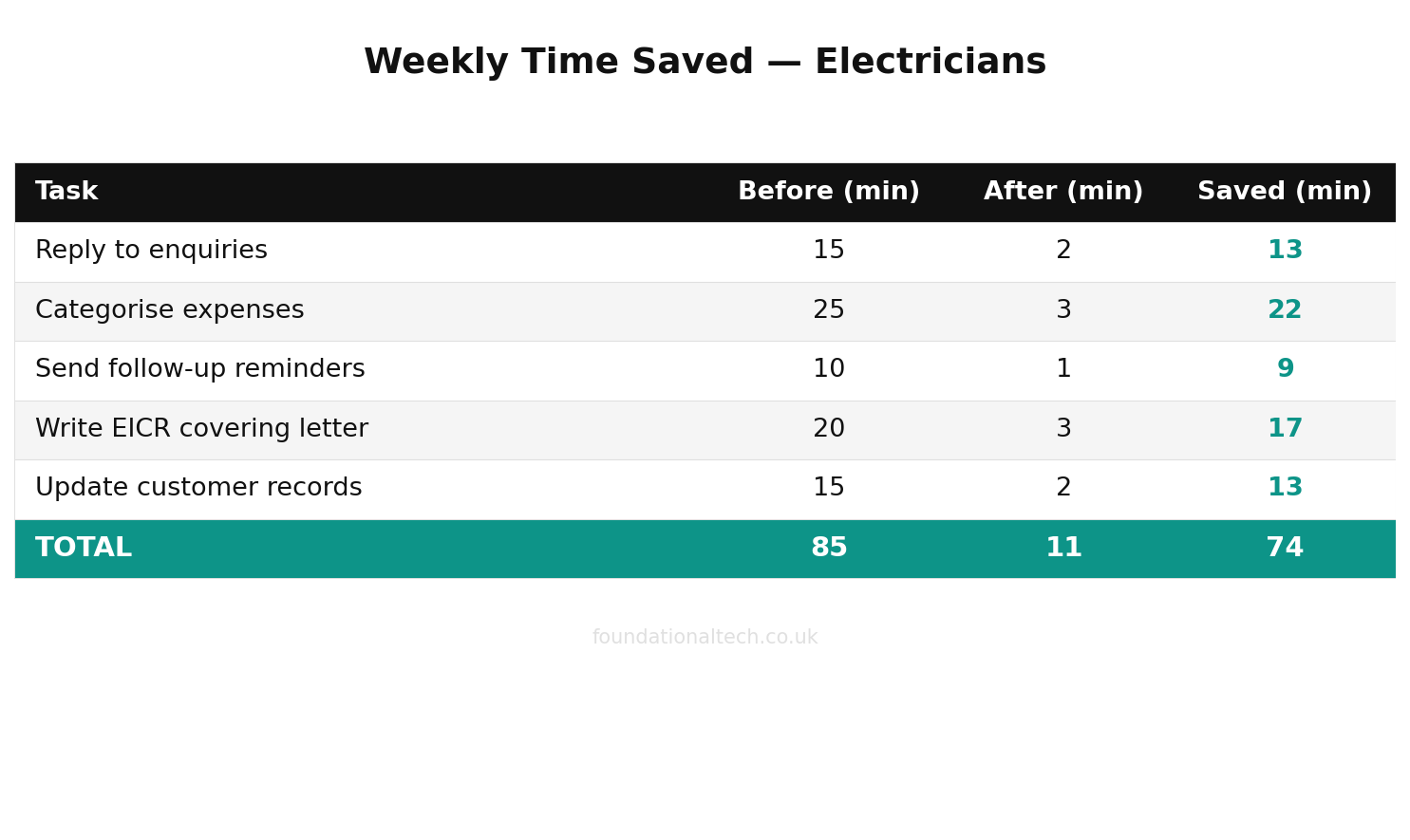
You've turned a cold inbox into a stack of ready replies. The customer hears back in minutes while you're still on site, and you haven't broken off the job to do it. Cost: your existing AI subscription plus a free Make or Zapier account, because a handful of enquiries a day sits comfortably inside the free tiers.
Workflow 2: The Books That Sort Themselves (AI + Finance)
The problem: receipts and odd transactions stack up, and the monthly catch-up with Xero quietly eats an evening you don't have. Dext already pulls the wholesaler receipts in; the time sink is making sense of the bits that don't fit.
The fix: use AI as a second brain over your own numbers, on demand, instead of squinting at a spreadsheet.
This one is lighter on plumbing-and-wiring and heavier on asking good questions. You don't hand AI live access to your bank — you don't need to, and you shouldn't. Instead, once a week, export a transaction list from Xero (or copy the screen), paste it into your AI assistant, and ask plain questions: "Group these transactions into materials, fuel, tools, subscriptions and 'unsure'. Flag anything that looks like a duplicate or a personal spend that's slipped onto the business card." In thirty seconds you get a tidy breakdown and a shortlist of things to check, instead of scrolling line by line.
For the firms that want it wired up, Make can go further: a scenario that, at month end, pulls your Xero expense summary, asks AI to write three sentences explaining where the money went versus last month, and drops that note into your email or a shared sheet. It won't file anything and it won't touch your VAT return — that stays in Xero under Making Tax Digital, calculated and submitted by you. What it gives you is a plain-English read on your own money without opening a single report.
Workflow 3: The Follow-Ups That Never Get Forgotten (AI + Client Communications)
The problem: the money is in the follow-up, and the follow-up is what falls off the end of a long day. The review you never asked for. The EICR that's due to expire next month on a landlord you'd forgotten. The quote you sent ten days ago that just needs a nudge.
The fix: an automation that watches Tradify for a job marked complete and triggers a personalised, AI-drafted message at the right moment.
Box by box:
Trigger — a job status changes to "Complete" in Tradify (via its built-in connection, or a Make/Zapier watch on the confirmation email).
AI step — draft a short, warm message using the customer's name and the job type: "Write a friendly two-line text thanking [name] for having us do their [job], saying it was good to help, and politely asking if they'd leave us a Google review — include the link."
Action — drop it into your drafts, or, once you trust it, send a templated version automatically a day after completion.
The same pattern handles expiry reminders. Most electrical certificates run to a fixed life — an EICR on a rented property is typically renewed every five years or at change of tenancy. So you can keep a simple sheet of certificate dates and have an automation email you, and draft the customer's reminder, sixty days before each one lapses. That's repeat work that used to depend on your memory, now landing in your inbox on its own.
Setup Guide
You do not need to build all three at once, and you shouldn't. Pick one, get it running, live with it for a week, then add the next.
~£16/month
total running cost for three AI workflows covering enquiries, bookkeeping and client follow-ups
Start with a free Make or Zapier account. Connect it to your email first — both walk you through a secure sign-in, no settings to fiddle with. Then connect your AI: you'll paste in an API key from your ChatGPT or Claude account (a string of characters you copy from the developer settings; the tool shows you exactly where). Build Workflow 1 by adding three steps in order — trigger, AI, action — and use the test button to fire a dummy enquiry through it. Read what lands in your drafts. Adjust the instruction until the tone sounds like you. The whole thing takes an evening, most of which is spent wording the AI step rather than wrestling with software.
A note on the new pricing model: Make moved from counting "operations" to counting "credits" in late 2025, and AI steps cost more credits than a plain action. For three light workflows handling a normal flow of enquiries and follow-ups, the free tier or the £7-a-month Core plan covers it. You'll only feel the ceiling if you start running hundreds of automations a day, which no one-van firm is doing.
What Not to Automate
Three things stay manual, no exceptions. Your final price, because only you know your real costs and your local market. Anything that goes on a certificate or in the regs, because that carries your registration and your liability. And the first reply to an unhappy customer, because a person needs to read the room, not a template. Automation is there to carry the routine so you have the time and the headspace for the parts that actually need you.
When a Workflow Stops Working
Automations break quietly. An email provider changes a setting, an AI key expires, a tool updates. Build in one habit: once a week, glance at the run history in Make or Zapier — it's a simple list of green ticks and red crosses. A red cross means a workflow failed and a customer didn't get their reply. Both tools can email you the moment a scenario errors, so switch that on. Two minutes a week of watching the dashboard is the price of trusting the machine the other six days.
Which One to Build First
If you only build one, build Workflow 1 — the instant-reply draft. It plugs the most expensive leak in an electrical business, which is enquiries going cold while you're on the tools. The books workflow saves you an evening a month; the follow-up workflow earns you reviews and repeat work over time. But the reply workflow wins you jobs this week, and a won job pays for the whole stack many times over.
Build one, trust it, then add the next. The goal was never to hand over the wheel. It's to stop being the person who has to carry every message across by hand, so the machine does the fetching and you keep every decision that matters.
Which of these three would save you the most time right now — the instant enquiry reply, the self-sorting books, or the automatic review and certificate reminders? Tell me which leak is costing you most and I'll tell you exactly how to wire it up first.
For the human side of this shift, see The Electrician Who Was Sure I’d Come to Take His Job.