Key Takeaway
Complete 2026 integration map for UK painters & decorators: Xero, Dext, YourTradebase connected. Data flow diagrams, sync settings, and troubleshooting.
Four articles into this series, you've got a quoting tool, a paint calculator, Xero, Dext, a payment processor and a Dulux or Crown trade account. Individually, each earns its keep. Collectively, they behave like five subcontractors who've never been introduced. The calculator doesn't know what you quoted. The trade account doesn't know which job the paint was for. And the one figure that actually decides whether a job made money — quoted material cost versus what you actually spent at the counter — currently lives in your head. It gets reconstructed at year end, from a memory that's had eleven months to fade.
This article stitches those five layers into one system. Some links are built in and cost nothing but a login. Others need a Zapier or Make workflow in the middle. And one — the trade counter — refuses to connect at all, which matters more to a decorator than to almost any other trade.
One Job, Five Handovers: How the Information Should Travel
A decorating job should move through five stages without you re-entering the same information twice: quote (YourTradebase, Trades Panel or HiveSuite, built from a paint coverage calculation) — acceptance and deposit (client portal, GoCardless or Stripe) — materials bought (Dulux Decorator Centre, Crown Trade or Leyland Trade, captured by Dext) — walkthrough and balance (marked complete on the app, balance invoice fires) — reconciled in Xero, with the true material cost sitting against the true quoted price on the same job record.
In practice, only parts of that chain connect natively. The rest is either a middleware bridge or a manual habit — and knowing which is which before you build the stack saves a fortnight of assuming something is automatic when it isn't.
The Links You Get Just by Logging In
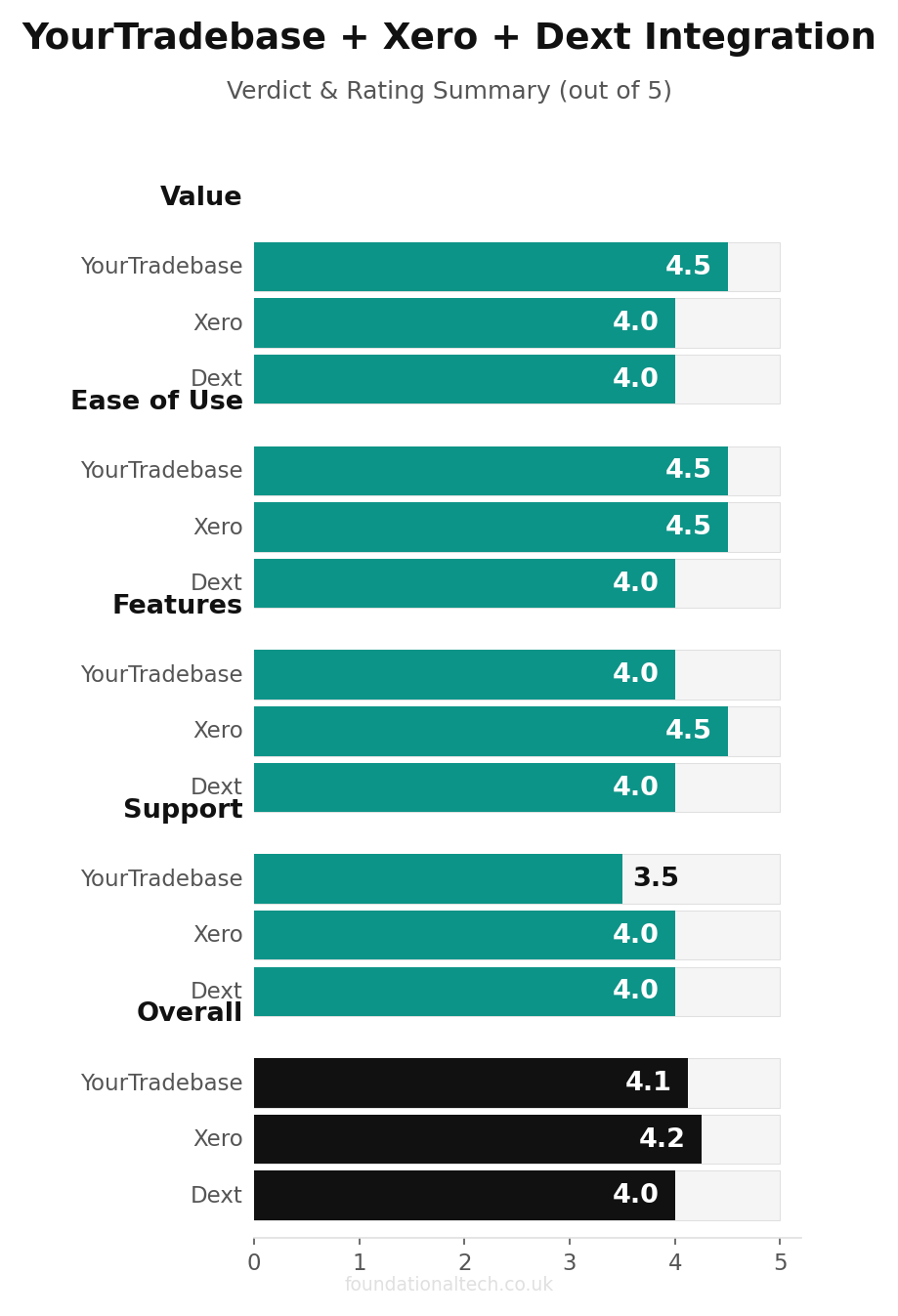
YourTradebase to Xero is the one genuinely native, no-middleware link in this stack. Connect it once in Settings and forget it exists: invoices you raise, edit or take payment on in YourTradebase appear in Xero on their own, customer records and payment status included. This is the strongest reason to lead with YourTradebase over its two competitors if Xero is your accounting backbone.
GoCardless to Xero and Stripe to Xero both connect natively through Xero's own app marketplace. Once linked, a collected Direct Debit payment or card payment matches automatically against the open invoice in your bank feed — no manual reconciliation, no guessing which client the £340 deposit that landed on a Tuesday actually belongs to.
Dext to Xero is the same story: photograph a trade counter receipt, and the coded transaction appears in Xero ready to reconcile, typically within minutes.
Xero Payroll, if you run one, is a module you switch on inside Xero rather than another app to bolt on. A decorator paying a labourer under CIS, or an apprentice through PAYE with pension auto-enrolment, is doing it inside the same books the invoices already live in — nothing to sync because there's nothing separate.
That's four solid native links. The two gaps sit exactly where you'd expect: the quoting tool you didn't choose, and the trade account you didn't build the software for.
Where It Doesn't Connect: Trades Panel, HiveSuite and the Trade Account
Trades Panel, particularly on its free tier, doesn't advertise a native Xero connection. Treat it as needing manual export or a Zapier bridge (see Workflow 3 below) unless the provider confirms one directly when you ask. For a one-person outfit still on the free plan, that's a genuine trade-off against YourTradebase's native sync, worth weighing against the £15/month you'd otherwise pay.
HiveSuite leans hard into its own AI quoting and analytics, and does not offer the same plug-and-play Xero connection YourTradebase does. If Xero reconciliation matters more to you than HiveSuite's built-in AI features, that's a real reason to choose differently. Confirm the current integration list with HiveSuite before committing — this is exactly the kind of feature that changes between software updates.
Dulux Decorator Centre, Crown Trade and Leyland Trade accounts have no API and no Zapier connection at all. Your monthly trade account statement is a PDF or a paper slip, full stop. The Dulux Trade Points app tracks your loyalty balance and lets you scan your card in-store. But it doesn't talk to your accounting software, any more than a supermarket loyalty app talks to your household budget spreadsheet. The only bridge between your trade account and your books is the habit covered in Article 4: photograph every receipt with Dext, at the counter, before it goes in your pocket. There is no automated version of this. It is the one link in the entire stack that stays manual no matter what you buy.
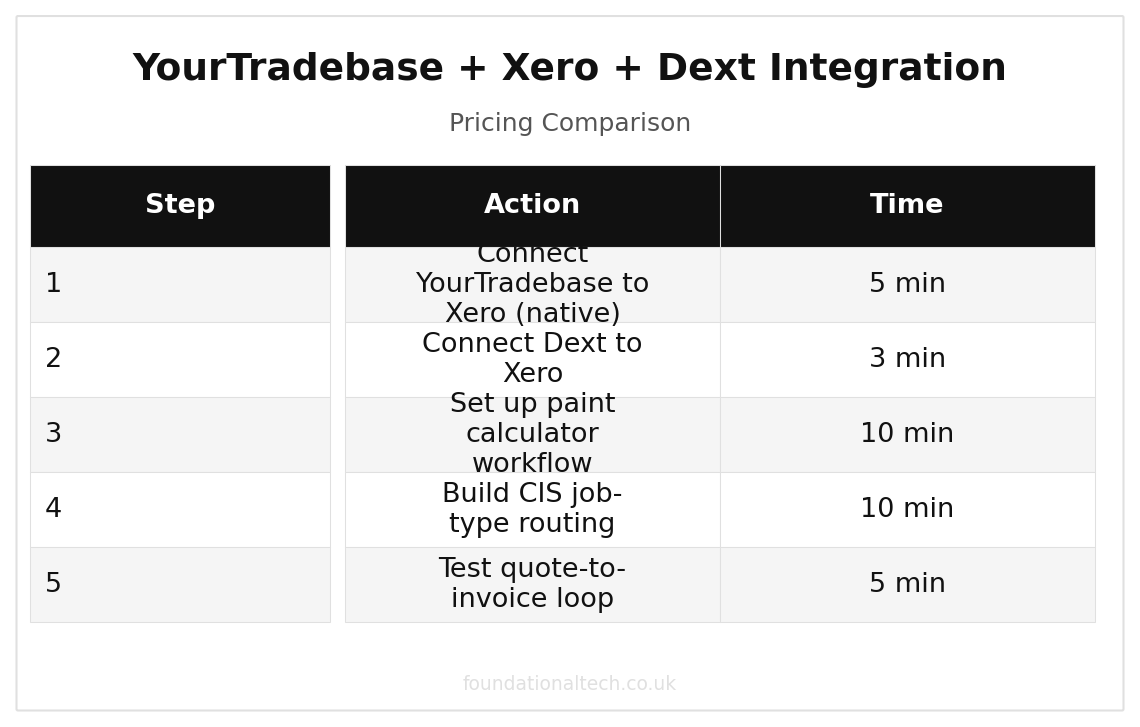
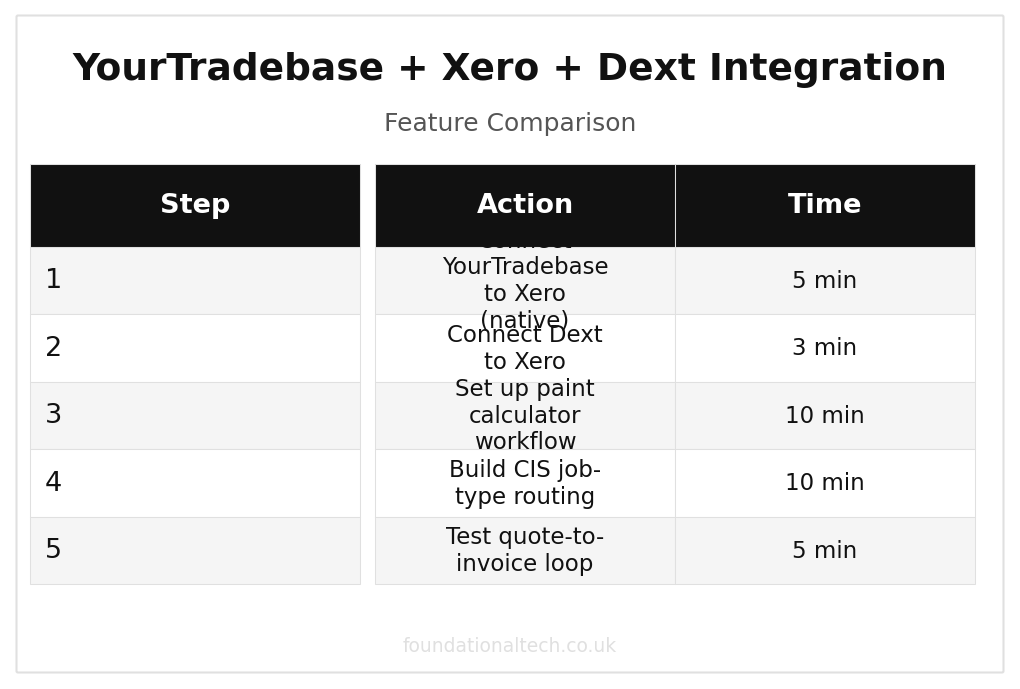
| Step | Action | Time |
|---|---|---|
| 1 | Connect YourTradebase to Xero (native) | 5 min |
| 2 | Connect Dext to Xero | 3 min |
| 3 | Set up paint calculator workflow | 10 min |
| 4 | Build CIS job-type routing | 10 min |
| 5 | Test quote-to-invoice loop | 5 min |
Three Gaps Worth Closing with Zapier or Make
Workflow 1: Paint Calculator Reading Into the Quote Line Item
No coverage calculator — not TradeCalcs, not Price Doctor — connects directly to YourTradebase, Trades Panel or HiveSuite. The litres-and-coats figure the calculator gives you has to be typed into the quoting tool as a line item by hand, every time. There's no Zapier trigger for "calculator produces a number," because these are simple web calculators, not accounts with an API. The workaround that actually saves time isn't automation at all: build a saved quote template in your chosen tool, with standard line items already structured for "walls," "ceiling," "woodwork" and "third-coat contingency." Then running the calculator and dropping the result into an existing field takes thirty seconds, rather than building the quote structure from scratch each time. Setup time: fifteen minutes, once.
Workflow 2: Walkthrough Complete — Balance Invoice — Before/After Photo Filed
Trigger:
job marked "complete" in YourTradebase, Trades Panel or HiveSuite during the client walkthrough.
Action:
the balance invoice generates and sends immediately (native to all three tools). A Zapier step simultaneously creates a task or folder entry prompting you to upload the before/after photo pair from day one and day three to a dedicated cloud folder in Google Drive or Dropbox. Each entry is tagged with the client's postcode and job type.
Why it matters specifically here:
decorators sell almost entirely on visual proof and word of mouth. A photo pair captured in the moment, filed automatically rather than left buried in a phone's camera roll, becomes the material for next month's quote follow-ups, your Checkatrade profile and any paid advertising. That only works if it's filed the same day — not scrolled past six weeks later when you're looking for something else entirely.
Setup time:
twenty minutes in Zapier or Make, using the "job status changed" trigger most quoting tools expose.
Workflow 3: CIS Job-Type Flag at Quote Stage — Correct Xero Routing
Trigger:
a new quote is created and tagged as either "domestic" or "contractor/site" at the point of creation — a single dropdown field, not an afterthought.
Action:
a Zapier or Make workflow reads that tag and routes the resulting Xero invoice into the correct ledger automatically — standard VAT treatment for domestic work, CIS-liable tracking for site work. That removes the risk described in Article 4: a site job accidentally landing in the wrong column during a busy week running both types of work at once.
Bonus step:
if you're on Trades Panel's free tier without native Xero sync, this is the same workflow that also pushes the invoice itself into Xero in the first place, solving two gaps with one automation.
Setup time:
thirty to forty minutes, and worth testing on a handful of real quotes before trusting it fully — a mis-tagged first job is a much smaller problem to catch than a mis-tagged fiftieth.
The Snag List: Where This Stack Catches Decorators Out
HiveSuite's AI quoting doesn't replace the coverage calculation. It's genuinely useful for turning a site visit into structured quote text, but it isn't pulling paint coverage data from anywhere. You still need to run the calculator separately and feed the number in, the same as with any other tool.
Dext will happily miscode a trade account receipt if the supplier name is inconsistent. Dulux Decorator Centre sometimes appears on statements under a slightly different trading name to the branch you actually used. Check the expense category Dext assigns for the first few receipts from a new branch, or job-costing by supplier becomes quietly unreliable.
GoCardless mandates don't cover cash or cheque payments some older or smaller landlord clients still prefer. These still need manual entry into Xero — automation covers the payment methods you've set clients up on, not the ones a long-standing client insists on using out of habit.
A Zapier or Make workflow triggered on "job status changed" will fire on every status change, not just the one you want. If your quoting tool has more granular statuses than "quote, active, complete" — for instance a "scheduled" or "in progress" stage — filter the trigger carefully. Otherwise you'll get a balance invoice firing when a job merely starts rather than finishes.
None of this replaces checking the actual trade account statement against Dext once a month. Automation reduces the manual work to a fifteen-minute check rather than an evening's reconstruction — it doesn't remove the check entirely, and the one month you skip it is reliably the month a receipt went uncaptured.
5 handovers per job
From enquiry to paid invoice, each handover automated through the YourTradebase + Xero stack
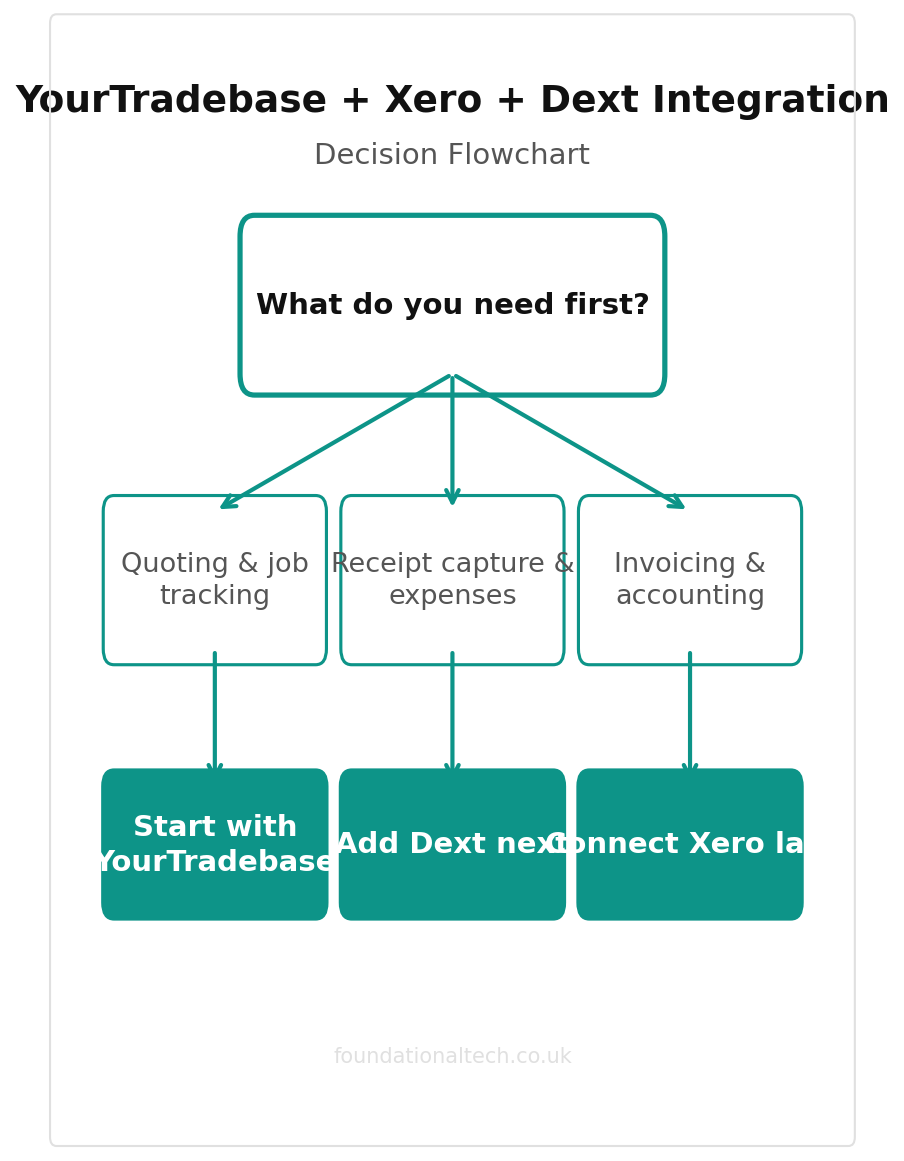
Setting It Up, In Order
Connect YourTradebase (or your chosen quoting tool) to Xero first. Every other link in this list assumes that one is already working.
Link GoCardless and Stripe to Xero so payments match automatically.
Install Dext and build the counter-receipt habit before adding anything else — this is the one link with no automated substitute.
Build the CIS job-type flag and routing workflow once you're comfortable with the basics, testing on real quotes before trusting it on a busy week.
Add the before/after photo workflow last — it's the one piece of this stack that's about growth rather than compliance, and it's fine to bolt on once the financial plumbing is solid.
How do you square your Dulux or Crown statement against what each job was quoted — a monthly Dext check, a spreadsheet, or a best guess at year end? Reply and describe your method, warts and all. The messy real-world versions are more useful to other decorators than any tidy wiring diagram.
A & Y Financial Services builds these exact automation stacks for painting and decorating businesses across the UK. If you've read the architecture and want someone to implement it — that's what we do.