Key Takeaway
Compare UK PPM scheduling software from £25/user/mo. Uptick, Joblogic, Loc8, ServiceM8 and Commusoft for planned preventative maintenance in 2026.
Key Takeaway
PPM scheduling software automates recurring maintenance visits, tracks asset compliance and stops you billing last year's price on this year's contract. For UK fire and security firms, Uptick (from ~£40/user/mo) and Joblogic (from ~£30/user/mo) lead on specialist compliance features. For smaller FM operations, Loc8 (from ~£25/user/mo) and ServiceM8 (from £29/mo flat) offer solid scheduling at a lower entry point. Commusoft sits in the middle with strong SLA tracking for commercial service contractors.
The best PPM scheduling software for UK trade businesses depends on what you maintain and how many sites you manage. Uptick is purpose-built for fire and security inspection rounds with deep asset registers. Joblogic handles mixed-discipline contractors running fire, mechanical and electrical under one roof. Loc8 and ServiceM8 work well for smaller operations that need recurring visit scheduling without enterprise-grade complexity. Commusoft is strongest where SLA management and customer communication matter most.
What PPM Software Actually Does (and Why Spreadsheets Stop Working)
Planned Preventative Maintenance software — PPM for short — automates the scheduling, tracking and documentation of recurring maintenance visits. Instead of a wall planner, a colour-coded spreadsheet or someone's memory, the system generates visit schedules from contracts, assigns engineers, tracks completion and flags anything overdue before a client or auditor does.
The "preventative" part matters. Reactive maintenance — something breaks, you fix it — is expensive and damages client relationships. PPM is the opposite: you visit on schedule, service the assets, catch defects early and document everything. For regulated industries like fire and security, it is not optional. BS 5839-1 requires a minimum of two inspection visits per year on most non-domestic fire alarm systems. Miss one and your certification body will notice.
PPM software is used by three overlapping groups in the UK:
- Fire and security firms — managing inspection rounds across hundreds of sites, generating fire certificates, tracking device-level asset histories and staying compliant with NSI, SSAIB or BAFE requirements.
- HVAC and mechanical contractors — scheduling F-Gas checks, filter changes, boiler services and planned maintenance on commercial plant under SFG20 task schedules.
- Facilities management companies — running multi-service contracts across building portfolios where SLA response times, asset registers and compliance documentation all feed into the same system.
The common thread: they all have recurring visits on a calendar, assets that need tracking, contracts that need billing and compliance that needs proving. A generic job management app handles the first one. PPM software handles all four.
PPM Software Compared: UK Pricing and Features
| Software | Starting Price (GBP) | Best For | Recurring Scheduling | Asset Register | Compliance Tracking | Xero Integration |
|---|---|---|---|---|---|---|
| Uptick | ~£40/user/mo | Fire & security maintenance | Yes — contract-driven | Device-level | BAFE, NSI, SSAIB | Yes |
| Joblogic | ~£30/user/mo | Mixed-discipline contractors | Yes — SFG20 native | Yes | Multi-scheme | Yes |
| Loc8 | ~£25/user/mo | Smaller FM teams | Yes | Yes | Basic | Yes |
| ServiceM8 | £29/mo (flat) | Solo operators, small teams | Yes — recurring jobs | Limited | Basic | Yes |
| Commusoft | Quote only | Commercial service contractors | Yes — SLA-driven | Yes | Yes | Yes |
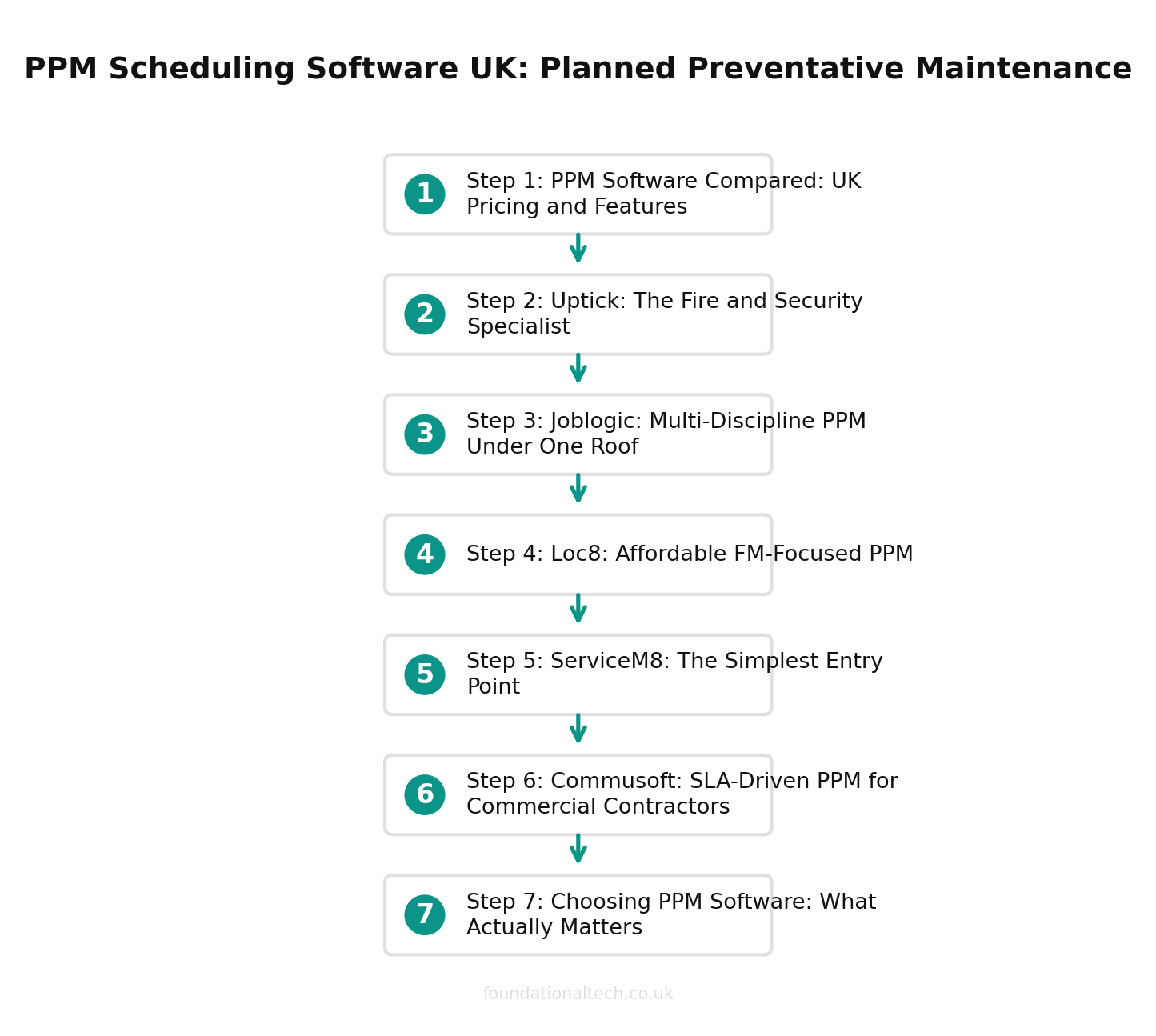
Uptick: The Fire and Security Specialist
Uptick was built around fire inspection workflows and it shows. The PPM scheduling is driven by the asset register: you define devices on a site, attach service frequencies to contracts and the system generates the visit calendar. Engineers work through inspections device by device on the mobile app, recording pass/fail results, defects and photos against each asset.
What makes Uptick stand out for PPM is the defect-to-quote flow. When a technician finds a faulty smoke detector head during a routine service, that defect becomes a priced remedial quotation without anyone re-entering the site details or the asset information. For firms running hundreds of maintenance visits a month, that automation turns routine inspections into remedial revenue.
Pricing is per user per month (approximately £40/user/mo, though exact pricing is quote-based). Customer and subcontractor logins are free and unlimited, which matters if you have facilities managers who want on-demand access to certificates or you push overflow work to subcontractors.
PPM strengths: Device-level scheduling, automated inspection rounds, fire certificate generation, offline mobile for plant rooms and basements.
Watch out for: Less suited to general mechanical maintenance. The per-user model is expensive for a one-person firm. Security-side features like intruder grading and URN records need configuring rather than arriving out of the box.
Joblogic: Multi-Discipline PPM Under One Roof
Joblogic starts at approximately £30 per user per month on the Standard tier (billed annually), with Premium and Enterprise tiers quoted separately. It is a UK-built platform designed for service contractors who do more than one thing — fire alarms and air conditioning, emergency lighting and mechanical plant, security and general M&E.
The PPM scheduling integrates with SFG20 task schedules natively, which is a genuine differentiator for firms doing planned mechanical maintenance. SFG20 defines the maintenance tasks, frequencies and competency requirements for building services — Joblogic imports those schedules and turns them into engineer work orders automatically.
For fire and security firms specifically, Joblogic handles compliance across multiple schemes (BAFE, REFCOM, F-Gas). Contract management lets you hold fire, security and mechanical assets under a single site agreement, so you are not running three separate systems for one building.
PPM strengths: Multi-discipline contract management, SFG20 integration, published transparent pricing, strong Xero sync.
Watch out for: The breadth means more modules to navigate. If you only do fire and security, you are paying for capability you will not use. Less specialised on the security compliance side than Uptick or dedicated alarm management platforms.
Loc8: Affordable FM-Focused PPM
Loc8 (now part of Datto, a Kaseya company) positions itself as work order and asset management software for facilities teams. Starting at approximately £25 per user per month, it is the most affordable per-user option on this list for teams that need proper asset registers and recurring maintenance scheduling.
The PPM functionality is straightforward: create assets, define maintenance plans with frequencies, and the system generates work orders on schedule. It tracks asset history, stores documents against locations and assets, and gives you a dashboard view of overdue, upcoming and completed maintenance.
Where Loc8 fits well is smaller FM operations — a facilities team managing a portfolio of commercial buildings, a property management company with a maintenance obligation, or a growing contractor who needs more than a spreadsheet but is not ready for an enterprise CAFM system.
PPM strengths: Clean asset management, good mobile app, sensible pricing for smaller teams, location-based work order management.
Watch out for: Not designed for fire and security compliance specifically. No native SFG20 integration. Less depth on contract billing and automated invoicing than Joblogic or Uptick.
ServiceM8: The Simplest Entry Point
ServiceM8 starts at £29 per month (not per user) on the Growing plan, which includes recurring jobs, online booking and automated follow-ups. The Growing plan supports unlimited staff. For a sole trader or a two-person operation looking to automate recurring maintenance visits, it is the lowest-cost entry point with genuine functionality.
PPM scheduling in ServiceM8 works through recurring jobs: you set a job to repeat at a defined interval (monthly, quarterly, six-monthly, annually) and the system creates the next job automatically. It is simple, it works, and for businesses with a manageable number of maintenance contracts it does the job without the overhead of a full FM platform.
The trade-off is depth. ServiceM8 does not have a proper asset register — you can attach notes and photos to jobs and clients, but there is no device-level tracking, no compliance framework and no SFG20 integration. It is a job management tool with recurring scheduling, not a PPM platform in the traditional sense.
PPM strengths: Flat monthly pricing regardless of team size, dead simple to set up, excellent mobile app, strong Xero integration, automated client communications.
Watch out for: No asset register. No compliance tracking. If you need to prove to an auditor that you serviced a specific device on a specific date, ServiceM8 alone will not get you there. Best paired with a separate compliance record for regulated work.
Commusoft: SLA-Driven PPM for Commercial Contractors
Commusoft is a UK-built platform aimed at commercial service contractors. Pricing is quote-based (expect mid-range per-user costs), but the PPM and contract management features are where it earns its keep.
The scheduling engine is contract and SLA-driven. You define service level agreements per contract — response times, visit frequencies, coverage hours — and the system schedules maintenance, tracks compliance against those SLAs and flags breaches before they happen. For FM companies and commercial maintenance contractors where SLA penalties are real money, that proactive alerting is the feature that matters.
Commusoft also handles the customer communication side well: automated appointment reminders, service reports sent on completion, and a customer portal where clients can log requests and view their maintenance history. If client retention depends on visible, professional communication, it fills that gap.
PPM strengths: SLA management and breach alerting, contract lifecycle tracking, strong customer communication tools, parts and inventory management.
Watch out for: Quote-based pricing makes comparison harder. Less fire-and-security-specific than Uptick. Setup and configuration takes longer than simpler tools like ServiceM8.
Choosing PPM Software: What Actually Matters
Forget the feature matrix for a moment. The decision comes down to five questions:
- Are you in a regulated trade? Fire and security firms need device-level asset registers and certification-body-ready documentation. That narrows you to Uptick, Joblogic or a dedicated alarm management platform. General FM and HVAC firms have more options.
- How many disciplines do you cover? One trade, one system is easy. Fire, security and mechanical under one roof means Joblogic or Commusoft. Trying to make a single-trade tool cover everything creates workarounds that cost more than the second licence you were trying to avoid.
- What does your contract book look like? Under fifty contracts: ServiceM8 or Loc8 will handle the scheduling. Over a hundred contracts with annual uplifts, multi-site clients and deferred revenue: you need Joblogic, Uptick or Commusoft’s billing engine.
- Do your engineers need offline mobile? If your maintenance round includes basements, plant rooms, riser cupboards or rural sites, test offline functionality during your trial. Not all "mobile apps" work without signal.
- What accounting software are you on? Every option here integrates with Xero. If you are on Sage or QuickBooks, check the specific integration before committing. A PPM tool that does not sync invoices to your accounts package is a PPM tool that creates double entry.
Integration With Accounting: The Bit Everyone Forgets
PPM software generates invoices from maintenance contracts. Your accounting software — whether that is Xero, Sage or QuickBooks — is where those invoices need to land. The quality of that integration varies enormously.
Good integration means: invoices created in the PPM tool push to your accounts package with the right nominal codes, the right VAT treatment and a link back to the contract. Deferred revenue from annual contracts paid upfront releases monthly. Payment status syncs back so engineers and office staff can see who has paid without logging into Xero.
Bad integration means: invoices export as a CSV that someone pastes into Xero manually every Friday. That person is the bottleneck, and when they are on holiday the invoicing stops.
During your demo, ask specifically: does the integration handle deferred income recognition for annual maintenance contracts? If the answer is "you can set that up in Xero," the integration is shallow. If the answer is "the contract billing module handles revenue recognition natively," you are looking at a tool built for maintenance businesses.
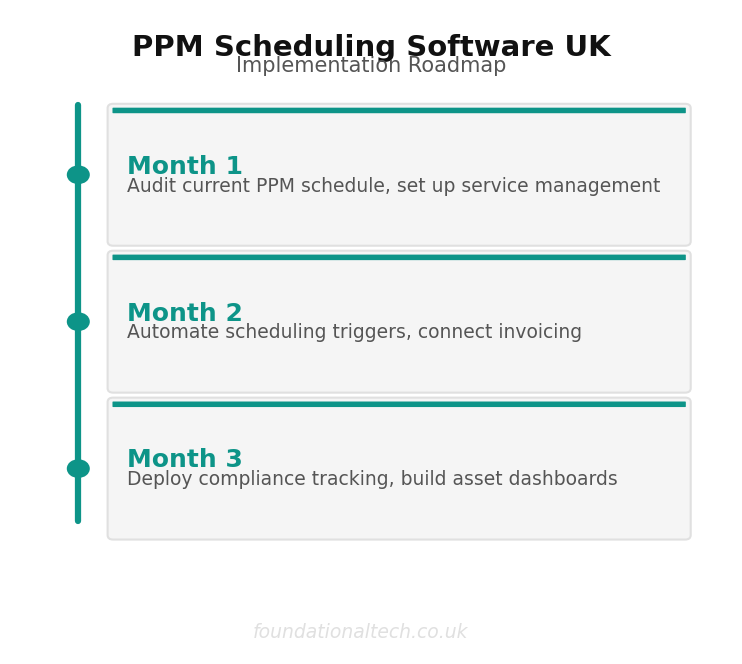
Getting Started: The First Two Weeks
Whichever PPM tool you choose, the implementation sequence matters more than the software itself. Get this wrong and you will spend six months fixing data instead of six months growing the maintenance book.
Week one:
- Build your site list (not customer list — a managing agent with eight buildings is one customer and eight sites)
- Load your asset register from the last round of service sheets, not from memory
- Set service frequencies per contract, matching the actual compliance requirement (BS 5839-1 for fire, annual for intruder, SFG20 for mechanical)
- Connect your accounting integration and map nominal codes correctly from day one
Week two:
- Run one billing cycle in parallel — invoice from the new system and the old way, then compare line by line
- Put two engineers on the mobile app for live visits before migrating the whole team
- Test offline functionality in a real plant room or basement, not in the office on WiFi
- Set up automated client notifications for upcoming visits — missed inspections are often a communication failure, not a scheduling failure
The asset register is the hard part and the valuable part. A clean register in any of these tools is worth more than a messy register in the most expensive one. Spend the time on data quality before you spend money on features.
Related Guides
If this was useful, you might also want to read:
- Uptick vs Joblogic vs AlarmMaster: Fire & Security Software UK
- Fire and Security Software UK: How to Choose the Right Platform
- AI for UK Fire and Security Installers
- Powered Now vs Tradify vs Joblogic
Considering Tradify? Get 50% off for 3 months.