Key Takeaway
How UK painters & decorators use AI to cut admin in 2026. Real examples for quoting, invoicing and scheduling.
A decorator in Norwich sends a colour consultation summary to a client the same evening as the site visit. Five paragraphs: why a warm white will read differently in a north-facing hallway than the swatch does in the shop, which sheen level copes with a family bathroom, and a note about the skirting needing two coats not one because of the colour change. He didn't write it from scratch. While the brushes were soaking, he thumbed a rough note into his phone — half-sentences, in whatever order they occurred to him — and let AI turn the mess into something a client could actually read. The client booked the job that night, off the back of advice that sounded like it came from someone who knew what they were talking about — because it did. All the machine contributed was speed and punctuation.
That's the honest version of what AI is doing in this trade right now. Not replacing the eye for colour or the judgement about how many coats a wall needs — replacing the ninety minutes it used to take to write up what you already knew.
What AI Is Genuinely Doing on Decorating Jobs in 2026
The hype version of this story has AI picking colour schemes and pricing jobs from photographs. The working version is duller and more useful: decorators getting real value from AI in 2026 are using it to compress the admin around jobs they'd already decided how to do. The consistent pattern: speak or type a rough note, get back something client-ready in the time it takes to load the van.
That matters more in this trade than most, because decorating runs on a higher volume of smaller, shorter jobs than a rewire or a re-roof. A construction firm might write ten quotes a month; a busy decorator can easily be writing ten a week, on top of the colour advice, the safety notes and the payment chasing that come with each one. The admin doesn't get lighter because the jobs are smaller — it gets more frequent, which is exactly the kind of repetitive, well-defined writing task AI compresses best.
There's a real risk sitting next to that benefit, and it needs naming before the use cases below. Decorating sells on personal recommendation more than almost any other trade. A client who senses a quote or a colour consultation was churned out by a machine will notice, even if they can't quite say why it feels off. The decorators getting this right aren't sending AI's first draft. They're editing it — cutting the bits that read like every other quote on the internet. Then they add the specific detail only someone who actually stood in that hallway would know: the radiator that needs working round, the neighbour's cat that keeps letting itself in through the back door. The output still needs to sound like you, not like a template with your logo on it.
Five Ways Decorators Are Putting AI to Work
1. Quoting: From a Site Note to an Itemised Quote
The habit from Article 1 — never quote from a mental estimate — gets faster with AI doing the writing. Dictate a voice note walking through each room: wall area, current condition, number of coats needed, any prep flagged (that Victorian skirting board, the nicotine-stained chimney breast). Paste the transcript into Claude or ChatGPT with a prompt describing your standard quote structure, and it drafts an itemised breakdown by room. Check it against your coverage calculator figures, then drop it into YourTradebase, Trades Panel or HiveSuite. The time saved isn't in the pricing decision — that's still yours — it's in never again spending an evening typing up what you already worked out on site.
20% higher close rate
when decorators send detailed, professional AI-drafted quotes within hours instead of days
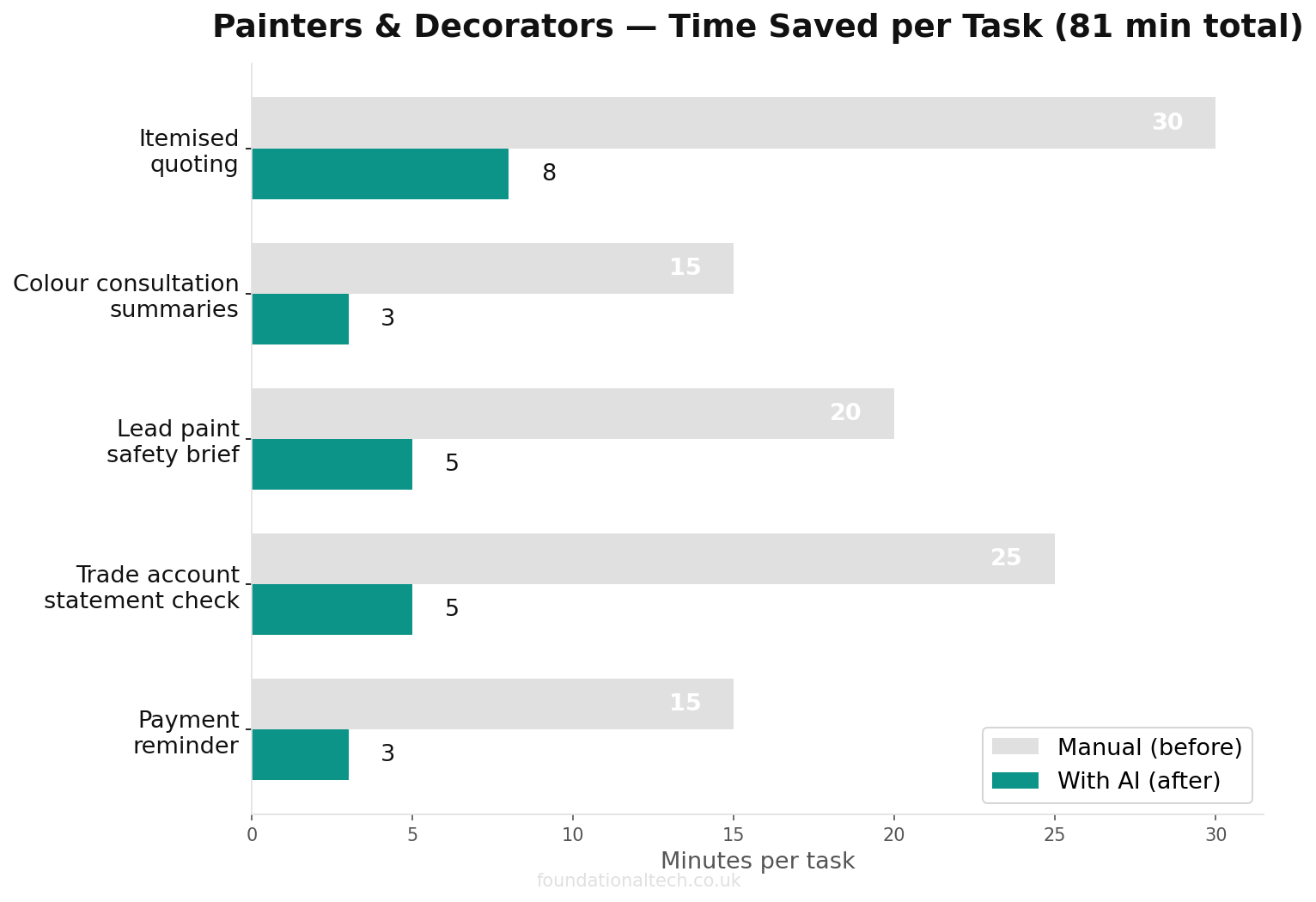
A worked example: a three-bed semi — lounge, hallway and stairs — walked in eight minutes on site. The voice note covers wall areas, the three layers of old wallpaper under lining paper in the hallway, and a flag that the stairwell will need scaffold access. Typed up by hand, that quote used to take the better part of an hour once you factored in structuring it properly, checking coverage figures and writing the covering note. Dictated and drafted by AI, then checked and adjusted against the calculator, it's a fifteen-minute job. The site visit takes the same eight minutes either way; the evening at the kitchen table typing it up largely disappears.
2. Colour Consultation Summaries and Finish Explanations
This is the use case genuinely unique to this trade. Most clients can't picture how a colour will actually read once four walls and a ceiling are covered in it, and most decorators are better at judging that by eye than at explaining it in writing. AI closes that gap: describe the room, the light direction, the client's Pinterest inspiration photos and the colours under consideration, then ask for a plain-English summary comparing the options. Why a colour that looks perfect on a north-facing wall can look flat on a south-facing one. Why a hallway with children and a dog needs a washable eggshell rather than a flat matt. Why a feature wall works in a large room and can shrink a small one. Pair this with the Dulux Visualizer app's AI-assisted colour matching for the visual side, and you're sending a client a considered, written case for your recommendation rather than just a swatch and a shrug.
3. The Lead Paint Safety Brief for Pre-1960 Properties
Every decorator working on an older property is supposed to explain, before starting, why they're wet-sanding rather than dry-sanding a Victorian skirting board, and what that means for the client's household during the job. Almost nobody actually writes this down. AI turns the Control of Lead at Work Regulations 2002 obligation into a two-minute task. Describe the property age, the surfaces affected and your planned method. Ask for a short, client-facing safety note explaining the risk, your approach, and what the household should expect: coveralls, dust sheets taped rather than loose, no dry sanding near where the kids play. This isn't a box-ticking exercise dressed up as content; it's a genuine compliance document that most decorators currently skip because writing it from scratch felt like too much friction for a two-day job. AI removes that friction, so the document that should exist actually does.
4. Reading the Trade Account Statement Against the Job
Once Dext has captured a month of till receipts and your Dulux, Crown or Leyland statement lands, AI is useful for the comparison Article 4 describes but nobody has time to run properly. Paste in the job-tagged receipt totals against what each job was quoted for materials, and ask it to flag which jobs ran over — and by how much. This isn't AI replacing Xero's reporting. It's AI doing the five minutes of "does this number look wrong" thinking that turns a spreadsheet into an actual answer. Which type of job — prep-heavy Victorian walls, say, versus a straightforward new-build snag — is quietly eating more paint than you're pricing for?
A decorator running fifteen jobs a month who tries this for the first time typically finds the same pattern. Two or three jobs run 15-20% over on materials — almost always the ones with prep the original quote underestimated — and the rest sit close enough to plan that the gap barely matters. Spotting which two or three jobs those are, consistently, is the difference between adjusting your pricing on pre-1960s properties specifically and quietly underpricing that whole category of work for another year.
5. The Walkthrough-Day Payment Reminder, Written in the Right Tone
Article 3 covers why a decorator's payment reminders need a different tone to a commercial debt chase — most late payers are delighted clients who simply forgot, not people avoiding you. AI is genuinely good at holding that tone consistently across a busy month when you're tired and the fifth reminder of the week would otherwise come out clipped. Feed it the job details — the room, the client's name, how many days overdue — and ask for a friendly, specific reminder that references the actual work, not a generic invoice nudge. The version that says "hope you're enjoying the new lounge" lands completely differently to "your invoice is overdue," and AI holds that difference reliably even on the fifth one you've sent that day.
Picking an Assistant: Claude, ChatGPT or Gemini
Claude Pro is priced in dollars, so the sterling figure drifts with the exchange rate — budget £17-18/month, dropping to roughly £14/month if you commit to a year up front. Of the three, it writes the most careful long-form English, which is exactly what the colour consultation summary and the lead paint brief above demand.
ChatGPT Plus works out just under £20/month once VAT lands on top of the headline £16/month. Where it earns that is speed in conversation: draft a quote, push back on it, tighten a line, all while you're still stood in the room deciding on a third coat.
Gemini Advanced sits at £18.99/month, with a £189.99/year option if you'd rather pay annually. If your quotes, job photos and client emails already live in Gmail and Google Drive, its pull is obvious — it can draft a reply from inside the thread itself, with nothing copied across.
None of the three knows what a Farrow & Ball colour actually looks like on your particular client's landing wall. That judgement call — the one from the opening of Article 1, standing in an empty room at 8pm deciding whether the second coat covered the magnolia — still belongs to you.
A Four-Week Run-In That Fits Around Jobs
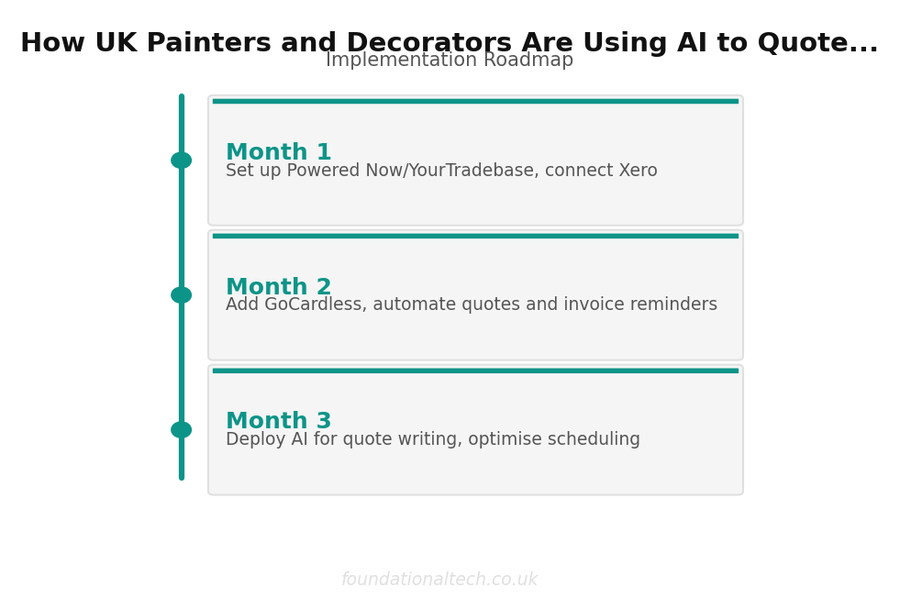
Week 1: pick one use case, not five. Quoting is the obvious starting point because you're already doing it several times a week — dictate your next three site visits instead of typing them up, and compare the time spent against your usual habit.
Week 2: add the payment reminder tone-checking from use case five. This is low-risk to test because you're not sending anything you haven't read first, and it's the fastest way to feel the difference between a generic nudge and one that actually references the job.
Week 3: try the colour consultation summary on a client who's genuinely undecided, rather than one who already knows what they want. This is where the use case earns its place — it's most valuable exactly when a client needs the extra reassurance to commit.
Week 4: write the lead paint safety brief for the next pre-1960s property on your books, even if you'd normally skip a written note for a small job. Once the prompt exists, reusing it costs nothing, and it's the one document in this list that closes a genuine compliance gap rather than just saving time.
By the end of the month, the honest test isn't whether AI has transformed the business — it's whether the evening admin pile is smaller than it was in week one, for the same number of jobs.
Where the Judgement Still Has to Be Yours
It can't tell you how many coats a wall needs from a description alone — that's still an on-site judgement. Treating an AI estimate as gospel is how a two-coat quote turns into a three-coat loss. It can't identify lead paint by looking at a photo with any reliability, so the safety brief in use case three still depends on you correctly assessing the property age and surface first. It can't judge whether a client is genuinely delighted or quietly unhappy with a colour choice — it can only help you write the message once you've made that read yourself. And it can't hold a brush. The cutting-in, the wet-sanding, the fourth trip up the ladder — going by how this series started, that part was never the bottleneck anyway.
The Rest of This Series
Article 7 is a prompt playbook: ten copy-and-paste prompts covering quotes, colour advice, the lead paint brief and payment chasing, each written in UK decorating terms rather than generic business-speak. Article 8 covers building an AI assistant with your business baked in — the rate card, the finishes you actually stock, the way you sign off an email — so the context stops needing to be pasted in fresh each time. Article 9 covers no-code automation connecting your inbox and quoting tool directly to AI. Article 10 is a full case study of one UK decorating business that rebuilt its admin from scratch.
Related guides: If you found this useful, see our guide on How to Automate a UK Painting and Decorating Business: The Complete Software Stack for Solo Decorators and Small Teams (2026) and How to Stop Chasing Payment as a UK Painter and Decorator: Automated Invoicing, Deposits and Direct Debit (2026).
Have you sent a client something AI helped write — a colour recommendation, a quote, a payment nudge — and did they spot it? Hit reply with what happened either way. The awkward failures teach more than the wins, and they stay in this inbox.
Related: The First Time AI Wrote a Better Client Email Than Me.