Key Takeaway
Automate payroll, receipts and supplier bills for UK Shopify sellers in 2026. Step-by-step Xero integration guide.
The average online seller can tell you their conversion rate to two decimal places and has no idea where last month’s supplier invoices are. The selling side of e-commerce is the most instrumented trade in Britain; the buying side still runs on email attachments and a drawer.
That gap has a price. This article covers the three back-office functions that bleed the most time in an online store — purchase records, expense routing, and payroll — and the stack that automates them, mostly with software you already pay for.
The Hidden Cost
The front office of a Shopify store automated itself years ago. Orders confirm themselves, payments collect themselves, and — if you’ve followed this series — sales land in Xero pre-reconciled. The back office is where the founder’s evenings still go.
£250,000+
annual revenue threshold where manual receipt admin becomes unsustainable
Count the actual jobs. Supplier invoices arrive by email — freight forwarders, packaging suppliers, the 3PL, the manufacturer in Guangzhou — and need saving, recording and matching to payments. Receipts pile up: ad spend, app subscriptions, samples, the courier dash to Screwfix for tape. Each app charges in a different currency on a different day. Then staff arrive — a packer, a VA, a part-time customer service hire — and suddenly you’re an employer, with HMRC’s Real Time Information rules expecting a payroll submission every single pay run, on or before payday, and pension auto-enrolment duties from the first hire.
A seller doing this by hand spends six to ten hours a month on it, every month, forever. Worse than the hours is the timing: it all gets done in a January panic, which means the year’s numbers were wrong for twelve months before anyone looked at them. Wrong numbers mean VAT surprises, missed import-VAT reclaims, and no real idea what anything costs.
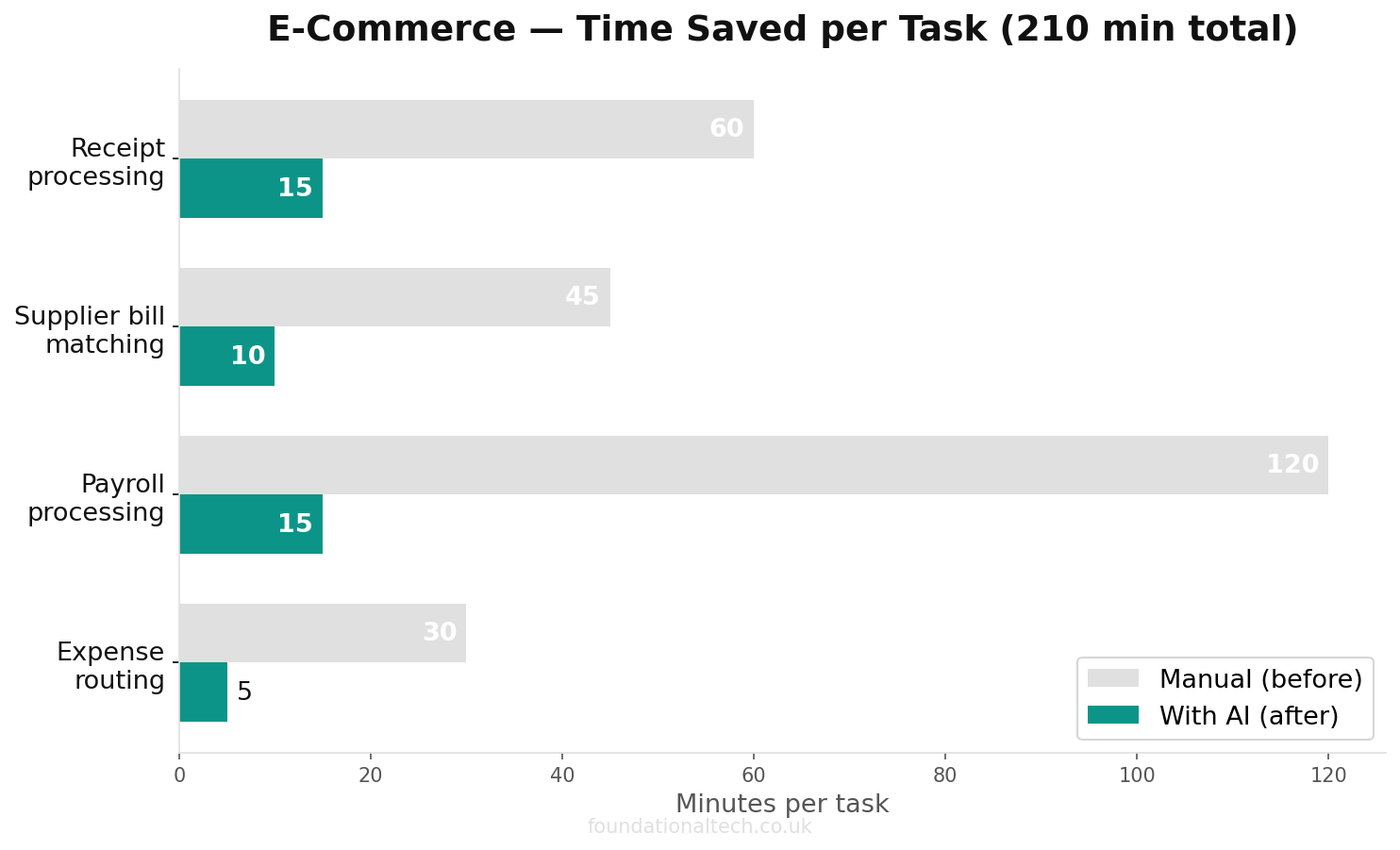
Put figures on it. A store doing £250,000 a year typically generates 40–60 supplier documents a month across freight, packaging, stock and software. Miss the VAT on even a tenth of them — the faded receipt, the invoice buried in a thread, the customs statement nobody downloaded — and you’re handing HMRC £50–150 a month you were entitled to keep. Add the founder’s time at any sensible hourly value and the manual back office costs more than the entire software stack in this series, several times over.
The fix isn’t discipline. It’s making the paperwork file itself.
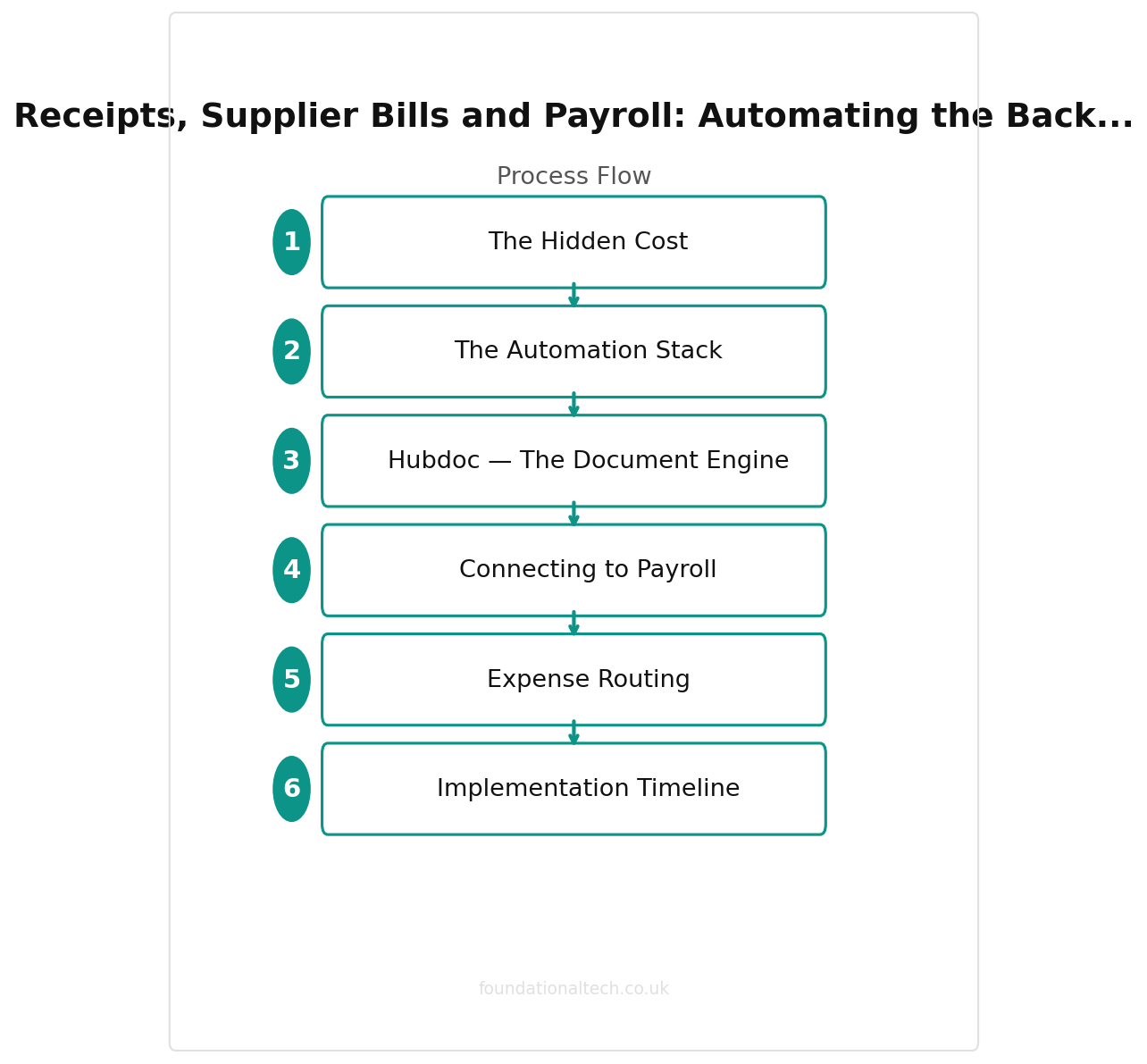
The Automation Stack
Hubdoc — The Document Engine
Hubdoc is the centrepiece, and it’s already yours: it’s included free with every UK Xero plan. Most sellers have never opened it.
Hubdoc gives you three intake routes. A unique email address — forward any supplier invoice to it. A phone app — photograph paper receipts at the till. And auto-fetch — it logs into suppliers that issue recurring bills and pulls each new invoice itself. Whatever arrives, Hubdoc reads the supplier name, date, amount and VAT, attaches the source document, and posts it to Xero as a draft bill or spend transaction, coded to the right account.
Setup that earns its keep for a seller:
Create one inbox rule. Anything from your freight forwarder, packaging supplier or 3PL auto-forwards to your Hubdoc address. Five minutes in Gmail or Outlook; removes the single biggest paper trail in the business.
Map suppliers once. First time each supplier appears, set its Xero account code and VAT treatment. Hubdoc applies it to every future document. After a month, 80–90% of bills arrive in Xero fully coded.
Photograph everything physical. HMRC accepts digital copies; the shoebox is now legally optional.
Catch the import paperwork. If you import stock, your monthly postponed import VAT statement from HMRC and your freight forwarder’s customs invoices belong in Hubdoc too. Import VAT is the single most commonly missed reclaim in seller books — often hundreds of pounds a quarter — and it’s missed because the documents live in a customs portal nobody checks. Forward them on arrival and the reclaim happens by default.
If you outgrow Hubdoc — high volumes, line-item extraction for COGS, supplier statements — Dext is the upgrade: from around £24/month on an annual contract, or £30/month rolling. (Dext quotes in dollars and no longer publishes GBP prices, so expect small exchange-rate wobble.) It brings sharper OCR and better multi-entity handling. Start with Hubdoc; it’s free and covers most stores comfortably.
Connecting to Payroll
The first hire is the moment back-office admin goes from annoying to legally consequential. RTI means HMRC expects a filing every payday. Auto-enrolment means a pension scheme, assessed every pay run.
Xero Payroll handles both inside the ledger you already run. It’s included for one employee on the Grow plan (£37/month), five on Comprehensive (£42), and ten on Ultimate (£65); extra employees are £1.50/month each (£1 on Ultimate). Payslips, RTI submissions to HMRC, pension assessment and auto-enrolment filings to NEST or your provider — all from the same screen as your accounts. (Payroll isn’t available on Ignite, which a trading store has outgrown anyway.)
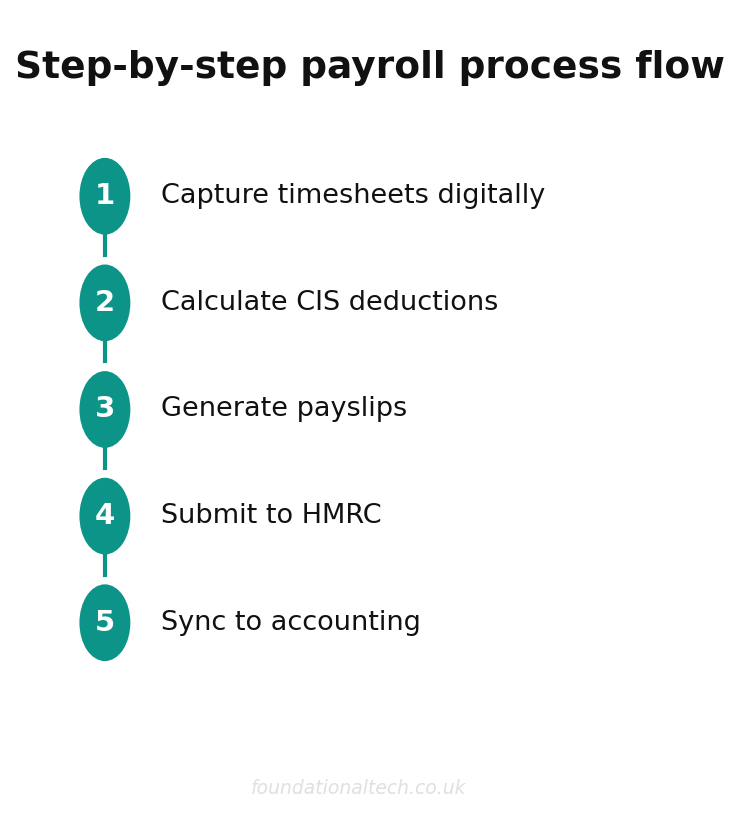
The automation flow: employees enter hours in the Xero Me app — or, for salaried staff, a pay template repeats monthly untouched. Run payroll, and the journals post to your P&L automatically, wages split from employer NI and pension costs. The numbers in your management accounts are right the moment payday happens, not when a bookkeeper catches up.
For hourly warehouse staff, a rota app like Deputy or Planday connects to Xero Payroll and pushes approved timesheets straight in — worth it from roughly five hourly employees. Below that, Xero Me is enough.
Two seller-specific wrinkles worth knowing before the first hire. Casual packing staff brought in for the Christmas peak still need enrolling in payroll from day one — there’s no minimum-hours exemption from RTI. And if your VA is overseas and invoices you as a freelancer, they’re a supplier bill through Hubdoc, not an employee — but a UK-based regular worker on set hours is almost certainly payroll, whatever their invoice says. HMRC’s employment-status rules don’t care what label the arrangement uses, and reclassification arrives with back-dated NI attached.
One non-negotiable: even a director-only company paying themselves a salary needs RTI filings. Xero Payroll on Grow covers a solo founder at no extra cost — set the pay template once, and your own payroll runs itself twelve times a year.
A note on what payroll automation doesn’t do: it won’t tell you the right salary/dividend split, whether to use the employment allowance, or how pension contributions interact with your tax position. Those are decisions for your accountant, made once a year. The software’s job is to execute the decision flawlessly every month — and file the paperwork HMRC fines you for missing. Late RTI filings carry penalties from £100 per month for the smallest employers; the automation makes them structurally impossible.
Expense Routing
The remaining leak is spending that never generates a paper document: ad platforms, app subscriptions, software billed in dollars.
Route it with three pieces, all free:
A dedicated business card (your bank’s debit card, or Wise for multi-currency ad spend) so business costs never hide in a personal statement.
Xero bank rules. “Meta” → Advertising, 20% VAT (Meta bills UK advertisers with VAT from a UK entity; Google likewise — but check each platform’s VAT treatment against its invoices, because reverse-charge rules apply when billed from Ireland). Rules auto-code every repeat transaction; twenty rules cover almost everything a store buys monthly.
Hubdoc auto-fetch for the invoices behind the charges — connect it to recurring billers so the VAT documents file themselves. Card statements alone aren’t VAT evidence; the fetched invoices are.
Shopify app charges deserve a special mention: they’re billed through Shopify’s invoice, often with reverse-charge VAT. One bank rule plus one Hubdoc fetch handles it permanently — a five-minute fix for the most commonly miscoded expense in seller books.
Why the VAT detail matters: reverse-charge purchases done wrong don’t just misstate one box on the return — they understate both your output and input VAT, and a quarter of miscoded ad spend is exactly the pattern an HMRC compliance check picks up first. Coded by rule, it’s right every month without anyone thinking about it. And with Making Tax Digital for Income Tax pulling sole traders over £50,000 into quarterly filing from April 2026, “fix it all in January” stops being an option — the back office has to be right in-quarter, which is only realistic when it codes itself.
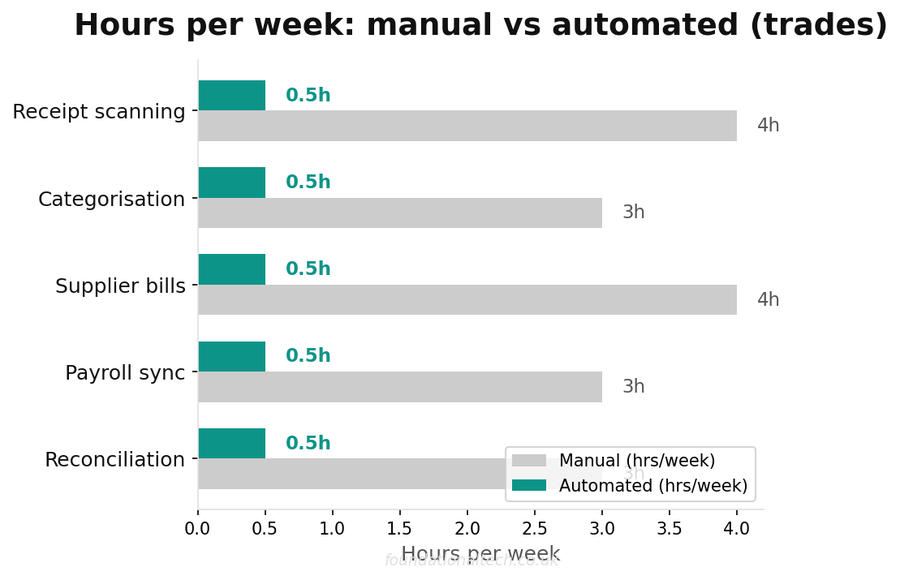
| Task | Manual | Automated |
|---|---|---|
| Invoice data entry | 3–5 hrs/week | 15 min/week |
| Receipt matching | 2 hrs/week | Automatic |
| Supplier payment | 1 hr/week | Scheduled |
| Payroll processing | 4 hrs/week | 1 hr/week |
Implementation Timeline
Week 1 — Documents. Activate Hubdoc (it’s in your Xero menu). Set up the forwarding address and inbox rule, connect auto-fetch suppliers, photograph the current receipt pile. Map your top ten suppliers to account codes.
Week 2 — Rules and routing. Build Xero bank rules for every recurring charge in last month’s statement. Confirm the VAT treatment of your big platforms — Meta, Google, Shopify — against their actual invoices. Run the month’s bills through Hubdoc and watch the match rate.
Week 3 — Payroll. Move payroll into Xero (or set it up for your first hire): employee details, pension scheme connection, pay templates, Xero Me invites. Run the first payroll in parallel with your old method, check the numbers match, then file live. HMRC’s payroll-change paperwork is lightest at the start of a tax month — time the switch accordingly.
Week 4 — Measure. Open Xero’s Business Snapshot and check three things: bills awaiting payment matches what you believe you owe, the advertising line shows VAT being reclaimed, and no bank line older than a week sits unreconciled. Those three checks, monthly, are the entire ongoing workload.
From there the back office runs on exceptions: you handle the odd unmatched bill, and everything else files, codes and pays itself. The six-to-ten monthly hours drop to about one — and January becomes just another month.
How many hours a week does your admin and bookkeeping actually take? Reply with the number — I’m building a benchmark across all fifty trades in this series, and e-commerce is currently mid-table.
A & Y Financial Services automates back-office operations for UK e-commerce businesses. That’s what we do.
See what this looks like in practice: From 63-Hour Weeks to 35: How One UK Homeware Seller Automated Their Entire Shopify Operation.