Key Takeaway
Automate timesheets, payroll, receipts for your UK construction firm business in 2026. Step-by-step guide using Dext, Xero, and payroll tools to cut admin.
Ask a builder what the hardest part of running the firm is and almost none will say laying brick or wiring a board. They will say Sunday night. That is when the week's crumpled timesheets get deciphered, hours get totted up by hand, wages get worked out, subcontractor deductions get calculated, and a pile of faded merchant receipts gets sorted into a shoebox marked “the accountant’s problem”.
That Sunday-night ritual is the back office, and for a construction firm it is the single most error-prone, most resented job in the business. It is also almost entirely automatable. This article maps the stack that turns it into a fifteen-minute review.
The Hidden Cost
Back-office admin is invisible because nobody invoices for it. A trade firm owner doing the books, the payroll and the receipts is spending five to ten hours a week on work that earns nothing and shows up on no quote. Across a year that is the equivalent of several full working weeks given to paperwork — unpaid, untracked, and done at the end of days that already started at seven.
20–30%
of construction firm admin time consumed by payroll and CIS
In construction the load is heavier than in most trades, for one reason: the Construction Industry Scheme. Pay a registered subcontractor and you must deduct 20% from the labour element — 30% if they are not registered — hand that money to HMRC, give the subcontractor a deduction statement, and file a return every single month. Miss the filing deadline and an automatic £100 penalty lands, climbing to £200 after two months and rising from there. Do that maths by hand, across several subbies, every month, and you have a recurring Sunday-night liability with a fine attached.
Then there is the workforce admin underneath it: hours logged on scraps of paper, holiday tracked in someone’s head, expenses reimbursed from memory, and the constant low-grade fear that a number is wrong somewhere. None of it is hard. All of it is fiddly, repetitive, and deadline-driven — which is exactly the profile of work software removes best.
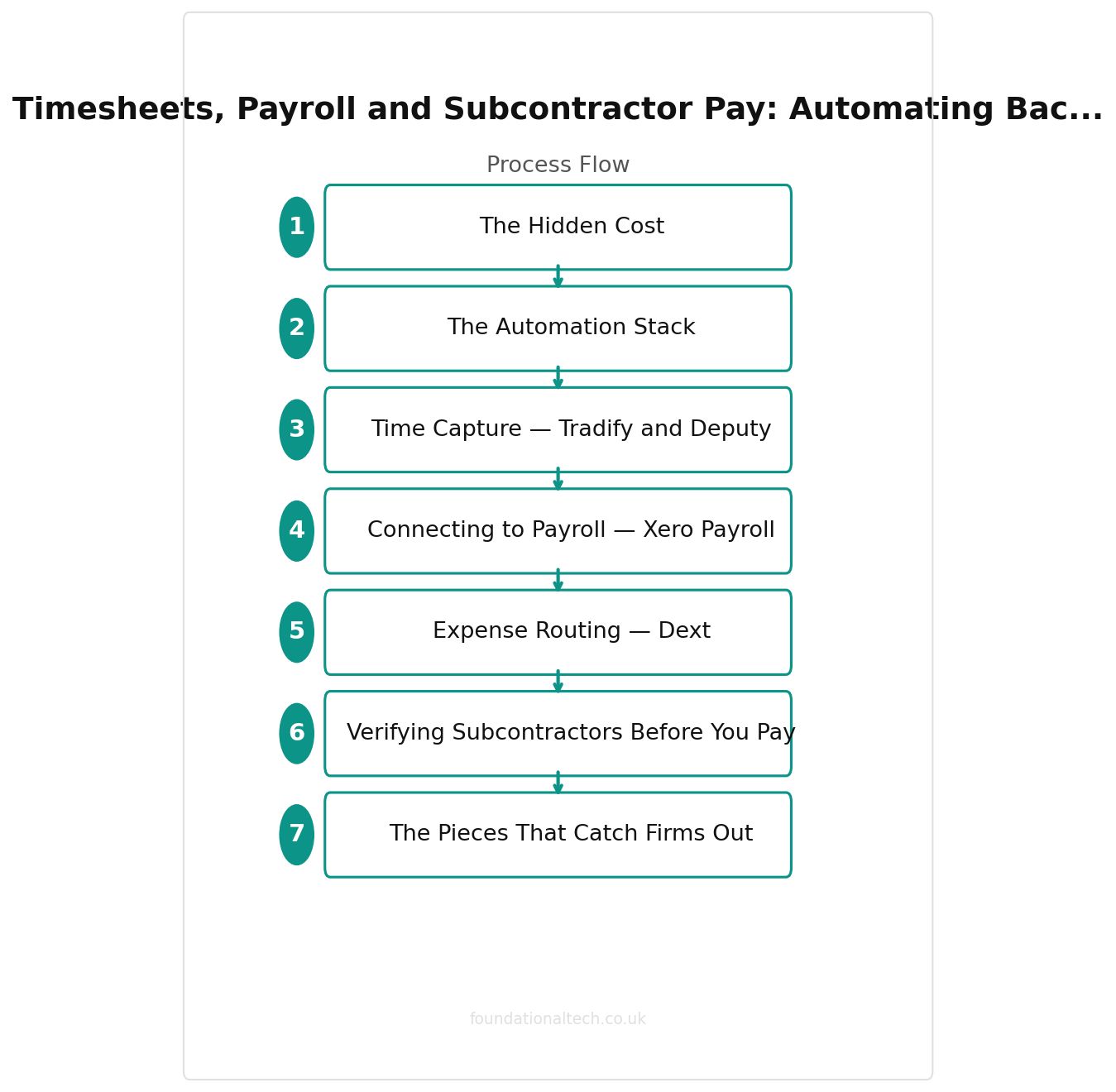
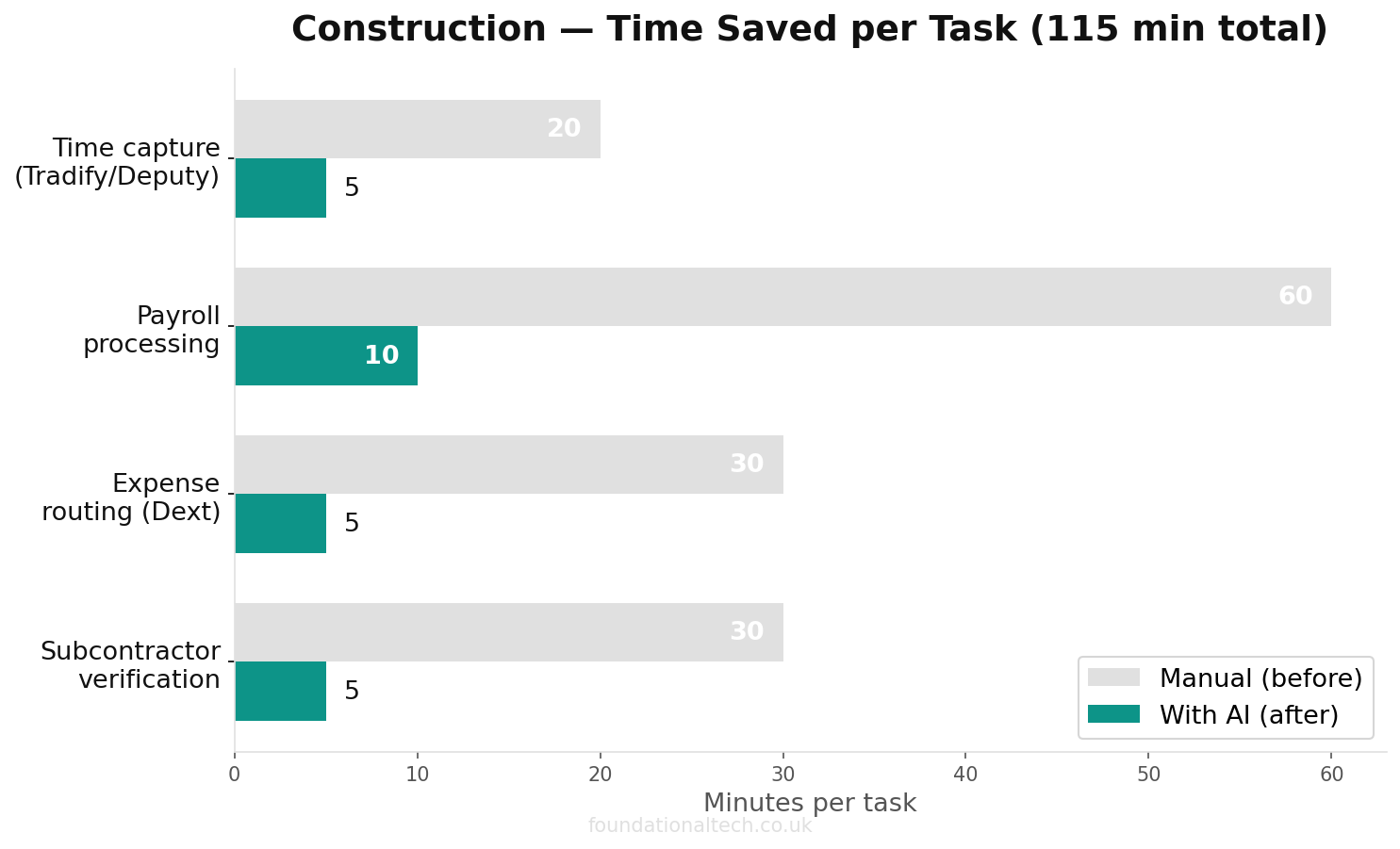
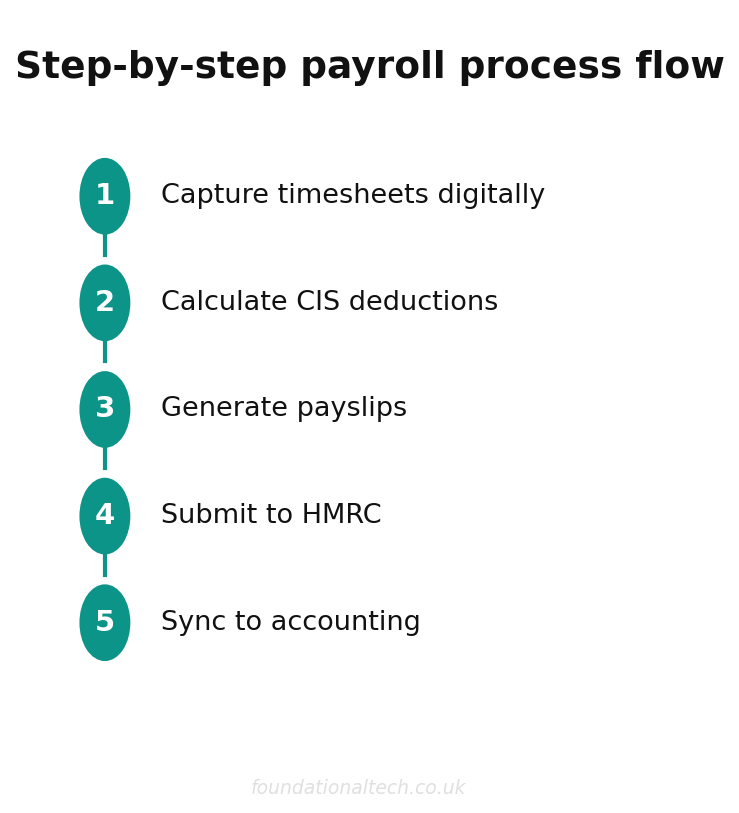
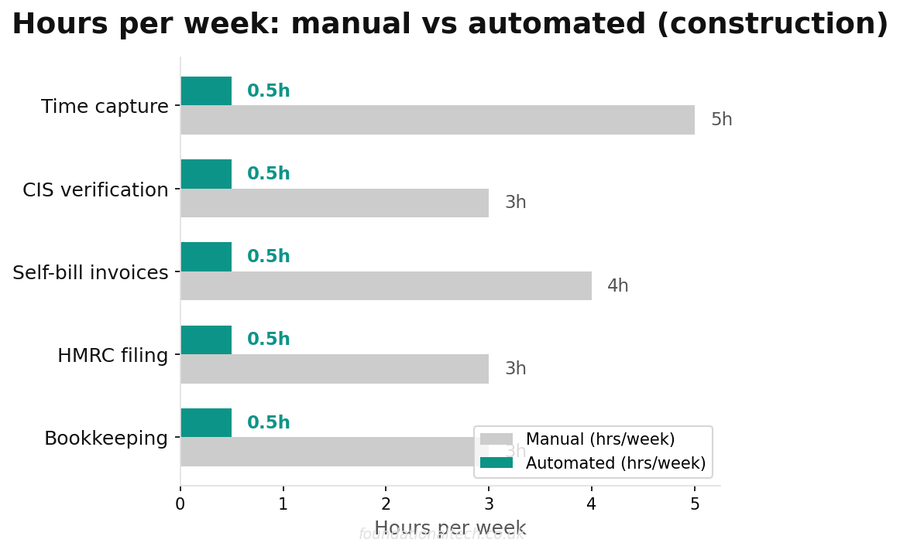
The Automation Stack
The principle is the same as the rest of the trade stack: capture each piece of data once, at the moment it happens, and let it flow to where it is needed without being re-typed. Three flows matter for the back office — time, pay, and expenses.
Time Capture — Tradify and Deputy
Hours should be recorded where the work happens, not reconstructed on Sunday.
In Tradify (Lite £34, Pro £37 per user/month, with volume discounts as the team grows), your team logs time against the actual job from their phones — clock on, clock off, attached to the address they are standing at. That single entry does two jobs at once: it costs the job, so you finally know which work makes money, and it feeds the payroll, so wages are based on logged hours rather than a guess.
For firms juggling rotas across several sites, Deputy adds proper shift scheduling, holiday tracking and clock-in with GPS and photo verification. UK pricing starts at around £4 per user/month (the Lite plan, billed in pounds, with a £20 minimum monthly spend), rising to about £7 for the Core plan with more reporting. Most firms under ten people can run on Tradify’s built-in timesheets alone and add Deputy only when scheduling becomes its own headache.
Either way, the output is the same: a clean, accurate record of who worked how many hours on what, with no paper and no Sunday-night arithmetic.
Connecting to Payroll — Xero Payroll
Logged hours should become paid wages without a spreadsheet in the middle.
Xero Payroll sits on top of your Xero accounting subscription at £1.50 per employee per month (on Ignite, Grow and Comprehensive plans; £1 on Ultimate) and handles the statutory machinery: PAYE, pension auto-enrolment, and the Real Time Information submissions HMRC requires every pay run. Because the hours already live in Xero’s ecosystem, a pay run becomes a review-and-approve job rather than a data-entry one.
For subcontractors, this is where CIS-compliant invoicing stops being a Sunday liability. Every UK Xero plan now calculates the CIS deduction automatically the moment you record a subcontractor payment — it works out the 20% or 30%, applies it, produces the deduction statement, and assembles the monthly return ready to file. Submitting that return to HMRC is a £5/month add-on on any plan. The chore that used to mean an hour with a calculator and a nagging fear of the £100 fine becomes a five-minute check before you click submit.
Expense Routing — Dext
The shoebox is the last thing to kill.
Every merchant receipt is two things at once: a job cost you need for accurate pricing, and VAT you are entitled to reclaim. Lose the paper — or let it fade in the van door, as builders’ receipts always do — and you lose both. Dext ends that. Photograph the receipt the moment it is handed over, or forward the supplier’s email, and Dext reads the line items and pushes them into Xero, coded and ready, where they land against the right job and the right VAT box.
UK pricing runs from around £24/month for a sole trader to roughly £25–30/month for a small business (covering up to five users and 250 documents). Dext sets its pound prices from US dollar rates, so confirm the exact figure at sign-up. For a firm spending thousands a month at the merchant’s counter, the reclaimed VAT alone covers the subscription many times over — before you count the hours saved sorting paper.
Verifying Subcontractors Before You Pay
One CIS step sits before the deduction and catches firms out: verification. Before you pay a new subcontractor, you are required to check their status with HMRC, which tells you whether to deduct at 20%, 30%, or not at all. Pay first and verify later, and you risk deducting the wrong amount — which means correcting the return and explaining yourself.
Xero handles this inside the same flow. When you add a subcontractor, it verifies them with HMRC and records the correct deduction rate against that contact, so every future payment uses the right figure automatically. You verify once, at the point of adding the subbie, rather than scrambling each month. It is a small thing that turns a compliance trap into a single box ticked when a new subcontractor joins the job.
The Pieces That Catch Firms Out
Two back-office obligations quietly trip up growing trade firms, and both are handled by the same stack once it is running.
The first is pension auto-enrolment. The moment you employ staff who meet the age and earnings thresholds, you are legally required to enrol them in a workplace pension and contribute. Xero Payroll assesses each employee automatically at every pay run and files the paperwork, so a duty that carries Pensions Regulator fines for getting it wrong becomes part of the same approve-and-go cycle as the wages.
The second is holiday pay, which for firms with variable hours or subcontracted-then-employed staff is a recurring source of error and dispute. Tracking it in someone’s head does not survive a team of more than three. Deputy and Xero between them accrue and record holiday automatically against the hours actually worked, so the figure is always defensible — and you are never guessing whether someone is owed two days or five.
There is a third trap that arrives only once a year and catches firms cold precisely because it is rare: the payroll year-end. Every April you must send a final RTI submission to HMRC and give each employee a P60 summarising their pay and deductions for the year. Miss it and the penalties land on top of an already busy filing season. Xero Payroll handles the year-end as part of its normal cycle — it flags the deadline, files the final submission, and produces every P60 for you to distribute. The subcontractor equivalent matters just as much: each subbie needs a CIS deduction statement every month showing what you withheld, and Xero generates these automatically alongside the return, so a subcontractor querying their deductions gets a clean document rather than an argument.
Neither is glamorous. Both are exactly the kind of compliance detail that costs nothing while it works and a great deal the one time it does not.
| Task | Manual | Automated |
|---|---|---|
| CIS verification | 30 min/sub | API lookup |
| CIS deductions | Spreadsheet | Auto-calculated |
| Subcontractor payments | Half a day | 1 hour |
| Monthly CIS return | 2–3 hours | Auto-filed |
Implementation Timeline
You do not roll all of this out at once. Sequence it so each piece is working before you add the next.
Week 1 — Time. Set up Tradify timesheets and get the whole team logging hours against jobs from their phones. This is the habit everything else depends on, so spend the week making it stick: clock on in the morning, clock off at night, no exceptions. If you run multiple crews across sites, set up Deputy scheduling in parallel.
Week 2 — Pay. Connect Xero Payroll and run your first pay cycle off the logged hours rather than paper. Record one subcontractor payment to watch Xero calculate the CIS deduction and build the return automatically. Switch on the £5/month CIS filing add-on. Run this in parallel with your old method once, and check the numbers match before you trust it fully.
Week 3 — Expenses. Roll out Dext to the team. The rule is one line long: photograph every receipt the moment it is handed over, before it reaches the van. Forward supplier invoices straight to your Dext inbox. By the end of the week, receipts should be flowing into Xero coded, and the shoebox should be empty.
Week 4 onward — Review. With time, pay and expenses all flowing automatically, your back office becomes a weekly review rather than a Sunday-night build. Check the timesheets are complete, approve the pay run, glance at the week’s flagged expenses, and confirm the CIS return before filing. Fifteen minutes, not five hours.
There is a compounding effect worth naming. The hours you reclaim are not the only return. Accurate job-costed timesheets tell you, for the first time, which jobs and which customers actually make money — so you quote better and chase the right work. Captured receipts mean you reclaim every pound of VAT you are owed and never overstate your tax bill. Automated CIS means you never eat a £100 penalty for a late return. Each of those is a leak the manual back office quietly tolerates, and the stack seals all of them at once.
The total monthly cost of running this — Xero with payroll and CIS filing, plus Dext, plus Deputy if you need it — sits comfortably under £100 for most small firms. A part-time bookkeeper or admin to do the same work by hand costs at least £1,200 a month. The back office is the clearest case in the whole business where the software is not a cost but a replacement for one — and the one job most owners will be glad to never do on a Sunday night again.
How many hours does your admin and bookkeeping actually take per week — timesheets, payroll, CIS and receipts combined? Reply with the number. I’m building a UK benchmark, and most owners have never added it up.
A & Y Financial Services automates back-office operations — payroll, CIS and expense management — for UK construction and trade businesses. That’s what we do.