Key Takeaway
CIS invoicing software for UK subcontractors compared — Xero from £15/mo, QuickBooks from £12/mo, FreeAgent from £19/mo. Auto deductions and HMRC filing.
Key Takeaway
CIS-compliant invoicing software like Xero (from £15/mo), QuickBooks (from £12/mo) or FreeAgent (from £19/mo) auto-calculates the 20% or 30% deduction on every subcontractor invoice, generates the deduction statements your subbies need, and files the monthly CIS return to HMRC — replacing the spreadsheet scramble on the 19th with a ten-minute review and submit.
The best CIS invoicing software for UK subcontractors in 2026 is Xero with the CIS add-on (around £5/mo on top of a plan from £15/mo). It verifies subcontractors with HMRC, applies the correct deduction rate automatically, produces compliant deduction statements, and files monthly returns — all without you touching a calculator. QuickBooks, FreeAgent and Sage all handle CIS too, so the right choice depends on what your accountant already uses and how many subbies you pay.
What Is the Construction Industry Scheme?
The Construction Industry Scheme — CIS — is HMRC's system for collecting tax from subcontractors working in construction. If you're a contractor (the person paying for work), you must register with HMRC, verify every subcontractor before you first pay them, deduct tax from their payments, and file a monthly return reporting those deductions. The subcontractor gets a deduction statement showing what was withheld, and they offset those deductions against their own tax bill at year end.
CIS applies to most construction work in the UK: building, repairs, decorating, demolition, civil engineering, and installing systems like heating, lighting and power. It doesn't cover architecture, surveying or carpet-fitting, but the line is narrower than most people think — and if you're reading this, you almost certainly fall inside it.
The scheme exists because construction has historically had high levels of tax non-compliance. Rather than chase thousands of self-employed subbies for unpaid tax, HMRC collects it at source through the contractor. It's your problem, not theirs — which is why getting it wrong carries penalties and why software that handles it properly is worth every penny of the subscription.
How CIS Deductions Work
When you pay a subcontractor, you deduct tax from the labour element of their invoice — not from materials. The rate depends on the subcontractor's registration status with HMRC:
- 20% deduction — the standard rate for subcontractors who are registered with HMRC under CIS. This is the most common rate you'll see.
- 30% deduction — the higher rate for subcontractors who are not registered, or whose details can't be verified. This is the rate HMRC applies when something is wrong — wrong UTR, wrong National Insurance number, name doesn't match.
- 0% deduction (gross payment status) — for subcontractors who have applied for and been granted gross payment status, usually because they have a clean compliance record and meet a minimum turnover threshold. You still verify them and report the payment, but you don't withhold anything.
The deduction applies only to the labour portion of the payment. If a subbie invoices £3,000 and £800 of that is materials (with evidence — receipts, not estimates), you deduct 20% of the remaining £2,200 labour, which is £440. You pay the subbie £2,560 and hand the £440 to HMRC. Get the split wrong and either the subbie is short-paid or you've under-deducted and HMRC comes looking.
This is precisely the kind of calculation that software should do. Not because it's hard — it's basic arithmetic — but because it's easy to get wrong when you're doing it at 10pm on a Sunday for twelve invoices with different labour/materials splits, three different deduction rates, and a filing deadline on the 19th.
What CIS Invoicing Software Actually Does
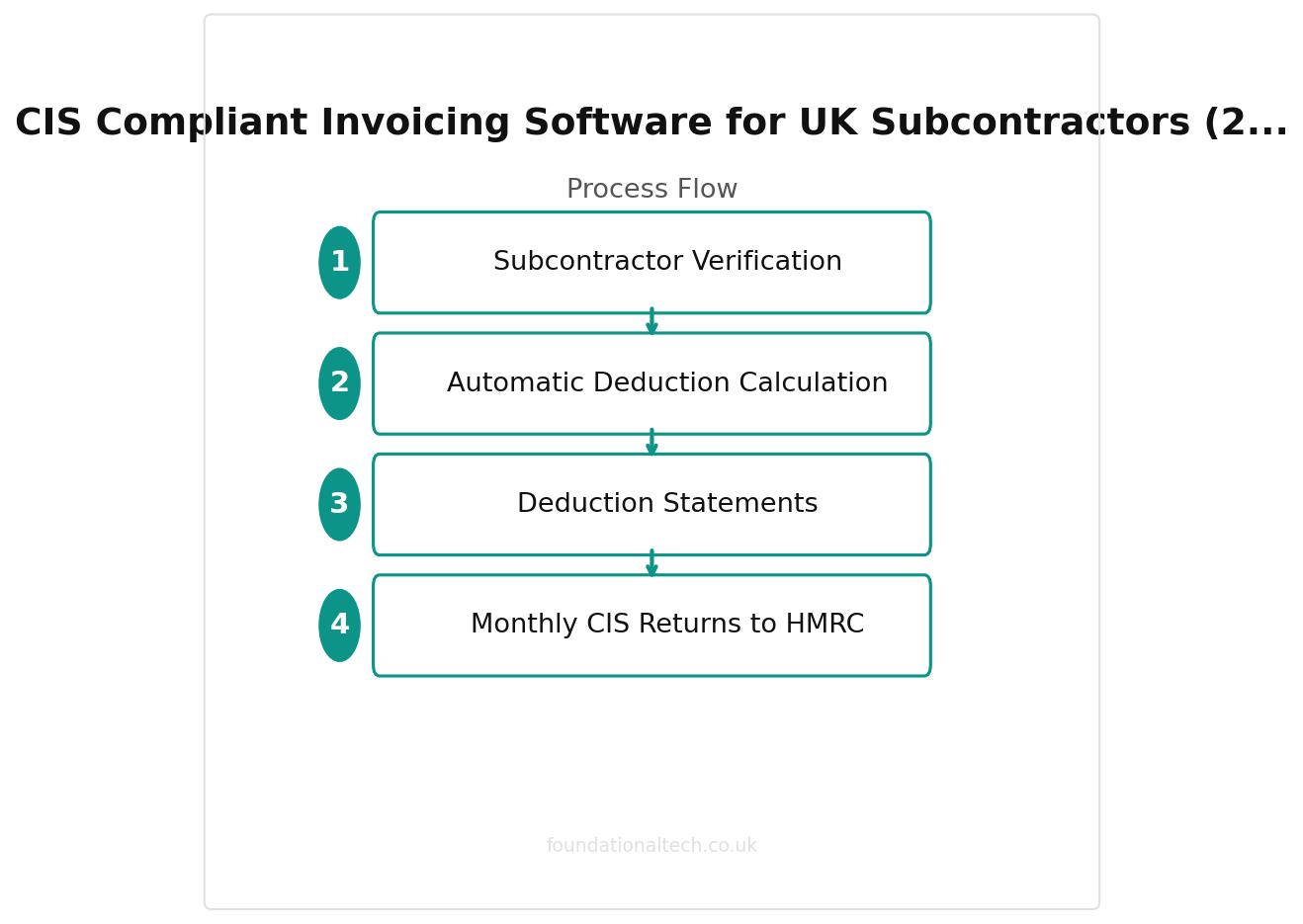
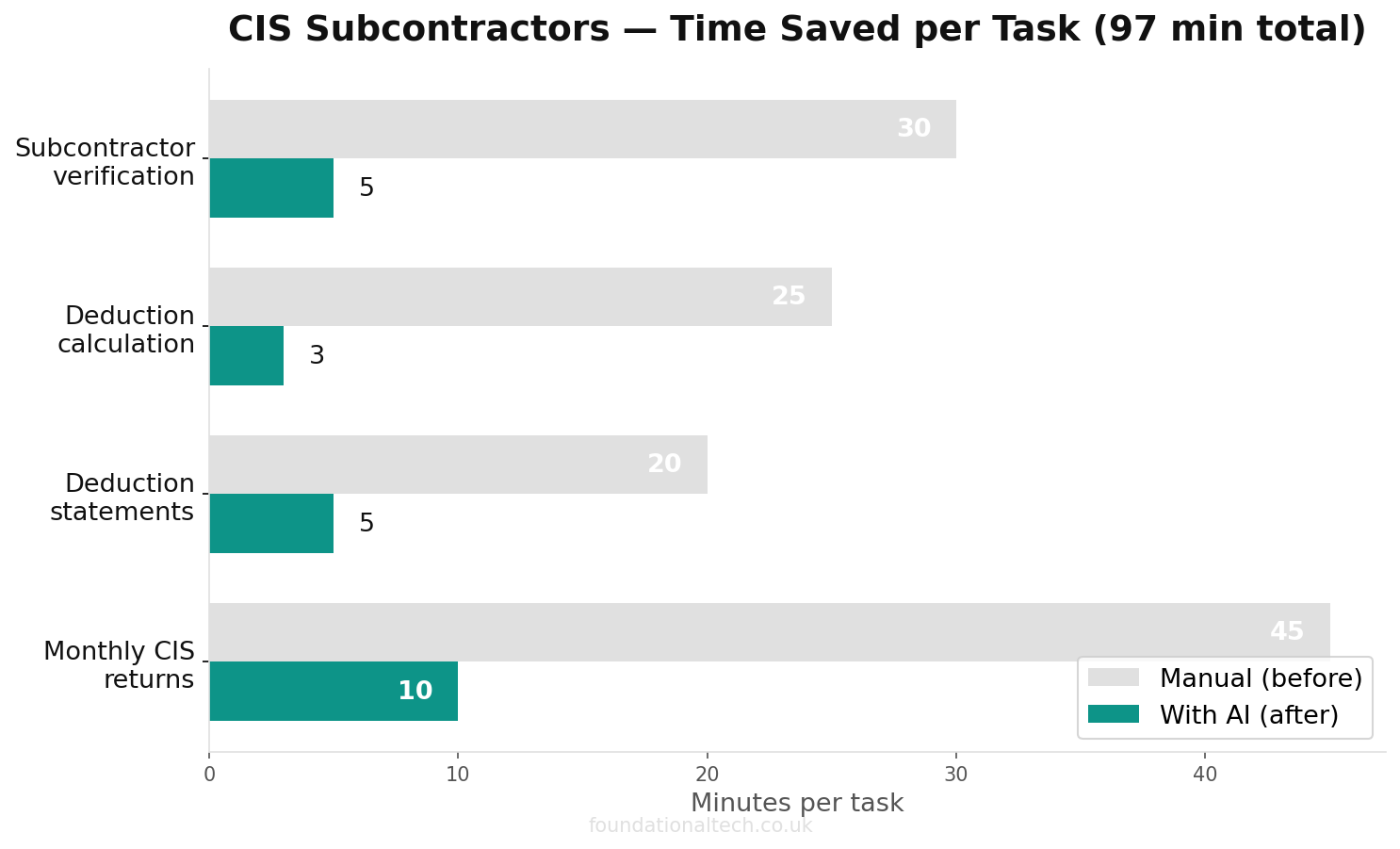
Good CIS software handles four things that would otherwise eat your evenings:
1. Subcontractor Verification
Before you pay a subcontractor for the first time, you must verify them with HMRC. The software submits their UTR (Unique Taxpayer Reference) and National Insurance number to HMRC's gateway and gets back their deduction rate — 0%, 20% or 30%. This happens inside the software rather than through a separate HMRC login, and the rate is stored against the subbie so every future invoice uses the correct figure automatically.
2. Automatic Deduction Calculation
When you enter or approve a subcontractor invoice, the software splits labour from materials, applies the correct deduction rate, and calculates the net payment. No spreadsheet, no mental arithmetic, no risk of applying 20% when the subbie is actually unverified and should be at 30%.
3. Deduction Statements
Every time you make a CIS deduction, you must give the subcontractor a written statement showing the gross amount, the deduction, and the net payment. The software generates these automatically and can email them directly. Your subbies need these statements to offset the deductions against their own tax — if you don't provide them, they can't reclaim what's been withheld, and you'll get the phone call.
4. Monthly CIS Returns to HMRC
By the 19th of every month, you must file a CIS return with HMRC covering all payments to subcontractors in the preceding tax month (6th to 5th). Even if you paid no subcontractors that month, you must file a nil return. Miss the deadline and the penalty starts at £100, climbing to £200 after two months, then £300 at six months, with further penalties beyond that. The software compiles the return from the invoices you've already processed, lets you review it, and files it directly to HMRC through the MTD gateway.
CIS Invoicing Software Compared
Here's how the main options stack up for UK construction businesses in 2026. All prices exclude VAT.
| Software | Starting Price | CIS Add-on Cost | CIS Verification | Auto Deductions | HMRC Filing | Best For |
|---|---|---|---|---|---|---|
| Xero | From £15/mo | ~£5/mo | Yes | Yes | Yes | Contractors with accountants already on Xero |
| QuickBooks | From £12/mo | Included on Advanced (£35/mo) | Yes | Yes | Yes | Smaller firms wanting CIS built into the main plan |
| FreeAgent | From £19/mo | Included | Yes | Yes | Yes | Sole trader subbies and one-person contractors |
| Sage Accounting | From £12/mo | Included on Standard (£26/mo) | Yes | Yes | Yes | Firms already in the Sage ecosystem |
| Powered Now | From £28/mo | Via accounting integration | Via Xero/QuickBooks | Via Xero/QuickBooks | Via Xero/QuickBooks | Trade businesses wanting job management + CIS invoicing in one flow |
Xero with CIS Add-on
Xero is the most common choice for UK construction firms, mainly because most accountants already use it. The CIS module costs around £5/month on top of your Xero plan (starting from £15/mo for the Starter plan, though most contractors need the Standard plan at £33/mo for multi-currency and project tracking). It handles verification, deductions, statements and monthly returns. The integration ecosystem is the real strength — tools like Tradify and Powered Now push invoices directly into Xero, so the CIS calculation happens automatically when a subbie's invoice lands.
Xero has flagged a price change from 1 September 2026, so confirm the current figure when you sign up — but the CIS add-on has historically stayed stable.
QuickBooks
QuickBooks includes CIS features on its Advanced plan (£35/mo), which also covers payroll. On the lower plans (Simple Start from £12/mo, Essentials from £22/mo), you don't get CIS — so for contractors it's really a £35/mo proposition. The CIS workflow is solid: verification, automatic deductions, statements and filing all work as expected. QuickBooks tends to be slightly more intuitive for people who haven't used accounting software before, which matters if you're doing your own books rather than handing them to an accountant.
FreeAgent
FreeAgent includes CIS in all its plans, starting from £19/mo (with a 50% discount in the first six months if you sign up via certain partners, and free with some business bank accounts — NatWest and Mettle, notably). It's designed for sole traders and small businesses, so the interface is simpler than Xero or QuickBooks. For a one-person subcontractor tracking their own CIS deductions received, or a small contractor with a handful of subbies, FreeAgent is often the most straightforward option. The trade-off is that it doesn't scale as well once you're managing twenty subcontractors and need project-level reporting.
Sage Accounting
Sage includes CIS on its Standard plan (£26/mo) and above. The Start plan at £12/mo doesn't include it. Sage has deep roots in UK construction — many firms have been on Sage since the desktop days — so if your accountant or bookkeeper already works in Sage, staying there avoids a migration. The CIS workflow handles verification, deductions and filing. Sage's mobile experience has improved but still lags behind Xero and FreeAgent for on-the-go invoice approvals.
Powered Now
Powered Now isn't accounting software — it's job management for tradespeople (from £28/mo). But it generates invoices, handles the labour/materials split, and pushes the data into Xero or QuickBooks where the CIS deduction and filing happens. For trade businesses that want to quote, schedule, invoice and manage CIS from one app on their phone, the Powered Now + Xero combination is hard to beat. You create the invoice in Powered Now on site, it syncs to Xero, and Xero handles the deduction and return.
Monthly Returns vs Real-Time Reporting
CIS returns are currently filed monthly, covering each tax month (6th to 5th). HMRC has been moving towards real-time reporting across other areas — RTI for payroll, MTD for VAT — and there's been talk of bringing CIS into a more frequent cadence. As of October 2026, monthly filing remains the requirement, but the software already works in near-real-time: deductions are calculated when you process the invoice, not when you compile the return. The monthly return is effectively a summary of what the system already knows.
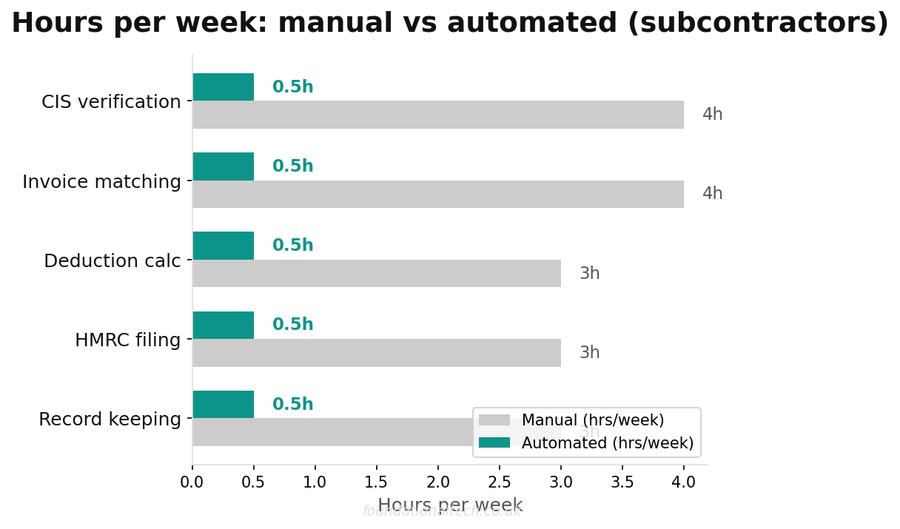
This matters because it changes how you work. Instead of a frantic catch-up session before the 19th, you process subcontractor invoices as they arrive throughout the month. By the time the deadline comes, the return is already compiled — you review the totals, confirm, and file. The firms that struggle with CIS deadlines are almost always the ones doing everything in a batch at month end.
If you're tracking timesheets and payroll alongside CIS, the same principle applies: hours and expenses flow in during the month, and the pay run and CIS return at month end are a formality rather than a project.
CIS and the Domestic Reverse Charge for VAT
Since March 2021, most CIS-registered businesses must apply the VAT Domestic Reverse Charge on construction services. This means the customer (contractor) accounts for the VAT rather than the supplier (subcontractor) charging it on their invoice. The subcontractor invoices without VAT, notes that the reverse charge applies, and the contractor accounts for both the output and input VAT on their return.
This interacts with CIS invoicing because the same invoices that carry CIS deductions may also need the reverse charge applied. Good software handles both: when you mark an invoice as CIS and reverse-charge applies, the system calculates the CIS deduction on the net amount and omits VAT from the invoice, while ensuring your VAT return picks up the reverse charge correctly. Xero, QuickBooks, FreeAgent and Sage all support the reverse charge, but you need to set it up properly — it's not always enabled by default, and getting it wrong means your VAT return is wrong too.
The reverse charge does not apply to end users or consumers, only to VAT-registered businesses that are also CIS-registered and making onward supplies of construction services. If you're invoicing a homeowner for a kitchen extension, normal VAT rules apply. If you're invoicing a main contractor for brickwork on a commercial site, the reverse charge almost certainly applies. The software can flag which rule applies based on how you've set up each customer, but you need to classify them correctly in the first place.
Automating the Whole CIS Workflow
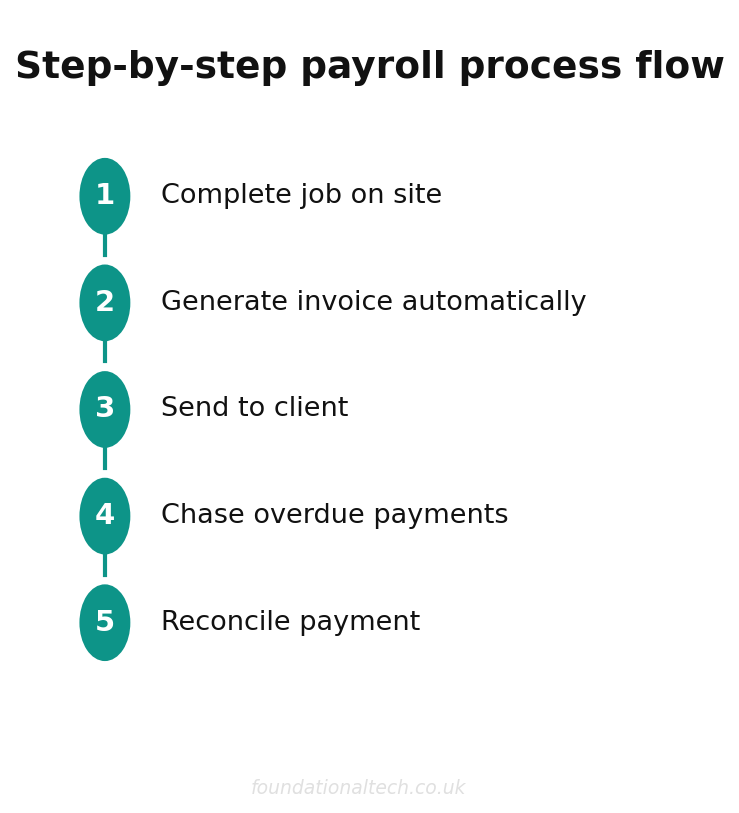
The real gain comes when CIS invoicing isn't a standalone task but part of an automated chain. Here's what good looks like:
- Job completion — your subbie finishes the work and submits their invoice (or you generate it from the job management system based on the agreed rate and hours worked).
- Invoice processing — the software checks the subbie's CIS status, splits labour from materials, calculates the deduction, and creates a bill in your accounts.
- Payment — you approve the payment, the subbie gets the net amount, and a deduction statement is emailed automatically.
- Return compilation — throughout the month, each processed invoice feeds into the CIS return. By the 19th, you review the compiled return and file with one click.
- Records — every deduction, statement and return is stored digitally, so when HMRC asks (and they do), you can pull the evidence in seconds rather than digging through lever-arch files.
If you're also tracking mileage and expenses alongside CIS, the same software stack captures those costs against the right jobs, so your profit-per-job figures actually reflect reality rather than a best guess.
Common CIS Mistakes the Software Prevents
Most CIS penalties come from a small number of recurring errors. Here's what goes wrong when you do it by hand — and why software stops it happening:
- Not verifying before paying — you must verify every subcontractor with HMRC before the first payment. Pay first and verify later, and you've technically failed to operate the scheme correctly. Software won't let you process a payment without verification.
- Wrong deduction rate — applying 20% when the subbie should be at 30% (or vice versa) means you've either under-deducted or over-deducted. The software pulls the rate from HMRC's records, not your memory.
- Missing the filing deadline — the £100 penalty for a late return is HMRC's favourite recurring revenue from construction firms. Software that files directly eliminates the risk.
- No deduction statements — subbies need these to reclaim their deductions. Hand-written ones get lost; emailed ones from the software don't.
- Deducting from materials — you only deduct from labour. Software that handles the split correctly means you're not accidentally withholding tax on a materials delivery.
- Filing a nil return when no subbies were paid — many firms forget that even a month with zero subcontractor payments still requires a return. The software reminds you, or files automatically.
Which Software Should You Pick?
The honest answer: whichever your accountant already uses. CIS compliance is a joint effort between you and your accountant, and if they're on Xero, you should be on Xero. If they don't have a preference, here's the short version:
- Xero + CIS add-on — if you have an accountant and more than a couple of subcontractors. Most flexible, best integration ecosystem.
- QuickBooks Advanced — if you want payroll and CIS in one plan and you're doing your own books.
- FreeAgent — if you're a sole trader subcontractor or a very small contractor. Simplest interface, included in all plans.
- Sage Standard — if you're already on Sage and don't want to migrate.
- Powered Now + Xero — if you want job management and CIS invoicing to flow from one app on your phone to your accountant's screen.
All of them handle the core CIS workflow. The difference is in what sits around it — payroll, job management, expense capture, reporting — and how well it connects to the rest of your business. For a deeper look at how these tools connect for subcontractor management alongside timesheets and payroll, we've covered that separately.
Related guides:
- Timesheets, Payroll and CIS: Automating Back-Office Admin for UK Roofing Businesses
- CIS, Mileage and the Glovebox: Automating Expenses for Construction
- Trades Construction Automation: Tradify and Xero
- How UK Builders and Tradespeople Choose Software
Considering Tradify? Get 50% off for 3 months.