Key Takeaway
Break the cash flow bottleneck in UK trade businesses. Automate quotes to payment with Tradify, Xero and GoCardless.
Quick Answer: The legacy field service model—relying on paper quotes, lost material receipts, and end-of-month manual invoicing—creates massive cash flow bottlenecks and unbilled material leakage. By deploying an API-linked architecture connecting a mobile job manager (Tradify), a receipt ingestion pipeline (Dext), a central ledger (Xero), and a native payment gateway (Stripe), trade businesses automate the "quote-to-cash" cycle. This stack completely eliminates the "dashboard database" of physical paperwork, ensuring materials are billed accurately and invoices are settled the moment the job finishes.
The Liability of the Dashboard Database
The single biggest operational failure in trades, construction, and field services is the latency between buying materials and collecting payment for the finished job.
Historically, tradespeople operate out of their vans. A plumber buys £300 worth of copper piping at a supplier, shoves the physical receipt onto the dashboard, finishes the job, and promises to "invoice the client later." At the end of the month, they sit at their kitchen table, attempt to decipher faded receipts, and manually type up invoices in a Word document.
This disconnected workflow destroys profit margins. If a tradesman forgets to add the £300 copper piping to the final invoice, they just worked that day for free. More importantly, delayed invoicing creates severe cash flow friction. If you wait 30 days to send an invoice, and the client takes 30 days to pay, the business is effectively acting as an interest-free bank for its customers.
To achieve high margins and predictable cash flow, modern trade businesses must completely bypass manual data entry and deploy a mobile, real-time data pipeline.
The Automated Trade Stack (With Verified 2026 UK Pricing)
A high-performance trade business requires specialised, cloud-based software that connects the field worker directly to the accounting ledger without administrative friction. Here is the exact architecture and verified 2026 UK pricing.
1. The Field Service Engine: Tradify
What it does: Tradify acts as the central operational hub. It handles automated quoting, job scheduling, GPS tracking, and digital signatures. Instead of writing quotes on a notepad, the tradesperson builds a digital quote on site using imported supplier price lists and pushes it to the client for an instant e-signature.
Accurate 2026 Cost: Tradify utilises a highly transparent flat-rate model. The Lite plan starts at £29.50 per user/month, the Pro plan at £37 per user/month, and the Plus plan at £44 per user/month (which unlocks AI SmartRead and bulk invoicing).
The Verdict: Rated heavily by UK contractors over competitors like Jobber due to its simple per-user pricing rather than complex feature gating. Tradify completely eliminates the paper trail; field workers clock into a job on the app, log their hours, and generate the final invoice before they even leave the client's driveway.
2. The Material Ingestion Pipeline: Dext Prepare
What it does: Dext solves the "lost receipt" problem. When a worker buys materials at a supplier, they snap a photo of the receipt using the Dext app before putting the van in drive. Using advanced Optical Character Recognition (OCR), Dext instantly extracts the supplier, date, and exact VAT breakdown.
Accurate 2026 Cost: Business plans start at roughly £24 per month.
The Verdict: Dext is an absolute necessity for the trades. It ensures that 100% of material costs are instantly digitised and pushed to the central ledger, completely stopping the margin erosion caused by lost physical receipts.
3. The Frictionless Payment Gateway: Stripe
What it does: Chasing clients for BACS transfers is a massive waste of administrative time. By integrating Stripe natively into Tradify, the final invoice includes a secure "Pay Now" button, allowing clients to settle the bill instantly via credit card, debit card, or Apple Pay.
Accurate 2026 Cost: No monthly subscription fee; standard UK transaction fees sit at 1.5% + 20p for standard UK cards.
The Verdict: Trade businesses deploying native payment gateways inside their invoices consistently report reducing their average payment collection time from 21 days down to under 48 hours.
4. The Central Financial Ledger: Xero
What it does: Xero acts as the master database. It ingests the digitised material bills directly from Dext, and the finalised sales invoices directly from Tradify.
Accurate 2026 Cost: £15 per month for the Starter plan; £33 per month for the Standard plan.
The Verdict: By wiring Tradify and Dext directly into Xero, the business achieves a real-time view of job profitability. The system matches the Stripe payouts against the live bank feed automatically, meaning the books are permanently reconciled.
| Tool | Monthly Cost | Role |
|---|---|---|
| Tradify | From £29/user/mo | Field service and job management |
| Dext | From £24/mo | Receipt capture and coding |
| Xero | From £15/mo | Central accounting ledger |
| Stripe | 1.5% + 20p/txn | Online payment collection |
| GoCardless | 1-2% + 20p/txn | Direct debit for recurring |
The Real-World Pipeline: From Quote to Cash
The true ROI of this architecture is how quietly it runs in the background. Here is exactly how an automated job flows:
The Quote: An electrician visits a site, opens Tradify, and generates a quote pulling from live supplier catalogs. The client signs digitally on the tablet.
The Materials: The electrician goes to the wholesaler, buys the supplies, and snaps a photo of the receipt via Dext. The receipt is instantly digitised and pushed to Xero as an accounts payable bill.
The Job: The electrician finishes the work and clicks "Complete" in Tradify. The software pulls the logged hours and the exact material costs to instantly generate the final invoice.
The Payment: The client receives the invoice via email and clicks the Stripe integration to pay instantly.
The Reconciliation: The following morning, Xero sees the money hit the live bank feed and automatically matches it against the Tradify invoice. The job is closed, the profit is tracked, and the accountant didn't have to type a single number.
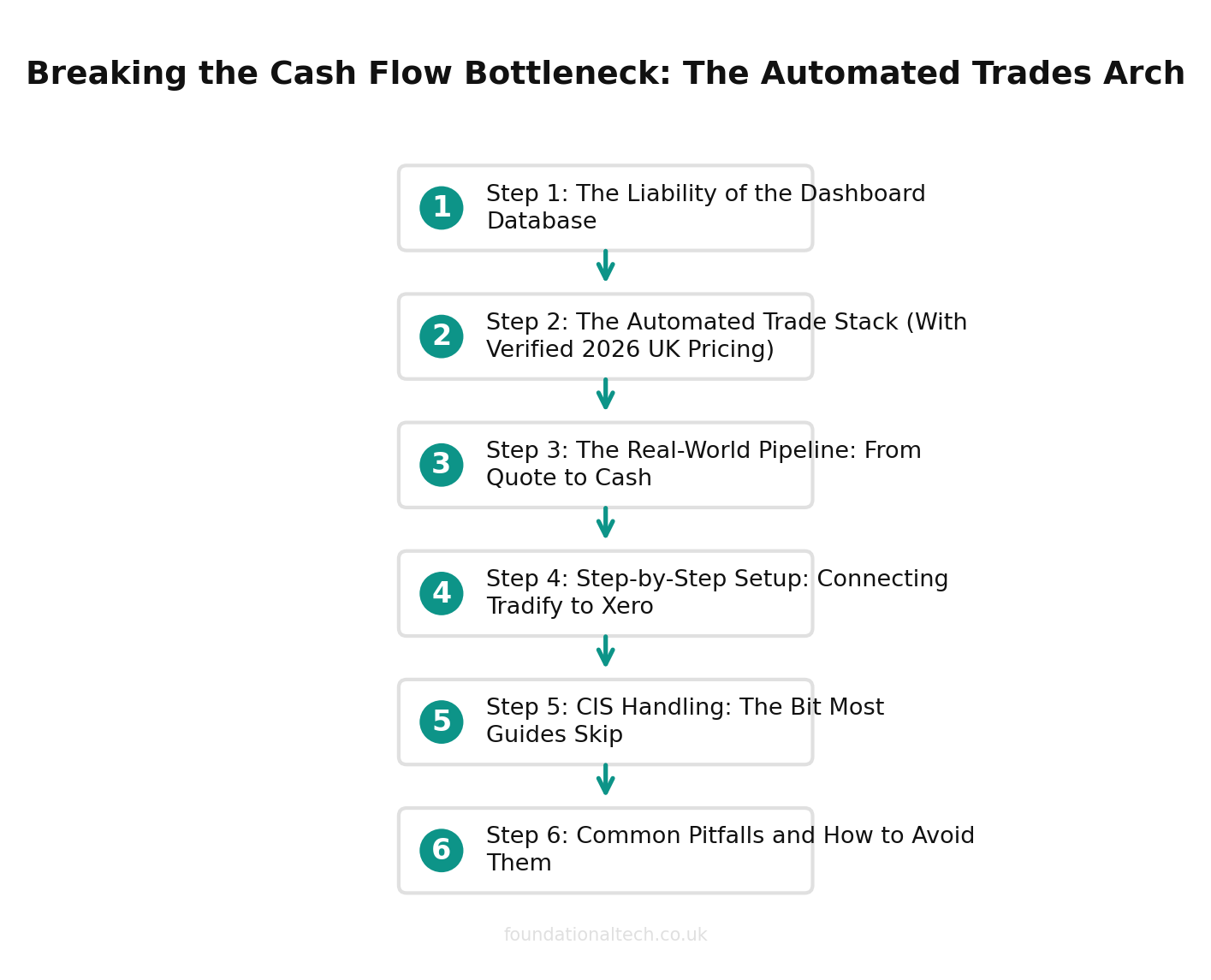
Step-by-Step Setup: Connecting Tradify to Xero
The theory is straightforward, but the actual setup process trips people up if they do things in the wrong order. Here is the exact sequence that gets you from zero to a fully connected stack with the least friction.
Step 1: Set up your Xero account and connect your bank feed. Start with Xero because it is the hub everything else feeds into. Sign up for the Standard plan at £33 per month, connect your business bank account (most UK banks link within 24 hours), and configure your chart of accounts for trades work. You want separate nominal codes for materials, subcontractor costs, labour, plant hire, and travel at minimum. If your accountant is already on Xero, ask them to set this up — most will do it as part of their onboarding at no extra charge.
Step 2: Install Tradify and set up your basics. Download the app, import your existing customer list (you can do this via CSV or just add them as jobs come in), and start building your price lists. The real time-saver here is importing standard prices from your main merchants — Screwfix, Toolstation, City Plumbing, or whoever you use regularly. Tradify lets you create price books so when you are quoting on site, you are pulling from real supplier prices rather than guessing. Allow an hour or two for this initial setup.
Step 3: Connect Tradify to Xero. Inside Tradify, go to Settings, then Integrations, and select Xero. You will be prompted to log into your Xero account and authorise the connection. The whole process takes about two minutes. Once connected, invoices created in Tradify automatically push through to Xero as sales invoices.
Step 4: Map your Tradify revenue and expense codes to Xero accounts. This is the step people skip and then regret. When Tradify sends an invoice to Xero, it needs to know which nominal code to post it against. Spend ten minutes mapping your Tradify categories (electrical work, plumbing, general maintenance, etc.) to the correct Xero revenue accounts. Do the same for expense categories. Getting this right now means your profit-and-loss report is actually useful from day one.
Step 5: Connect Dext and set up your forwarding email. Sign up for Dext at £24 per month and connect it to Xero. Dext gives you a unique email address — set it up so that supplier invoices from your merchants can be forwarded directly. Even better, download the Dext app and make it a habit to photograph every receipt the moment you get it. Train any employees to do the same.
Step 6: Enable Stripe in Tradify for payment links. Inside Tradify, connect your Stripe account (no monthly fee, just 1.5% plus 20p per transaction). Every invoice you send from Tradify will now include a "Pay Now" button. Customers can pay by card or Apple Pay the moment they receive the invoice, which dramatically reduces your average payment collection time.
Total setup time is around two to three hours if you follow this guide step by step, or roughly half a day if you are figuring it out on your own. The most important thing is to do it in this order — Xero first, then Tradify, then the connections — so that everything maps correctly from the start.
CIS Handling: The Bit Most Guides Skip
If you subcontract any work out — and most trades businesses do at some point — you need to understand the Construction Industry Scheme, because getting it wrong comes with penalties that will wipe out the efficiency gains from your shiny new software stack.
The basics: if you are a contractor who pays subcontractors for construction work, you must register with HMRC as a contractor under CIS, verify each subcontractor before you pay them, deduct CIS tax from their payments (usually 20%, or 30% if they are not verified), and file a monthly CIS return with HMRC. This applies even if you are a sole trader who occasionally brings in a mate to help on bigger jobs.
How Xero handles CIS: Xero has a built-in CIS module that you can enable under Settings. Once activated, you can verify subcontractors directly with HMRC through Xero (it checks their UTR and National Insurance number against the HMRC database), and the system automatically calculates the correct CIS deduction when you process a subcontractor invoice. At month end, Xero generates the CIS return and lets you file it directly to HMRC. The entire process that used to involve spreadsheets and phone calls to the HMRC helpline now takes about fifteen minutes.
How Tradify fits in: When you log subcontractor costs against a job in Tradify, those costs sync across to Xero as bills. The CIS deduction is then handled on the Xero side when you process the payment. This means you get accurate job costing in Tradify (showing the full subcontractor cost) while Xero handles the tax compliance side. The two systems complement each other rather than duplicating the work.
The common mistake that catches people out is forgetting to verify a new subcontractor with HMRC before making the first payment. If you pay an unverified subcontractor, you must deduct CIS at 30% instead of 20%, and if you fail to file your monthly return on time or file it incorrectly, HMRC charges a £100 penalty per return, escalating to £200 after two months and further penalties after that. The fix is simple: the moment you agree to use a new subcontractor, verify them in Xero before the first invoice arrives. It takes two minutes and saves you a guaranteed headache.
Common Pitfalls and How to Avoid Them
Even with the right software in place, there are a handful of mistakes that trip up almost every trade business in the first few months of using a connected stack. Here is what to watch for.
Duplicate invoices from creating in both Tradify and Xero. This is the single most common error. Once Tradify is connected to Xero, you must create all your sales invoices in Tradify and let them sync across. If you also create invoices directly in Xero for the same jobs, you will end up with duplicates that overstate your revenue and create reconciliation nightmares. The rule is simple: Tradify is where invoices are born, Xero is where they live. Never create in both.
VAT flat rate scheme complications. If your trade business is on the VAT flat rate scheme (common for businesses under £150,000 turnover), you need to be careful. Tradify sends invoices to Xero at the standard VAT rate because that is what appears on the invoice to your customer. But your actual VAT liability is calculated at the flat rate percentage. Make sure your accountant configures Xero's flat rate scheme settings correctly, otherwise your VAT returns will be wrong. This is a setup-once issue, but it catches a lot of people who connect the systems without thinking about it.
Materials bought on trade accounts not matching Dext receipts. Many tradespeople have 30-day trade accounts with merchants like Screwfix, Plumbase, or Graham. The monthly statement from the merchant will not match the individual Dext receipts if you have been photographing delivery notes rather than the actual invoices. The solution is to either photograph the monthly statement when it arrives and use that as your Dext entry, or reconcile the individual receipts against the statement. Pick one method and stick with it.
Forgetting to log personal purchases on trade accounts separately. If you buy something for personal use on your business trade account (and everyone does occasionally), it needs to be logged separately in Xero as drawings or a director's loan, not as a business expense. Dext will faithfully capture whatever you photograph, so make sure personal items are coded correctly when they hit Xero.
What does all this actually cost? For a sole trader, the total monthly outlay is roughly: Tradify Lite at £29.50, Dext at £24, Xero Standard at £33, plus Stripe transaction fees of around £15 to £30 depending on volume. That is approximately £105 to £120 per month. For a three-person trade business, you are looking at Tradify Pro at £37 per user (£111 for three users), Dext at £24, Xero Standard at £33, and Stripe fees of perhaps £30 to £60. That totals around £200 to £230 per month. Compare that to the cost of a part-time bookkeeper at £200 to £400 per month, plus the unbilled materials and late invoices you are currently absorbing, and the software pays for itself almost immediately.
60-day cash gap
When you wait 30 days to invoice and clients take 30 days to pay — automated invoicing eliminates this
Conclusion: Escaping the Administrative Grind
For trade business owners, the goal is to get off the tools and scale the business, but you cannot scale a company built on a foundation of paper receipts and delayed invoices.
By deploying this API-linked architecture, tradespeople bridge the gap between the field and the office. You ensure every hour is billed, every material is accounted for, and cash flow is realized instantly.
Related guides: If you found this useful, see our guide on How to Connect The Scaffold Software, Xero and GoCardless: The Complete UK Scaffolding Integration Map (2026) and Scaffolding Software UK: How Scaffold Contractors Are Automating Quotes, Weekly Hire and the 7-Day Inspection in 2026.
Stop bleeding margin to manual data entry. The architecture outlined above is exactly what we build for our clients. A & Y Financial Services acts as your dedicated tech integrator and financial controller. We will deploy this exact stack, configure the API routing, and handle your ongoing HMRC compliance.
With the Making Tax Digital for ITSA deadline approaching in 2026, this automated architecture becomes even more critical for UK trades.