Key Takeaway
MTD for ITSA is live from April 2026 for UK sole traders earning over £50k. Compatible software from £12/mo — here is exactly what to set up.
Key Takeaway
Making Tax Digital for Income Tax Self Assessment (MTD for ITSA) is now live for sole traders and landlords earning over £50,000. You must submit quarterly updates through compatible software like FreeAgent (from ~£19/mo), Xero (from £15/mo), or QuickBooks (from £12/mo). If you are a self-employed plumber, electrician, or builder above the threshold, you should already be set up. If not, act now — penalties for late digital submissions start accumulating from the first missed quarter.
MTD for ITSA requires sole traders and landlords with gross income over £50,000 to keep digital records and submit quarterly updates to HMRC using MTD-compatible software. The first mandated group went live in April 2026. You cannot use spreadsheets alone — the software must have a direct digital link to HMRC. Setup takes a few hours and compatible software starts from around £12/month.
What Is Making Tax Digital for ITSA?
Making Tax Digital for Income Tax Self Assessment — MTD for ITSA — is HMRC's programme to move self-employed individuals and landlords from annual Self Assessment tax returns to quarterly digital reporting. Instead of filing one tax return per year, you now submit four quarterly updates plus a final declaration, all through MTD-compatible software.
This is not optional. If your gross self-employment or property income exceeds £50,000, you are in the first wave, which went live in April 2026. The £30,000 threshold follows in April 2027. HMRC has signalled that lower thresholds will follow in subsequent years, though no dates are confirmed below £30,000 yet.
For UK trade businesses — plumbers, electricians, builders, roofers, landscapers — this is a significant change. Many sole traders in the trades have historically done minimal bookkeeping during the year and handed everything to their accountant in January. That approach no longer works.
Who Is Affected Right Now?
You must comply with MTD for ITSA from April 2026 if:
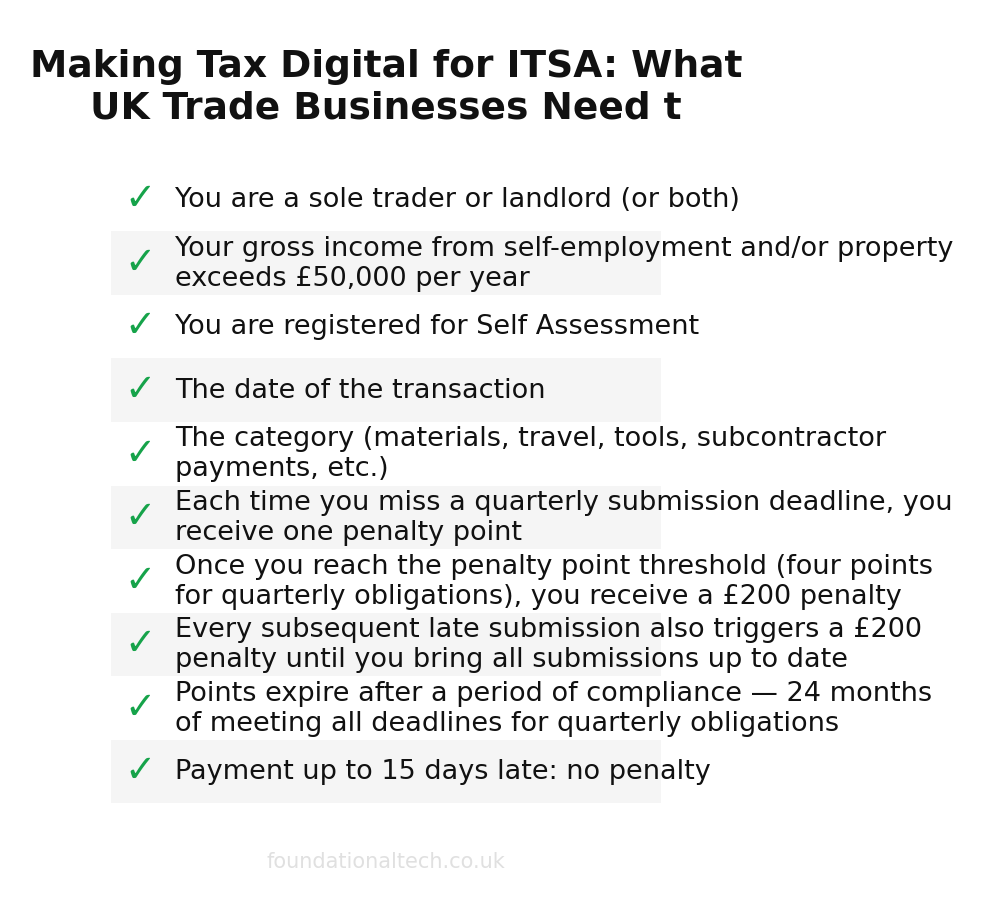
- You are a sole trader or landlord (or both)
- Your gross income from self-employment and/or property exceeds £50,000 per year
- You are registered for Self Assessment
Note: this is gross income, not profit. A self-employed electrician turning over £65,000 but netting £38,000 after expenses is still caught by the £50,000 threshold. Many trade business owners underestimate their gross figure because they think in terms of profit.
Partnerships are not yet included — HMRC has deferred MTD for partnerships to a later date, though no firm timeline has been published. Limited companies are also outside the scope of MTD for ITSA; they fall under Corporation Tax, which has its own separate MTD timeline.
What You Actually Have to Do: The Quarterly Cycle
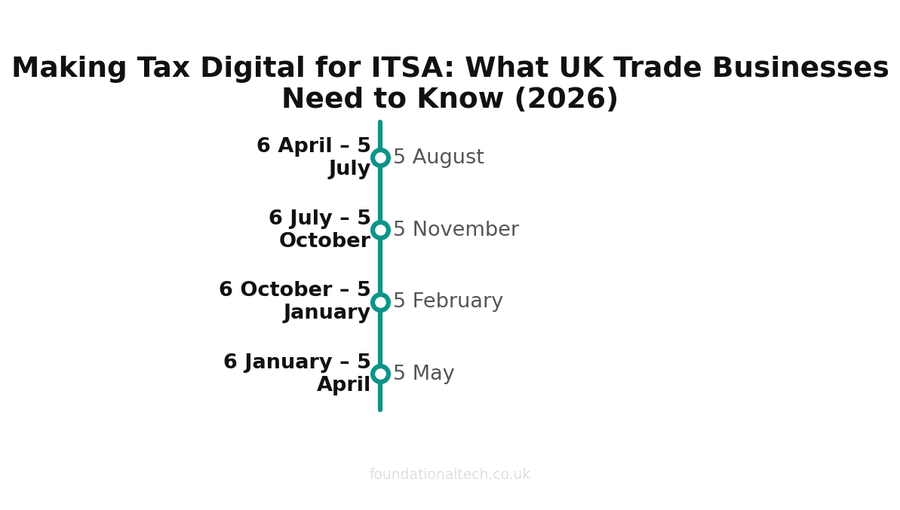
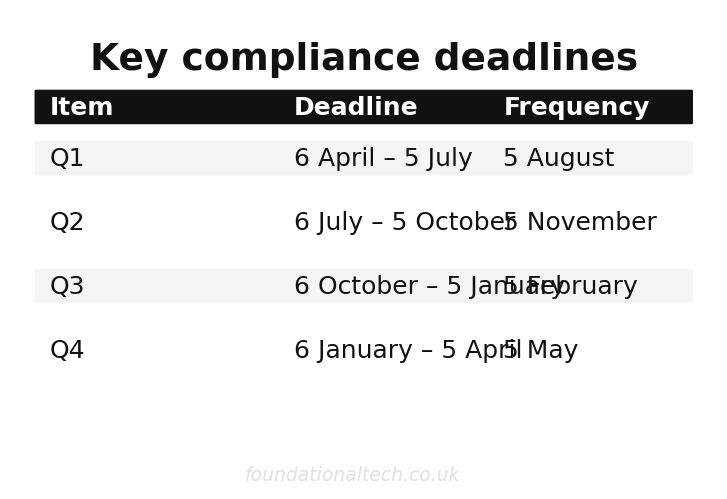
Under MTD for ITSA, your tax year is divided into four quarters. For each quarter, you must submit a digital update to HMRC showing your income and expenses for that period. The deadlines are:
| Quarter | Period Covered | Submission Deadline |
|---|---|---|
| Q1 | 6 April – 5 July | 5 August |
| Q2 | 6 July – 5 October | 5 November |
| Q3 | 6 October – 5 January | 5 February |
| Q4 | 6 January – 5 April | 5 May |
After Q4, you also submit an End of Period Statement (EOPS) confirming that the figures are complete, followed by a Final Declaration — which replaces the traditional Self Assessment tax return — by 31 January following the end of the tax year.
Each quarterly update does not need to be perfect. You can adjust figures in later quarters and in the EOPS. But you do need to submit something each quarter, and it must come from MTD-compatible software with a digital link to HMRC. You cannot email a spreadsheet or phone it in.
What Counts as "Digital Records"?
HMRC requires you to keep digital records of all business income and expenses. Specifically, for each transaction you need:
- The date of the transaction
- The amount
- The category (materials, travel, tools, subcontractor payments, etc.)
These records must be held in MTD-compatible software. You can use spreadsheets as part of your record-keeping, but they must have a digital link to MTD-compatible software that handles the HMRC submission. In practice, most sole traders will find it far simpler to record everything directly in their accounting software.
If you are already using software like Xero or a receipt-capture pipeline to manage your books, you are most of the way there. The main addition is the quarterly submission to HMRC, which your software handles with a few clicks.
Compatible Software: What to Use and What It Costs
HMRC maintains a list of MTD for ITSA compatible software. For UK trade businesses, these are the main options worth considering:
FreeAgent — from ~£19/month (£11.50/month with NatWest/RBS)
FreeAgent is purpose-built for UK freelancers and sole traders. It handles MTD for ITSA submissions natively, includes Self Assessment filing, CIS management, and automatic bank feed reconciliation. If you bank with NatWest, RBS, or Ulster Bank, you get FreeAgent free or heavily discounted — which makes it the obvious choice for sole traders with those accounts.
FreeAgent is particularly good for one-person trade businesses. The interface is simpler than Xero or QuickBooks, the tax timeline feature shows your estimated tax bill in real time, and MTD quarterly submissions are built into the workflow rather than bolted on. The main limitation is that it lacks some of the app integrations and scalability of Xero if you plan to grow beyond a few employees.
Xero — from £15/month (Starter plan)
Xero is the market leader for small business accounting in the UK and supports MTD for ITSA. The Starter plan at £15/month covers basic invoicing and bank reconciliation, but most trade businesses will need the Standard plan at £33/month for unlimited invoices and bills. MTD quarterly submissions are handled through Xero Tax or via your accountant's Xero dashboard.
Xero's strength is its ecosystem. If you are already using tools like Dext for receipt capture or running payroll through Xero, adding MTD submissions is straightforward. Your accountant almost certainly uses Xero already, which makes collaboration seamless.
QuickBooks Self-Employed — from £12/month
QuickBooks offers a Self-Employed plan specifically designed for sole traders, starting at £12/month. It includes MTD for ITSA support, mileage tracking, and basic invoicing. The Simple Start plan at £14/month adds more features including unlimited invoicing. QuickBooks is a solid budget option, particularly if your bookkeeping needs are straightforward.
One advantage of QuickBooks for trade workers is the built-in mileage tracker — useful if you are claiming mileage expenses across multiple job sites. The mobile app is competent for on-the-go invoicing after completing a job.
Sage Accounting — from £14/month
Sage Accounting Start at £14/month covers MTD for ITSA compliance with invoicing, bank feeds, and expense tracking. The Standard plan at £33/month adds quotes, purchase invoices, and multi-currency support. Sage has deep roots in UK accounting — many accountants trained on Sage — and its MTD integration is mature.
Hammock — from £9/month
Hammock is specifically designed for UK landlords and property investors but also covers self-employed income. At £9/month for the basic plan, it is one of the cheapest MTD-compatible options. It handles quarterly MTD submissions, tracks rental income and expenses, and integrates with Open Banking for automatic bank feeds. If your income is a mix of trade work and property, Hammock handles both streams in one place.
Software Comparison
| Software | Starting Price | Best For | MTD for ITSA | CIS Support | Mobile App |
|---|---|---|---|---|---|
| FreeAgent | ~£19/mo | Sole traders, NatWest customers | Yes | Yes | Yes |
| Xero | £15/mo | Growing businesses, accountant collaboration | Yes | Yes (via add-on) | Yes |
| QuickBooks | £12/mo | Budget-conscious sole traders | Yes | Yes | Yes |
| Sage | £14/mo | Traditional accounting, established businesses | Yes | Yes | Yes |
| Hammock | £9/mo | Landlords, mixed property/trade income | Yes | No | Yes |
Penalties for Non-Compliance
HMRC has introduced a new points-based penalty system for MTD for ITSA. Here is how it works:
- Each time you miss a quarterly submission deadline, you receive one penalty point
- Once you reach the penalty point threshold (four points for quarterly obligations), you receive a £200 penalty
- Every subsequent late submission also triggers a £200 penalty until you bring all submissions up to date
- Points expire after a period of compliance — 24 months of meeting all deadlines for quarterly obligations
Late payment penalties are separate:
- Payment up to 15 days late: no penalty
- 16–30 days late: penalty of 2% of the tax owed at day 15
- 31+ days late: a further 2% of the tax owed at day 30, plus a daily rate of 4% per year on the outstanding balance
HMRC also charges late payment interest from the due date at the Bank of England base rate plus 2.5%. With the base rate currently elevated, that adds up quickly.
The practical message: missing one quarter is a slap on the wrist. Missing multiple quarters accumulates to real financial penalties. And if you are not submitting at all, HMRC will come knocking — this is not a system you can quietly ignore.
What to Set Up Right Now: A Step-by-Step Checklist
If you are a sole trader in the trades with income over £50,000 and have not yet set up for MTD, here is what to do this week:
- Choose your software. If you already use accounting software, check it is MTD for ITSA compatible (most major platforms are). If you are starting from scratch, FreeAgent is the simplest for sole traders; Xero is best if your accountant prefers it; QuickBooks is cheapest.
- Sign up for MTD for ITSA with HMRC. You need to register through your Government Gateway account. This is separate from your existing Self Assessment registration. Your accountant can do this on your behalf if authorised.
- Connect your bank feeds. Link your business bank account to your software. Barclays, NatWest, Lloyds, Starling, Tide, and most UK banks support automatic feeds. This means transactions appear in your software daily without manual entry.
- Set up receipt capture. Install your software's mobile app or a dedicated tool like Dext. Photograph receipts as you get them — from Screwfix, Toolstation, Travis Perkins, the petrol station. Each photo becomes a digital record.
- Categorise your opening transactions. Go through the last month of bank transactions and categorise them: materials, fuel, tools, insurance, phone, vehicle costs, subcontractor payments. This builds your category list for future transactions.
- Talk to your accountant. Agree who submits the quarterly updates — you or them. Most accountants will handle submissions as part of their existing fee, but some charge extra. Clarify this now, not at the first deadline.
- Set calendar reminders. Your first quarterly deadline depends on when your obligation started. Put the four submission deadlines in your phone calendar with two-week advance warnings.
How Quarterly Submissions Actually Work
The quarterly update itself is anticlimactic if your books are up to date. In FreeAgent, for example, you navigate to the tax section, review a summary of income and expenses for the quarter, and click submit. The software sends the data directly to HMRC through their API. You get a confirmation. The whole process takes five minutes.
In Xero, your accountant typically handles the submission from their practice dashboard. They review the figures, check for anything unusual, and file on your behalf. You might get a quick email saying "Q1 submitted, all looks fine."
The hard part is not the submission — it is keeping your records up to date throughout the quarter so there is something accurate to submit. If you have been photographing receipts, reconciling bank feeds weekly, and categorising transactions as they come in, the submission is trivial. If you have done nothing for three months, the submission becomes a panic.
This is why automating as much of the bookkeeping workflow as possible matters so much under MTD. The quarterly cycle means you cannot afford to let things pile up.
Common Questions from Trade Business Owners
"I use a spreadsheet — is that enough?"
On its own, no. You can use a spreadsheet to record transactions, but it must feed into MTD-compatible software through a digital link for the HMRC submission. In practice, you will save time by recording directly in software like QuickBooks or FreeAgent rather than maintaining a spreadsheet and then importing.
"My accountant handles everything — do I need to do anything?"
Your accountant can submit on your behalf, but they need your data quarterly, not annually. That means you need to either give them access to your accounting software with live bank feeds, or provide them with categorised records every three months. The days of dropping off a bag of receipts once a year are genuinely over.
"What about CIS deductions?"
If you work as a subcontractor under CIS, the tax deducted by contractors still applies. Your MTD-compatible software should track CIS deductions alongside your regular income and expenses. FreeAgent, Xero, and QuickBooks all handle CIS. The quarterly updates show your gross income before CIS deductions, and the deductions are accounted for in your final declaration. Read more about automating CIS and mileage claims.
"I earn under £50,000 — can I ignore this?"
For now, yes — you are not mandated until your income exceeds the threshold. But the £30,000 threshold kicks in from April 2027, and HMRC will likely lower it further. Setting up digital records now, voluntarily, means you are ready when the mandate reaches you. Plus, most trade business owners find that proper accounting software saves them money in missed expenses they were not claiming.
The Bigger Picture: MTD Is Not Going Away
MTD for ITSA is part of HMRC's long-term strategy to digitise the UK tax system. MTD for VAT has been mandatory since April 2019 for VAT-registered businesses, and most trade businesses above the VAT threshold are already compliant there. ITSA extends the same principle to income tax.
The direction of travel is clear: more frequent digital reporting, lower thresholds, less tolerance for paper-based record keeping. Setting up properly now is not just about compliance — it is about building habits and systems that make your business easier to run.
A self-employed plumber who photographs every receipt, reconciles bank feeds weekly, and reviews a quarterly profit figure is a plumber who knows exactly how their business is performing. They spot problems early, claim every allowable expense, and make better decisions about pricing, hiring, and investment. That is worth far more than the £12–£19/month the software costs.
If you are already using integrated accounting software and keeping your records current, MTD for ITSA is a minor procedural addition. If you are not, treat it as the push you needed to modernise. Your future self — and your accountant — will thank you.
Related guides: For more on automating your trade business finances, see our guides on automating CIS and mileage claims, building a receipt-to-ledger pipeline with Dext and Xero, and getting paid faster as a trade business.