Key Takeaway
Automate legal billing and close the work-to-cash gap for UK law firms. Covers WIP tracking, time capture, fee earner dashboards, and cashier automation.
Every law firm I work with has the same leak. It is not dramatic — no single catastrophic loss — but it drains revenue steadily, month after month. Time gets recorded late or not at all. Pre-bills sit in a partner's inbox for a fortnight. Invoices go out by post, and payment trickles in six, eight, sometimes twelve weeks later. This is the work-to-cash gap, and in a profession that sells time by the six-minute unit, it is remarkable how many firms treat the journey from work done to cash received as an afterthought.
I have spent the past three years helping professional services firms — solicitors, barristers' chambers, accountancy practices — close this gap with automation. What follows is the architecture I now recommend to any firm running between two and thirty fee earners: the tools, the integration points, the compliance guardrails, and the real costs involved.
Why Law Firms Leak Revenue
The work-to-cash gap is not one problem but a chain of small failures. Each link is individually manageable; together, they compound into a significant drag on cash flow and profitability.
- Incomplete timesheets. Most solicitors reconstruct their day from memory at 5pm, or worse, on Friday afternoon. Studies from Thomson Reuters consistently show that contemporaneous time recording captures 25–40% more billable time than end-of-day reconstruction. For a five-solicitor firm billing at an average of £225 per hour, even a 10% leakage on a 1,200 billable-hour target per fee earner means roughly £135,000 in lost revenue annually.
- Manual pre-bill review. The traditional pre-bill process — print a draft bill, mark it up in pen, return it to accounts — adds days or weeks of latency. I have seen firms where pre-bills sit in a physical tray for three weeks before anyone looks at them.
- Paper or PDF invoices sent by post. Every day an invoice spends in Royal Mail is a day your cash is not moving. Worse, postal invoices provide no visibility on whether the client has even opened the envelope.
- No embedded payment link. When payment requires the client to set up a bank transfer manually, you are relying on their motivation, their accuracy, and their memory. Each friction point extends the collection cycle.
- Trust account confusion. Firms that handle client money — conveyancing, probate, litigation — must segregate funds under the SRA Accounts Rules 2019. Manual processes increase the risk of inadvertent breaches, which can trigger investigation by the Solicitors Regulation Authority.
The architecture I describe below addresses every one of these failure points with a connected, largely automated pipeline.
The Clio and LawPay Separation: What Firms Must Do Now
If you are running Clio with LawPay for payment processing, you need to pay attention to this. In August 2026, the integration between Clio and LawPay is being formally separated. The two companies, which had operated with a tight native integration for years, are decoupling their platforms following Clio's decision to build out its own payments infrastructure — Clio Payments.
For firms currently using LawPay through Clio, this means a few things:
- The embedded payment links in Clio-generated invoices will no longer route through LawPay automatically. You will need to either migrate to Clio Payments or reconfigure LawPay as a standalone payment processor.
- Trust account payment routing may need reconfiguration. If you relied on the Clio–LawPay integration to route payments into the correct client or office account, you must verify that your replacement setup maintains that segregation.
- LawPay's pricing remains at 2.9% + 30p per transaction, which is notably higher than alternatives like Stripe (1.5% + 20p for UK cards) or GoCardless (1% + 20p per transaction for direct debit).
My recommendation is straightforward: if you are on Clio, migrate to Clio Payments. If you are not on Clio but are using LawPay standalone, evaluate whether GoCardless or Stripe gives you a better rate for your payment profile. Do not let the August deadline arrive without a plan.
Passive Time Capture: Recording What Actually Happened
The single highest-impact change I make in most firms is replacing manual time entry with passive time capture. The concept is simple: software runs in the background, watches which applications, documents, and emails you interact with, and builds a timeline of your day. You then review and approve time entries rather than constructing them from memory.
WiseTime — background tracking done properly
WiseTime is my preferred tool for passive capture. It installs as a lightweight desktop agent and records activity across applications — Outlook, Word, case management systems, browsers — without requiring any change to how fee earners work. At the end of the day, the solicitor reviews a visual timeline, assigns activities to matters, and posts time entries directly into their practice management system.
WiseTime integrates natively with Clio, and the pricing starts at £15 per user per month. For a five-solicitor firm, that is £75 per month — a trivial cost when set against the revenue recovery it enables.
LeanLaw — hybrid billing for Xero-centric firms
For firms that have built their accounting around Xero rather than a full practice management platform, LeanLaw offers a compelling hybrid. It provides legal-specific time tracking, billing, and trust accounting that sits on top of Xero, from £40 per user per month. LeanLaw is particularly strong for smaller firms — two to ten fee earners — that want legal billing without the overhead of a full Clio deployment.
Clio's native timer
Clio Manage includes built-in timers at every level — the desktop app, the mobile app, the browser extension. These are not passive in the WiseTime sense, but they do reduce friction significantly compared to end-of-day reconstruction. For firms already on Clio, combining the native timer for active matters with WiseTime for background capture gives the most complete picture.
SRA Accounts Rules 2019: Why Compliance Is Non-Negotiable
Any architecture for legal billing must account for the SRA Accounts Rules 2019, which govern how solicitors handle client money. The rules are not optional guidance — breaches can result in disciplinary action, fines, conditions on your practising certificate, or intervention into your firm.
The key requirements that affect billing automation are:
- Rule 2.1: Client money must be kept separate from the firm's own money. Your payment routing must ensure that funds received on account of a client matter go into a client account, not the office account.
- Rule 2.3: Client money must be returned promptly when there is no longer any proper reason to hold it.
- Rule 8.1: You must keep accounting records to show accurately the position with regard to the money of each current and former client.
Automation actually helps with compliance rather than hindering it. When payment routing rules are configured correctly in your practice management system, they enforce the segregation mechanically — removing the risk of a tired accounts clerk posting a receipt to the wrong ledger on a Friday afternoon.
The Payment Routing Architecture
Here is the payment stack I now recommend for most firms. It provides multiple payment channels for clients while maintaining proper fund segregation.
40% revenue leakage
typical unbilled time at UK law firms — automated time capture and billing pipelines close the gap
Clio Payments — the native replacement
Clio Payments processes card payments directly within Clio-generated invoices. The client receives an email with an embedded payment link, clicks it, pays by card, and the funds are routed according to the matter type. Transaction fees are 2.9% + 25p for card payments and 1% for eChecks. The advantage is zero integration overhead — it simply works within the Clio ecosystem.
GoCardless — recurring and direct debit collection
For clients on monthly retainers, fixed-fee arrangements, or instalment plans, GoCardless provides direct debit collection at 1% + 20p per transaction (capped at £4). Direct debit is significantly cheaper than card processing for predictable, recurring amounts. I use GoCardless heavily for firms with family law retainers, ongoing commercial advisory work, or any arrangement where the client pays a regular monthly amount.
Stripe — card payments with lower UK rates
For ad hoc card payments outside the Clio ecosystem, Stripe offers UK card processing at 1.4% + 20p — roughly half the cost of LawPay or Clio Payments for domestic card transactions. Stripe also handles Apple Pay, Google Pay, and open banking payments, giving clients maximum flexibility.
Trust and client account segregation
The critical architectural requirement is that your payment processor can route funds to different bank accounts based on the payment type. Money on account of costs (client money) must go to the client account. Payment of a delivered bill (office money) goes to the office account. Both Clio Payments and Stripe support multiple connected bank accounts, enabling this routing to be configured once and enforced automatically.
The Central Ledger Sync: Clio to Xero
Whatever combination of tools you use for time capture, billing, and payment processing, the numbers must ultimately land in your accounting system. For most firms I work with, that means Xero (priced at £15–£42 per month depending on plan).
The Clio-to-Xero integration syncs invoices, payments, and client balances automatically. When configured correctly, it eliminates the most tedious part of legal accounting: the manual reconciliation of what the practice management system says happened against what the bank says happened. The integration posts invoices as accounts receivable in Xero, matches incoming payments, and flags discrepancies for review.
For firms using LeanLaw instead of Clio, the Xero integration is native — LeanLaw was built specifically as a Xero layer, so the sync is tighter and requires less configuration.
Step-by-Step Implementation: The Full Billing Pipeline
Here is how I implement this architecture in a typical five-solicitor firm, from start to finish.
- Audit current state. Map every step from time entry to cash receipt. Identify where time is lost, where manual steps create delays, and where compliance risks exist. This typically takes one day.
- Deploy passive time capture. Install WiseTime on all fee earner machines. Configure matter mappings and train fee earners on the review-and-approve workflow. Allow two weeks for adoption.
- Configure Clio billing workflows. Set up automated pre-bill generation — Clio can generate draft bills on a schedule (e.g., the 25th of each month for all matters with unbilled time). Configure approval workflows so partners can review and approve pre-bills within Clio rather than on paper.
- Set up payment routing. Enable Clio Payments for invoice-linked card payments. Configure GoCardless for retainer clients. Set up Stripe as a fallback for clients who prefer to pay via a separate payment page. Verify that all three route to the correct bank accounts (client account vs. office account).
- Connect Xero. Enable the Clio–Xero sync. Map chart of accounts, verify VAT treatment, and run a parallel month to confirm that automated postings match manual ones.
- Automate follow-up. Configure Clio's automated payment reminders — I typically set reminders at 7, 14, and 28 days overdue, with escalating tone.
- Test with a live matter. Run one conveyancing or commercial matter through the full pipeline end to end before rolling out firm-wide.
What It Costs: Monthly Breakdown for a Five-Solicitor Firm
Here is the realistic monthly cost for the full stack:
- Clio Manage (Complete): 5 users × £89 = £445/month
- WiseTime: 5 users × £15 = £75/month
- Xero (Growing plan): £37/month
- Clio Payments: Transaction-based — approximately £180–£350/month depending on volume (assuming £12,000–£15,000 in card payments at 2.9% + 25p)
- GoCardless: Transaction-based — approximately £40–£80/month (assuming £4,000–£8,000 in direct debit collections at 1% + 20p)
Total fixed costs: approximately £556/month. Total including transaction fees: approximately £800–£1,000/month. That is roughly £160–£200 per fee earner per month for a fully automated billing pipeline.
Scenario: A Conveyancing Matter From Time Entry to Cash in Bank
Let me walk through a real example. A residential conveyancing matter comes in. The client pays £1,500 on account, which is received via Clio Payments and routed automatically to the client account — the SRA Accounts Rules segregation handled without manual intervention.
Over the following weeks, the solicitor works the file. WiseTime captures time spent in the Land Registry portal, drafting emails, reviewing title documents in Word, and conducting searches. At the end of each day, the solicitor reviews the timeline, assigns entries to the matter, and approves. Total captured time: 8.2 hours at £225/hour = £1,845 plus VAT and disbursements.
On the 25th of the month, Clio generates a draft bill. The supervising partner reviews it in Clio, adjusts one narrative entry, and approves. The invoice is emailed to the client with an embedded payment link within minutes. The client pays by card three days later. Clio Payments routes the payment to the office account (this is now a delivered bill, so office money under the SRA rules). The remaining client funds on account are reconciled and any balance returned.
The Xero integration posts the invoice, matches the payment, and the matter is financially closed. Total elapsed time from bill generation to cash in bank: three days. Compare that to the six-to-eight-week cycle I see in firms still running manual processes.
Common Mistakes I See Firms Make
- Not migrating from LawPay before the August 2026 deadline. Firms that wait until the integration breaks will face a period with no embedded payment links in their invoices — and a corresponding spike in collection times.
- Mixing client and office account payments. This is an SRA compliance issue. Every payment channel must be configured to route funds to the correct account based on whether the money is client money or office money. Test this before going live.
- Keeping manual pre-bill processes. Automating time capture and payment processing while still printing pre-bills for physical review defeats the purpose. The bottleneck simply moves to the partner's desk.
- Ignoring VAT on disbursements. Automated billing only works if your VAT treatment is correctly configured. Get your Xero VAT codes right from the start, or you will spend hours fixing returns later.
- Not training fee earners on passive capture review. WiseTime captures activity, but fee earners must still review, assign, and approve. Without training, the approval queue becomes its own bottleneck.
The ROI Calculation
For a five-solicitor firm, the numbers typically look like this:
- Revenue recovery from better time capture: Even a conservative 10% improvement in captured time across five fee earners billing 1,200 hours at £225/hour = approximately £135,000 per year in additional recorded (and billable) time. Not all of this converts to collected revenue, but even half of it — £67,500 — dwarfs the technology cost.
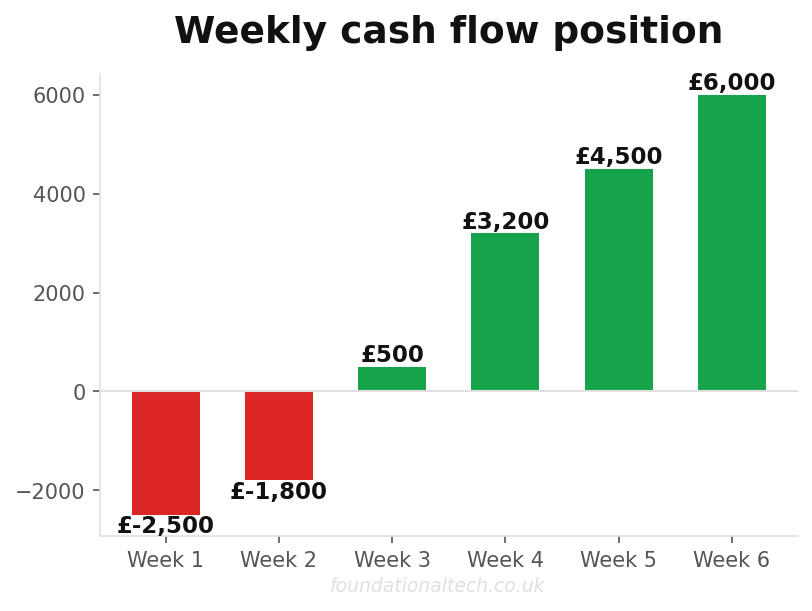
- Faster collection: Reducing average collection from 60 days to 14 days on a turnover of £1.35 million improves cash flow by approximately £170,000 in working capital freed up.
- Reduced write-offs: Firms that bill promptly and provide easy payment options typically see write-offs fall by 15–25%. On a £1.35 million turnover with a 5% write-off rate, that is £10,000–£17,000 saved annually.
- Administrative time saved: Automating billing, reconciliation, and payment chasing typically saves 15–20 hours per month of accounts staff time — worth roughly £4,000–£6,000 per year.
Total annual benefit: conservatively £80,000–£90,000. Total annual cost of the technology stack: approximately £10,000–£12,000. The payback period is measured in weeks, not months.
Where to Start
If you are reading this and recognising your own firm, the single most impactful first step is deploying passive time capture. It requires no changes to your billing process, no new payment infrastructure, and no compliance reconfiguration. Install WiseTime, let it run for a month, and measure the difference in captured time. That data alone will make the case for everything else.
The full architecture — passive capture, automated pre-bills, embedded payments, ledger sync — takes most firms four to six weeks to implement properly. It is not a transformation project requiring consultants and a steering committee. It is a set of well-documented integrations between mature platforms, configured once and maintained with minimal ongoing effort.
The firms that close the work-to-cash gap do not just improve their cash flow. They change the fundamental economics of their practice — billing more of the work they actually do, collecting faster, and spending less time chasing money. That is not a technology benefit. It is a business one.
For real-time profitability dashboards, see The Algorithmic CFO: Visualising Real-Time Legal Profitability.