Key Takeaway
The Scaffold Software vs SMART Scaffolder vs Scaffold Tracker compared. Hire billing, 3D design and inspection tracking from £49/mo for UK firms.
The right scaffold hire management software pays for itself the month you stop losing unbilled rent weeks. Marcus Whitfield ran his Wolverhampton firm for eleven years on a whiteboard and paper inspection sheets — it worked until he crossed fifteen live jobs at once and two ground rent weeks went unbilled on a shopfit that overran. A CISRS card lapsed without anyone noticing. Together, those two mistakes in the same month cost more than a year of the subscription he’d been putting off.
That’s the pattern worth understanding before you pick a platform. The tool that sits at the centre of a scaffolding business doesn’t just replace the whiteboard. It decides whether your weekly hire actually gets billed, whether your inspections happen on the day they’re due rather than the day someone remembers, and whether the paperwork survives contact with an HSE spot check — one Bolton firm learned this the hard way. Get it right and everything else in the stack — Xero, GoCardless, Dext — plugs in cleanly behind it. Get it wrong, or skip it entirely, and you’re running a hire business on memory.
This article puts three UK platforms side by side: The Scaffold Software, SMART Scaffolder, and Scaffold Tracker. They are not chasing the same customer, and picking between them without understanding that is how firms end up paying for design software when what they needed was inspection tracking, or the other way round.
The Question Behind the Question
Before comparing features, be honest about what kind of firm you actually run, because scaffolding splits into two quite different businesses wearing the same hi-vis.
Say most of your revenue comes from standard tube-and-fitting configurations: scaffold to a house, a shopfront, a straightforward commercial elevation. Your bottleneck is operational. Getting quotes out fast, tracking which of your thirty jobs crossed into an unbilled rent week, and proving every inspection happened on schedule. If instead you’re regularly designing bespoke structures — birdcages, loading towers, temporary roofs, anything outside a standard TG20:21 compliance sheet — your bottleneck sits upstream of all that. It’s at the design desk, where a job either gets modelled accurately or it gets guessed.
Most firms are somewhere between the two, which is exactly why three different platforms have carved out three different pieces of this market rather than one winning outright.
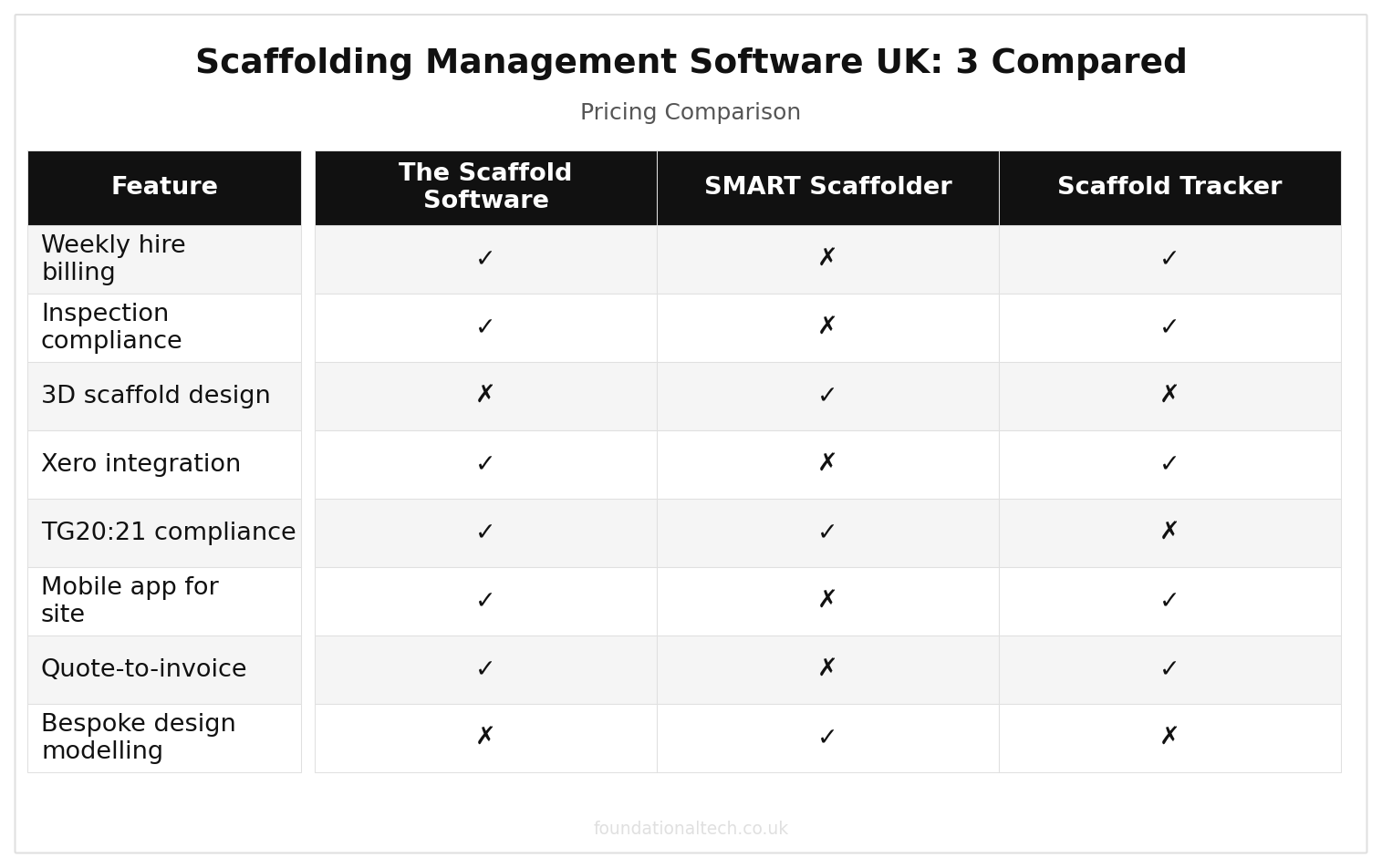
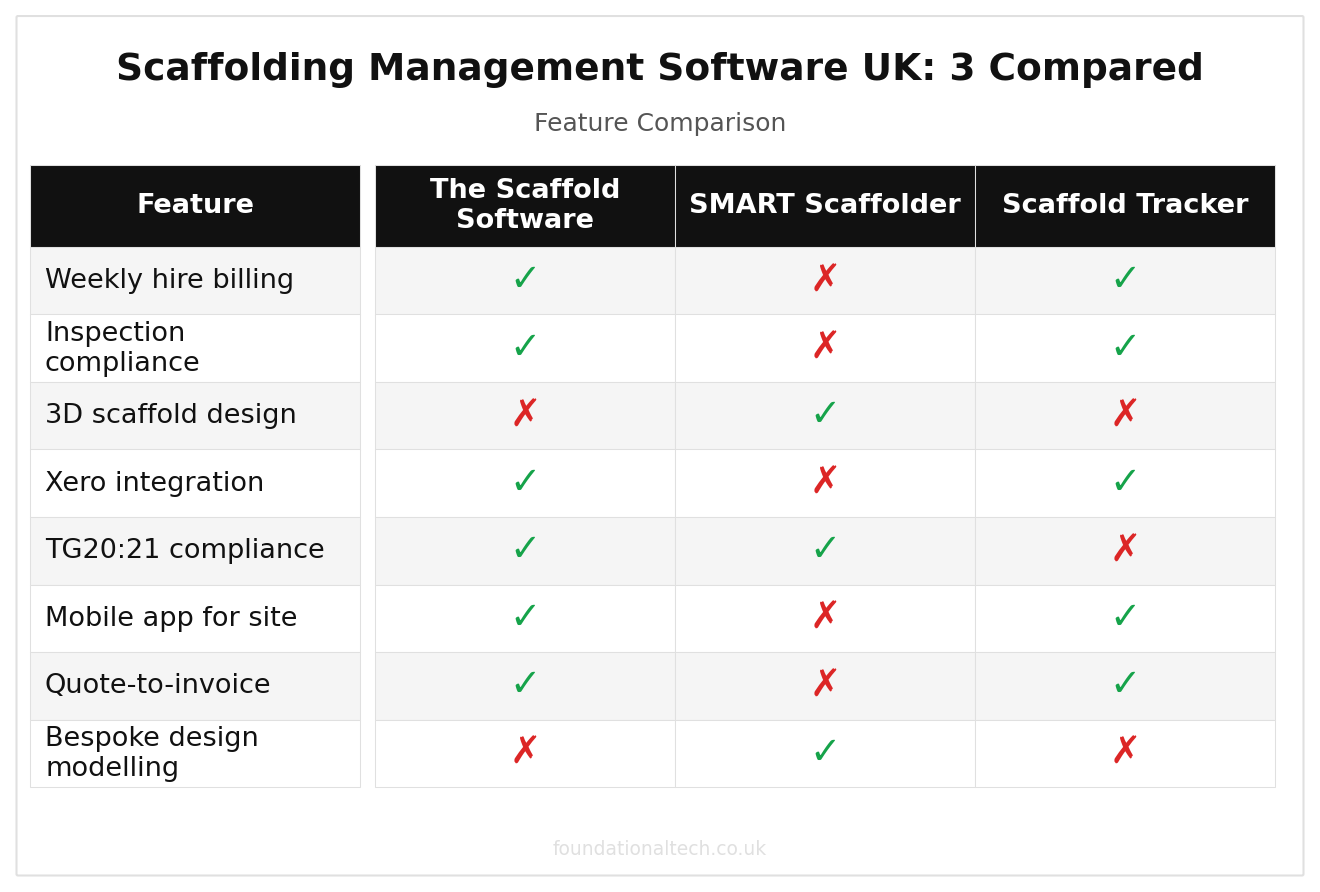
| Feature | The Scaffold Software | SMART Scaffolder | Scaffold Tracker |
|---|---|---|---|
| Weekly hire billing | ✓ | ✗ | ✓ |
| Inspection compliance | ✓ | ✗ | ✓ |
| 3D scaffold design | ✗ | ✓ | ✗ |
| Xero integration | ✓ | ✗ | ✓ |
| TG20:21 compliance | ✓ | ✓ | ✗ |
| Mobile app for site | ✓ | ✗ | ✓ |
| Quote-to-invoice | ✓ | ✗ | ✓ |
| Bespoke design modelling | ✗ | ✓ | ✗ |
Three Platforms, Three Different Bets
The Scaffold Software — Built Around the Weekly Invoice
Best for:
hire-focused contractors running mostly standard configurations who need quoting, inspection compliance and billing under one roof. Our full seven-tool scaffolding software comparison covers the wider market.
UK pricing:
Basic from £150/month, Pro from £358/month on the current early-access offer, extra users at £10/month — confirm current rates before committing to annual billing, since early-access pricing is time-limited.
Xero integration:
native.
Standout feature:
it treats a standing scaffold as a live billing object. Ground rent, extra-hire charges and variation orders generate against the job automatically for as long as it stays up, and the statutory weekly inspection is built into the same workflow rather than tracked separately.
Weakness:
it is not a design tool. Anything beyond a standard configuration still needs pricing and modelling elsewhere before it gets quoted here.
SMART Scaffolder — Built Around the Design Desk
Best for:
firms taking on bespoke or complex structures — non-standard birdcages, temporary roofs, large loading towers — where accurate 3D modelling and material take-off decide whether the quote is profitable.
UK pricing:
modular and subscription-based — CADS UK doesn’t publish a headline monthly figure, so get a tailored quote for your module mix (design, estimating, inspection) directly from CADS before budgeting.
Xero integration:
none native; material and labour costings export for manual entry or via a third-party connector.
Standout feature:
produces professional 3D drawings, works with both tube-and-fitting and system scaffolding, and generates an accurate material list. That list is the single biggest lever on margin for a bespoke job. Guessing tube counts on a complex structure is how quotes quietly lose money before the first pole goes up.
Weakness:
it stops at the design and estimate. It has nothing to say about weekly billing, inspection scheduling or day-to-day job management once the scaffold is up.
Scaffold Tracker — Built Around the Inspection Clipboard
Best for:
firms whose main pain point is compliance documentation and hire-stock visibility rather than quoting or design — often larger operations with a compliance manager rather than an owner doing everything.
UK pricing:
£49 plus VAT per month, covering up to ten staff on the core system; larger headcounts need a custom quote directly from the provider.
Xero integration:
limited/via export; this is not primarily a finance tool.
Standout feature:
digital inspection tagging, plus a stock ledger that shows exactly what equipment is out, on which job, and for how long. It’s as useful for firms losing track of tube and board across multiple depots as it is for the inspection paperwork itself.
Weakness:
it doesn’t quote or bill. You still need something else handling ground rent invoicing and cash collection.
The Cost of Getting This Wrong: A Missed 7-Day Window
None of this is abstract. Regulation 12 of the Work at Height Regulations 2005 requires a scaffold to be inspected before first use, then at intervals not exceeding seven days for as long as it stands. It must also be inspected after any event likely to affect its stability — a storm, a vehicle strike, a substantial alteration. The result has to be recorded, and that record has to be kept until the next inspection is logged. This isn’t a best-practice suggestion sitting alongside NASC’s guidance. It’s a legal duty, and the gap between “we’re confident it’s fine” and “we can prove it’s fine on demand” is exactly where a platform earns its subscription fee.
A firm running paper inspection pads across fifteen live jobs is relying on someone physically noticing, each week, which scaffold is due. A firm running software that pushes a reminder against every open job before day seven has turned a memory problem into a system problem. It fires regardless of how many other jobs are competing for attention that week. One of those approaches survives an HSE spot check without a scramble. The other one is how a firm ends up explaining itself to an inspector with an out-of-date sheet clipped to the base board.
Stop doing scaffolding admin by hand
The Scaffolding Automation Starter Kit gives you a quote-to-invoice Excel workbook, a Make.com automation blueprint, and a step-by-step setup guide. Save 8–12 hours a week on paperwork.
Setting Up The Scaffold Software to Xero: The First Week
For the majority of firms — standard-configuration hire work, not primarily bespoke design — The Scaffold Software’s native Xero connection is where setup actually starts paying off. In the first hour, connect the two accounts and map your chart of accounts. That means scaffold hire income, erect/dismantle labour, tube and fittings materials, and a separate line for CIS-liable subcontractor payments if you bring in extra gangs on busy weeks. In the first day, load your current live jobs — client, site address, erect date, agreed weekly rent — so the inspection clock and billing cycle start from the correct date rather than from today.
By the end of week one, the pattern should be running on its own. A job quoted and accepted generates RAMS — AI can draft site-specific RAMS in minutes — and a scheduled erect. Once up, the seven-day inspection reminder starts firing automatically, weekly rent posts to Xero without anyone typing an invoice by hand, and GoCardless, once connected on top, collects it. The manual version of that same week — inspecting from memory, invoicing from a spreadsheet, chasing payment by phone — is the version that quietly costs firms the ground rent they’re actually owed.
2 unbilled weeks
Cost of missed hire billing on a single overrunning job — more than a year of software subscription
The Verdict
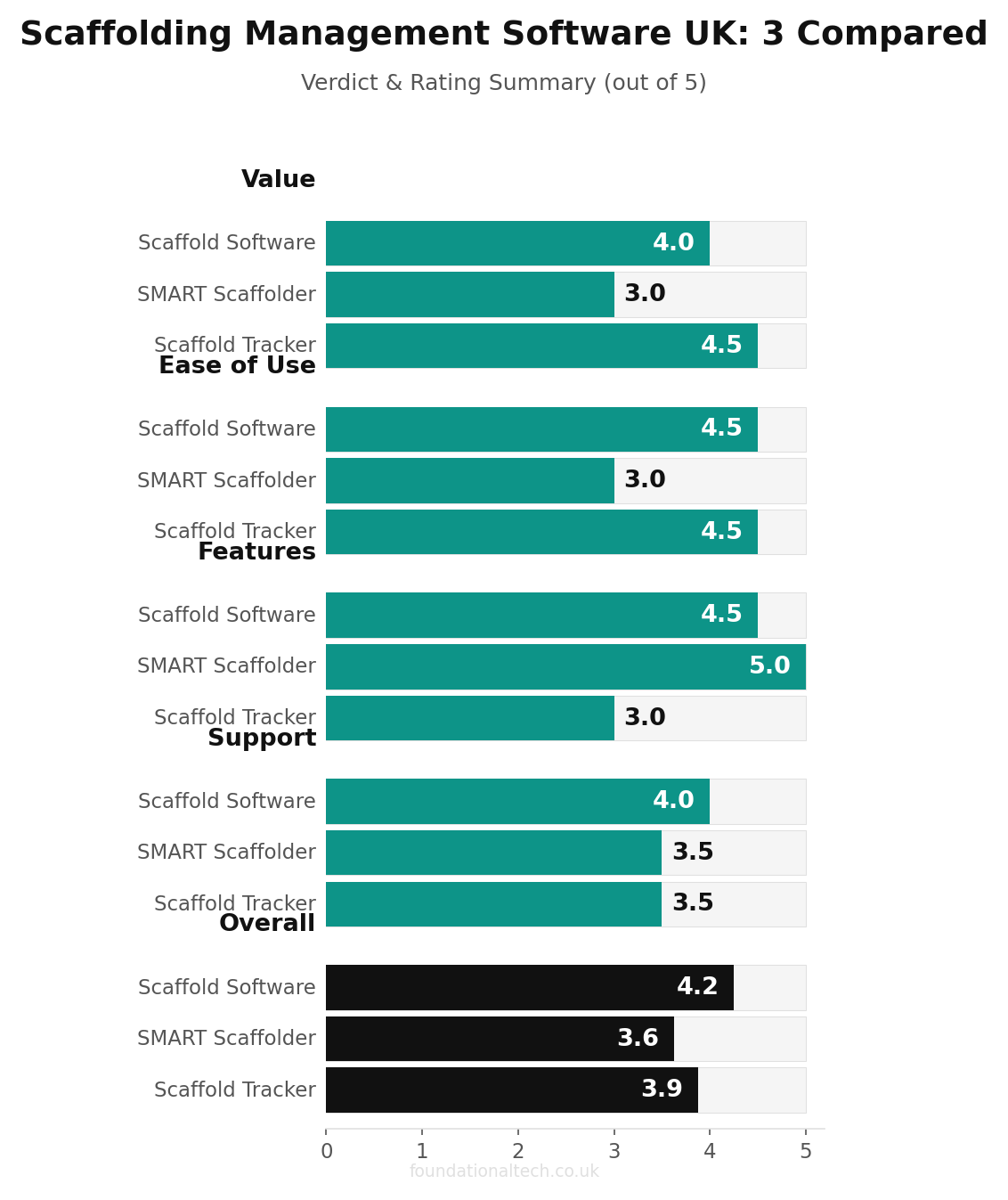
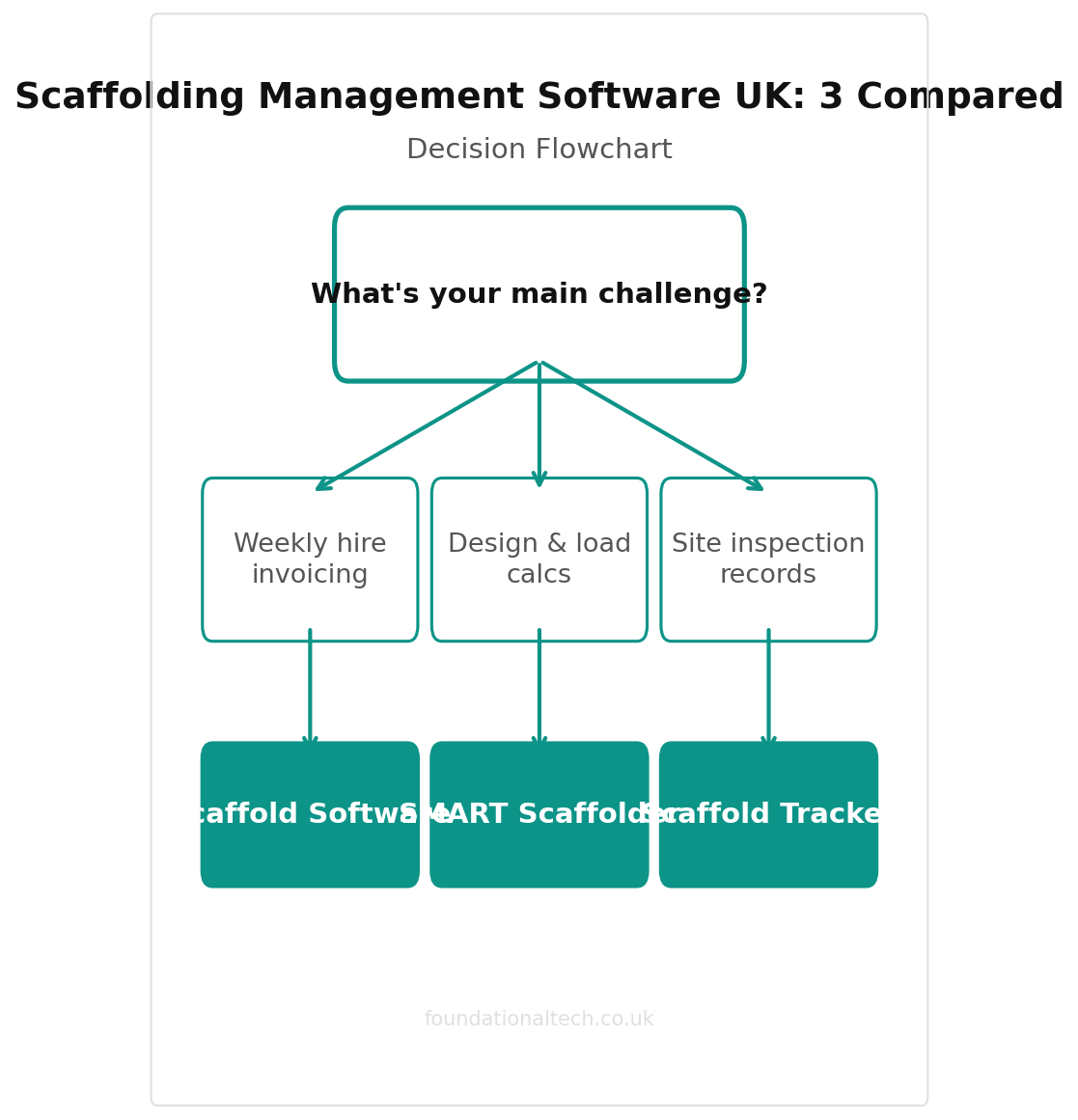
Some firms live and die on standard hire jobs, and what costs them money is unbilled standing rent and inspection paperwork they can’t produce fast enough. For those, The Scaffold Software is the correct starting point. It is the only one of the three built around the weekly invoice as the central object, and its native Xero link means the rest of this series’ stack plugs straight in.
If bespoke design work is where your margin actually gets made or lost, SMART Scaffolder belongs on the estimator’s desk regardless of what else you run for job management. An accurate material take-off on a complex structure pays for the subscription on the first job it saves from under-quoting.
Larger operations with a dedicated compliance function and stock spread across depots are a different case. Scaffold Tracker is worth running alongside whichever quoting tool you use, specifically for the inspection and stock-visibility layer the others don’t cover as deeply.
Many firms end up running two of the three rather than one. That’s not a failure of choice — it reflects that quoting-and-billing, design, and inspection-and-stock are genuinely three different jobs wearing one hi-vis.
Which part of your scaffolding operation still lives on a whiteboard, a phone note or a paper pad — this week’s ground rent invoices, the yard’s standing stock, or the inspection due dates? Reply and tell me which. I’m collecting real answers for Article 4.