Key Takeaway
End the Save-As era in UK law firms. Automate document assembly with clause libraries, auto-populated fields, version control, and approval workflows.
The Liability You Cannot See
I was sitting in a partner's office in a mid-sized commercial firm in Birmingham when she showed me something that made my stomach drop. A trainee had used "Save As" on a completed share purchase agreement, changed the client name and a few key terms, and sent it out as a fresh draft. The problem? The metadata still contained the original client's name, the tracked changes history revealed the previous deal's commercial terms, and a clause from the old agreement — a non-compete with entirely different geographic restrictions — had survived the find-and-replace untouched.
Opposing counsel found all of it. Every last byte.
This is what I call the Frankenstein document problem, and after fifteen years consulting with UK law firms on their document workflows, I can tell you it is not rare. It is the norm. The "Save As" method of document creation is the single most persistent source of professional embarrassment, regulatory risk, and genuine liability in legal practice today. And yet most firms still do it, every single day.
The Frankenstein Document Problem
Let me be specific about what goes wrong, because the risks are more varied than most solicitors realise.
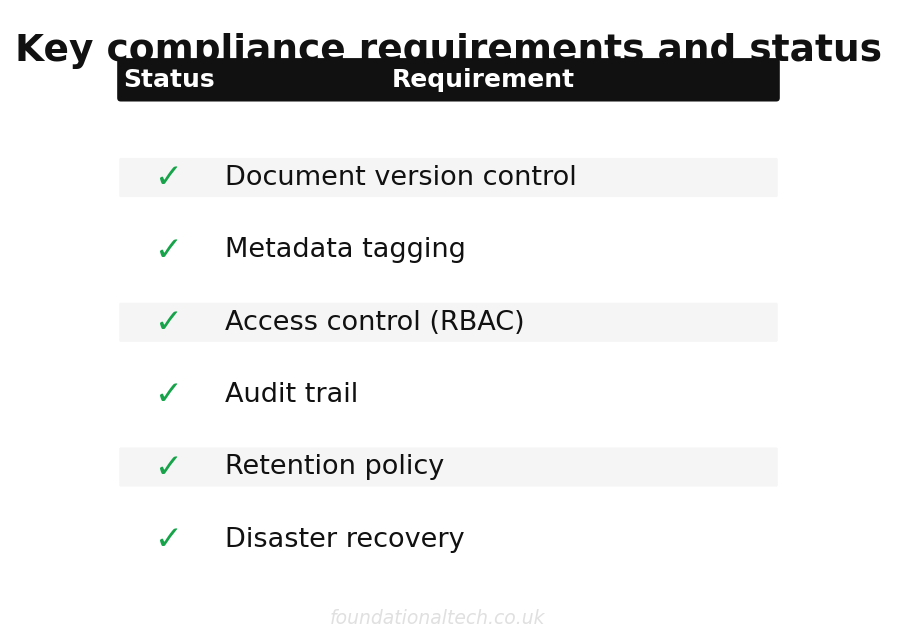
- Metadata leakage: Every Word document carries hidden data — author names, organisation details, tracked changes, comments, revision history, template paths. When you "Save As" from Client A's document to create Client B's, that metadata travels with it unless you actively scrub it. Under GDPR, leaking one client's personal data to another party is a reportable breach. Under the SRA Standards and Regulations, it is a potential breach of Principle 6 (acting in the best interests of each client) and Principle 7 (compliance with legal and regulatory obligations).
- Zombie clauses: Find-and-replace catches the terms you remember to search for. It misses the ones you do not. I have reviewed documents where an old client's limitation of liability cap survived into a new agreement, where jurisdiction clauses referenced the wrong courts, and where defined terms pointed to schedules that no longer existed.
- Version control chaos: "Final v2 AMENDED (John's comments) FINAL.docx" — you have seen this. Everyone has. When three fee earners are working on the same document and emailing versions back and forth, nobody knows which draft is current. Clauses get overwritten, approved language disappears, and the version that gets signed may not be the version the partner reviewed.
- Ethical wall breaches: In firms handling matters for parties with adverse interests, a document created from another client's template and stored in the wrong location can constitute a conflict of interest. The SRA takes a dim view of this.
The solution is not more careful lawyers. The solution is a system that makes these errors structurally impossible.
Layer One: The Secure Repository
The foundation of any document automation stack is a proper document management system — a DMS. This is not a shared drive. It is not SharePoint with some folders. It is a purpose-built platform that understands how legal documents need to be stored, secured, and retrieved.
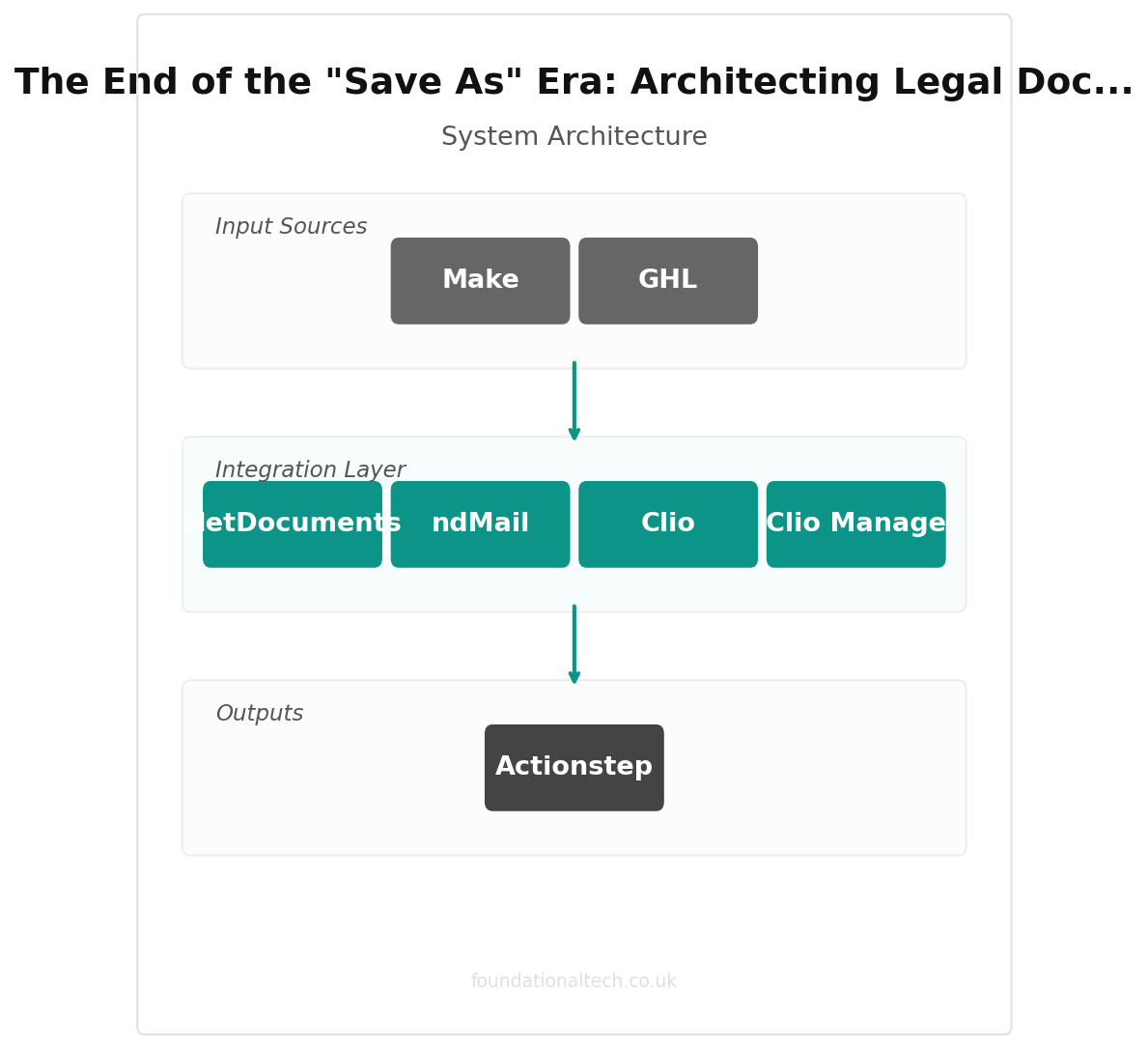
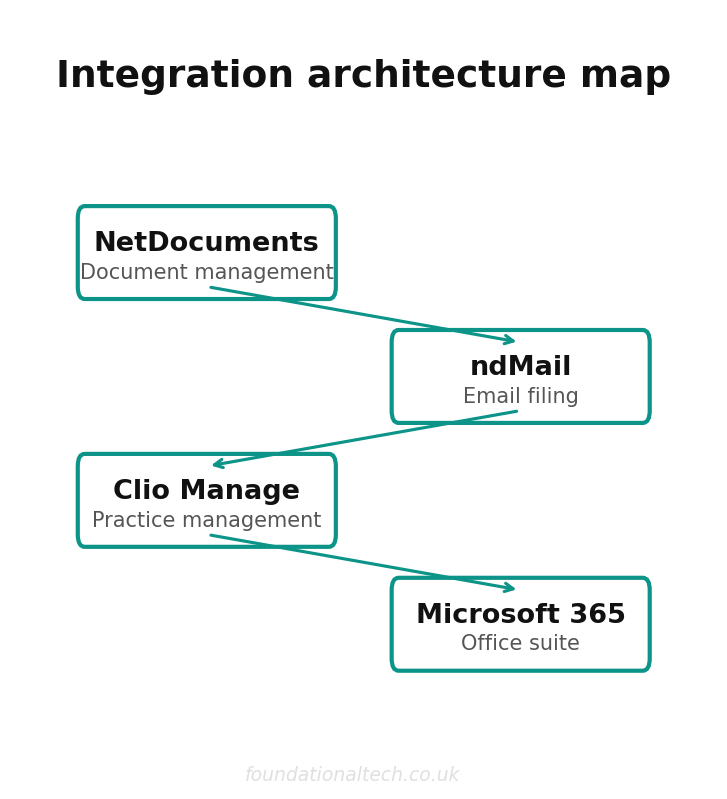
NetDocuments and ndMail email automation vs iManage
The two dominant platforms in the UK legal market are NetDocuments (from £20/user/month) and iManage (from £30/user/month, typically suited to larger firms with 50+ users). Both offer the features that matter:
- Ethical walls: Automated access controls that prevent fee earners working on one matter from seeing documents belonging to a conflicting matter. These are not optional suggestions — they are hard barriers enforced at the system level.
- Metadata scrubbing: Documents downloaded or emailed from the DMS can be automatically stripped of internal metadata before they leave the firm. Author names, tracked changes, comments, revision history — gone.
- GDPR compliance: Both platforms offer SOC 2 Type II certification and UK/EU data residency options. NetDocuments operates data centres in London. iManage offers both cloud and on-premises deployment for firms with specific data sovereignty requirements.
- Version control: Every save creates a new version. Every version is retained. You can compare any two versions side by side. There is always one current version, and it is always clear which one it is.
- Full audit trail: Who opened what, when, and what they did with it. This matters for regulatory compliance and for the inevitable "who changed this clause?" conversation.
NetDocuments is generally the better fit for firms under 100 users — the pricing is more accessible, the cloud-native architecture means less IT overhead, and the integration ecosystem is broad. iManage tends to suit larger firms that want more granular control over their deployment and have the IT resources to manage it.
Layer Two: The Assembly Engine
A DMS stores and secures your documents. But it does not create them. For that, you need an assembly engine — software that generates documents from templates and data, rather than from other documents.
This is where the Frankenstein problem dies. When every new document is assembled fresh from an approved template, populated with data pulled directly from your practice management system, there is no old metadata to leak, no zombie clauses to survive, and no wrong client name hiding in a footer.
Clio Draft
Clio Draft (formerly Lawyaw), available from £49/user/month as an add-on to Clio Manage, is the option I recommend most often for firms already in the Clio ecosystem. The workflow is straightforward:
- You build templates in Word with merge fields mapped to your Clio matter data — client name, address, matter reference, key dates, financial terms.
- When a fee earner needs a new document, they select the template, select the matter, and the system pulls the data automatically.
- Conditional logic handles the variations — different clauses for different entity types, optional schedules based on deal structure, jurisdiction-specific language.
- The assembled document is saved directly to the DMS, properly profiled and version-controlled from the moment it exists.
Combined with Clio Manage at £59/user/month, you get a practice management platform that handles matters, contacts, time recording, and billing alongside the document assembly. The integration between the two is native, which means no middleware, no manual data entry, and no synchronisation delays.
Layer Three: The Collaborative Layer
Documents do not exist in isolation. They are reviewed, commented on, amended, and approved by multiple people — often simultaneously. This is where Microsoft 365 Business Premium (from £18.70/user/month) earns its place in the stack.
The key capabilities for legal document workflows:
- Co-authoring: Multiple fee earners working on the same document simultaneously, with real-time visibility of each other's changes. No more emailing versions back and forth.
- Track Changes with identity: Every change is attributed to a specific user, timestamped, and preserved until explicitly accepted or rejected.
- SharePoint integration: Both NetDocuments and iManage offer deep integration with SharePoint and Teams, meaning documents stored in the DMS can be accessed and edited through familiar Microsoft interfaces.
- Sensitivity labels: Microsoft Information Protection can classify and encrypt documents based on their content and intended audience, adding another layer of protection against accidental disclosure.
The UK-Native Alternative: Osprey Approach
Not every firm wants to assemble a multi-vendor stack. For firms that prefer an integrated, UK-built solution, Osprey Approach (from £55/user/month) deserves serious consideration. It is a practice management system built specifically for the UK legal market, and it includes document automation as a built-in feature rather than an add-on.
Osprey's document automation works on the same principle — templates with merge fields, data pulled from the case management system, conditional logic for variations — but it is all within a single platform. You also get time recording, billing, legal accounting compliant with SRA Accounts Rules, and client portal functionality.
The trade-off is flexibility. A multi-vendor stack lets you choose best-in-class at each layer. Osprey gives you a single vendor, a single support relationship, and a system that was designed from the ground up for how UK law firms operate. For firms with 5 to 30 fee earners, that simplicity often outweighs the theoretical advantages of a more complex architecture.
Actionstep (from £45/user/month) occupies similar territory — a cloud-native practice management platform with built-in document automation — though its heritage is more international than UK-specific.
The Real-World Pipeline: From Data to Signed Contract
Let me walk through what this looks like in practice for a commercial property transaction:
- Matter opening: A new matter is created in Clio Manage. Client details, property details, transaction type, and key dates are entered once.
- Document assembly: The fee earner opens Clio Draft, selects the commercial lease template, and selects the matter. The system pulls all relevant data and generates a first draft — correctly formatted, correctly populated, with no metadata from any previous transaction.
- Internal review: The draft is saved to NetDocuments, profiled to the matter, and shared with the supervising partner via Microsoft 365 co-authoring. Both work on the document simultaneously. All changes are tracked and attributed.
- Client review: The document is exported from NetDocuments with metadata automatically scrubbed. The client receives a clean PDF or Word file with no internal comments, no revision history, and no author information beyond what the firm intends to share.
- Negotiation: Amendments from the other side are incorporated in a new version within NetDocuments. The version history maintains a complete record of every iteration. Comparison tools highlight exactly what changed between versions.
- Completion: The final agreed version is locked, and the executed copy is stored in the DMS with the matter closed. The entire document history — every draft, every comment, every version — is preserved for the retention period required by the SRA (typically six years after the matter closes, though many firms retain for longer).
At no point did anyone use "Save As." At no point did anyone email a version as an attachment. At no point was there any ambiguity about which draft was current.
The Metadata Risk You Are Already Carrying
A Word document is not just what you see on screen. It is a container, and it holds far more than the visible text.
When you right-click a Word file and select Properties, you see the basics — author, last modified by, creation date. But that is the surface. Embedded within the file are tracked changes (including deleted text), comments (including resolved ones), hidden text, custom document properties, template references revealing your file server paths, and in some cases, fragments of data from linked Excel spreadsheets.
Opposing counsel who knows what they are doing — and increasingly, they do — can extract all of this in minutes using free tools. They can see what your first draft said before you amended it. They can see the internal comments your partner made about negotiation strategy. They can see that the document was originally created for a different client entirely.
This is not theoretical. The SRA has issued guidance on metadata risks, and professional indemnity insurers are increasingly asking about document handling procedures at renewal. A proper DMS with automatic metadata scrubbing on outbound documents eliminates this risk entirely.
What It Costs: The Full Stack
For a firm of ten fee earners, here is what a modern document automation stack costs per month:
- Clio Manage: £59 x 10 = £590/month
- Clio Draft: £49 x 10 = £490/month
- NetDocuments: £20 x 10 = £200/month
- Microsoft 365 Business Premium: £18.70 x 10 = £187/month
Total: approximately £1,467/month, or £147 per user per month.
The Osprey Approach alternative, which bundles practice management and document automation:
- Osprey Approach: £55 x 10 = £550/month
- Microsoft 365 Business Premium: £18.70 x 10 = £187/month
Total: approximately £737/month, or £74 per user per month.
Set that against the cost of a single metadata breach — the regulatory investigation, the professional indemnity claim, the reputational damage, the client relationship destroyed. A PI excess alone typically starts at £10,000 to £25,000. One incident pays for the entire stack for years.
Implementation: The 10-Week Rollout
Do not try to do everything at once. Here is the phased approach I use with firms:
- Weeks 1-2 — Audit and planning: Map your current document workflows. Identify the 20 documents that account for 80% of your output. Review your metadata handling. Assess your current DMS (or lack thereof).
- Weeks 3-4 — DMS deployment: Set up NetDocuments or iManage. Configure matter-centric filing, ethical walls, and security policies. Migrate active matters from your shared drive. Set up automatic metadata scrubbing on all outbound documents.
- Weeks 5-6 — Template creation: Convert your top 20 documents into Clio Draft templates (or Osprey templates). Map merge fields to your practice management data. Build conditional logic for common variations. Test every template with real matter data.
- Weeks 7-8 — Microsoft 365 integration: Configure co-authoring workflows. Set up sensitivity labels. Train fee earners on collaborative editing within the DMS rather than via email attachments.
- Weeks 9-10 — Training and go-live: Run hands-on training sessions with every fee earner. Provide quick-reference guides. Go live with a support period where the old "Save As" method is discouraged but not yet blocked. Monitor adoption.
- Week 12 onwards — Lock down: Once adoption reaches 80% or above, restrict the ability to save documents outside the DMS. The old way stops being an option.
| Feature | NetDocuments | iManage | Osprey |
|---|---|---|---|
| UK data hosting | Yes (Azure UK) | Yes | Yes (UK-native) |
| Email filing | ndMail | FileSite | Built-in |
| Document assembly | Via integration | Via integration | Built-in |
| Starting price | £20/user/mo | £35/user/mo | Bespoke |
The Document Your Firm Sends Out Is Your Firm
Every document that leaves your practice carries your firm's name, your firm's reputation, and potentially your firm's liabilities. A document assembled from clean templates, populated with verified data, stored in a secure repository, and scrubbed of metadata before it reaches anyone outside your walls — that is a document you can stand behind.
A document cobbled together from "Save As," riddled with zombie clauses, leaking metadata from three previous clients, with "FINAL final v3 (2).docx" in the filename — that is a liability waiting to find its moment.
Related guides: If you found this useful, see our guide on The End of the Billable Bottleneck: Architecting a Frictionless Law Firm Tech Stack and The Zero-Touch Intake: Automating Legal Client Acquisition & AML Compliance.
The tools exist. The pricing is accessible. The implementation is measured in weeks, not months. The only question is whether your firm addresses this before the metadata leak happens, or after.
For the overarching architecture, see The Sovereign Practice: Engineering the Autonomous Law Firm.