Key Takeaway
How UK accountants are using AI to cut admin time in 2026. Real examples for quoting, invoicing, and client communications — without sounding robotic.
One in three UK accounting practices now uses an AI tool daily. Most started in the last twelve months. Nearly all of them began with the same question: “Can this actually help, or is it just hype?”
The answer, after watching dozens of firms adopt AI through 2025 and into 2026, is specific and measurable. AI handles the work your team does reluctantly — the drafting, the categorising, the first-pass analysis — and does it faster. It does not replace judgement. It does not file your clients’ tax returns. It does not understand your client’s divorce situation and how it affects their capital gains position. But it eliminates the dead time between receiving information and acting on it.
Here is what’s working right now, what it costs, and where the limits are.
AI in Accountancy: What’s Actually Working Right Now
The ICAEW published guidance in April 2026 on using Claude, ChatGPT, and Copilot in accounting workflows. Their conclusion: these tools are production-ready for specific, bounded tasks — but they require supervision, not blind trust. That matches what practitioners on the ground are finding.
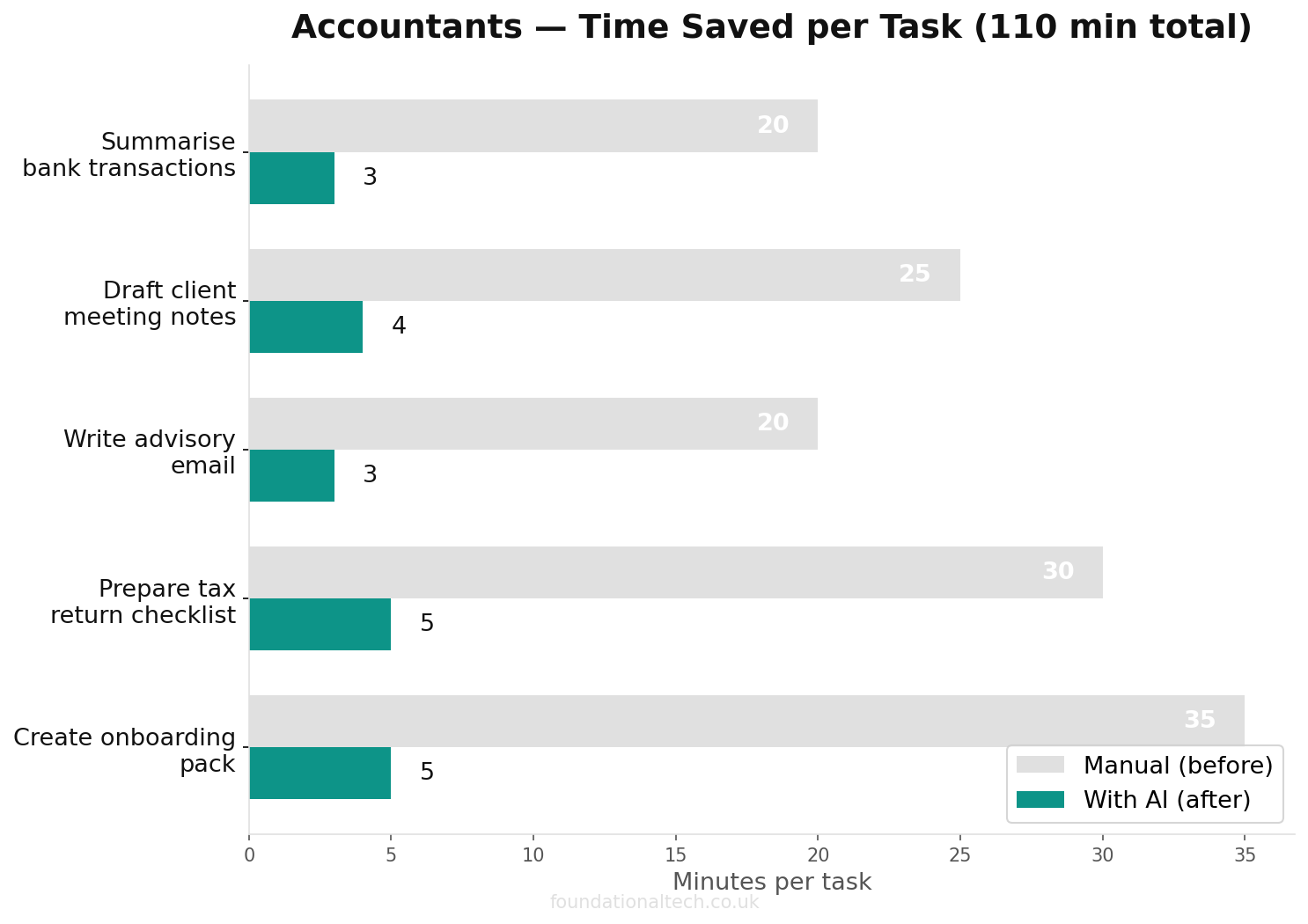
Forget the conference keynotes about AI transforming the profession. On the ground, in real UK practices, AI adoption looks like this:
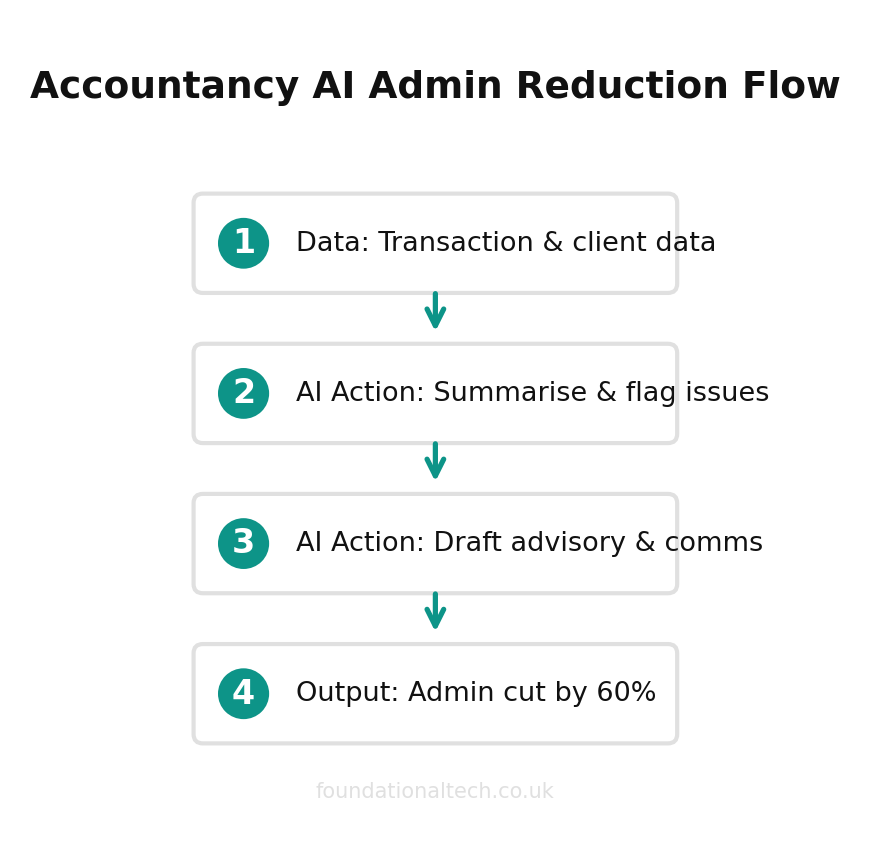
A sole practitioner uses Claude to draft client emails, turning three bullet points into a professional response in 20 seconds. A bookkeeping team uses Dext’s AI to categorise 500 receipts in minutes instead of hours. A mid-size firm uses Xero’s new JAX engine to auto-reconcile 80% of bank transactions without human input. A practice manager uses ChatGPT to convert complex tax guidance into plain-English client summaries.
None of this is revolutionary in isolation. Stacked together, it compounds. Firms report 50-60% reductions in admin time on the tasks where AI is applied.
Five AI Use Cases for Practice Owners
1. Client Communications: From Bullet Points to Polished Emails
This is where most accountants start, because the ROI is immediate.
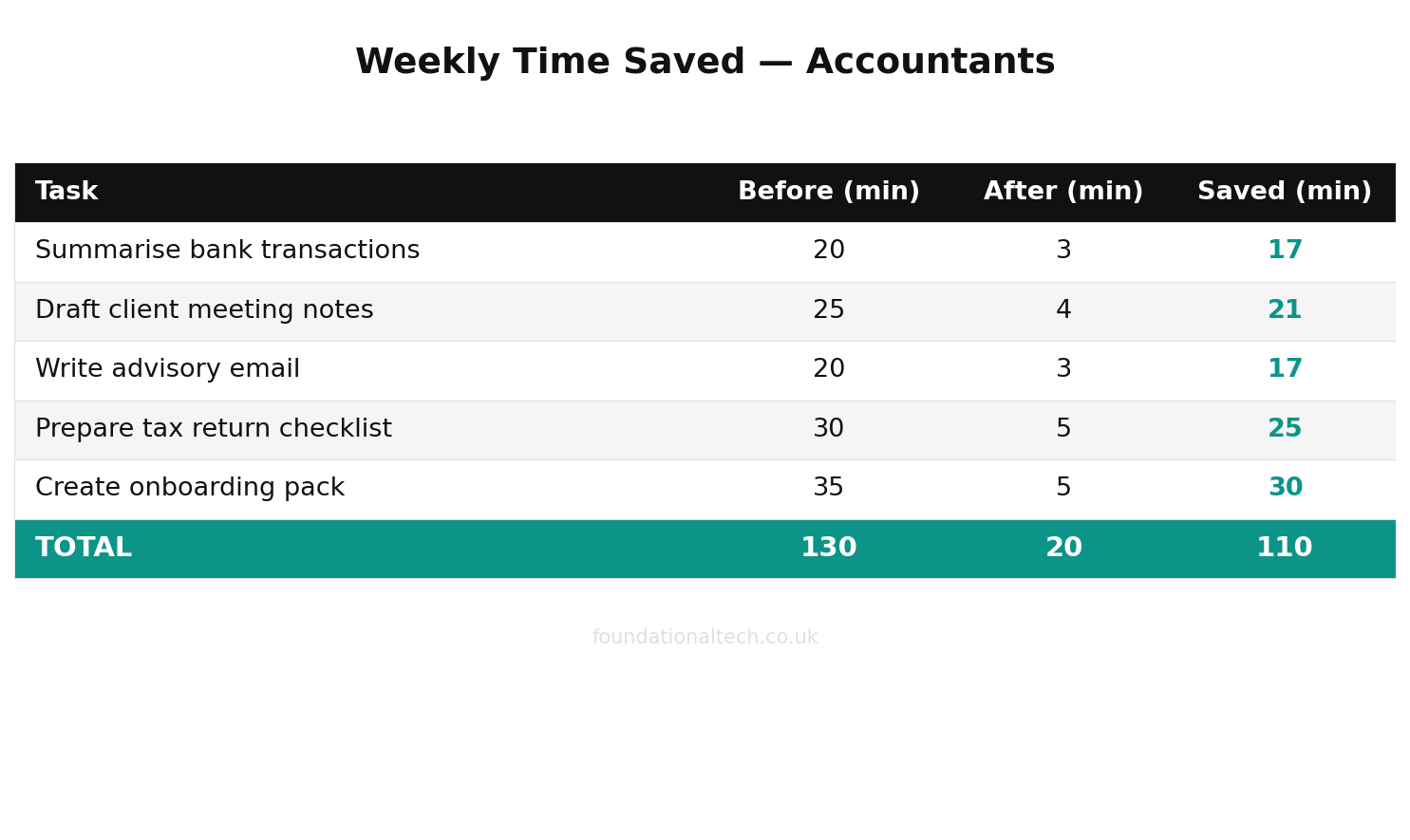
200 hours/year
saved across a typical three-person UK accounting practice by using AI for drafting, research and reconciliation checks
You receive a query about dividend timing. Instead of spending ten minutes composing a careful reply, you type three key points into Claude or ChatGPT: “dividends vs salary for 2025/26, personal allowance used, dividend allowance £500.” The AI produces a 200-word email explaining the trade-off in language your client understands. You review it in 30 seconds, adjust one figure, and send.
Scale this across 15-20 client emails per day. At three minutes saved per email, that’s 45-60 minutes reclaimed daily. Across a year, that’s roughly 200 hours — five working weeks.
The quality gap matters here. A poorly worded email to a client about their tax position creates anxiety, follow-up questions, and sometimes complaints. AI-drafted emails are consistently professional in tone, which reduces the back-and-forth. Several practice owners report that client satisfaction scores improved after adopting AI for communications — not because the advice changed, but because the clarity of delivery improved.
Best for this: Claude. Its responses are more measured and precise with financial content. It handles nuance — the difference between “you should” and “you may wish to consider” — better than alternatives. ChatGPT produces faster first drafts but requires more editing for tone.
2. Document Processing: Receipt Capture on Autopilot
Dext’s AI extracts supplier name, date, amount, VAT rate, and expense category from receipts and automated invoice follow-ups with over 99% accuracy. It publishes coded transactions directly to Xero.
This isn’t new — Dext has done this for years. What’s new in 2026 is the accuracy. Earlier versions needed significant manual correction. Current AI models handle handwritten receipts, foreign-currency invoices, and multi-line bills reliably.
For practices still manually entering supplier invoices, the shift to Dext typically saves 15-20 hours per month for every 200 client transactions processed. It also eliminates a category of error that manual entry creates — transposed digits, wrong VAT codes, invoices posted to the wrong period.
One important development for 2026: Xero shut down Hubdoc on 8 May 2026. Xero’s replacement — Xero Files — stores documents but does not extract data. This means practices previously relying on Hubdoc for document capture now need a third-party tool. Dext has absorbed much of this market. If you haven’t set up document capture yet, Dext is the default choice for Xero-connected practices.
Cost: Dext business plans start at £24/month for 250 documents. Practice plans for accountants start at approximately £190-240/month for 10 client companies, with per-client pricing decreasing as you add more. Annual billing reduces this by roughly 20%.
3. Bank Reconciliation: Xero’s JAX Engine
The biggest single AI development for UK accountants in 2026 is Xero’s JAX (Just Ask Xero) automatic bank reconciliation.
JAX categorises and matches bank transactions without manual input. It learns from your own reconciliation history and from anonymised patterns across Xero’s entire user base. Crucially, it shows you what it matched and why before confirming — you approve every reconciliation rather than accepting outputs blindly.
Xero’s stated ambition for 2026: “Moving from AI as a feature to AI as the core engine.” JAX can now assist with the entire cycle — capturing invoice data, processing the payment, and reconciling the transaction.
For practices spending 2-3 hours per client per month on bank reconciliation, JAX cuts this by 60-75%. The remaining time is spent on the genuinely ambiguous transactions that require human judgement.
Cost: Included in all Xero plans. Xero Standard: £33/month. Xero Growing: £37/month.
4. Advisory and Reporting: AI-Assisted Analysis
This is where AI shifts from “saving time” to “generating revenue.”
Fathom pulls data from Xero and generates KPIs, trend analysis, and management reports automatically. Layer an AI assistant on top, and you can turn raw Fathom output into client-ready advisory commentary.
Practical example: paste a client’s quarterly P&L into Claude and ask it to identify the three most significant variances and draft a one-paragraph explanation for each. Claude produces first-draft advisory commentary in 30 seconds. You add context the AI can’t know — “revenue dipped because their biggest customer delayed an order” — and the report is done.
Firms charging £200-500/month for advisory services report that AI cuts their preparation time from 3-4 hours to under 1 hour per client. The economics change: advisory becomes profitable at smaller client sizes. A practice with 40 clients can now offer quarterly management accounts to all of them, not just the top ten who justify the manual effort.
Here’s the workflow that makes this practical: Fathom generates the report. You export the KPI summary as a PDF. Paste the key numbers into Claude with the prompt: “Identify the three most significant changes from the previous quarter. For each, write a two-sentence explanation in plain English suitable for a non-financial business owner.” Claude returns draft commentary. You add the context only you know — the client lost a key contract, hired three people, moved premises. Total time: 20 minutes per client instead of two hours.
5. Tax Research and Technical Queries
HMRC guidance is dense, frequently updated, and scattered across GOV.UK, HMRC manuals, and tribunal decisions. AI handles the translation layer.
Ask Claude: “Summarise the conditions for Business Asset Disposal Relief in 2025/26 for a client selling 60% of their company shares, held for 3 years, who is a full-time working director.” You get a structured answer covering qualifying conditions, the £1m lifetime limit, the requirement for 5% ordinary share capital, and common pitfalls — in 15 seconds.
Ask ChatGPT: “A client has received a CIS deduction statement. Explain how to reclaim the deductions through their corporation tax return, and what evidence HMRC requires.” The answer arrives in 10 seconds, with a step-by-step process that would take 15 minutes to piece together from HMRC guidance.
This doesn’t replace checking the primary source. It gives you a starting point that’s faster than wading through GOV.UK. Claude is particularly strong here because it handles multi-condition tax scenarios better than ChatGPT, tracking interactions between reliefs and allowances with fewer errors. ChatGPT is better at procedural questions — “how do I do X” rather than “should I do X.”
Important caveat: AI can hallucinate tax thresholds and rates. Always verify specific numbers against HMRC’s published rates. Claude occasionally conflates UK and US terminology (saying “Section 1202” when it means “Business Asset Disposal Relief”). ChatGPT sometimes invents HMRC deadlines that don’t exist. Treat every figure as provisional until you’ve confirmed it against the primary source. Use AI for structure and reasoning, not as a definitive reference.
The Tools: Claude vs ChatGPT vs Gemini for Accountants
All three work. Each has strengths.
Claude Pro ($20/month, approx. £18)
Best for: complex reasoning, tax scenario analysis, nuanced client communications, long document review. Claude handles 100-page financial documents and maintains context across extended conversations. Its tone suits professional advisory work — it defaults to careful, qualified language rather than confident assertions.
ChatGPT Plus ($20/month, approx. £20)
Best for: quick categorisation questions, drafting engagement letters, first-pass summarisation, translating technical accounting into plain English. ChatGPT is faster for simple tasks and generates more creative outputs — useful for marketing copy, blog content, and practice newsletter drafts.
Google Gemini AI Pro ($19.99/month, approx. £16)
Best for: tasks involving Google Workspace. If your practice runs on Gmail, Google Sheets, and Google Drive, Gemini integrates natively — it can draft emails in Gmail, analyse data in Sheets, and summarise documents in Drive without switching windows. Less capable than Claude or ChatGPT for standalone accounting work, but the ecosystem integration matters if Google is your primary platform. Gemini’s free tier is also the most generous, including access to its Gemini 3.5 Flash model and five Deep Research reports per month.
The practical answer: Most practices benefit from both Claude and ChatGPT. At ~£32/month combined, the cost is trivial against the time saved. Use Claude for anything requiring precision — tax research, advisory commentary, complex client situations. Use ChatGPT for speed tasks — categorisation questions, first-draft letters, quick summaries. Use Gemini if you’re embedded in Google Workspace and want AI that operates inside your existing tools without context-switching.
A note on team plans: Once two or more people in your practice are using AI daily, Team plans become cost-effective. Claude Team costs $28/seat/month (approx. £22) and includes admin controls, a shared workspace, and a data processing agreement that prevents your inputs from being used for model training. ChatGPT Team costs $25/seat/month (approx. £20) with similar protections. For a five-person practice, equipping everyone costs roughly £210/month — less than a day of a junior accountant’s salary.
What AI Cannot Do (Yet)
Being honest about limitations builds more trust than overselling capabilities.
AI cannot file with HMRC. It cannot submit VAT returns, corporation tax returns, or self-assessment filings. These require verified software with HMRC’s Making Tax Digital for ITSA (MTD) credentials. AI is nowhere near this, and no credible vendor is promising it. The compliance layer — the final submission — remains firmly in your hands as a qualified practitioner. AI helps you prepare faster, not file automatically.
AI cannot exercise professional judgement. Whether a transaction is capital or revenue, whether a client qualifies for a relief, whether a particular tax structure is aggressive — these require a qualified accountant’s judgement. AI can present the options. It cannot weigh them against a client’s specific risk appetite, financial position, and personal circumstances.
AI cannot guarantee accuracy. Every AI model hallucinates. Claude and ChatGPT occasionally invent tax thresholds, misstate HMRC deadlines, or conflate UK and US tax rules. Any AI output involving specific numbers or deadlines must be verified against primary sources. Treat AI like a smart but occasionally overconfident trainee: fast, usually right, but not yet trusted to work unsupervised. The cost of an AI error that reaches a client — wrong tax threshold in a letter, incorrect deadline in a reminder — is reputational damage that far outweighs the time AI saves. Build a verification step into every workflow.
AI cannot access your client data securely. Pasting sensitive financial data into ChatGPT or Claude raises GDPR and confidentiality questions. Use anonymised or redacted data wherever possible. For practice-wide deployment, consider Team or Enterprise plans that offer data processing agreements and prevent your inputs from being used for model training.
How to Start Without Disrupting Your Practice
The worst approach: buying subscriptions for the whole team on Monday morning and announcing “we’re an AI practice now.” Here is what actually works.
Week 1: One person, one task. Pick the team member most open to experimentation. Give them a Claude Pro or ChatGPT Plus subscription ($20/month). Ask them to use it for client email drafting only — nothing else. They’ll build confidence with a low-risk task.
Week 2: Expand the task list. Same person adds tax research summaries and management report commentary to their AI workflow. They’re now using it 15-20 times per day. The time savings become visible to the rest of the team.
Week 3: Second adopter. A second team member gets a subscription. They focus on a different task — perhaps Dext categorisation review or engagement letter drafting. Now you have two people building different use cases.
Week 4: Practice-wide evaluation. Review: how many hours did AI save? Which tasks worked best? What failed? Based on this, decide whether to roll out Team plans (Claude Team: $28/seat/month; ChatGPT Team: $25/seat/month) or stay with individual subscriptions.
This approach costs under £40 for the first month and generates enough data to make an informed decision about wider deployment. It also avoids the cultural resistance that comes from top-down mandates. People adopt tools they’ve seen work, not tools they’ve been told to use.
The most common failure mode is the opposite approach: a senior partner buys ten ChatGPT licences, sends a company-wide email about “embracing AI,” and six months later, nobody is using them. Adoption is a bottom-up process. Start with enthusiasm, not mandates.
Data handling policy: Before anyone pastes client data into an AI tool, establish a simple rule. Remove client names, UTRs, and National Insurance numbers. Replace them with “Client A” or generic identifiers. The AI doesn’t need personal identifiers to analyse a P&L or draft a tax summary. This single practice addresses 90% of GDPR concerns.
The Numbers: What AI Costs vs What It Saves
For a sole practitioner:
| Tool | Monthly Cost | Hours Saved/Month |
|---|---|---|
| Claude Pro | ~£18 | 15–20 hrs |
| ChatGPT Plus | ~£20 | 10–15 hrs |
| Dext (AI features) | £24+ | 15–20 hrs |
| Xero JAX (included) | £0 | 8–12 hrs |
| Total | ~£56 | 48–67 hrs |
At a billing rate of £75/hour, recovering even 20 of those hours generates £1,500/month in additional capacity — against £56 in subscriptions. The ROI is not subtle.
For a five-person firm, the maths scale proportionally. Five Claude Team seats ($28 each = ~£112/month) and five ChatGPT Team seats ($25 each = ~£100/month) cost £212/month total. If each team member saves 10 hours monthly — a conservative estimate — that’s 50 hours of recovered capacity worth £3,750 at £75/hour.
Three Practices, Three Approaches: What’s Working in 2026
The sole practitioner (25 clients, no staff). She uses Claude Pro for all client communications and tax research. Total AI spend: £18/month. Time saved: approximately 15 hours/month, mostly on emails and HMRC guidance lookups. She’s redirected that time toward advisory conversations, which have generated three new annual accounts engagements worth £4,500/year combined. Her view: “I should have started six months earlier.”
The three-person firm (80 clients, one admin assistant). The firm uses ChatGPT Team across all three accountants, Dext for document capture, and Xero JAX for reconciliation. Total AI spend: approximately £297/month (ChatGPT Team £60 + Dext Practice £200 + Xero Growing £37, with JAX included). The admin assistant’s role has shifted from data entry to client liaison. Month-end close time dropped from 8 days to 5 days. The practice owner’s assessment: “AI didn’t replace anyone. It changed what everyone does.”
The mid-size practice (12 staff, 300+ clients). This firm invested in both Claude Team and ChatGPT Team, deployed Fathom across all client organisations, and built custom Zapier workflows linking AI outputs to their Karbon task management. Total AI-related spend: approximately £800/month. They’ve launched a new advisory tier priced at £350/month per client — a service that wasn’t economically viable before AI reduced preparation time. Twelve clients signed up in the first quarter, adding £50,400/year in recurring revenue. The managing partner’s summary: “The subscription costs pay for themselves in the first week of every month.”
These aren’t hypothetical scenarios. They represent the three most common adoption patterns across the UK practices we work with. The specifics differ — different tools, different client mixes, different starting points — but the trajectory is consistent. AI adoption starts with curiosity, proves itself through measurable time savings, and eventually reshapes the practice’s service offering.
What’s Coming Next
This article covered the broad landscape. The next two articles in this series go deep:
For ready-made templates, see our 12 Claude prompts every UK accountant should be using.
Prompt Playbook for Accountants — the exact prompts that work for tax research, client emails, management report commentary, and engagement letter drafts. Copy, paste, adapt.
AI Worker Setup for Accounting Practices — how to configure Claude or ChatGPT as a permanent tool in your practice workflow, including team access, data handling policies, and integration with your existing stack.
The Prompt Playbook will be available to paid subscribers. If the content so far has been useful, that’s where the real implementation detail lives.
Have you tried using AI in your accounting practice yet? What task did you hand it first — and did it actually save you time? Reply and tell me. I’m collecting real examples from UK practices.
A & Y Financial Services helps accounting practices implement AI alongside their automation stack. That’s what we do.
For a real-world example, read how one UK practice doubled its clients without hiring.